Uvod
This manual provides detailed instructions for the setup, operation, and maintenance of your Audiovox CE-122 Personal CD Player with Car Kit. Please read this manual thoroughly before using your device to ensure proper functionality and to maximize your listening experience.
The Audiovox CE-122 is a portable CD player designed for versatile use, featuring a Digital Anti-Shock System (DASS) for uninterrupted playback during movement, a 22-track programmable memory, and a bass boost function. It includes a complete car kit for in-vehicle use.
Sadržaj paketa
Provjerite da li se u vašem paketu nalaze sve dolje navedene stavke:
- Audiovox CE-122 Portable CD Player
- Slušalice
- AC adapter
- Auto adapter
- Cassette Adapter
- Korisnički priručnik (ovaj dokument)
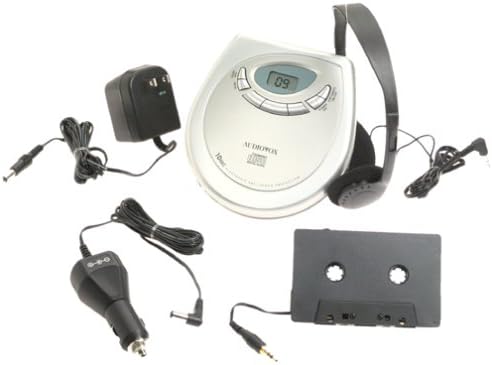
slika: The Audiovox CE-122 portable CD player shown with all its accessories, including headphones, AC adapter, car adapter, and cassette adapter.
Karakteristike proizvoda
- Plays audio CD and CD-R/RW discs.
- AC/DC operation for home and portable use.
- Complete car kit included for in-vehicle audio.
- Digital Anti-Shock System (DASS) provides up to 20 seconds of skip protection.
- 22-track programmable memory for custom playback sequences.
- Bass boost feature for enhanced audio.
- Forward and reverse search functions.
- Repeat and pause functions.
- Key hold switch to prevent accidental button presses.
- Line out jack for connecting to external audio systems.
- Auto power off function to conserve battery life.
- Dual stereo headphone jack for shared listening.
- Built-in charger for rechargeable batteries (rechargeable batteries not included).
Setup
1. Umetanje baterija
The CD player operates on 4 AA batteries (included). For rechargeable batteries (not included), ensure they are inserted correctly for charging.
- Otvorite poklopac odjeljka za baterije koji se nalazi na dnu jedinice.
- Umetnite 4 AA baterija, pazeći na ispravan polaritet (+/-) kao što je naznačeno unutar odjeljka.
- Čvrsto zatvorite poklopac odeljka za baterije.
2. Connecting Power (AC Adapter)
For home use or to charge rechargeable batteries:
- Plug the small end of the AC adapter into the DC IN 4.5V jack on the CD player.
- Uključite drugi kraj AC adaptera u standardnu zidnu utičnicu.
- If using rechargeable batteries, select the 'charge' function (if available on your model) to begin charging.
3. Povezivanje slušalica
Plug the headphones into one of the two headphone jacks on the side of the CD player.

slika: Krupni plan view of the headphones included with the Audiovox CE-122 CD player.
4. Car Kit Setup
To use the CD player in your vehicle:
- Plug the car adapter into your vehicle's cigarette lighter or 12V power outlet.
- Connect the small end of the car adapter to the DC IN 4.5V jack on the CD player.
- Insert the cassette adapter into your vehicle's cassette player.
- Connect the audio cable from the cassette adapter to the LINE OUT jack on the CD player.
- Ensure your car stereo is set to the cassette function to hear the CD player's audio.
Uputstvo za upotrebu
1. Umetanje CD-a
- Press the OPEN button to open the CD compartment lid.
- Place a CD (audio CD or CD-R/RW) onto the center spindle with the label side facing up.
- Lagano pritisnite CD prema dolje dok ne klikne na svoje mjesto.
- Čvrsto zatvorite poklopac pretinca za CD dok se ne zaključa.

slika: The Audiovox CE-122 portable CD player with its lid open, revealing the disc compartment where a CD is placed.
2. Osnovna reprodukcija
- Igraj: Pritisnite PLAY/PAUSE button to start playback. The track number will appear on the display.
- pauza: Pritisnite PLAY/PAUSE button during playback to pause. Press again to resume.
- zaustaviti: Pritisnite STOP dugme za zaustavljanje reprodukcije.
3. Navigacija stazom
- Preskoči stazu: Pritisnite NAPRIJED NAPRIJED (►►) or PRESKOČI NAZAD (◄◄) buttons to move to the next or previous track.
- Traži: Pritisnite i držite NAPRIJED NAPRIJED (►►) or PRESKOČI NAZAD (◄◄) buttons during playback to fast forward or rewind within a track.
4. Funkcija ponavljanja
Pritisnite REPEAT dugme za kretanje kroz režime ponavljanja:
- Ponovite 1: Ponavlja trenutnu numeru.
- Ponovi sve: Ponavlja sve pjesme na disku.
- Ponavljanje isključeno: Disables repeat function.
5. Programmable Memory
Možete programirati do 22 pjesama za reprodukciju određenim redoslijedom:
- With the CD stopped, press the PROGRAM dugme.
- Koristite NAPRIJED NAPRIJED (►►) or PRESKOČI NAZAD (◄◄) buttons to select the desired track.
- Pritisnite PROGRAM again to add the track to the memory.
- Repeat steps 2 and 3 for up to 22 tracks.
- Pritisnite PLAY/PAUSE to start playback of the programmed sequence.
6. Bass Boost
Pritisnite BASS BOOST button to activate or deactivate the bass enhancement feature.
7. Key Hold Switch
Povucite HOLD switch to the ON position to disable all buttons, preventing accidental operation during transport.
8. Digital Anti-Shock System (DASS)
The DASS provides up to 20 seconds of skip protection. This feature is automatically active during playback to ensure smooth audio even during movement.
9. Automatsko isključivanje
The unit will automatically power off after a period of inactivity or when a CD finishes playing to conserve battery life.

slika: The Audiovox CE-122 portable CD player, a silver-colored device with a digital display and control buttons, shown alongside its black over-ear headphones.
Održavanje
1. Cleaning the CD Player
- Obrišite vanjski dio uređaja mekom, suhom krpom. Ne koristite abrazivna sredstva za čišćenje ili rastvarače.
- Za čišćenje sočiva koristite specijalizirani disk za čišćenje CD sočiva. Ne dodirujte direktno sočivo.
2. Održavanje baterije
- Izvadite baterije ako uređaj nećete koristiti duži period kako biste spriječili curenje.
- Replace all batteries at the same time; do not mix old and new batteries or different types of batteries.
3. Skladištenje
CD plejer čuvajte na hladnom i suhom mjestu, dalje od direktne sunčeve svjetlosti i ekstremnih temperatura.
Rješavanje problema
If you encounter issues with your Audiovox CE-122, please refer to the following common problems and solutions:
- Nema napajanja:
• Check if batteries are inserted correctly and are not depleted. Replace if necessary.
• Ensure the AC adapter or car adapter is securely connected and the power source is active. - CD se ne reproducira / Greška diska:
• Ensure the CD is inserted correctly with the label side up.
• Check if the CD is scratched or dirty. Clean the CD with a soft, lint-free cloth.
• Make sure the CD compartment lid is fully closed.
• The disc format may not be supported (e.g., data CD instead of audio CD or CD-R/RW). - Skipping During Playback:
• While the DASS provides protection, severe shocks or vibrations can still cause skipping. Try to keep the player stable.
• Ensure the CD is clean and free of scratches.
• Low battery power can sometimes affect anti-shock performance. Replace or recharge batteries. - Nema zvuka:
• Check headphone connection and ensure they are fully plugged in.
• Podesite jačinu zvuka.
• If using the car kit, ensure the car stereo is set to the correct input (cassette function) and volume is up. - Dugmad ne reagiraju:
• Provjerite je li HOLD switch is in the ON position. Slide it to OFF to enable buttons.
Specifikacije
| Broj modela | CE-122 |
| Podržani formati diskova | Audio CD, CD-R/RW (MP3 compatible) |
| Zaštita od udara | 20 seconds (Digital Anti-Shock System) |
| Programabilna memorija | 22 numera |
| Izvor napajanja | 4 x AA batteries, AC adapter (4.5V DC), Car adapter (12V DC) |
| Povezivanje | Auxiliary (Line Out), Dual Headphone Jacks |
| Dimenzije (približno) | 11.1 x 7.8 x 3.2 inča (pakovanje) |
| Težina (približno) | 1.5 funte |
Garancija i podrška
For warranty information and customer support, please refer to the documentation provided at the time of purchase or contact Audiovox customer service. Keep your proof of purchase for warranty claims.


