
1. Uvod
This manual provides instructions for the Re-Flix Light Remote Control, specifically designed for use with the BLAUPUNKT 40FGC5500S television. This remote offers immediate functionality without complex programming, serving as an ideal replacement or secondary remote.
Ključne karakteristike uključuju:
- Immediate Use (Plug & Play): No complicated programming or code entry is required; simply insert batteries and immediately use all functions.
- Smart TV Control: Designed for modern smart TVs, it may include dedicated buttons for popular streaming services like Netflix and YouTube. Please verify the presence of these specific buttons on your remote.
- Ergonomski dizajn: Engineered for comfortable handling and ease of use.
2. Podešavanje
2.1 Instalacija baterije
To begin using your Re-Flix Light Remote Control, you must first install the batteries.
- Pronađite odeljak za baterije na poleđini daljinskog upravljača.
- Pomaknite poklopac odjeljka za baterije prema dolje ili pritisnite zasun i podignite da biste ga otvorili.
- Insert two AAA batteries (not included), ensuring the positive (+) and negative (-) terminals align correctly with the indicators inside the compartment.
- Vratite poklopac pretinca za baterije tako što ćete ga gurnuti nazad na mjesto dok ne klikne sigurno.

Slika 1: Natrag view of the remote control, illustrating the battery compartment location.
2.2 Početna upotreba
Once batteries are installed, the remote control is ready for immediate use with your BLAUPUNKT 40FGC5500S TV. No additional pairing or programming steps are required. Point the remote control towards your television and press any button to confirm functionality.
3. Upravljanje daljinskim upravljačem
The Re-Flix Light Remote Control provides full functionality for your BLAUPUNKT 40FGC5500S TV. Familiarize yourself with the button layout for optimal use.
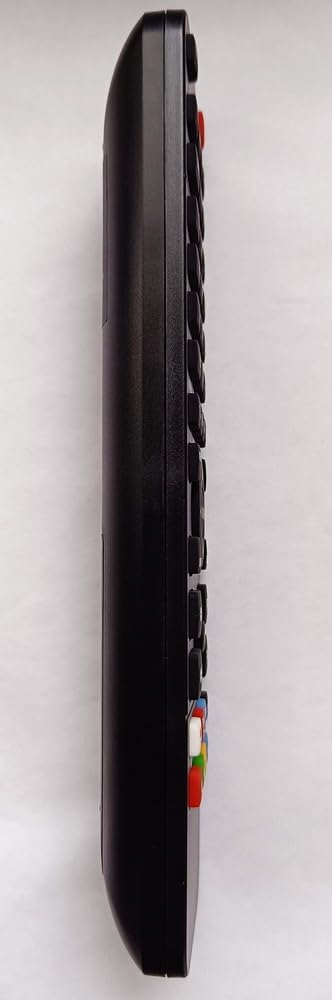
Slika 2: Bočna strana view of the remote control, highlighting the ergonomic design and button placement.
3.1 Osnovne funkcije
- Dugme za napajanje: Uključuje ili isključuje TV.
- Pojačavanje/stišavanje glasnoće: Podešava nivo zvuka.
- Kanal gore/dolje: Mijenja TV kanale.
- Dugme za isključivanje zvuka: Utišava zvuk televizora.
- Brojčani gumbi (0-9): Direktno birajte kanale.
- Dugme za ulaz/izvor: Prebacuje se između različitih ulaznih izvora (HDMI, AV, itd.).
3.2 Funkcije pametnog TV-a
If your BLAUPUNKT 40FGC5500S TV is a Smart TV, this remote may include dedicated buttons for quick access to streaming services and smart features. Look for buttons labeled with service logos such as Netflix, YouTube, or a 'Smart Hub' button. Pressing these buttons will launch the corresponding application directly.
Note: The availability and functionality of Smart TV buttons depend on your specific TV model and its installed applications.
4. Održavanje
4.1 Čišćenje
Da biste održali izgled i funkcionalnost daljinskog upravljača, redovno ga čistite:
- Za brisanje površine koristite meku, suhu krpu.
- Za tvrdokornu prljavštinu, lagano dampi krpu vodom ili blagim neabrazivnim sredstvom za čišćenje.
- Izbjegavajte upotrebu jakih hemikalija, rastvarača ili abrazivnih materijala, jer oni mogu oštetiti završnu obradu daljinskog upravljača ili unutrašnje komponente.
4.2 Zamjena baterije
Zamijenite baterije kada daljinski upravljač postane spor ili prestane raditi. Uvijek zamijenite obje baterije istovremeno novim AAA baterijama. Ne miješajte stare i nove baterije ili različite vrste baterija.
5. Otkrivanje problema
If you experience issues with your Re-Flix Light Remote Control, refer to the following common solutions:
- Daljinski ne reaguje:
- Provjerite jesu li baterije pravilno umetnute s ispravnim polaritetom.
- Zamijenite baterije svježim.
- Provjerite da nema prepreka između daljinskog upravljača i infracrvenog senzora televizora.
- Provjerite da li se nalazite unutar efektivnog dometa IR prijemnika televizora.
- Određeni tasteri ne rade:
- Clean the remote control, especially around the problematic buttons, to remove any dirt or debris that might be preventing contact.
- If it's a Smart TV button, ensure your TV model supports that specific function or streaming service.
- TV ne reaguje ni na jedan daljinski upravljač:
- Check if the TV's power is on.
- Try using the manual controls on the TV itself to rule out a TV issue.
6. Specifikacije
| Brand | Re-Flix |
| Broj modela | 747516 |
| Boja | Crna |
| Kompatibilni uređaji | Television (BLAUPUNKT 40FGC5500S) |
| Tehnologija povezivanja | Infracrveni |
| Maksimalan broj podržanih uređaja | 1 |
7. Garancija i podrška
For information regarding warranty coverage or technical support, please refer to the documentation provided with your purchase or contact the retailer. Keep your proof of purchase for any warranty claims.