
Uvod
This manual provides essential information for the safe and efficient use of your ciciglow 4G Slide Phone. Please read these instructions carefully before operating the device and retain them for future reference. This phone combines a classic slide design with modern 4G connectivity and a touch screen interface.
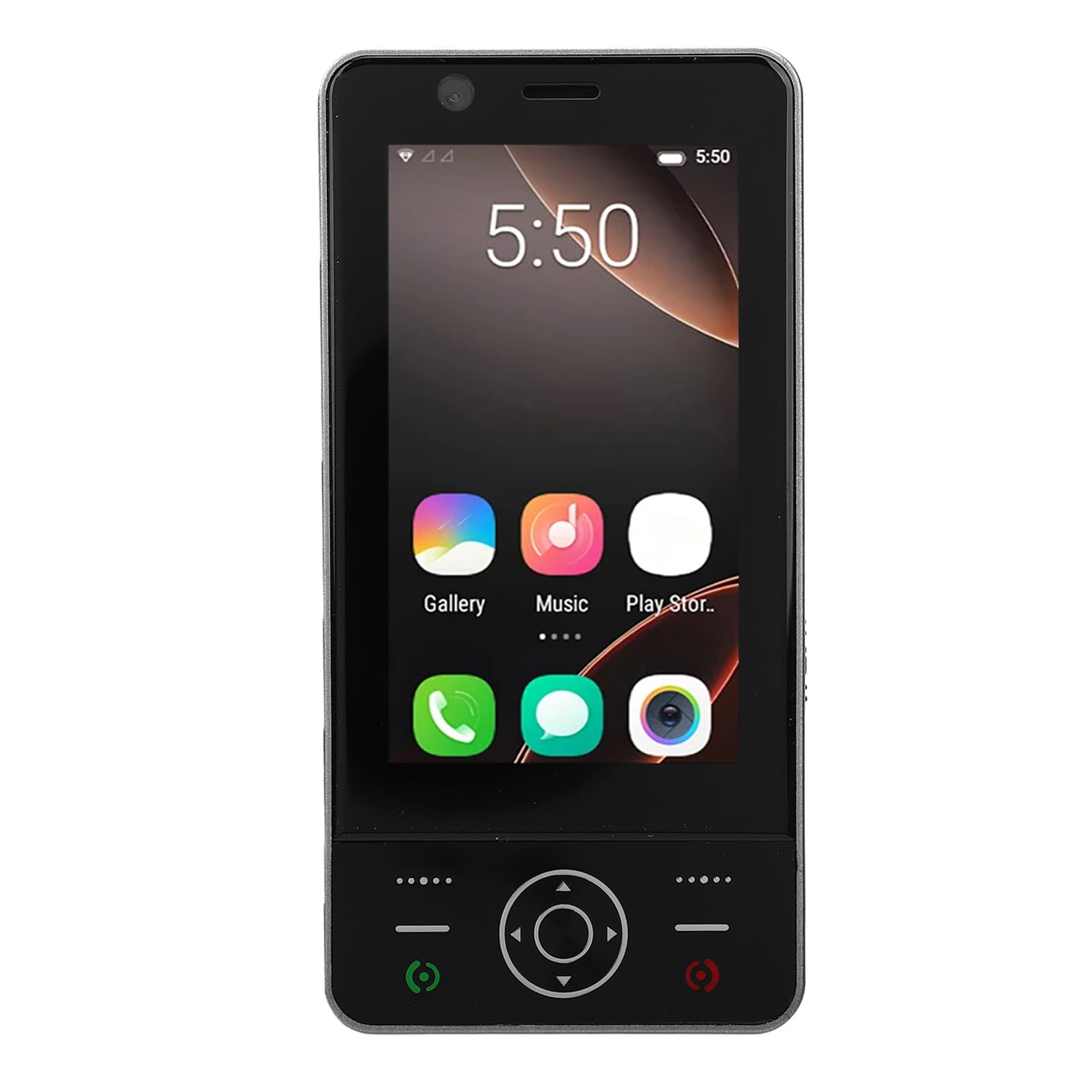
Image: The ciciglow 4G Slide Phone in its open position, displaying the touch screen interface and the physical keypad.
Product Overview
Ključne karakteristike
- Dizajn slajda: Compact and portable form factor with a sliding physical keypad.
- Prikaz: 3.0-inch touch screen for intuitive navigation.
- Operativni sistem: Android 8.1 (non-upgradable).
- Mrežna povezanost: Supports 4G/3G/2G networks (GSM 850/900/1800/1900, WCDMA B1/B2/B4/B5/B8, FDD B1/2/3/5/7/8/20/28AB, TDD B38/40/B41).
- Podrška za SIM kartice: Dual SIM slots for flexible network usage.
- Skladištenje: 2GB RAM and 16GB internal storage, expandable up to 32GB via memory card (not included).
- bežični: Bluetooth V5.0 and Wi-Fi connectivity.
- kamera: 2MP front and rear cameras.
- baterija: Ugrađena baterija od 2000mAh.
- luke: Type-C charging port and 3.5mm headphone jack.
Sadržaj paketa
Provjerite da li su sve stavke prisutne u paketu:
- 1 x ciciglow 4G Slide Phone
- 1 x kabel za punjenje (tip-C)
- 1 x Lanyard
- 2 x Korisnički priručnik (ovaj dokument)
- 1 x Alat za izbacivanje SIM kartice

Image: The ciciglow 4G Slide Phone, lanyard, charging cable, and SIM ejector tool, representing the package contents.
Setup
1. Inserting SIM Card(s) and Memory Card
- Pronađite ladicu za SIM karticu sa strane telefona.
- Koristite priloženi alat za izbacivanje SIM kartice da biste otvorili ladicu.
- Carefully place your Nano-SIM card(s) into the designated slots. Ensure the gold contacts face downwards.
- If using a memory card (MicroSD, up to 32GB), insert it into the dedicated memory card slot on the tray.
- Lagano gurnite ladicu nazad u telefon dok se ne poravna s tijelom uređaja.
2. Punjenje uređaja
- Spojite kabel za punjenje Type-C na priključak za punjenje na dnu telefona.
- Drugi kraj kabla priključite na kompatibilni USB adapter za napajanje (nije uključen) ili USB port računara.
- Allow the phone to charge fully before initial use. The battery indicator on the screen will show charging status.
3. Uključivanje / isključivanje napajanja
- Za uključivanje: Pritisnite i držite dugme za napajanje (obično sa strane) dok se ekran ne upali.
- Za isključivanje: Pritisnite i držite dugme za napajanje, a zatim odaberite "Isključivanje" iz opcija na ekranu.
Uputstvo za upotrebu
Osnovna navigacija
The ciciglow 4G Slide Phone offers dual navigation methods: the 3.0-inch touch screen and the physical keypad.
- Ekran na dodir: Dodirnite za odabir, prevucite prstom za pomicanje, uštipnite za zumiranje.
- Fizička tastatura: Use the directional pad for menu navigation and the numeric keys for dialing or text input when the keypad is extended.

Image: The phone with its keypad extended, illustrating the combination of touch screen and physical button controls.
Upućivanje i primanje poziva
- Za upućivanje poziva: Open the dialer application on the touch screen or slide open the phone to use the physical keypad. Enter the phone number and press the call button.
- Da primite poziv: When a call comes in, swipe the answer icon on the touch screen or press the green call button on the keypad.

Image: A person using the ciciglow 4G Slide Phone for a call, demonstrating its ergonomic design.
Tekstualne poruke
Access the messaging application from the home screen. You can compose messages using the on-screen keyboard or the physical keypad when extended.
Povezivanje na Wi-Fi
- Idi na Postavke > Mreža i Internet > Wi-Fi.
- Uključi/isključi Wi-Fi On.
- Odaberite željenu mrežu s popisa i unesite lozinku ako se to od vas zatraži.
Bluetooth uparivanje
- Idi na Postavke > Povezani uređaji > Bluetooth.
- Uključite Bluetooth On.
- Ensure the device you wish to pair with is in pairing mode.
- Odaberite uređaj s popisa dostupnih uređaja i slijedite upute na ekranu da biste dovršili uparivanje.
Upotreba kamere
Open the Camera application from the home screen. Tap the screen to focus and press the shutter button to take a photo. You can switch between front and rear cameras within the app.
Održavanje
Čišćenje vašeg uređaja
- Za čišćenje ekrana i kućišta telefona koristite meku krpu koja ne ostavlja dlačice.
- Izbjegavajte upotrebu jakih hemikalija, abrazivnih sredstava za čišćenje ili aerosolnih sprejeva.
- Održavajte portove bez prašine i ostataka.
Battery Care
- Izbjegavajte izlaganje telefona ekstremnim temperaturama.
- Nemojte bušiti ili rastavljati bateriju.
- Za optimalno trajanje baterije, izbjegavajte često potpuno pražnjenje baterije ili njeno duže držanje na 100% napunjenosti.
Ažuriranja softvera
The operating system for this device is Android 8.1 and is not upgradable. Ensure you have the latest available applications from the Play Store for optimal performance.
Rješavanje problema
| Problem | Moguće rješenje |
|---|---|
| Telefon se ne uključuje. | Ensure the battery is charged. Connect the phone to a charger for at least 30 minutes. If it still doesn't power on, contact support. |
| Nema mrežnog signala. | Check if the SIM card is correctly inserted. Verify that you are in an area with network coverage. Restart the phone. |
| Ekran osjetljiv na dodir ne reaguje. | Restart the phone. Ensure the screen is clean and dry. If the issue persists, contact support. |
| Nije moguće povezati se na Wi-Fi. | Ensure Wi-Fi is enabled on the phone and the router is working. Re-enter the Wi-Fi password. Restart both the phone and the router. |
| Aplikacije su spore ili se ruše. | Close unnecessary background applications. Clear app cache (Settings > Apps > [App Name] > Storage > Clear cache). Restart the phone. |
Specifikacije
| Feature | Detalj |
|---|---|
| Brand | ciciglow |
| Naziv modela | ciciglowzsbnh152p6-13 |
| Operativni sistem | Android 8.1 (Non-upgradable) |
| Procesor | MTK6737 |
| Veličina ekrana | 3.0 inča |
| Display Type | Touch Screen, LED |
| Memorija (RAM) | 2GB |
| Pohrana (ROM) | 16GB |
| Proširiva pohrana | Supports up to 32GB Memory Card (MicroSD) |
| Cellular Technology | 4G/3G/2G |
| Frekvencijski opseg | 2G GSM 850/900/1800/1900, 3G WCDMA B1/B2/B4/B5/B8, 4G FDD B1/2/3/5/7/8/20/28AB, TDD B38/40/B41 |
| Broj utora za SIM kartice | Dual SIM |
| Bežično povezivanje | Wi-Fi, Bluetooth V5.0 |
| Kamera | 2MP Front and Rear |
| Kapacitet baterije | 2000 mAh (ugrađena) |
| Port za punjenje | Tip-C |
| Priključak za slušalice | 3.5mm |
| Dimenzije (približno) | Height: 136mm (5.35in), Width: 52mm (2.05in), Thickness: 19mm (0.74in) |
| Težina (približno) | 135g |

Image: Detailed dimensions and weight of the ciciglow 4G Slide Phone.

Image: An illustration of the phone's internal chipset, highlighting the MTK6737 processor, Android 8.1, 16GB ROM, and 2GB RAM.
Garancija i podrška
Informacije o garanciji
This ciciglow 4G Slide Phone is covered by a manufacturer's warranty for 90 days from the date of purchase. Please retain your proof of purchase for warranty claims.
Korisnička podrška
For further assistance, technical support, or warranty inquiries, please refer to the contact information provided with your purchase or visit the official ciciglow brand store online. You can find more information at the ciciglow Store.