
Uvod
Hvala na kupoviniasing the YOMILUVE Farmhouse L-Shaped Desk. This manual provides essential information for the safe assembly, operation, and maintenance of your new desk. Please read these instructions carefully before beginning assembly and retain them for future reference.
Sigurnosne informacije
- Always assemble the desk on a clean, soft surface to prevent scratches.
- Prije upotrebe provjerite jesu li svi dijelovi sigurno pričvršćeni. Povremeno provjeravajte i zategnite sve spojeve.
- Do not overload the desk or shelves. Refer to specifications for weight limits.
- Držite sitne dijelove i materijale za pakovanje dalje od djece i kućnih ljubimaca kako biste izbjegli opasnost od gušenja.
- Use the built-in power outlet responsibly. Do not exceed the rated electrical capacity.
- Izbjegavajte stavljanje vrućih predmeta direktno na površinu stola bez zaštite.
Sadržaj paketa
Prije montaže, provjerite da li su sve dolje navedene komponente prisutne i neoštećene. Ako bilo koji dio nedostaje ili je oštećen, obratite se korisničkoj podršci.
- Desk Panels (Desktop, Side Panels, Back Panels)
- 3 Wooden Drawers
- Ormar za odlaganje s podesivim policama
- Stalak za štampač
- Monitor stand
- Built-in Power Strip (2 AC Outlets, 1 USB Port, 1 Type-C Port)
- Assembly Hardware (Screws, Bolts, Dowels, Drawer Slides, Handles)
- Assembly Tool (Basic screwdriver may be included, but a personal screwdriver is recommended)
Upute za postavljanje i montažu
Pažljivo slijedite ove korake za pravilnu montažu. Preporučuje se da za montažu učestvuju dvije osobe.
- Raspakujte i identifikujte dijelove: Lay out all components and hardware. Refer to the included parts list to ensure everything is present.
- Sastavite noge: Attach the desk legs to the main desktop panels using the provided screws. Tighten securely with the appropriate tool.
- Connect Desktop Sections: Join the L-shaped desktop sections using the designated bolts and connectors. Ensure a flush and stable connection.
- Ugradnja klizača za ladice: Insert the drawer slides into the side panels of the drawer unit. Pay attention to the orientation of the slides.
- Sastavljanje ladica: Construct the three wooden drawers and attach the handles. Insert the assembled drawers into the installed slides.
- Assemble Storage Cabinet and Shelves: Follow the provided diagram to assemble the storage cabinet. Insert the adjustable shelves into the desired positions.
- Attach Monitor Stand: Secure the monitor stand to the main desktop surface.
- Integrirajte produžni kabel: Place the built-in power strip into its designated slot on the desktop. Ensure the power cable is routed safely.
- Konačna provjera: Verify that all screws, bolts, and connections are tight and secure.

Figure 1: Product Dimensions. This diagram illustrates the overall size and key measurements of the desk and its components.

Figure 2: Storage Drawers. The image demonstrates the capacity and design of the three storage drawers, suitable for various document sizes.

Figure 3: Monitor Stand Ergonomics. This image highlights the ergonomic benefits of the elevated monitor stand, promoting better posture.
Uputstvo za upotrebu
Using the Built-in Power Outlet
The YOMILUVE L-Shaped Desk includes a convenient built-in power strip for your electronic devices.
- AC utičnice: Two 125V/12A AC outlets are provided for standard electronics like monitors, lamps, or laptops.
- USB port: One 5V/2A USB-A port is available for charging smartphones, tablets, and other USB-powered devices.
- Port tipa C: One 5V/2A Type-C port is included for charging compatible devices.
- sigurnost: Ensure the desk's power cord is plugged into a grounded wall outlet. Do not exceed the maximum load capacity of the power strip.
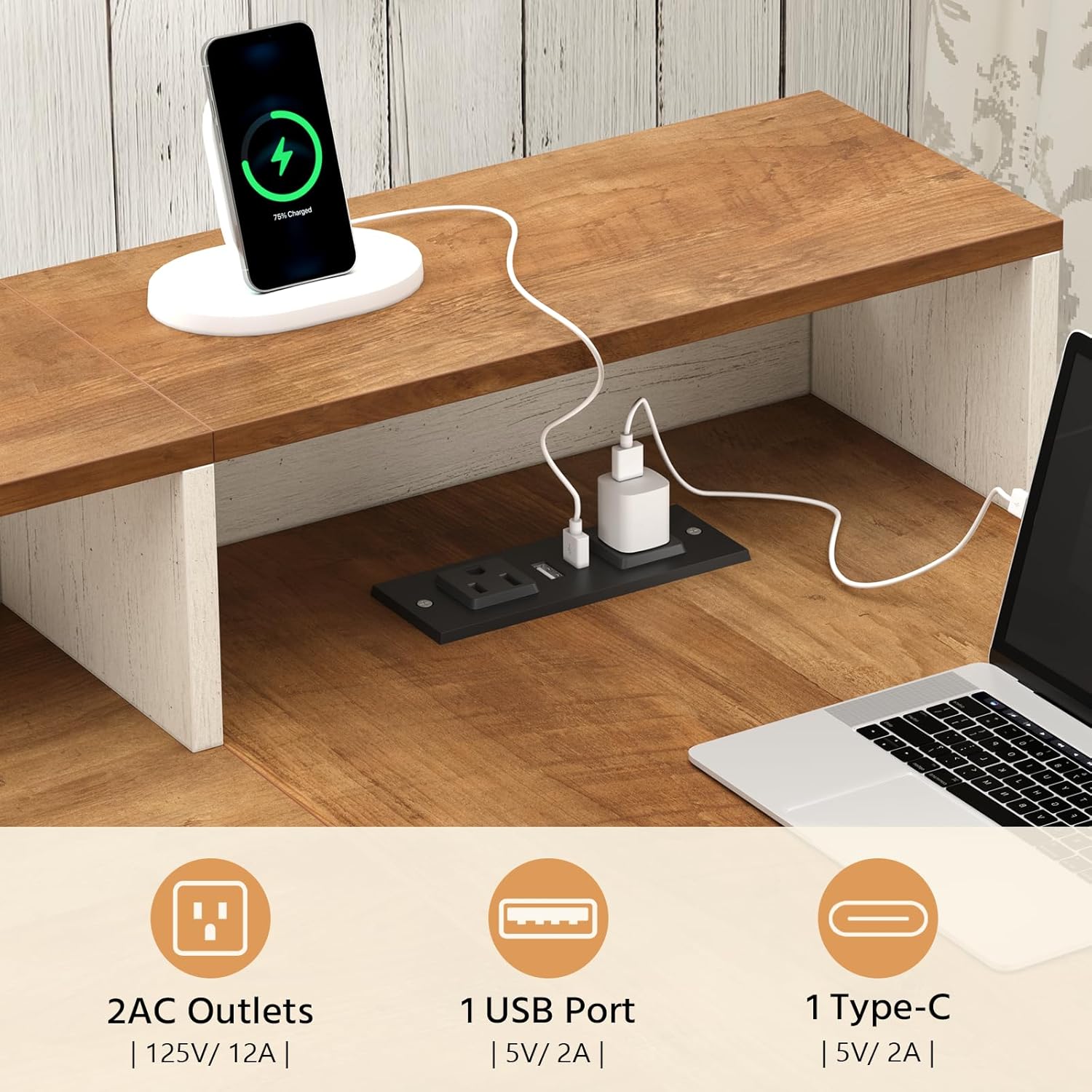
Figure 4: Integrated Power Outlet. This image details the power strip with its various ports for convenient device charging.
Korištenje funkcija pohrane
The desk offers multiple storage solutions to keep your workspace organized.
- ladice: Use the three wooden drawers for files, stationery, and personal items. The bottom drawer is designed for letter and A4 size documents.
- Ormarić za odlaganje: The cabinet features adjustable shelves, allowing you to customize the space for larger items like books, binders, or a small CPU.
- Postolje za monitor: The elevated monitor stand provides additional space underneath for keyboards, mice, or small accessories when not in use.
- Polica za štampač: A dedicated shelf is provided for a printer or other office equipment.

Slika 5: Ample Storage Space. This image illustrates the various storage compartments, including open shelves and drawers, designed for organization.
Održavanje
- čišćenje: Obrišite površine mekom, damp krpom. Izbjegavajte jake hemikalije ili abrazivna sredstva za čišćenje koja bi mogla oštetiti završnu obradu.
- Prosipanje: Odmah očistite prolivenu tekućinu kako biste spriječili mrlje ili oštećenje obrađenog drveta.
- hardver: Povremeno provjeravajte sve vijke i šrafove kako biste bili sigurni da su čvrsto zategnuti. Po potrebi ih ponovo zategnite kako biste održali stabilnost.
- Izbjegavajte direktnu sunčevu svjetlost: Prolonged exposure to direct sunlight can cause fading or warping.
- Toplotna zaštita: Use coasters or protective pads under hot items to prevent heat damage.
Rješavanje problema
| Problem | Mogući uzrok | Rješenje |
|---|---|---|
| Radni sto je klimav. | Labavi vijci ili neravan pod. | Check and tighten all assembly screws. Ensure the desk is on a level surface; use shims if necessary. |
| Fioke se ne pomiču glatko. | Improperly installed slides or obstruction. | Verify drawer slide installation. Check for any obstructions in the tracks. Apply a silicone-based lubricant if needed. |
| Utičnice ne rade. | Desk not plugged in, circuit breaker tripped, or faulty connection. | Ensure the desk's main power cord is securely plugged into a functional wall outlet. Check your home's circuit breaker. If issues persist, contact customer support. |
| Dijelovi se ne uklapaju tokom montaže. | Incorrect orientation or manufacturing defect. | Double-check the assembly instructions and diagrams for correct part orientation. Do not force parts. If a defect is suspected, contact customer support. |
Specifikacije
| Feature | Detalj |
|---|---|
| Brand | YOMILUVE |
| Model | Farmhouse L-Shaped Desk |
| Dimenzije proizvoda (D x Š x V) | 39"D x 61"Š x 29.5"H |
| Boja | Smeđe i belo |
| Materijal | Engineered Wood |
| Broj ladica | 3 |
| Broj polica | 2 (open), 1 (enclosed cabinet) |
| Posebne karakteristike | Built-In Power Strip (2 AC Outlets, 1 USB Port, 1 Type-C Port), Monitor Stand, Printer Shelf |
| Obavezna montaža | Da |
Informacije o garanciji
Specific warranty details for the YOMILUVE Farmhouse L-Shaped Desk may vary. Please refer to the documentation included with your purchase or contact the seller/manufacturer directly for information regarding warranty coverage, terms, and conditions.
Korisnička podrška
If you have any questions, require assistance with assembly, or encounter any issues with your YOMILUVE Farmhouse L-Shaped Desk, please do not hesitate to contact our customer support team. We are committed to providing prompt and helpful service.
- Način kontakta: Please refer to your purchase documentation or the YOMILUVE brand store on Amazon for the most current contact information.
- When contacting, please provide: Your order number, the product model (B0GS9BTZS8), and a detailed description of your issue.
Visit the official YOMILUVE Store: YOMILUVE Store