
1. Uvod
The EPOMAKER TH108 V2 PRO is a full-size mechanical keyboard designed for versatility and performance. It features multi-mode connectivity (Bluetooth, 2.4GHz wireless, and wired USB-C), a customizable screen and knob, hot-swappable switches, RGB lighting, and a gasket-mounted design for a comfortable typing experience. This manual provides instructions for setting up, operating, maintaining, and troubleshooting your keyboard.
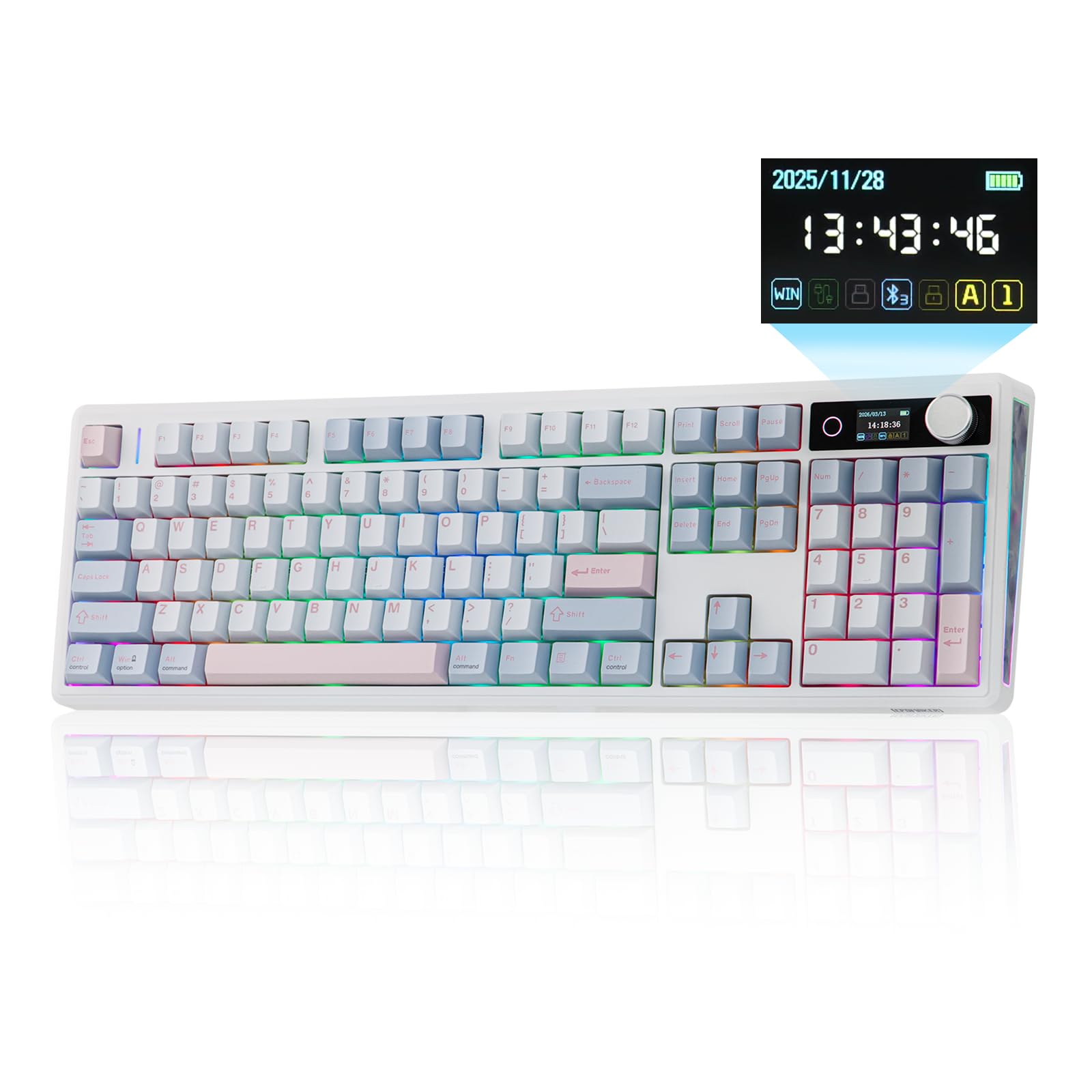
Figure 1.1: EPOMAKER TH108 V2 PRO Mechanical Keyboard
2. Šta se nalazi u kutiji
- EPOMAKER TH108 V2 PRO Full-Sized Gaming Keyboard
- Detachable USB A-to-C Cable
- Wireless 2.4Ghz Receiver (stored under the left kick-stand)
- Extra Switch
- 2-u-1 izvlakač za prekidače i kapice tipki
- Summarized Multilingual Manual and Product Card

Figure 2.1: Location of the 2.4Ghz Wireless Receiver
3. Proizvod je gotovview
The TH108 V2 PRO keyboard integrates several features for enhanced user experience:
- Višemodna povezivost: Supports Bluetooth, 2.4GHz wireless, and wired USB-C connections.
- Customizable Screen & Knob: A 1.06-inch functional glass screen displays real-time keyboard information, backlight settings, and supports custom GIFs or images. The rotary knob controls volume and screen pages, and is customizable.
- Prekidači koji se mogu brzo mijenjati: Allows for easy replacement of mechanical switches without soldering.
- Dizajn nosača zaptivke: Multiple layers of sound-dampening materials (PORON, latex, IXPE, silicone, foams) provide a soft, bouncy typing feel and a deep acoustic profile.
- RGB rasvjeta: Features per-key adjustable south-facing LEDs, an integrated light bar, and a custom decor panel for vibrant lighting effects.
- Dug vijek trajanja baterije: Equipped with a 10000mAh battery, providing up to 200 hours of continuous use.
- Mac/Windows Compatibility: Includes dedicated Mac modifier keycaps for seamless switching between operating systems.

Figure 3.1: Cushioned Gasket Structure

Figure 3.2: Pre-Lubed Linear Switches

Figure 3.3: Mac Modifier PBT Keycaps

Figure 3.4: Vibrant RGB Lighting
Video snimci proizvoda
Video 3.1: Comparison between TH108 PRO and TH108 V2 PRO, highlighting key differences and improvements.
Video 3.2: Demonstrates the typing sound and feel of Creamy Jade and Sea Salt Silent V2 switches on the TH108 V2 PRO.
Video 3.3: Provides close-up views of various components and design elements of the TH108 V2 PRO keyboard.
4. Podešavanje
4.1 Opcije povezivanja
The TH108 V2 PRO supports three connection modes:
- Ožičeni način: Connect the keyboard to your device using the provided USB A-to-C cable.
- 2.4GHz bežični način rada: Insert the 2.4GHz USB receiver (found under the left kick-stand) into your device's USB port. Switch the keyboard's mode selector to 2.4G.
- Bluetooth način rada: Switch the keyboard's mode selector to BT. Press FN + Q/W/E za odabir Bluetooth kanala. Indikatorska lampica će treptati, što označava režim uparivanja. Traži "TH108 V2 PRO" on your device and connect.
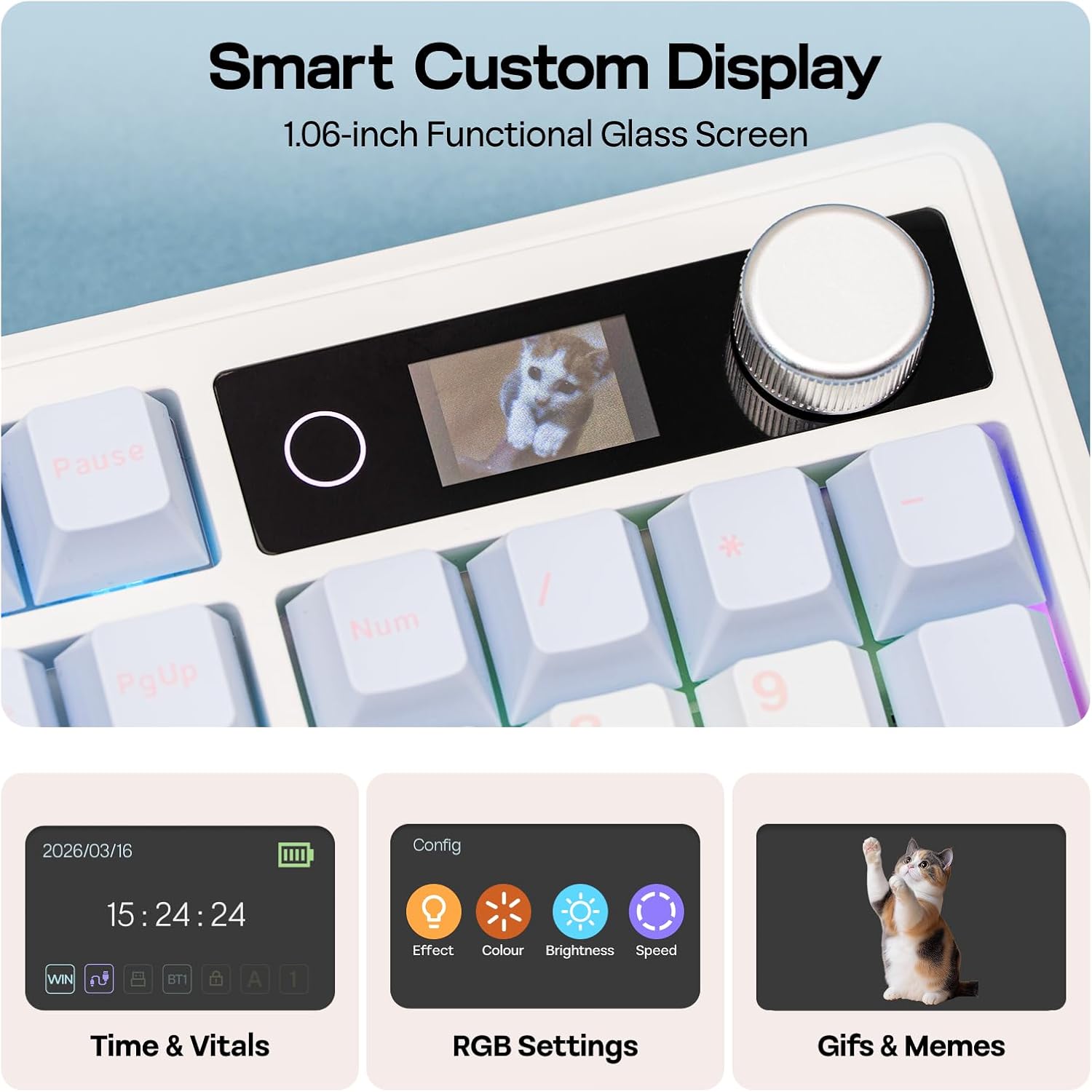
Figure 4.1: Connection Hub and Mode Switches
4.2 Promjena operativnog sistema
Use the dedicated switch on the keyboard to toggle between Windows (WIN) and Mac operating system layouts. This ensures correct key mapping for your system.
4.3 Početno punjenje
Before first use, it is recommended to fully charge the keyboard using the provided USB-C cable. The screen will indicate charging status.
Video 4.2: An unboxing video of the TH108 V2 PRO, showing initial setup components.
5. Uputstvo za upotrebu
5.1 Screen and Knob Functions
The 1.06-inch screen displays various information and settings. The rotary knob allows for quick adjustments:
- Default Knob Function: Okrenite za podešavanje jačine zvuka. Pritisnite za isključivanje/uključivanje zvuka.
- FN + dugme: Toggles between screen pages (e.g., time, battery, connection status, RGB settings).
- Prilagodba: The screen can display custom GIFs, drawings, or photos. This is managed via the web-compatible software.

Figure 5.1: Smart Custom Display and Knob
5.2 Kontrola RGB osvjetljenja
The keyboard features customizable RGB backlighting. You can adjust effects, colors, brightness, and speed using:
- Integrated Knob and Screen: Use FN + Knob to navigate to RGB settings on the screen, then use the knob to adjust.
- Tasterske prečice: Refer to the included quick guide for specific FN key combinations to change RGB modes.
- Web-Softver zasnovan na: For advanced customization, including per-key lighting and custom effects.
5.3 Programabilni softver
The TH108 V2 PRO utilizes a web-compatible software for advanced customization. This software allows you to:
- Remap tipke
- Record macros
- Customize RGB lighting
- Adjust keyboard settings
- Upload GIFs or images to the screen
Access the software via the official EPOMAKER website. It is compatible across various devices and operating systems.
Video 5.2: A guide on how to customize your TH108 V2 PRO using the available software and features.
6. Održavanje
6.1 Čišćenje
- Prije čišćenja isključite tastaturu iz svih izvora napajanja.
- Koristite meku krpu koja ne ostavlja dlačiceampvodom ili blagim sredstvom za čišćenje obrišite tipke i kućište.
- Za prašinu i nečistoće između tipki koristite komprimirani zrak ili malu četku.
- Avoid harsh chemicals, abrasives, or excessive moisture.
6.2 Zamjena tipki i prekidača
The TH108 V2 PRO features hot-swappable switches, allowing for easy replacement without soldering.
- Use the provided 2-in-1 switch-and-keycap puller.
- To remove a keycap, gently pull it upwards with the keycap puller.
- To remove a switch, use the switch puller to grasp the top and bottom clips of the switch and pull straight upwards.
- When inserting a new switch, ensure the pins are straight and align with the PCB sockets. Press firmly until it clicks into place.
- When replacing keycaps, align them with the switch stem and press down gently.
7. Otkrivanje problema
- Tastatura ne reaguje:
- Provjerite da li je tastatura napunjena.
- Check the connection mode switch (wired, 2.4GHz, Bluetooth) matches your setup.
- For 2.4GHz, ensure the receiver is properly inserted.
- For Bluetooth, re-pair the device.
- Pokušajte se povezati putem USB-C kabela kako biste isključili probleme s bežičnom vezom.
- RGB osvjetljenje ne radi/neispravno je:
- Check RGB settings via the screen or software.
- Ensure brightness is not set to zero.
- Ažurirajte firmver tastature ako je dostupan.
- Ključevi se ne registruju:
- Ako određeni ključ ne radi, pokušajte ukloniti i ponovo umetnuti njegov prekidač.
- Ensure the switch pins are not bent.
- Test with a different switch if available.
- Problemi sa softverom:
- Ensure you are using a compatible browser (e.g., Chrome) for the web-bazirani softver.
- Obrišite keš memoriju preglednika ili pokušajte s drugim preglednikom.
- Refer to the EPOMAKER support website for software-specific FAQs.
8. Specifikacije
| Brand | EPOMAKER |
| Naziv modela | TH108 V2 PRO |
| Tehnologija povezivanja | 2.4Ghz Wireless, Bluetooth, USB Cable |
| Opis tastature | Mehanički |
| Broj ključeva | 104 |
| Raspored tipkovnice | QWERTY |
| Tip prekidača | Linear, Linear Silent (depending on variant) |
| Posebne karakteristike | Backlit, Ergonomic, Hot-Swappable, Programmable Keys, Volume Roller, Screen |
| Pozadinsko osvetljenje tastature | RGB |
| Izvor napajanja | Napajanje baterijom (10000 mAh) |
| Materijal | Plastic (Enclosure), Polycarbonate (Plate) |
| Kompatibilni uređaji | Igraća konzola, laptop, računar, pametni telefon, tablet |
| Kompatibilan OS | Android, Windows, Mac OS 11 Big Sur and above |
| Stopa anketiranja (žična mreža) | 1000Hz |
| Latencija (žična) | 2ms |
9. Garancija i podrška
The EPOMAKER TH108 V2 PRO Mechanical Keyboard comes with a 1-godišnja garancija od datuma kupovine.
For technical support, warranty claims, or additional information, please visit the official EPOMAKER website or contact their customer service directly. You can also find more resources and product information on the EPOMAKER trgovina na Amazonu.