
1. Uvod
The FG-300 Signal Generator is a versatile device designed for generating various waveforms, including sine, square, and chamfered square waves. It offers a wide frequency adjustment range from 0.01 Hz to 200,000 Hz, with a default Schumann resonance frequency of 7.83 Hz. This generator is suitable for electronic equipment testing, instrument calibration, scientific experiments, and other applications requiring precise signal generation in laboratory and studio environments. Its compact size and USB power supply ensure portability and ease of use.
2. Sigurnosne informacije
Molimo vas da pročitate i razumjete sva sigurnosna uputstva prije upotrebe uređaja. Nepoštivanje ovih uputstava može dovesti do strujnog udara, požara ili oštećenja proizvoda.
- Izvor napajanja: Use only a 5V USB power source. Do not use power adapters with higher voltage izlazi.
- Okruženje: Operate the device in a dry environment. Avoid exposure to moisture, water, or extreme temperatures.
- Rukovanje: Pažljivo rukujte uređajem. Ne ispuštajte ga niti ga izlažite jakim udarcima.
- Izmjene: Ne pokušavajte rastavljati, popravljati ili modificirati uređaj. Za sve servisne radove obratite se kvalifikovanom osoblju.
- ventilacija: Osigurajte odgovarajuću ventilaciju oko uređaja tokom rada.
3. Sadržaj paketa
Provjerite da li se u vašem paketu nalaze sve dolje navedene stavke:
- 1 x FG-300 Adjustable Sine Wave Resonator Generator with Acrylic Case
- 1 x USB kabl za prenos podataka
- 1 x Uputstvo za upotrebu
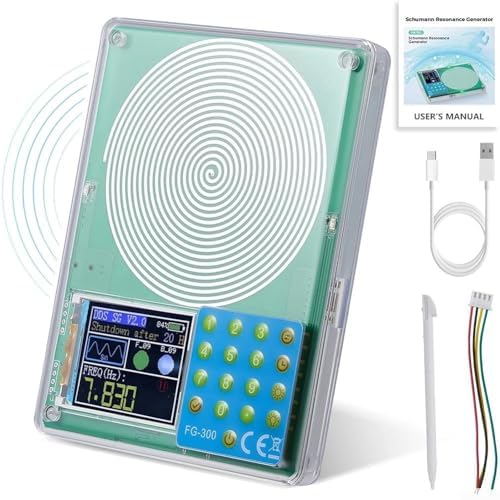
slika: The FG-300 Signal Generator shown with its USB data cable, a stylus for screen interaction, and the user manual.
4. Proizvod je gotovview
The FG-300 Signal Generator features a compact design with an acrylic case, making it durable and portable. It includes a display screen for frequency and waveform settings, and a keypad for input. The device is powered via a standard USB connection.
slika: Jasno view of the FG-300 Signal Generator, highlighting its main components including the spiral coil, digital display, and control keypad.

slika: The FG-300 device labeled as an FM783 Schumann Resonance Generator, illustrating its function in generating a frequency field.

slika: The FG-300 device being placed into a bag, emphasizing its small and convenient design for portability.
5. Podešavanje
To set up your FG-300 Signal Generator, follow these simple steps:
- Raspakirajte: Pažljivo izvadite sve komponente iz pakovanja.
- Priključite napajanje: Connect the provided USB data cable to the USB port on the FG-300 device. Plug the other end of the USB cable into a compatible 5V USB power source (e.g., a computer USB port, a USB wall adapter, or a power bank).
- Uključeno: The device should power on automatically or can be activated by pressing the power button. Refer to the 'Operating Instructions' section for details on screen activation.
6. Uputstvo za upotrebu
This section details how to operate your FG-300 Signal Generator, including power management, frequency adjustment, and waveform selection.
6.1. Power Management and Screen Control

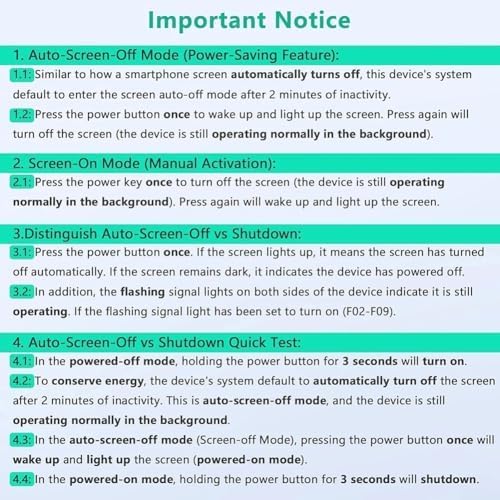
slika: An important notice outlining the device's screen-off modes, manual activation, and how to distinguish between auto-screen-off and full shutdown.
- Auto-Screen-Off Mode (Power-Saving): The device's system will automatically enter screen auto-off mode after 2 minutes of inactivity. The device continues to operate normally in the background.
- Screen-On Mode (Manual Activation): Press the power button once to wake up and light up the screen. Pressing it again will turn off the screen, but the device remains operational.
- Distinguishing Auto-Screen-Off vs. Shutdown:
- Press the power button once. If the screen lights up, the device was in auto-screen-off mode.
- If the screen remains dark, the device has powered off.
- Flashing signal lights on both sides of the device indicate it is still operating (if the flashing signal light has been set to turn on, F02-F09).
- Isključivanje: In powered-on mode, hold the power button for 3 seconds to shut down the device.
6.2. Podešavanje frekvencije
The FG-300 allows for precise frequency adjustment across a broad range.
- Frekvencijski raspon: The adjustable frequency range is 0.01 Hz to 200,000 Hz.
- Zadana frekvencija: The default Schumann resonance frequency is 7.83 Hz.
- Unapred podešene frekvencije: The device can also be adjusted to specific higher frequencies such as 174 Hz, 285 Hz, 396 Hz, 417 Hz, 528 Hz, 639 Hz, 741 Hz, 852 Hz, and 963 Hz.
- Podešavanje: Use the keypad and display interface to input and set the desired frequency. Refer to the on-screen prompts for navigation.
6.3. Odabir talasnog oblika
The FG-300 supports multiple waveform outputs to suit various applications.

slika: A visual representation of the multiple waveform outputs available from the device, including sine, square, triangle, forward sawtooth, reverse sawtooth, ECG, half wave, Lorentz, Gauss, Singer, exponential rise, exponential fall, and 7.83Hz for Schumann wave.
- Dostupni talasni oblici: Sine wave, square wave, and chamfered square wave.
- Izbor: Use the device's interface to select the desired waveform. The display will show the currently active waveform.
- Izlaz Amplitudes: Sine wave signal voltage amplitude is approximately 3 V. Square wave signal voltage amplitude is approximately 5 V.
7. Održavanje
Proper maintenance ensures the longevity and optimal performance of your FG-300 Signal Generator.
- čišćenje: Use a soft, dry cloth to clean the device's exterior. Do not use liquid cleaners or solvents, as they may damage the acrylic case or internal components.
- Skladištenje: Kada se ne koristi, uređaj čuvajte na hladnom i suhom mjestu, dalje od direktne sunčeve svjetlosti i ekstremnih temperatura.
- Rukovanje: Izbjegavajte ispuštanje ili izlaganje uređaja fizičkim udarima.
8. Otkrivanje problema
This section addresses common issues you might encounter with your FG-300 Signal Generator.
- Uređaj se ne uključuje:
- Ensure the USB cable is securely connected to both the device and a working 5V USB power source.
- Try a different USB cable or power source to rule out cable/power supply issues.
- Screen is dark but device is operating:
- The device may be in Auto-Screen-Off Mode. Press the power button once to reactivate the screen.
- Check if the flashing signal lights (if enabled, F02-F09) are active, indicating background operation.
- Incorrect waveform or frequency output:
- Verify the settings on the display screen. Use the keypad to adjust frequency and waveform as needed.
- Ensure the device is not in a mode that overrides manual settings.
9. Specifikacije
| Naziv dijela | Generator |
| Brand | Generic |
| Broj modela | Generičko54 |
| Materijal | PCB |
| Boja | Primarily Green |
| Dimenzije (D x Š x V) | Približno 12.7 x 9.9 x 2 cm (5 x 3.9 x 0.8 inča) |
| Težina artikla | Približno 190 g (0.42 lbs) |
| Frekvencijski opseg | 0.01 Hz do 200,000 Hz |
| Zadana frekvencija | 7.83 Hz (Schumann Resonance) |
| Napajanje Voltage | 5 V (USB powered) |
| Sine Wave Signal Voltage Amplitude | 3 V |
| Square Wave Signal Voltage Amplitude | 5 V |
10. Jamstvo i podrška
Information regarding product warranty and customer support is not available in the provided data. Please refer to the seller or manufacturer's website for details on warranty coverage and support options.