
1. Uvod
Hvala na kupoviniasing the Sharp PS-916 Bluetooth Party Speaker System. This system includes two identical portable Bluetooth speakers designed to deliver powerful audio with versatile connectivity options. Please read this manual carefully before using the product to ensure proper operation and to maximize your listening experience.
Sadržaj paketa:
- 2 x Sharp PS-916 Party Speakers
- 1 x Kabl za punjenje
- 1 x daljinski upravljač
- 1 x Uputstvo za upotrebu

Image: The Sharp PS-916 system includes two speakers for a complete stereo experience.
2. Podešavanje
2.1 Punjenje zvučnika
The PS-916 speakers are equipped with rechargeable batteries, providing up to 12 hours of playback. Before initial use, fully charge both speakers.
- Connect the charging cable to the DC IN port on the rear of each speaker.
- Plug the other end of the charging cable into a suitable power adapter (not included) or USB power source.
- Indikatorska lampica punjenja će se upaliti. Promijenit će boju ili se ugasiti nakon što se punjenje završi.
2.2 Uključivanje/isključivanje
To power on or off each speaker, press and hold the ON/STAND BY INPUT dugme koje se nalazi na kontrolnoj tabli.
2.3 Bluetooth uparivanje (jedan zvučnik)
- Ensure the speaker is powered on and in Bluetooth mode. The Bluetooth indicator will flash, indicating it is ready for pairing.
- Na svom mobilnom uređaju omogućite Bluetooth i potražite dostupne uređaje.
- Select "Sharp PS-916" from the list of devices.
- Nakon povezivanja, Bluetooth indikator će prestati treptati i ostati stalno svijetliti.
2.4 Pravo bežično stereo (TWS) uparivanje (dva zvučnika)
TWS allows you to connect two PS-916 speakers wirelessly for a stereo sound experience.
- Power on both PS-916 speakers.
- Ensure neither speaker is currently connected to a Bluetooth device.
- Na jednom od zvučnika (ovo će biti primarni zvučnik), pritisnite TWS button. The speaker will enter TWS pairing mode.
- The primary speaker will automatically search for the secondary speaker. Once connected, you will hear an audible confirmation, and the TWS indicator lights on both speakers will illuminate.
- Sada povežite svoj mobilni uređaj s primarnim zvučnikom putem Bluetootha kao što je opisano u odjeljku 2.3. Zvuk će se reproducirati preko oba zvučnika u stereo formatu.
3. Operativni
3.1 Kontrolna tabla prekoview

Image: Main control panel for the Sharp PS-916 speaker.
- ON/STAND BY INPUT: Power on/off, switch input modes (Bluetooth, USB, TF, AUX, FM).
- PLAY/PAUSE (►/∕∕): Reprodukcija ili pauziranje reprodukcije zvuka.
- PREVIOUS (◀◀): Preskoči na prethodnu numeru.
- NEXT (▶▶): Preskoči na sljedeću pjesmu.
- ZVUČNICA: Okrenite da biste podesili glavnu jačinu zvuka.
- TWS: Initiate or disconnect True Wireless Stereo pairing.
- EQUALIZER: Cycle through preset equalizer modes.
- BASS: Activate or deactivate bass boost.
- SVJETLO: Change or turn off the LED light effects.
- MIC CONTROL: Adjust microphone volume or echo (if applicable).
3.2 ulaznih portova
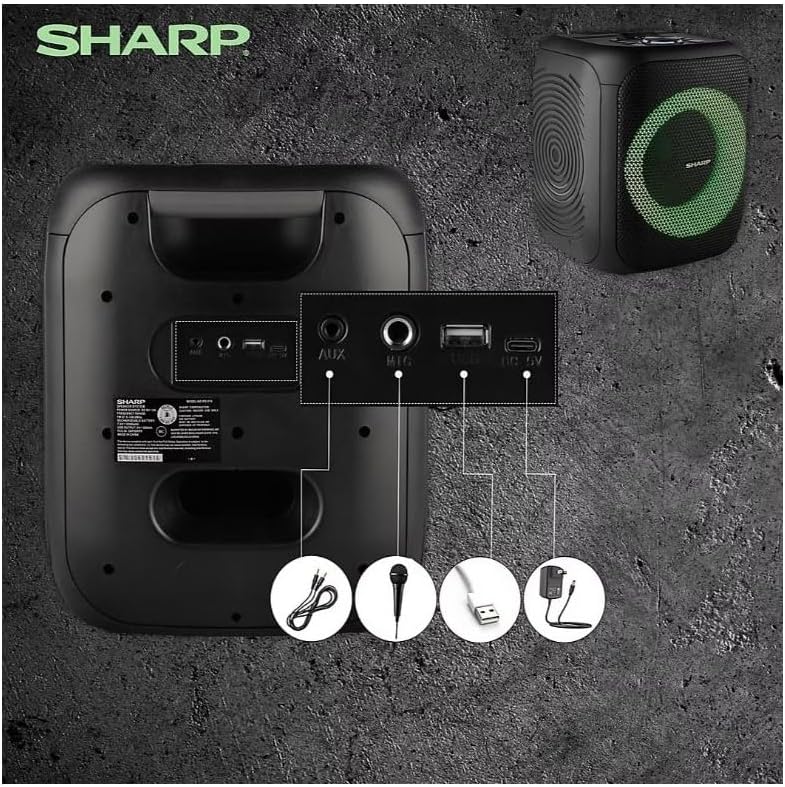
Image: Rear panel with various input and charging ports.
- AUX IN: Povežite eksterne audio uređaje pomoću 3.5 mm audio kabla.
- MIC IN: Connect a microphone (sold separately) for karaoke or announcements.
- USB: Umetnite USB fleš disk za reprodukciju zvuka.
- TF KARTICA: Insert a TF (microSD) card for audio playback.
- DC IN: Connect the charging cable to power and charge the speaker.
3.3 Playing Audio from USB/TF Card
- Insert a USB flash drive or TF card into the corresponding port.
- Pritisnite ON/STAND BY INPUT button repeatedly until the display shows the USB or TF mode.
- Reprodukcija će početi automatski. Koristite PLAY/PAUSE, PRETHODNA, i NEXT dugmad za kontrolu reprodukcije.
3.4 Korištenje AUX ulaza
- Connect one end of a 3.5mm audio cable to the AUX IN port on the speaker.
- Drugi kraj priključite na priključak za slušalice ili audio izlaz vašeg vanjskog uređaja.
- Pritisnite ON/STAND BY INPUT button repeatedly until the display shows AUX mode.
- Kontrolirajte reprodukciju i jačinu zvuka sa svog eksternog uređaja.
3.5 Rad FM radija

Image: The PS-916 features an integrated FM Tuner.
- Pritisnite ON/STAND BY INPUT button repeatedly until the display shows FM mode.
- Pritisnite i držite PLAY/PAUSE dugme za automatsko skeniranje i spremanje dostupnih FM stanica.
- Koristite PRETHODNA i NEXT tipke za navigaciju kroz spremljene stanice.
3.6 LED svjetlosnih efekata
Pritisnite LIGHT button to cycle through different LED light modes or to turn the lights off.
4. Održavanje
4.1 Čišćenje
- Uvijek isključite zvučnik i iskopčajte ga iz izvora napajanja prije čišćenja.
- Za brisanje vanjskih površina koristite meku, suhu krpu.
- Ne koristite tekuća sredstva za čišćenje, aerosole ili rastvarače, jer mogu oštetiti završnu obradu ili unutrašnje komponente.
4.2 Skladištenje
- Čuvajte zvučnike na hladnom i suhom mjestu, dalje od direktne sunčeve svjetlosti i ekstremnih temperatura.
- Ako skladištite bateriju duži period, punite je do otprilike 50% svakih nekoliko mjeseci kako biste je održali u ispravnom stanju.
5. Otkrivanje problema
If you encounter issues with your Sharp PS-916 speakers, please refer to the following common problems and solutions:
| Problem | Moguće rješenje |
|---|---|
| Zvučnik se ne uključuje. | Provjerite je li baterija napunjena. Spojite kabel za punjenje i pokušajte ponovo. |
| Nema zvuka iz zvučnika. | Provjerite nivo jačine zvuka i na zvučniku i na povezanom uređaju. Osigurajte da je odabran ispravan način unosa. |
| Bluetooth uređaj se ne može upariti. | Ensure the speaker is in Bluetooth pairing mode (indicator flashing). Move your device closer to the speaker. Disconnect from other Bluetooth devices. |
| Uparivanje TWS-a nije uspjelo. | Ensure both speakers are powered on and not connected to any other Bluetooth devices. Try initiating TWS pairing again. |
| Izobličen zvuk. | Reduce the volume on both the speaker and your connected device. Ensure the audio source is not distorted. |
6. Specifikacije
| Feature | Detalj |
|---|---|
| Brand | Sharp |
| Naziv modela | PS-916 |
| Konfiguracija zvučnika | 8" Woofer, 1" Tweeter (per speaker) |
| Vršna izlazna snaga | 400 W (po zvučniku) |
| RMS izlazna snaga | 40 W (po zvučniku) |
| Tehnologija povezivanja | Bluetooth |
| Dodatni ulazi | USB, TF Card, 3.5mm AUX, Microphone Input |
| Trajanje baterije | Do 12 sati |
| Posebne karakteristike | True Wireless Stereo (TWS) Pairing, Bass Boost, LED Light Effects, FM Tuner |
| Boja | Crna |
| Težina artikla | 6.5 funti (po zvučniku) |
| UPC | 728434122111 |
| GTIN | 728434122111 |
7. Jamstvo i podrška
7.1 Informacije o garanciji
This Sharp PS-916 product comes with a 90-day limited warranty. This warranty covers manufacturing defects under normal use. It does not cover damage caused by misuse, accidents, unauthorized modifications, or normal wear and tear.
7.2 Korisnička podrška
For technical assistance, warranty claims, or further inquiries, please refer to the contact information provided with your purchase documentation or visit the official Sharp support website.