
Ulefone RugKing Pad Pro
Ulefone RugKing Pad Pro Android 16 Rugged Tablet User Manual
Model: RugKing Pad Pro | Brand: Ulefone
1. Uvod
This manual provides essential instructions for setting up, operating, and maintaining your Ulefone RugKing Pad Pro rugged tablet. Please read this manual thoroughly before using the device to ensure proper function and longevity.
2. Sadržaj paketa
Provjerite da li se u paketu vašeg proizvoda nalaze svi artikli:
- Ulefone RugKing Pad Pro Tablet x 1
- AC Charger (100~240V) x 1
- Type-C Data Cable (100 cm) x 1
- Protective Film (Pre-installed) x 1
- Metal Pry Opener x 1
- Portable Strap x 1
- Vijci x 2
- Multilingual User Manual x 1
- Charging Instruction Card x 1
- Safety Warning Declaration x 1

Figure 2.1: Contents of the Ulefone RugKing Pad Pro package.
3. Proizvod je gotovview
The Ulefone RugKing Pad Pro is a rugged tablet designed for durability and performance. Familiarize yourself with its physical components.
3.1 Fizičke komponente
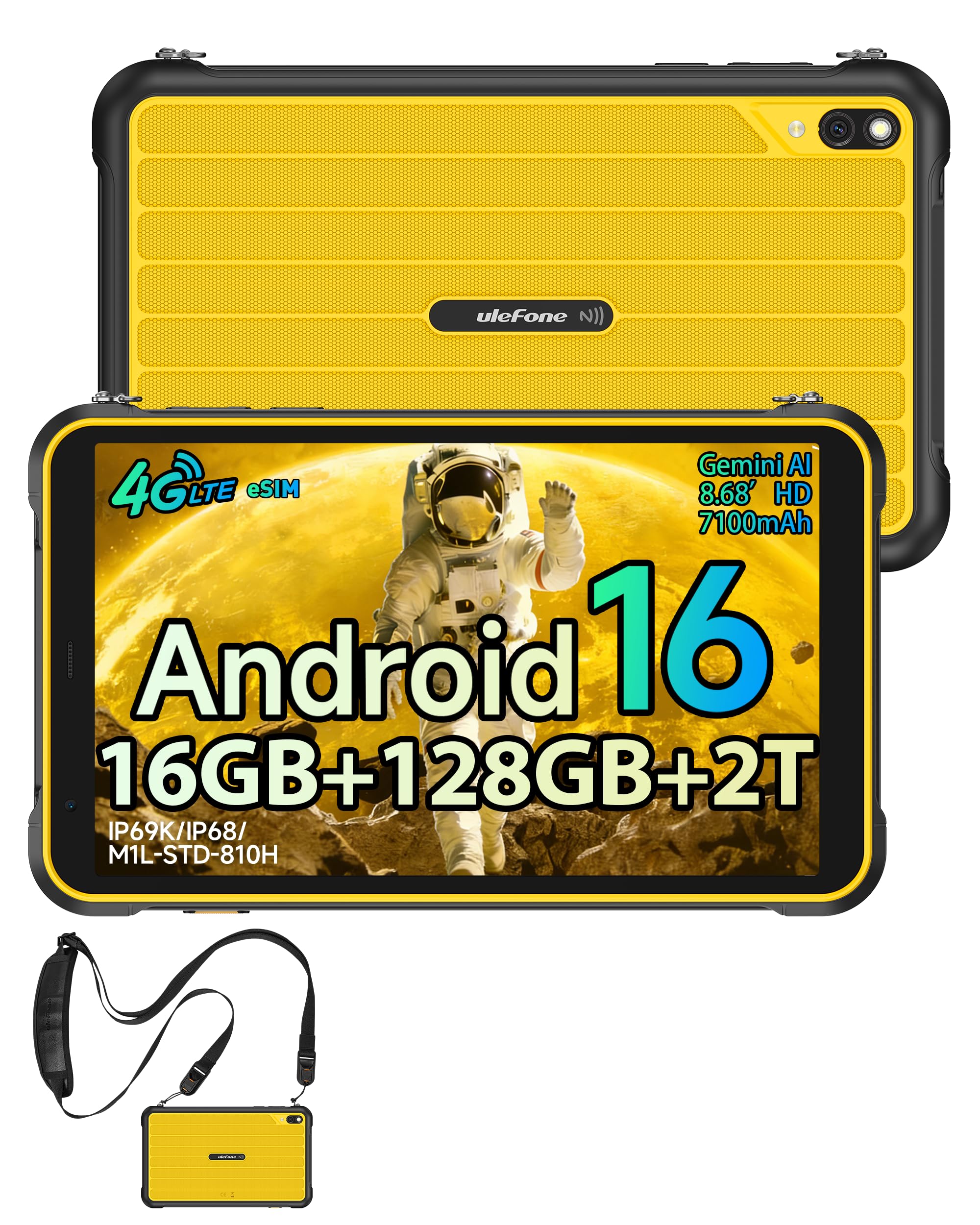
Slika 3.1: Prednja strana view of the Ulefone RugKing Pad Pro.

Slika 3.2: Bočna strana view sa dugmadima i portovima.
- Prikaz: 8.68-inch, 90Hz refresh rate, Corning Gorilla Glass.
- Dugme za napajanje: Nalazi se sa strane, koristi se za uključivanje/isključivanje ili buđenje/spavanje uređaja.
- Dugmad za jačinu zvuka: Podesite nivoe zvuka.
- USB Type-C port: Za punjenje i prijenos podataka.
- Rešetke zvučnika: Dual stereo speakers for audio output.
- kamera: Zadnja kamera od 16 MP, prednja kamera od 8 MP.
- svjetiljka: Integrated 133 lumen Super Torch.
- Utor za SIM/MicroSD karticu: Supports dual SIM and up to 2TB microSD expansion.
- uSmart konektor za proširenje: For compatible peripherals like endoscopes.
- 3.5 mm priključak za slušalice: For audio accessories.
4. Podešavanje
4.1 Početno uključivanje
- Pritisnite i držite Dugme za napajanje until the Ulefone logo appears.
- Slijedite upute na ekranu da biste odabrali jezik, regiju i povezali se na Wi-Fi mrežu.
- Prijavite se sa svojim Google računom ili kreirajte novi da biste pristupili Google Play trgovini i drugim uslugama.
4.2 SIM Card and eSIM Setup
The RugKing Pad Pro supports dual physical SIM cards and eSIM functionality for 4G LTE connectivity.

Figure 4.1: Triple card slot for SIM and MicroSD.
4.2.1 Physical SIM Card Installation
- Pronađite ladicu za SIM karticu sa strane tableta.
- Use the provided metal pry opener to eject the tray.
- Place your Nano-SIM cards into the designated slots.
- Carefully reinsert the tray into the tablet.
4.2.2 Aktivacija eSIM-a
To activate eSIM, navigate to Postavke > Mreža i internet > SIM kartice and follow the instructions to add a new mobile plan. You will typically need a QR code or activation code from your network provider.

Figure 4.2: eSIM connectivity feature.
5. Uputstvo za upotrebu
5.1 Operativni sistem Android 16
The RugKing Pad Pro runs on Android 16, offering a dynamic and fluid user interface with enhanced security and usability features. Enjoy desktop-like window views for multitasking and smarter notification management.

Slika 5.1: Korisnički interfejs za Android 16.
5.2 Prikaz i interakcija
The 8.68-inch display with a 90Hz refresh rate provides smooth navigation and streaming. With 860 nits peak brightness, the screen is readable even in bright sunlight. Corning Gorilla Glass offers enhanced scratch resistance.

Figure 5.2: Display features including 90Hz refresh rate and Gorilla Glass.
5.2.1 Način rada s rukavicama
For use in cold environments or industrial settings, enable Glove Mode in settings to allow touch input while wearing gloves. Note that some leather gloves may not be compatible due to material differences.

Figure 5.3: Tablet operation with gloves enabled.
5.3 Kamera i svjetiljka
The tablet features a 16MP rear camera for clear photos and document scanning, and an 8MP front camera for video calls. The integrated 133 lumen Super Torch provides bright illumination in low-light conditions.

Figure 5.4: Camera and Super Torch features.
5.4 Povezivanje i navigacija
- 4G LTE: Stay connected with dual SIM or eSIM.
- NFC: Supports Google Pay and other NFC functions for identification and authentication.
- GPS: Integrisani GPS, GLONASS, BeiDou i Galileo za preciznu navigaciju.
- Wi-Fi: Supports 802.11b/g/n standards.
- Bluetooth: Za povezivanje bežične dodatne opreme.

Figure 5.5: NFC enabled device for various applications.

Figure 5.6: GPS navigation in a vehicle.
5.5 Posebne karakteristike
- Prilagođeni ključ: Assign specific functions to a programmable key for quick access.
- ID lica: Otključajte uređaj pomoću prepoznavanja lica.
- FM radio: Listen to FM radio without headphones.
- uSmart konektor za proširenje: Connect compatible external peripherals such as endoscopes (uSmart E01, E02) or digital microscopes (uSmart C01).

Figure 5.7: uSmart expansion connector and peripherals.
6. Karakteristike izdržljivosti
The RugKing Pad Pro is built to withstand extreme conditions, certified with IP68, IP69K, and MIL-STD-810H standards.
- IP68: Dustproof and resistant to continuous immersion in water up to 2 meters for 30 minutes.
- IP69K: Protected against high-pressure, high-temperature jet sprays.
- MIL-STD-810H: Military-grade standard ensuring reliable resistance to shocks, vibrations, and extreme temperatures.

Figure 6.1: Rugged design and certifications.

Figure 6.2: Dust, water, and drop resistance tests.
7. Upravljanje baterijom
The RugKing Pad Pro is equipped with a 7100 mAh battery, offering extended usage. It supports 492 hours of standby time or 10 hours of video playback on a single charge.
7.1 Punjenje
- Standardno punjenje: Connect the provided Type-C cable and AC charger to the tablet.
- Pogo Pin Punjenje: The tablet is compatible with Pogo Pin charging docks (sold separately) for convenient charging.
- Obrnuto punjenje (OTG): Use the tablet as a power bank to charge other devices via an OTG cable (sold separately).

Slika 7.1: Kapacitet baterije i metode punjenja.
8. Pohrana i performanse
Powered by an Unisoc T7250 Octa-core processor, the RugKing Pad Pro handles complex applications and demanding tasks efficiently. It comes with 16GB RAM (8GB physical + 8GB virtual) and 128GB internal storage, expandable up to 2TB via microSD card.

Figure 8.1: Octa-core processor for uninterrupted flow.

Figure 8.2: Memory and storage specifications.
*MicroSD card is sold separately for storage expansion. Dynamic RAM activation is user-configurable in Settings.
9. Održavanje
9.1 Čišćenje uređaja
- Za čišćenje ekrana i kućišta koristite meku krpu koja ne ostavlja dlačice.
- Za tvrdokornu prljavštinu, lagano dampNapržite krpu vodom. Izbjegavajte jake hemikalije ili abrazivne materijale.
- Ensure all port covers are securely closed before cleaning with liquids to maintain water resistance.
9.2 Ažuriranja softvera
Regularly check for software updates to ensure optimal performance, security, and access to new features. Navigate to Postavke > Sistem > Ažuriranje sistema da biste provjerili i instalirali dostupna ažuriranja.
9.3 Upravljanje skladištem
Periodično review vaše pohranjeno files and applications. Delete unnecessary data to free up space and maintain device speed. Utilize the microSD card slot for large media files.
10. Otkrivanje problema
| Problem | Rješenje |
|---|---|
| Uređaj se ne uključuje. | Provjerite je li baterija napunjena. Spojite punjač i pričekajte nekoliko minuta prije nego što ponovo pokušate uključiti uređaj. |
| Ekran ne reagira. | Perform a forced restart by holding the Power button for 10-15 seconds. If the issue persists, ensure Glove Mode is not causing interference if not needed. |
| Nije moguće povezati se na Wi-Fi. | Provjerite je li Wi-Fi omogućen u postavkama. Ponovo pokrenite ruter i tablet. Provjerite lozinku za Wi-Fi. |
| SIM kartica nije otkrivena. | Provjerite je li SIM kartica ispravno umetnuta u ležište. Ponovo pokrenite tablet. Provjerite je li SIM kartica aktivna kod vašeg operatera. |
| Baterija se brzo prazni. | Reduce screen brightness, close unused apps, disable unnecessary connectivity features (Bluetooth, GPS, Wi-Fi) when not in use. Check for background app activity. |
11. Specifikacije
| Feature | Detalj |
|---|---|
| Naziv modela | Ulefone RugKing Pad Pro |
| Operativni sistem | Android 16 |
| Procesor | Unisoc T7250 Octa-core |
| RAM | 16 GB (8 GB fizičke + 8 GB virtuelne) |
| Interna pohrana | 128 GB |
| Proširiva pohrana | Do 2 TB putem microSD kartice |
| Veličina ekrana | 8.68 inča |
| Rezolucija ekrana | 1400x800 piksela (HD+) |
| Refresh Rate | 90 Hz |
| Zaštita ekrana | Corning Gorilla Glass |
| Zadnja kamera | 16 MP |
| Prednja kamera | 8 MP |
| Video Recording | FHD 1080p |
| Kapacitet baterije | 7100 mAh (litijum-polimer) |
| Trajanje baterije (prosječno) | 13 Days (standby), 10 Hours (video playback) |
| Povezivanje | 4G LTE (Dual SIM, eSIM), Wi-Fi (802.11b/g/n), Bluetooth, NFC |
| Navigacija | GPS, GLONASS, BeiDou, Galileo |
| Ocjene izdržljivosti | IP68, IP69K, MIL-STD-810H |
| Sigurnosne karakteristike | Face ID |
| Dimenzije (D x Š x V) | 20 x 10 x 1 cm |
| Težina | 450 grama |
12. Garancija i podrška
12.1 Informacije o garanciji
The Ulefone RugKing Pad Pro comes with a 2-godišnja garancija proizvođačaOva garancija pokriva nedostatke u materijalu i izradi pri normalnoj upotrebi. Molimo sačuvajte dokaz o kupovini za potrebe reklamacije.


Figure 12.1: Ulefone brand and 2-year warranty indication.
12.2 Korisnička podrška
For technical assistance, warranty claims, or further inquiries, please contact Ulefone customer support. A service center is available in Europe.
- Refer to the official Ulefone webweb mjesto za kontakt detalje.
- Consult the "Multilingual User Manual" included in your package for additional information.
- The tablet includes a "Service Center 2.0" application for intelligent support.
Ask a question about this manual
Ask about setup, troubleshooting, compatibility, parts, safety, or missing instructions. Manuals+ will review the question and use this page’s manual context to help answer it.