
1. Proizvod je gotovview
The HONOR Magic8 Lite 5G is a robust and feature-rich smartphone designed for durability and high performance. It boasts industry-leading resistance to drops, water, and dust, a long-lasting battery, a high-resolution camera, and an immersive display, all powered by an efficient processor with advanced AI capabilities.
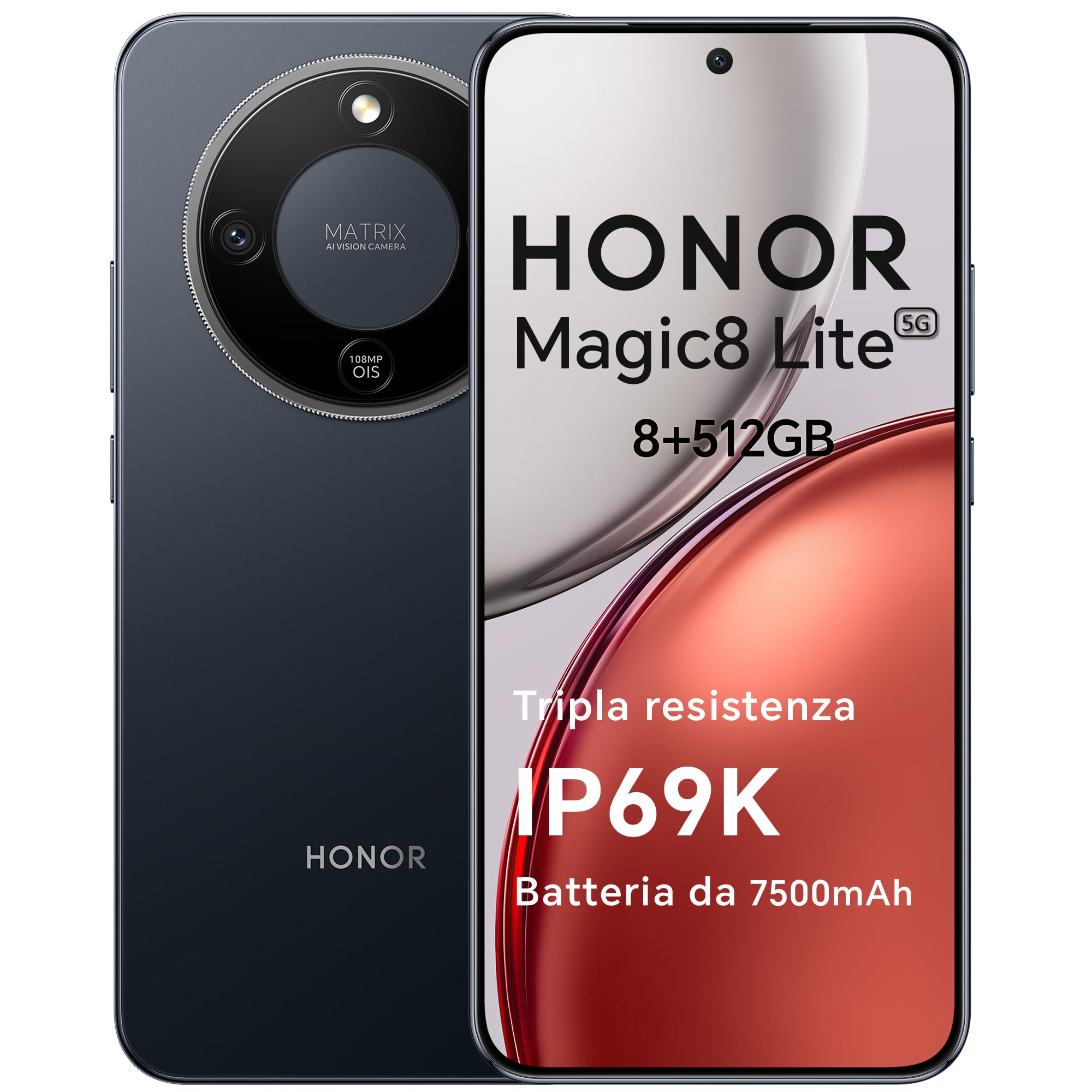
Figure 1: HONOR Magic8 Lite 5G Smartphone, Midnight Black variant.
Ključne karakteristike:
- Triple Resistance: SGS Five-Star Overall Drop Resistance (up to 2.5 meters), IP69K and IP68 water and dust resistance.
- Dugotrajna baterija: 7500 mAh silicon-carbon battery with up to 3 days of autonomy and 66W SuperCharge. Functions as a portable power bank.
- Napredni sistem kamera: 108 MP Ultra-Sensing Camera with Optical Image Stabilization (OIS) and Electronic Image Stabilization (EIS) for clear photos and stable 4K videos. Includes AI photography features.
- Imerzivni ekran: 6.79-inch 1.5K OLED display with 6000 nits peak brightness, 120 Hz refresh rate, and HONOR Eye Comfort Display technology.
- Snažne performanse: Snapdragon 6 Gen 4 (4nm) mobile platform for smooth multitasking and gaming, integrated with Google Gemini and other AI functionalities.
2. Podešavanje uređaja
2.1 Sadržaj paketa
Provjerite da li vaš paket sadrži sljedeće stavke:
- HONOR Magic8 Lite 5G pametni telefon
- USB-C kabl
- Power Adapter (66W SuperCharge)
- Alat za izbacivanje SIM kartice
- Vodič za brzi početak
- Garantni list
2.2 Umetanje SIM kartica
- Pronađite ladicu za SIM karticu sa strane uređaja.
- Umetnite alat za izbacivanje SIM kartice u mali otvor pored ladice i čvrsto pritisnite dok ladic ne iskoči.
- Place your Nano-SIM card(s) into the designated slots on the tray. Ensure the gold contacts face downwards. The device supports Dual SIM functionality.
- Pažljivo vratite ležište SIM kartice u telefon.
The device also supports eSIM functionality. Refer to your carrier for activation details.
2.3 Početno punjenje i uključivanje
- Connect the USB-C cable to the phone's charging port and the other end to the 66W power adapter. Plug the adapter into a power outlet.
- Allow the phone to charge for at least 15 minutes before initial use.
- To power on, press and hold the Power button (located on the side) until the HONOR logo appears on the screen.
- Slijedite upute na ekranu da biste dovršili početno podešavanje, uključujući odabir jezika, Wi-Fi vezu i postavljanje Google računa.

Figure 2: The 7500mAh silicon-carbon battery provides extended usage.
3. Uputstvo za upotrebu
3.1 Osnovna navigacija
- Ekran na dodir: Dodirnite za odabir, prevucite prstom za pomicanje, uštipnite za zumiranje.
- Početni ekran: Pristupite aplikacijama, widgetima i obavještenjima.
- Gestovi: Customize navigation gestures in Settings for a fluid experience.
3.2 Korištenje kamere
The HONOR Magic8 Lite 5G features a 108 MP Ultra-Sensing Camera with OIS and EIS for superior image and video capture.
- Open the Camera app from your home screen or lock screen.
- Select your desired mode (Photo, Video, Portrait, Night, Pro, etc.).
- Dodirnite dugme okidača da biste snimili fotografiju ili pokrenuli/zaustavili snimanje videa.
- Utilize AI features like AI Eraser, AI Cutout, and AI Outpainting for enhanced photo editing.
- For underwater photography, ensure the device is properly sealed and use the dedicated underwater mode.

Slika 3: Pramples of high-quality images captured by the 108 MP camera.
3.3 Upravljanje baterijom
The 7500 mAh battery is designed for extended use. To optimize battery life:
- Omogućite načine rada za uštedu energije kada je baterija slaba.
- Podesite postavke svjetline ekrana i vremena isključenja ekrana.
- Close background apps not in use.
- The device supports reverse charging, allowing it to act as a power bank for other devices. Connect the devices using a compatible USB-C cable.

Figure 4: The device can charge other accessories, acting as a power bank.
3.4 Karakteristike ekrana
The 6.79-inch 1.5K OLED display offers vibrant visuals and eye comfort features.
- Način rada za udobnost očiju: Reduces blue light to prevent eye strain. Activate it in Display Settings.
- Dinamička brzina osvježavanja: The 120 Hz adaptive refresh rate adjusts automatically for smooth scrolling and power efficiency.
- Visoka svjetlina: With 6000 nits peak brightness, the display remains clear even in direct sunlight.

Figure 5: The 1.5K OLED display offers exceptional clarity and color.
3.5 AI Features and Google Gemini
The device integrates advanced AI functionalities and Google Gemini for enhanced user experience.
- Google Gemini: Interact with Gemini for real-time translation, information retrieval, and more.
- AI Writing Tools: Utilize AI to assist with text composition and productivity tasks.
- Magic Portal: A shortcut for AI-powered tasks.

Figure 6: Google Gemini integration for intelligent assistance.
3.6 NFC funkcionalnost
The HONOR Magic8 Lite 5G supports Near Field Communication (NFC) for quick and secure transactions and data exchange.
- Enable NFC in your phone's Settings.
- Tap your phone to compatible NFC readers for mobile payments or to share content with other NFC-enabled devices.
4. Održavanje
4.1 Čišćenje uređaja
Despite its IP69K and IP68 ratings for water and dust resistance, proper cleaning helps maintain your device's longevity.
- Koristite meku krpu koja ne ostavlja dlačice za brisanje ekrana i kućišta.
- Izbjegavajte upotrebu jakih hemikalija, abrazivnih materijala ili komprimiranog zraka.
- If the device gets wet, wipe it dry with a clean cloth before charging or opening any ports.
4.2 Ažuriranja softvera
Regular software updates provide security patches, new features, and performance improvements. Ensure your device is connected to Wi-Fi and has sufficient battery before initiating an update.
- Navigirajte do Postavke > Sistem i ažuriranja > Ažuriranje softvera da provjerite dostupna ažuriranja.
4.3 Njega baterija
The 7500 mAh battery is designed for a long lifespan. To maximize its performance:
- Avoid extreme temperatures (below -30°C or above 55°C) as they can degrade battery performance.
- Use only HONOR-approved chargers and cables.
- Izbjegavajte često potpuno pražnjenje baterije.

Figure 7: The device is designed to operate in a wide range of temperatures.
5. Otkrivanje problema
This section addresses common issues you might encounter with your HONOR Magic8 Lite 5G.
5.1 Uređaj se ne uključuje
- Provjerite je li baterija napunjena. Spojite punjač i pričekajte nekoliko minuta prije nego što ponovo pokušate uključiti uređaj.
- Pritisnite i držite dugme za napajanje najmanje 10-15 sekundi da biste prisilno ponovo pokrenuli računar.
5.2 Problemi s naplatom
- Provjerite jesu li kabel za punjenje i adapter sigurno spojeni.
- Try using a different HONOR-approved charger and cable.
- Pregledajte priključak za punjenje da li ima krhotina ili oštećenja.
5.3 Kamera ne funkcioniše
- Ponovo pokrenite uređaj.
- Obrišite keš memoriju i podatke aplikacije Kamera u Postavke > Aplikacije > Kamera > Pohrana.
- Ensure no other apps are currently using the camera.
5.4 Water/Dust Exposure
While the device is highly resistant, prolonged exposure or exposure to high-pressure jets (beyond IP69K/IP68 limits) can cause damage.
- If the device gets wet, dry it thoroughly before charging.
- Do not intentionally submerge the device in water beyond specified depths or for extended periods.
- If you suspect water damage, contact customer support.

Figure 8: The device is designed with advanced water resistance.
For other issues, refer to the official HONOR support websajtu ili kontaktirajte korisničku podršku.
6. Specifikacije
| Feature | Specifikacija |
|---|---|
| Brand | ČAST |
| Model | Magic8 Lite |
| RAM | 8 GB |
| Interna pohrana | 512 GB |
| Boja | Midnight Black |
| Kapacitet baterije | 7500 mAh |
| Display | 6.79-inch 1.5K AMOLED, 120Hz, 6000 nits peak brightness |
| Zadnja kamera | 108 MP sa optičkom stabilizacijom slike |
| Procesor | Snapdragon 6 Gen 4 (4nm) |
| Otpornost na vodu i prašinu | IP69K, IP68 |
| Otpor na pad | SGS Five-Star Overall Drop Resistance (up to 2.5m) |
| Povezivanje | 5G, Dual SIM, NFC |
| Porijeklo | Kina |
| ASIN | B0G43TWKGS |

Figure 9: Detailed product information sheet.
For more detailed energy efficiency information, please refer to the EPREL database: https://eprel.ec.europa.eu/qr/2515767
7. Garancija i podrška
7.1 Informacije o garanciji
Warranty terms and conditions are typically provided with your purchase documentation. Please retain your proof of purchase for warranty claims. For specific warranty details, refer to the warranty card included in your product package or visit the official HONOR websajt za vašu regiju.
7.2 Korisnička podrška
For technical assistance, service, or further inquiries, please contact HONOR customer support:
- Službeno Webstranica: https://www.honor.com/de/
- Self-Repair Support: https://www.honor.com/de/support/self-repair/
- Podrška putem e-pošte: support@honor.com