
1. Uvod
Hvala na kupoviniasing the ULTIMEA Aura A60 U2621 7.1ch Dolby Atmos Soundbar System. This manual provides essential information for setting up, operating, and maintaining your new sound system. Please read this manual thoroughly before use to ensure proper functionality and to maximize your audio experience.

Figure 1.1: Immersive audio experience with the ULTIMEA Aura A60 system.
2. Sigurnosne informacije
Da biste smanjili rizik od strujnog udara, požara ili oštećenja uređaja, molimo vas da se pridržavate sljedećih sigurnosnih mjera opreza:
- Ne izlažite ovaj uređaj kiši ili vlazi.
- Ne stavljajte predmete napunjene tečnošću, kao što su vaze, na aparat.
- Osigurajte odgovarajuću ventilaciju. Ne blokirajte ventilacijske otvore.
- Ne postavljajte u blizini izvora toplote kao što su radijatori, grejni registri, peći ili drugi uređaji (uključujući ampLifiers) koji proizvode toplotu.
- Zaštitite kabl za napajanje od gaženja ili priklještenja, posebno na utikačima, utičnicama i na mjestu gdje izlaze iz uređaja.
- Koristite samo dodatke/pribor koje je naveo proizvođač.
- Isključite ovaj aparat iz struje tokom oluja sa grmljavinom ili kada se ne koristi duži vremenski period.
- Sav servis prepustite kvalifikovanom serviseru.
3. Sadržaj paketa
Molimo Vas da provjerite da li su svi artikli prisutni i u dobrom stanju:
- ULTIMEA Aura A60 Soundbar
- Wireless Subwoofer (4-inch, BassMX Technology)
- 4 x Surround Speakers (2 front, 2 rear)
- Daljinski upravljač
- HDMI kabl
- Adapter/kablovi za napajanje
- Korisnički priručnik (ovaj dokument)
4. Proizvod je gotovview
The ULTIMEA Aura A60 U2621 is a 7.1ch Dolby Atmos soundbar system designed to deliver an immersive home theater audio experience. It features a main soundbar unit, a powerful wireless subwoofer with BassMX technology, and four surround speakers.
4.1 Main Soundbar Unit
The main soundbar unit houses 3 main channels for clear dialogue and primary audio. It serves as the central hub for all audio connections.

Figure 4.1: Main soundbar unit with front surround speakers.
4.2 Bežični subwoofer
The dedicated 4-inch wireless subwoofer incorporates BassMX technology to enhance low frequencies, providing deep and resonant bass for a more impactful audio experience.

Figure 4.2: Wireless subwoofer with BassMX technology.
4.3 surround zvučnika
The system includes four surround speakers: two front and two rear. The rear speakers connect wirelessly to the soundbar, minimizing cable clutter and allowing flexible placement to create an expansive acoustic space.

Figure 4.3: Diagram of 7.1ch sound distribution.
4.4 Ulazno/izlazni portovi
The soundbar features multiple input options for versatile connectivity:
- HDMI eARC: For high-quality audio transmission and seamless TV integration.
- optički: Digitalni audio ulaz.
- AUX: Analogni audio ulaz.
- USB: Za reprodukciju medija.
- Bluetooth: Bežični audio streaming.

Figure 4.4: Rear panel connections, including HDMI eARC.
5. Podešavanje
5.1 Fizički smještaj
Optimalno postavljanje komponenti vašeg zvučnog sistema je ključno za najbolje audio iskustvo.
- Soundbar: Place the soundbar centrally below your television. Ensure it is not obstructed.
- Subwoofer: Position the wireless subwoofer on the floor near the soundbar. Experiment with placement to find the best bass response for your room.
- Prednji surround zvučnici: Place the two wired front surround speakers to the left and right of your TV, ideally at ear level when seated.
- Stražnji surround zvučnici: Position the two wireless rear surround speakers behind your primary listening position, to the left and right. These speakers will automatically connect wirelessly to the soundbar once powered on.

Figure 5.1: Recommended speaker placement for Dolby Atmos.
5.2 Veze
Pratite ove korake da biste povezali svoj soundbar sistem:
- Priključak za napajanje: Connect the power cables to the soundbar, subwoofer, and surround speakers, then plug them into a power outlet.
- HDMI eARC (preporučeno): Connect one end of the provided HDMI cable to the HDMI eARC port on your soundbar and the other end to the HDMI eARC/ARC port on your TV. This connection supports Dolby Atmos and allows for TV remote control of the soundbar.
- Optička veza (alternativa): If your TV does not have an HDMI eARC/ARC port, connect an optical cable (not included) from your TV's optical output to the OPTICAL input on the soundbar.
- AUX Connection (Alternative): For analog audio sources, connect a 3.5mm AUX cable (not included) from your device's audio output to the AUX input on the soundbar.
- USB veza: Insert a USB drive into the USB port on the soundbar for direct media playback.
- Bluetooth uparivanje: To connect a Bluetooth device, select the Bluetooth input on the soundbar. On your device, search for 'ULTIMEA Aura A60' and pair.
6. Uputstvo za upotrebu
6.1 Uključivanje/isključivanje napajanja
Pritisnite dugme za napajanje na soundbaru ili daljinskom upravljaču da biste uključili ili isključili sistem.
6.2 Odabir ulaza
Use the 'Input' button on the remote control or the soundbar to cycle through available input sources: HDMI eARC, Optical, AUX, USB, and Bluetooth.

Slika 6.1: Daljinski upravljač za jednostavno rukovanje.
6.3 Kontrola jačine zvuka
Adjust the master volume using the 'Volume Up' and 'Volume Down' buttons on the remote control or the soundbar. You can also adjust subwoofer and surround speaker levels independently.
6.4 Sound Modes and EQ Presets
The Aura A60 offers various sound modes and EQ presets to optimize audio for different content and preferences.
- Dedicated Modes: Select from 6 specialized modes: Movie, Music, Voice, Sports, Game, and Night.
- EQ unapred podešene postavke: Access 121 professional EQ presets for genres like Bass, Pop, Classical, and Rock via the ULTIMEA app.

Figure 6.2: 121 preset EQ matrix for customized audio.
6.5 Kontrola aplikacija
Download the ULTIMEA app to your smartphone for advanced control and customization options, including a 10-band EQ and access to all EQ presets.
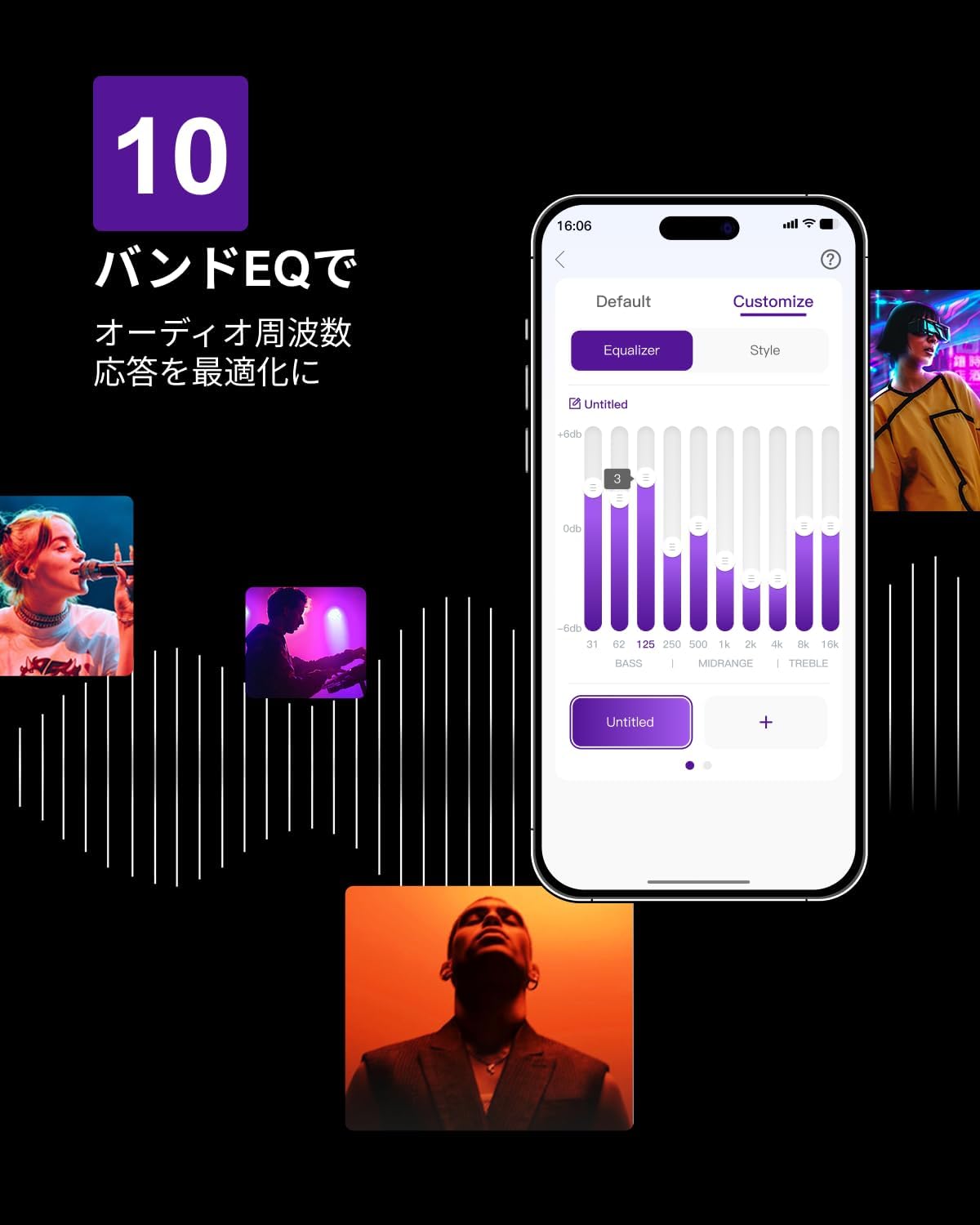
Figure 6.3: ULTIMEA mobile application interface.
7. Održavanje
To ensure the longevity and optimal performance of your ULTIMEA Aura A60 soundbar system, follow these simple maintenance guidelines:
- čišćenje: Use a soft, dry cloth to wipe the surfaces of the soundbar, subwoofer, and speakers. Do not use liquid cleaners or abrasive materials, as they may damage the finish.
- ventilacija: Osigurajte da svi ventilacijski otvori ostanu čisti i nezaklonjeni kako biste spriječili pregrijavanje.
- Skladištenje: Ako sistem skladištite duži period, isključite ga iz struje i čuvajte ga na hladnom i suhom mjestu, dalje od direktne sunčeve svjetlosti i ekstremnih temperatura.
8. Otkrivanje problema
Ako naiđete na probleme sa vašim soundbar sistemom, pogledajte sljedeće uobičajene probleme i rješenja:
| Problem | Mogući uzrok | Rješenje |
|---|---|---|
| Nema zvuka sa soundbara. | Odabran pogrešan ulaz, jačina zvuka preniska, kablovi nisu pravilno povezani. | Verify the correct input source. Increase volume. Check all cable connections (HDMI, Optical, AUX). Ensure the soundbar is powered on. |
| No sound from subwoofer/surround speakers. | Subwoofer/speakers not paired or powered on, volume too low. | Ensure subwoofer and surround speakers are powered on. They should automatically pair. If not, refer to the pairing instructions in the full manual (if available) or contact support. Increase their individual volume levels. |
| Izobličen ili loš kvalitet zvuka. | Incorrect audio settings, poor source quality, interference. | Adjust EQ settings or try different sound modes. Ensure the audio source is high quality. Check for nearby electronic devices causing interference. |
| Problemi sa Bluetooth vezom. | Device out of range, not in pairing mode, interference. | Ensure the soundbar is in Bluetooth pairing mode. Move your device closer to the soundbar. Disconnect and re-pair the device. |
Ako problem i dalje postoji nakon isprobavanja ovih rješenja, obratite se korisničkoj podršci ULTIMEA-e.
9. Specifikacije
| Feature | Detalj |
|---|---|
| Brand | KRAJNJI |
| Naziv modela | Aura A60 |
| Broj modela | U2621 |
| Vrsta zvučnika | Soundbar with 7.1ch Surround Sound |
| Audio tehnologija | Dolby Atmos, BassMX Technology |
| Povezivanje | HDMI eARC, Bluetooth, Optical, AUX, USB |
| Subwoofer | 4-inch Wired Subwoofer (integrated BassMX) |
| Surround Speakers | 4 (2 wired front, 2 wireless rear) |
| Kontrola | Remote Control, ULTIMEA App |
| Boja | Crna |
| Dimenzije (D x Š x V) | 9 cm x 40 cm x 7 cm (Soundbar, approximate) |
| Zemlja porijekla | Kina |
10. Garancija i podrška
ULTIMEA is committed to providing high-quality products and customer satisfaction. Your Aura A60 U2621 soundbar system comes with comprehensive support.
10.1 Informacije o garanciji
Specific warranty details may vary by region. Please refer to the warranty card included with your product or visit the official ULTIMEA webstranicu za najnovije uslove i odredbe garancije.
10.2 Korisnička podrška
For any questions, technical assistance, or troubleshooting not covered in this manual, please contact our dedicated support team:
- 365-Day Support: Our expert staff is available year-round to assist you.
- Live Chat: Instant responses are available via live chat on our website.
- Povratak: We offer a 30-day return policy with free shipping for your peace of mind.

365-Day Expert Support

Instant Live Chat

30-dnevni besplatni povrati
Za dodatnu pomoć, molimo vas da posjetite ULTIMEA Brand Store.