1. Uvod
The KONNWEI MAXOBD OBD2 Scanner is a professional diagnostic tool designed to read and clear diagnostic trouble codes (DTCs) from your vehicle's engine control unit (ECU). It provides access to various vehicle systems, allowing users to monitor live data, perform I/M readiness tests, and retrieve vehicle information. This manual provides detailed instructions for the proper use and maintenance of your MAXOBD scanner.
2. Sigurnosne informacije
Before operating the MAXOBD OBD2 Scanner, please read and understand all safety messages and instructions in this manual. Failure to do so may result in personal injury or damage to the vehicle or the scanner.
- Testiranje automobila uvijek obavljajte u sigurnom okruženju.
- Nosite zaštitu za oči koja zadovoljava ANSI standarde.
- Držite odjeću, kosu, ruke, alate, opremu za testiranje itd. podalje od svih pokretnih ili vrućih dijelova motora.
- Upravljajte vozilom u dobro provetrenom radnom prostoru; izduvni gasovi su otrovni.
- Stavite mjenjač u PARK (za automatski mjenjač) ili NEUTRAL (za ručni mjenjač) i uvjerite se da je parkirna kočnica aktivirana.
- Keep a fire extinguisher suitable for gasoline/electrical fires nearby.
- Nemojte povezivati ili isključivati bilo koju opremu za testiranje dok je kontakt uključen ili motor radi.
3. Proizvod je gotovview
The MAXOBD scanner features a clear display and intuitive button layout for easy navigation and operation. It connects directly to your vehicle's OBD-II port to retrieve diagnostic information.
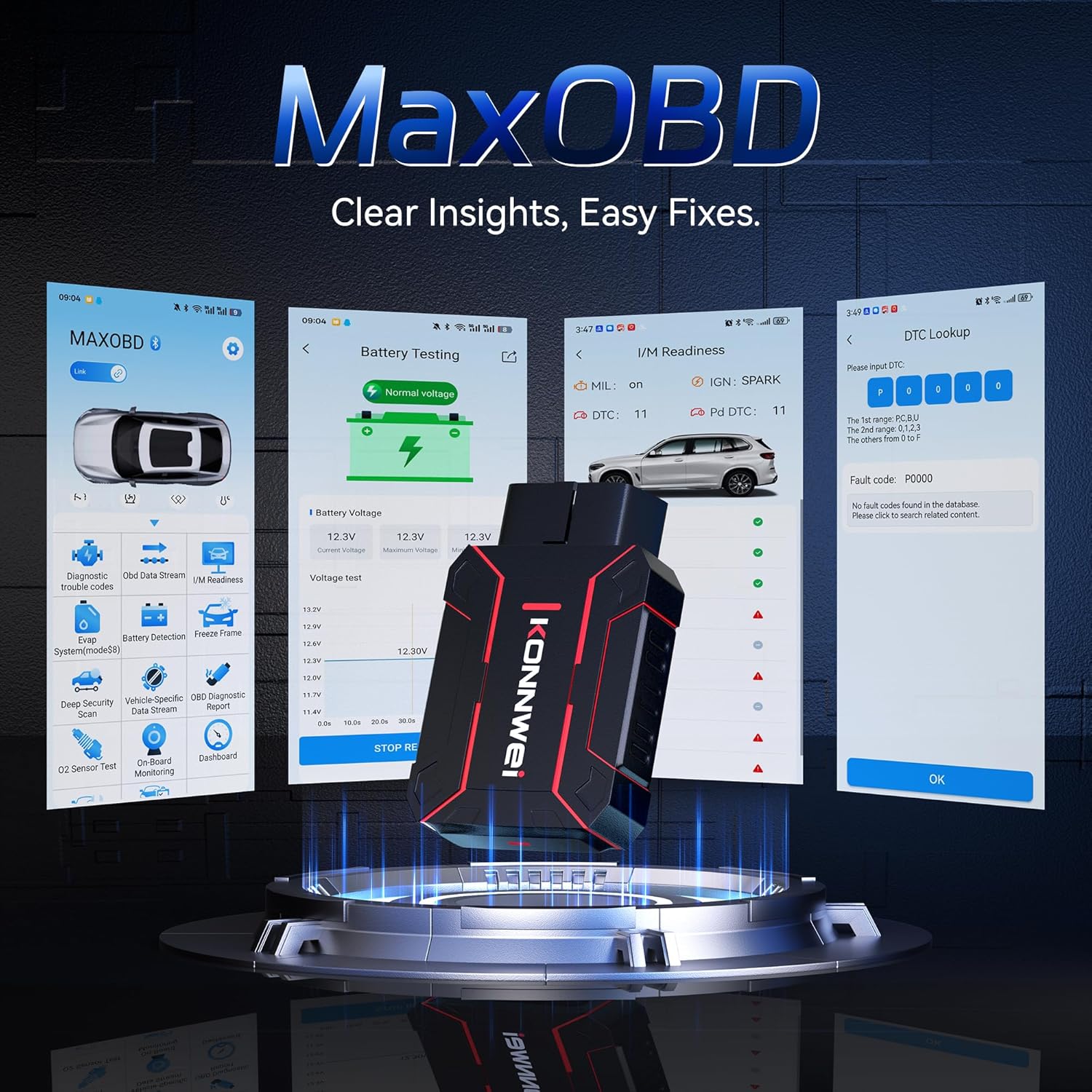
Image: The KONNWEI MAXOBD OBD2 Scanner device, illustrating its physical form and various diagnostic screen interfaces such as battery testing, I/M readiness, and DTC lookup.
Ključne komponente:
- OBD-II Connector: Povezuje se na DLC (Data Link Connector) vozila.
- LCD ekran: Prikazuje rezultate testa i opcije menija.
- Navigacijski gumbi: Koristi se za listanje kroz menije i odabir opcija.
- Enter/Exit Buttons: Confirm selections or return to previous screens.
4. Podešavanje
Follow these steps to set up your MAXOBD OBD2 Scanner:
- Pronađite OBD-II priključak vozila: 16-pinski konektor za podatkovnu vezu (DLC) obično se nalazi ispod instrumentne ploče na vozačevoj strani vozila. Za tačnu lokaciju pogledajte servisni priručnik vašeg vozila ako ga ne možete pronaći.
- Povežite skener: Plug the MAXOBD scanner's OBD-II connector firmly into the vehicle's DLC. Ensure a secure connection.
- Uključeno: Once connected, the scanner will automatically power on. If it does not, turn the vehicle's ignition to the 'ON' position (engine off).
5. Uputstvo za upotrebu
The MAXOBD scanner offers various diagnostic functions. Use the navigation buttons to move through menus and the Enter button to select options.

Image: A visual representation of a vehicle highlighting various systems (Engine, ABS, SAS, SRS, DPF, TPMS) that the MAXOBD scanner can perform a full system scan on.
Funkcije glavnog menija:
- Pročitajte kodove: Retrieves Diagnostic Trouble Codes (DTCs) from the vehicle's ECU. These codes indicate specific issues detected by the vehicle's onboard diagnostic system.
- Obriši kodove: Clears all DTCs from the vehicle's ECU and turns off the Malfunction Indicator Lamp (MIL). Ensure the underlying issue is resolved before clearing codes.
- I/M spremnost: Provjerava status sistema za praćenje emisija kako bi se utvrdilo da li su spremni za test emisija.
- Prijenos podataka: Displays real-time operational parameters from the vehicle's sensors and components. This can include engine RPM, vehicle speed, oxygen sensor readings, and more.
- Zamrzni okvir: Captures a snapshot of sensor data at the moment a DTC was set. This data can help identify the conditions under which a fault occurred.
- Test O2 senzora: Retrieves O2 sensor monitoring test results for the most recently completed tests from the vehicle's onboard computer.
- Test ugrađenog monitora: Dohvaća rezultate za komponente i sisteme pogonskog sklopa povezane s emisijama koje se ne prate kontinuirano.
- Test EVAP sistema: Pokreće test curenja za sistem za kontrolu emisije isparavanja vozila.
- Podaci o vozilu: Prikazuje identifikacijski broj vozila (VIN), ID kalibracije (CALID) i broj za verifikaciju kalibracije (CVN).
Performing a Diagnostic Scan:
- Connect the scanner to the vehicle's DLC and turn the ignition to 'ON'.
- From the main menu, select 'Read Codes' and press Enter.
- The scanner will communicate with the vehicle and display any detected DTCs.
- Use the navigation buttons to scroll through the codes and their descriptions.
- To clear codes, return to the main menu, select 'Erase Codes', and confirm.
6. Održavanje
Proper maintenance ensures the longevity and reliable operation of your MAXOBD scanner.
- čišćenje: Koristite meku, damp krpu za čišćenje vanjštine skenera. Ne koristite abrazivna sredstva za čišćenje ili rastvarače.
- Skladištenje: Store the scanner in a dry, clean environment away from extreme temperatures and direct sunlight. Keep it in its original packaging or a protective case when not in use.
- Ažuriranja softvera: Periodično provjeravajte službene podatke KONNWEI-a website for available software updates to ensure your scanner has the latest vehicle compatibility and features. Follow the instructions provided on the website for updating the device.
7. Otkrivanje problema
If you encounter issues with your MAXOBD scanner, refer to the following common problems and solutions:
| Problem | Mogući uzrok | Rješenje |
|---|---|---|
| Skener se ne uključuje. | Loose connection; vehicle ignition off; faulty OBD-II port. | Ensure the scanner is securely plugged into the DLC. Turn vehicle ignition to 'ON'. Test on another vehicle if possible. |
| Poruka "Greška veze" ili "Greška u komunikaciji". | Loose connection; vehicle not OBD-II compliant; ignition off; communication protocol issue. | Verify connection. Ensure vehicle is OBD-II compliant (most vehicles 1996 and newer). Turn ignition to 'ON'. Try a different vehicle if available. |
| Ekran je prazan ili zamrznut. | Softverski kvar; prekid napajanja. | Disconnect and reconnect the scanner. If the issue persists, contact customer support. |
If the problem persists after attempting these solutions, please contact KONNWEI customer support for further assistance.
8. Specifikacije
- Brand: KONNWEI
- Model: maxobdTM
- Izvor napajanja: Battery Powered (via OBD-II port)
- Operativni sistem: Linux
- Veličina ekrana: 2.8 inča
- Vrsta automobilske opreme: Universal Fit (for OBD-II compliant vehicles)
- Dimenzije paketa: 10.04 x 7.28 x 2.76 inča
9. Garancija i podrška
KONNWEI products are designed for reliability and performance. For warranty information, please refer to the documentation included with your purchase or visit the official KONNWEI website. For technical support, troubleshooting assistance, or any other inquiries, please contact KONNWEI customer service through their official channels.
KONNWEI Official Webstranica: Visit the KONNWEI Store on Amazon


