
1. Uvod
Hvala na kupoviniasing the ELEPHAS BL128MINI Mini Projector. This manual provides essential information for setting up, operating, and maintaining your projector. Please read it thoroughly before use to ensure optimal performance and longevity of the device.
2. Sadržaj paketa
Provjerite da li se u vašem paketu nalaze sve dolje navedene stavke:
- 1 x ELEPHAS BL128MINI Projector
- 1 x daljinski upravljač
- 1 x Korisnički priručnik (ovaj dokument)
- 1 x HDMI kabl
- 1 x Odvojivi tronožac
3. Proizvod je gotovview
3.1 Ključne karakteristike
- 1080P Full HD rezolucija: Supports 1920 x 1080 resolution for clear images.
- 24-bit True Color: Pruža žive i precizne boje.
- Projekcija na velikom ekranu: Capable of projecting up to a 200-inch screen.
- Detachable Tripod: Provides stable placement and flexible positioning.
- Built-in HIFI Speaker: Offers integrated audio output.
- Više opcija povezivanja: Includes USB, HDMI, AV, and Audio ports.

Image 3.1: The ELEPHAS BL128MINI Projector offers 1080P Full HD resolution with 24-bit true color, an 8000:1 contrast ratio, and enhanced brightness for a vivid viewing iskustvo.
3.2 Projector Ports and Controls
Familiarize yourself with the various ports and controls on your projector for proper connection and operation.

Image 3.2: Rear panel of the ELEPHAS BL128MINI Projector, highlighting DC power input, USB ports, HDMI port, AV port, and audio output. Compatible devices include Xbox, TV Stick, PC, Smartphone, USB drives, speakers, and headphones.
4. Podešavanje
4.1 Priključak za napajanje
- Spojite adapter za napajanje na DC IN priključak na projektoru.
- Uključite adapter za napajanje u zidnu utičnicu.
4.2 Tripod Installation
The included detachable tripod allows for stable placement on various surfaces.
- Locate the tripod mounting screw hole on the bottom of the projector.
- Screw the tripod securely into the mounting hole.
- Adjust the tripod legs to achieve the desired height and angle for projection.

Image 4.2: The detachable tripod provides stability for the projector, whether placed on a desktop or uneven outdoor surfaces.
4.3 Postavljanje i udaljenost projekcije
Position the projector on a flat, stable surface. The optimal projection distance ranges from 3.3 to 9.8 feet for screen sizes between 50 and 200 inches.

Image 4.3: Recommended projection distances for achieving various screen sizes, from 50 to 200 inches.
5. Uputstvo za upotrebu
5.1 Uključivanje/isključivanje napajanja
- Uključeno: Pritisnite dugme za napajanje na projektoru ili daljinskom upravljaču.
- Iskljuciti: Press the power button again. The projector will enter standby mode.
5.2 Podešavanje fokusa
Okrećite prsten za fokusiranje na objektivu projektora dok projicirana slika ne postane jasna i oštra.
5.3 Odabir ulaznog izvora
Use the 'Source' button on the remote control or the projector to select the desired input source (HDMI, USB, AV).
5.4 Povezivanje vanjskih uređaja
Projektor podržava različite vanjske uređaje:
- HDMI: Connect laptops, PCs, TV boxes, TV sticks, gaming consoles (e.g., Xbox), or other HDMI-enabled devices using the provided HDMI cable.
- USB: Umetnite USB fleš disk u USB port da biste reprodukovali medije files direktno.
- OD: Use the AV port for older devices with composite video output.
- Pametni telefoni/tableti: For iOS and Android devices, an additional HDMI adapter (not included) is required for connection.
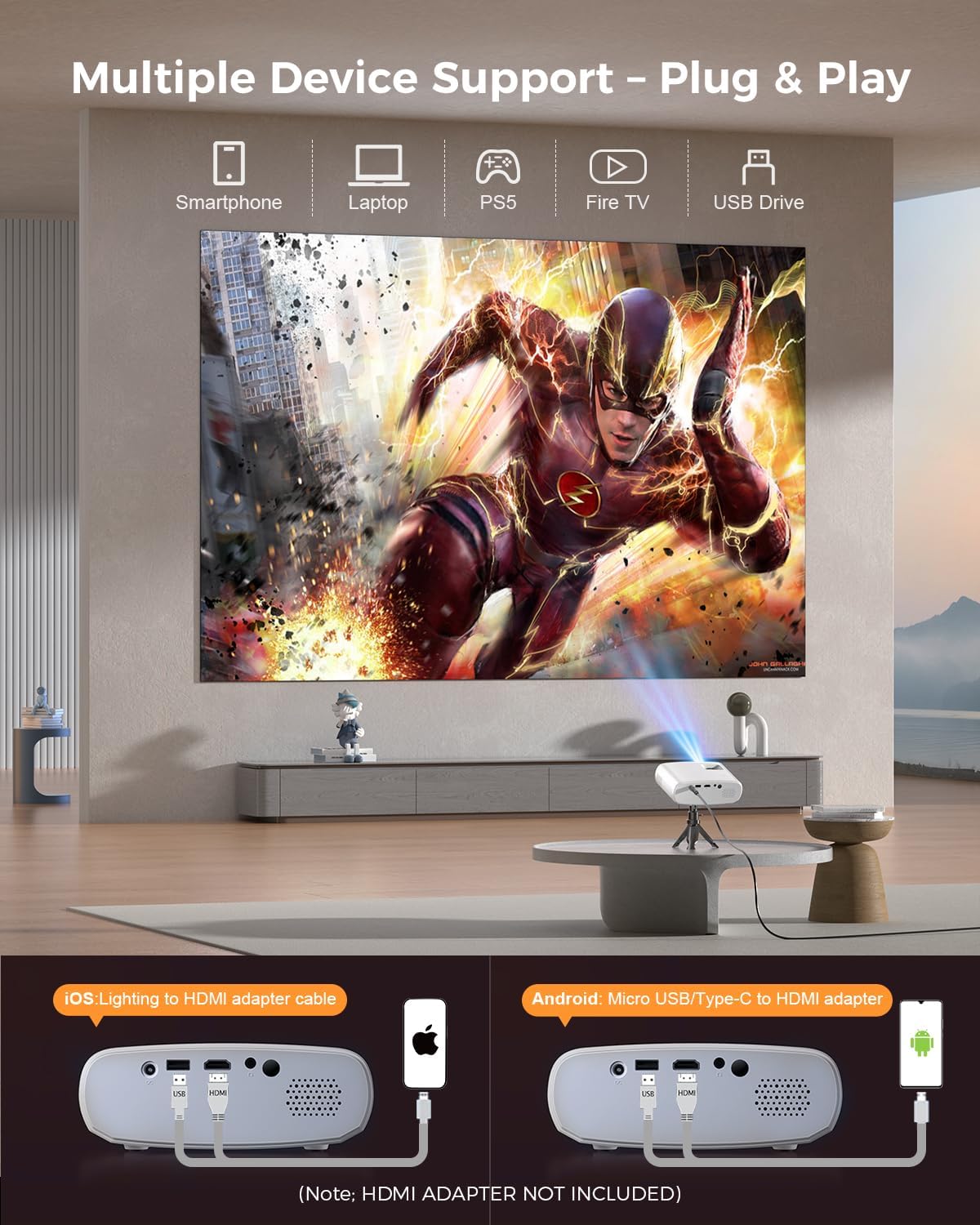
Image 5.4: The projector supports multiple devices via HDMI and USB. Note that an HDMI adapter is required for direct smartphone connection (not included).
5.5 Audio izlaz
The projector has a built-in HIFI speaker. For external audio, connect headphones or external speakers to the Audio Out port.
6. Održavanje
6.1 Čišćenje
- Objektiv: Use a soft, lint-free cloth or lens cleaning paper. Avoid abrasive materials.
- Casing: Obrišite projektor casing with a soft, dry cloth. Do not use liquid cleaners or solvents.
- ventilacija: Ensure ventilation openings are clear of dust and obstructions to prevent overheating.
6.2 Skladištenje
When not in use, store the projector in a cool, dry place, away from direct sunlight and extreme temperatures. Use the original packaging or a protective bag to prevent dust accumulation.
7. Otkrivanje problema
| Problem | Mogući uzrok | Rješenje |
|---|---|---|
| Nema projicirane slike | Kabl za napajanje labav; Neispravan ulazni izvor; Uređaj nije pravilno povezan. | Check power connection; Select correct input source; Reconnect HDMI/USB cable. |
| Slika mutna | Fokus nije podešen; Projektor je preblizu/predaleko od platna. | Podesite prsten za fokusiranje; Podesite udaljenost projekcije. |
| Nema zvuka | Jačina zvuka je preniska; Zvuk je isključen; Vanjski audio uređaj nije povezan. | Povećajte jačinu zvuka; Uključite zvuk; Provjerite vanjske audio veze. |
| Daljinski upravljač ne radi | Baterije su slabe/prazne; Prepreka između daljinskog upravljača i projektora. | Zamijenite baterije; Osigurajte jasnu liniju vidljivosti IR prijemnika. |
| Cannot play Netflix/Hulu/Prime Video | HDCP copyright protection. | Use an external streaming device like Amazon Fire Stick or Roku Stick (not included). |
8. Specifikacije
| Feature | Detalj |
|---|---|
| Model | BL128MINI |
| Brand | ELEPHAS |
| Rezolucija ekrana | 1920 x 1080 (1080P Full HD) |
| Tehnologija povezivanja | HDMI, USB, AV, audio izlaz |
| Posebne karakteristike | HDMI Connectivity, Portable, Built-in Speakers, Detachable Tripod |
| Preporučena upotreba | Indoor/Outdoor |
| Težina artikla | 1.96 funte (otprilike 0.89 kg) |
| Dimenzije proizvoda | 6 x 4.4 x 2.4 inča (približno 15.2 x 11.2 x 6.1 cm) |
9. Garancija i podrška
ELEPHAS projectors are certified with CE, FCC, and RoHS standards.
- Factory Support: We provide 3-years factory support for this product.
- tehnička podrška: Doživotna tehnička podrška je dostupna.
- Služba za korisnike: 24/7 professional service is provided.
- Povratak: A 30-day return or exchange policy is in place.
For further assistance, please refer to the contact information provided on the product packaging or the official ELEPHAS website.

Image 9.1: ELEPHAS offers comprehensive customer support, including 24/7 professional service, a 30-day return policy, and lifetime technical support.