
1. Uvod
This manual provides detailed instructions for the installation, operation, and maintenance of your darkFlash DS900 Air ATX Mid-Tower PC Gaming Case. Please read this manual thoroughly before beginning assembly to ensure proper setup and safe usage. The DS900 Air is designed to offer a clear view of your components with its 270° full-view tempered glass and provides excellent cooling capabilities for high-performance systems.

Figure 1.1: darkFlash DS900 Air ATX Mid-Tower PC Gaming Case with internal components and RGB lighting.
2. Sigurnosne informacije
Uvijek se pridržavajte sljedećih sigurnosnih mjera opreza tokom instalacije i rada:
- Isključite napajanje iz zidne utičnice prije instaliranja ili uklanjanja bilo kakvih komponenti.
- Nosite antistatičku narukvicu kako biste spriječili oštećenje osjetljivih komponenti uzrokovano elektrostatičkim pražnjenjem (ESD).
- Handle tempered glass panels with care. Avoid impacts or dropping them, as they can shatter.
- Držite male dijelove i vijke dalje od djece.
- Osigurajte odgovarajuću ventilaciju oko kućišta kako biste spriječili pregrijavanje.
- Do not attempt to modify the case structure, as this may void the warranty and pose safety risks.
3. Specifikacije
| Feature | Specifikacija |
|---|---|
| Naziv modela | DS900 Air |
| Tip slučaja | ATX Mid-Tower |
| Podrška za matičnu ploču | ATX, Micro ATX, Mini ITX |
| Razmak dužine GPU-a | Do 425 mm |
| Visina hladnjaka procesora | Do 170 mm |
| Tip PSU | ATX (Bottom-mounted) |
| Drive Bays | 2x 3.5" HDD or 2x 2.5" SSD, 2x 2.5" SSD |
| Slotovi za proširenje | 7 PCIe slot |
| I/O portovi | 1x USB-C, 1x USB 3.0, Audio (HD Audio) |
| Podrška fanovima | Bottom: 3x 120mm; Top: 3x 120mm or 2x 140mm; Rear: 1x 120mm; Right Side: 2x 120mm |
| Podrška radijatora | Top: Up to 360mm; Side: Up to 240mm |
| Materijali | Čelik, Kaljeno staklo |
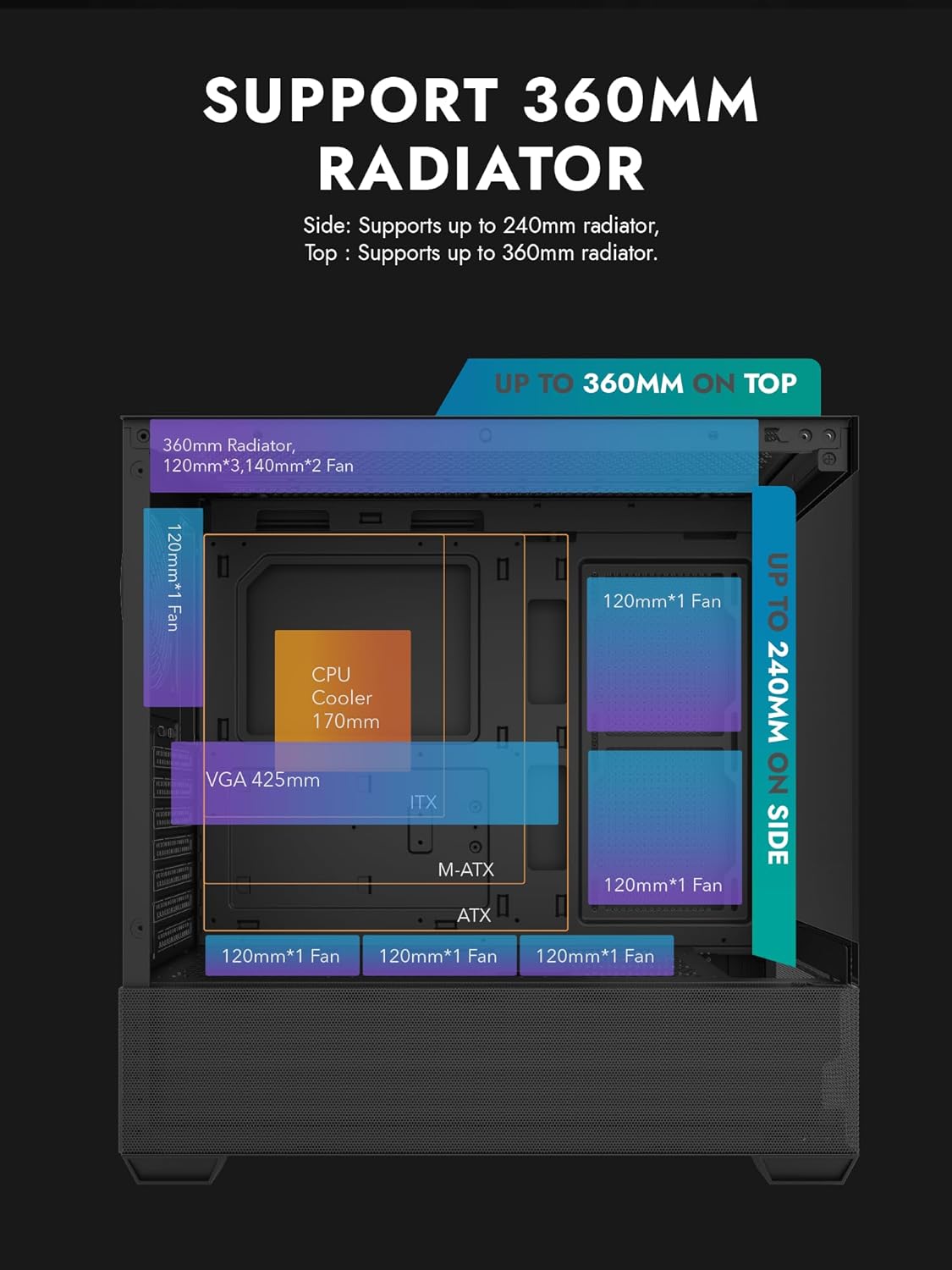
Figure 3.1: Radiator and fan support diagram for the DS900 Air case, illustrating maximum component dimensions.
4. Postavljanje i instalacija
Follow these steps to assemble your PC components within the darkFlash DS900 Air case.
4.1. Priprema slučaja
- Uklonite bočne ploče: The DS900 Air features a tool-free clamshell side panel. Gently pull the top edge of the tempered glass side panel to unlatch it, then lift it off. Repeat for the other side panel if necessary.
- Kutija za pribor: Pronađite kutiju s priborom unutar kućišta koja sadrži vijke, vezice za kablove i ostali pribor za montažu.
4.2. Instalacija matične ploče
- Instalirajte I/O štitnik u zadnji otvor kućišta.
- Align your ATX, Micro-ATX, or Mini-ITX motherboard with the standoffs inside the case. Ensure the I/O ports align with the I/O shield.
- Pričvrstite matičnu ploču pomoću priloženih vijaka.
4.3. Instalacija jedinice za napajanje (PSU)
- The DS900 Air has a dedicated bottom PSU chamber. Slide your ATX power supply into the chamber from the rear of the case.
- Pričvrstite napajanje vijcima sa stražnje strane kućišta.
- Route necessary power cables through the cutouts into the main compartment.
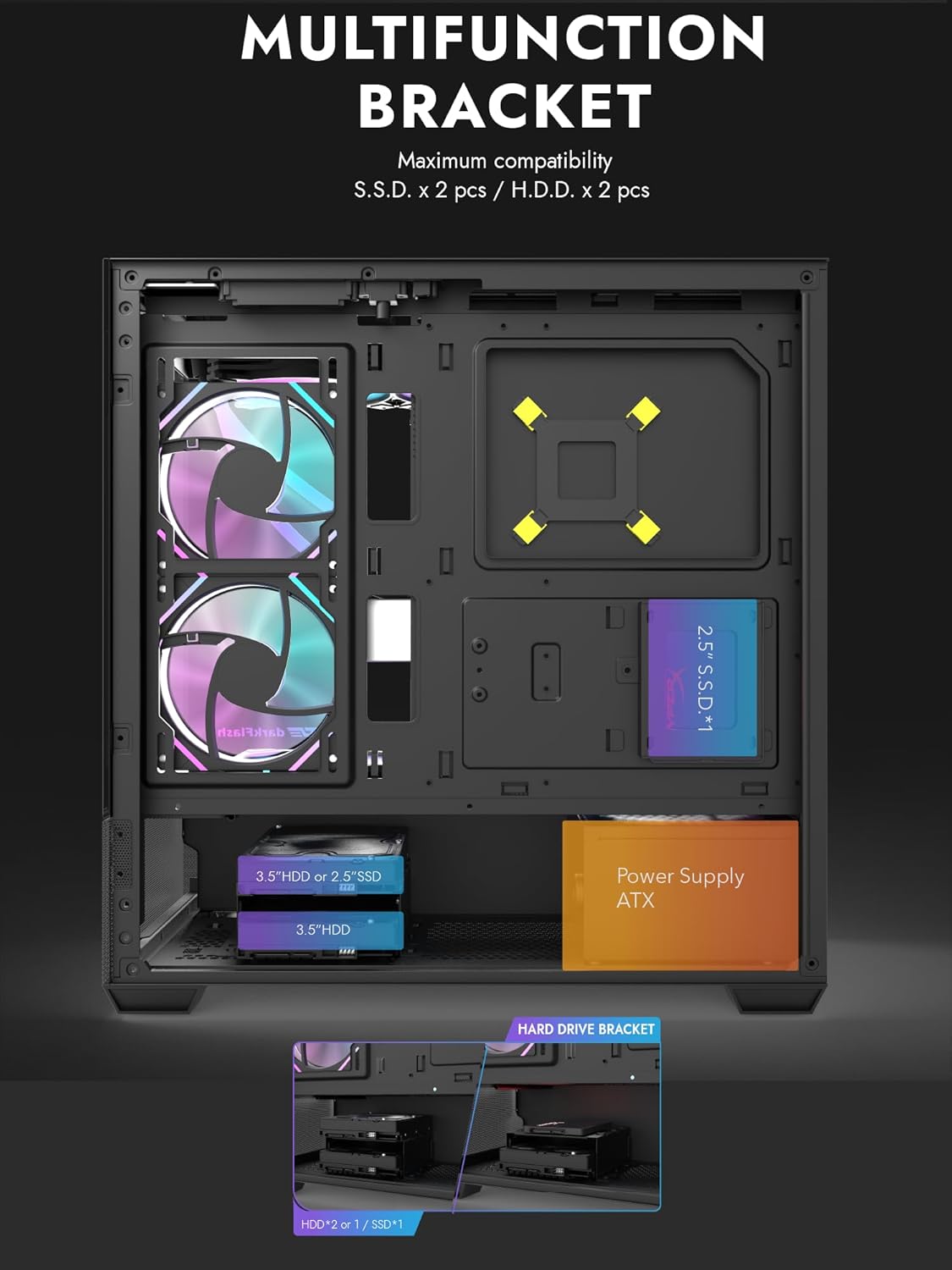
Figure 4.1: Internal layout showing the multifunction drive bracket and the bottom-mounted PSU chamber.
4.4. Instalacija uređaja za pohranu podataka
The case supports up to two 3.5" HDDs or 2.5" SSDs in the hard drive bracket, and two additional 2.5" SSDs on the multifunction bracket.
- 3.5" HDD / 2.5" SSD: Install drives into the removable hard drive bracket located in the PSU chamber. Secure with screws.
- 2.5" SSD: Mount 2.5" SSDs onto the multifunction bracket located on the motherboard tray. Secure with screws.
4.5. Instalacija grafičke kartice (GPU)
- Uklonite potrebne poklopce PCIe utora sa stražnje strane kućišta.
- Umetnite grafičku karticu u odgovarajući PCIe slot na matičnoj ploči.
- Pričvrstite grafičku karticu vijcima. Kućište podržava grafičke procesore dužine do 425 mm.
4.6. Cooling System Installation (Fans/Radiators)
The DS900 Air offers extensive cooling options:
- Vrh: Supports up to 3x 120mm fans or 2x 140mm fans, or a 360mm radiator.
- dno: Supports up to 3x 120mm fans.
- pozadi: Supports 1x 120mm fan.
- Desna strana: Supports 2x 120mm fans or a 240mm radiator.
Install fans and radiators using the appropriate screws and mounting points. Ensure correct airflow direction for optimal cooling.

Figure 4.2: Fan support locations and quantities within the DS900 Air chassis.

Figure 4.3: Airflow diagram demonstrating optimal cooling paths through the case.
4.7. Povezivanje prednjih I/O kablova
Connect the front panel cables (USB-C, USB 3.0, HD Audio, Power, Reset, LED) to their corresponding headers on your motherboard. Refer to your motherboard manual for exact header locations.

Figure 4.4: Top-right I/O panel featuring USB-C and USB 3.0 ports.
4.8. Upravljanje kablovima
Koristite izreze za usmjeravanje kablova i tačke za vezivanje iza ležišta matične ploče za upravljanje kablovima. Ovo poboljšava protok vazduha i estetiku.
5. Upravljanje računarom
Once all components are installed and cables are connected, replace the side panels. Connect your monitor, keyboard, mouse, and power cable. Press the power button on the case to start your system. Ensure all fans are spinning and components are receiving power.
6. Održavanje
Redovno održavanje pomaže u osiguravanju optimalnih performansi i dugotrajnosti komponenti vašeg računara.
- Čišćenje prašine: Periodically clean dust filters and internal components using compressed air. The DS900 Air features mesh panels that help filter dust.
- Protok zraka: Ensure no obstructions block the intake or exhaust vents of the case.
- Upravljanje kablovima: Re-evaluate cable routing periodically to ensure no cables are interfering with fan blades or airflow.
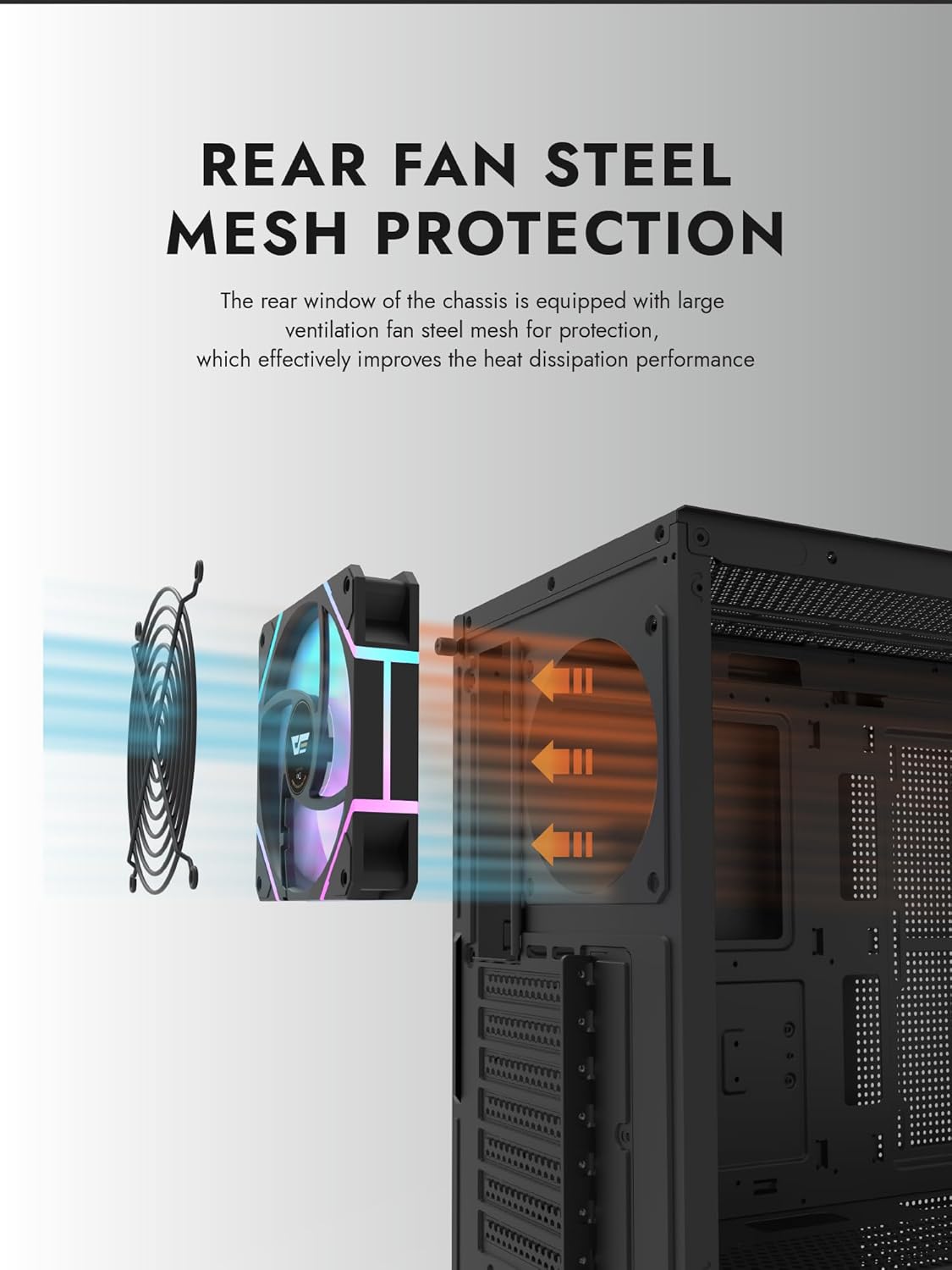
Figure 6.1: Rear fan steel mesh protection, designed to improve heat dissipation.
7. Otkrivanje problema
Ako naiđete na probleme sa sastavljanjem računara, razmotrite sljedeće uobičajene korake za rješavanje problema:
- Nema napajanja: Check all power connections, including the PSU to the wall, PSU to motherboard, and front panel power switch cable to the motherboard.
- Bez prikaza: Ensure your monitor is connected to the graphics card (not the motherboard I/O unless using integrated graphics). Reseat the graphics card and RAM.
- pregrijavanje: Verify all fans are spinning correctly and are oriented for proper airflow. Check CPU cooler installation.
- Komponenta nije otkrivena: Reseat the component (e.g., RAM, GPU, storage drive) and check its power and data connections.
8. Garancija i podrška
darkFlash products are manufactured to high-quality standards. For warranty information or technical support, please refer to the official darkFlash webweb-mjesto ili kontaktirajte prodavača. Sačuvajte dokaz o kupovini za slučaj reklamacije.