
1. Uvod
Thank you for choosing the LOEWE Leo Wireless Headphones. These premium headphones are designed to deliver an exceptional audio experience with advanced features such as Hi-Res Audio, adaptive noise cancellation, and real-time voice translation. This manual provides essential information for setting up, operating, and maintaining your headphones to ensure optimal performance and longevity.
2. Sadržaj paketa
Prije upotrebe, molimo Vas da provjerite da li se u pakovanju nalaze svi sastojci:
- LOEWE Leo Wireless Headphones
- USB-C kabl za punjenje
- AUX to USB-C Audio Cable
- Kožna torbica
- Tvrda torbica
- Torbica za kabl
- Korisnički priručnik (ovaj dokument)
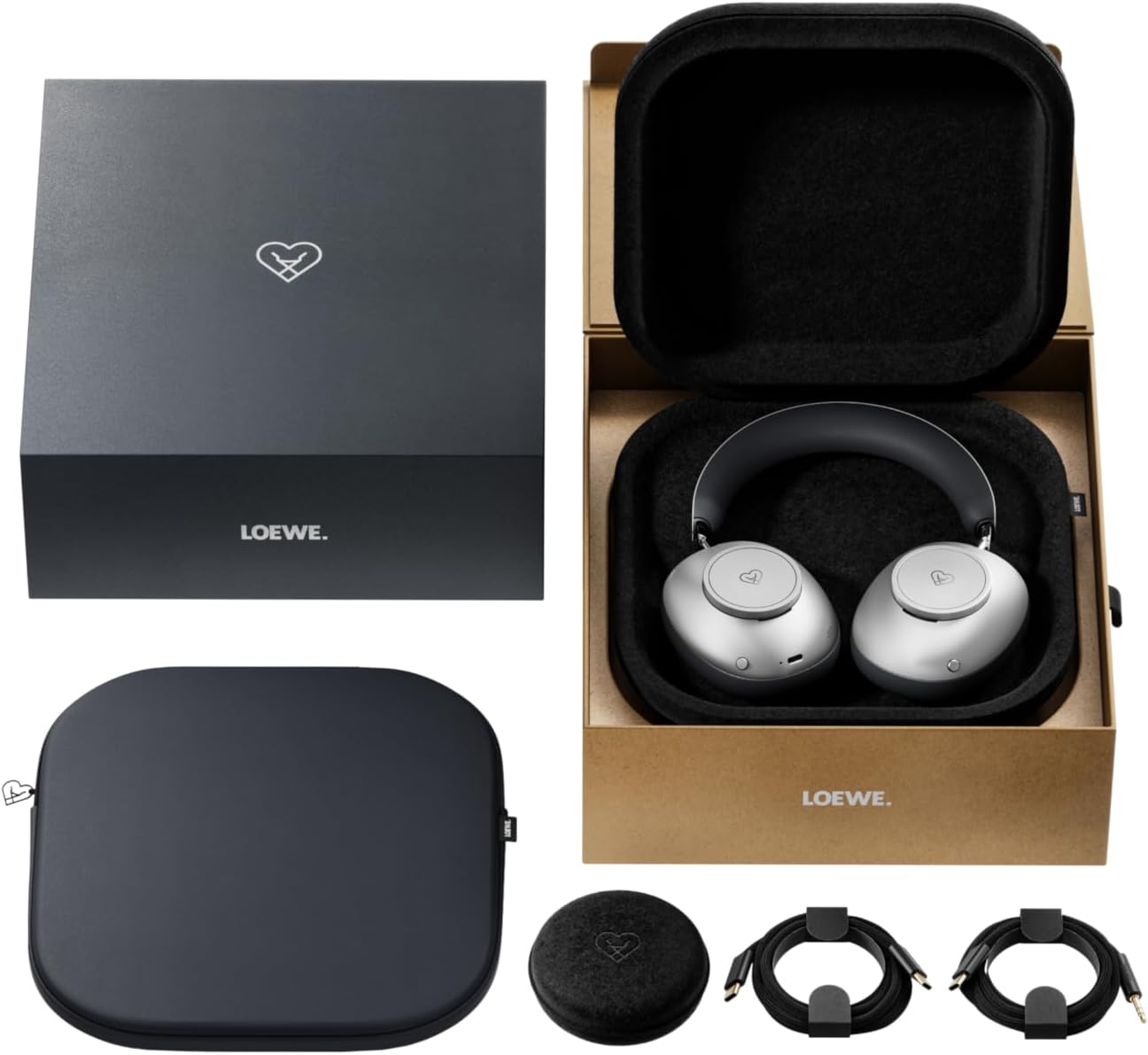
Image: The LOEWE Leo Wireless Headphones package contents, showing the headphones, USB-C cable, AUX cable, leather case, hard case, and cable pouch.
3. Proizvod je gotovview
Familiarize yourself with the physical components and controls of your LOEWE Leo headphones.

Slika: Front view of the LOEWE Leo Wireless Headphones, showcasing slušalice i traku za glavu.
3.1. Kontrole i portovi
The headphones feature intuitive controls for easy operation:
- Kontrolni brojčanici: Two precision-crafted rotary wheels for volume adjustment and navigation.
- Akciona dugmad: Dedicated buttons for playback control, ANC modes, and voice translation activation.
- USB-C priključak: Za punjenje i žičanu audio vezu.
- 3.5 mm Jack: For traditional wired audio connection.

Slika: Detaljna view of the earcup, highlighting the control dial, USB-C port, and 3.5mm audio jack.
4. Getting Started
4.1. Punjenje slušalica
Before first use, fully charge your LOEWE Leo headphones. A full charge provides up to 65 hours of continuous playback.
- Spojite priloženi USB-C kabel za punjenje na USB-C priključak na slušalicama.
- Drugi kraj kabla priključite na kompatibilni USB adapter za napajanje (nije uključen) ili USB port računara.
- LED indikator na slušalicama će prikazivati status punjenja. Obično će se isključiti ili promijeniti boju nakon što se potpuno napune.
4.2. Uključivanje/isključivanje
- Za uključivanje: Pritisnite i držite dugme za napajanje otprilike 3 sekunde dok se LED indikator ne upali.
- Za isključivanje: Pritisnite i držite dugme za napajanje otprilike 3 sekundi dok se LED indikator ne ugasi.
4.3. Bluetooth uparivanje
The LOEWE Leo headphones utilize Bluetooth Low Energy (BLE) for faster pairing and reduced power consumption.
- Uvjerite se da su slušalice isključene.
- Press and hold the Power button for approximately 5 seconds until the LED indicator flashes rapidly, indicating pairing mode.
- Na svom uređaju (pametnom telefonu, tabletu, računaru) omogućite Bluetooth i potražite dostupne uređaje.
- Select "LOEWE Leo" from the list of found devices.
- Kada se poveže, LED indikator će prestati da treperi i ostati će stalno plavi.
4.4. Žična veza
For a wired audio experience, use the supplied AUX to USB-C cable.
- Connect the USB-C end of the AUX cable to the headphones.
- Connect the 3.5mm end of the AUX cable to your audio source's 3.5mm jack.
- Slušalice će se automatski prebaciti u žičani način rada.
5. Upravljanje slušalicama
5.1. Audio Playback and Volume Control
Use the control dials and action buttons for managing your audio:
- Pojačavanje/stišavanje glasnoće: Rotate the designated control dial.
- Pusti/pauza: Press the central action button once.
- Sljedeća pjesma: Double-press the central action button.
- Prethodni zapis: Triple-press the central action button.

Image: Close-up of the earcup's control dial, used for volume and navigation.
5.2. Adaptive Noise Cancellation (ANC)
The LOEWE Leo features advanced adaptive noise cancellation that continuously analyzes your environment and adjusts in real-time.
- Aktiviranje/Deaktiviranje ANC-a: Press the dedicated ANC button once.
- Transparentni način rada: Press the ANC button twice to allow ambient sounds to pass through, enhancing situational awareness.

Image: Illustration of the adaptive noise cancellation feature, depicting sound wave management.
5.3. Real-time Voice Translation
Communicate across language barriers with the integrated real-time voice translation feature.
- Ensure your headphones are connected to a device with internet access and the LOEWE companion app installed.
- Activate the translation feature via the dedicated button or the companion app.
- Speak into the headphone's microphone. The translated audio will be played back in real-time.

Image: Earcup detail showing the microphone for voice input and the 'leo' icon, representing the real-time translation function.
5.4. Dolby Atmos and Spatial Audio
Experience immersive sound with Dolby Atmos and spatial audio support. This feature is automatically enabled when compatible content is played through a connected device that supports these audio technologies.
6. Održavanje i njega
6.1. Čišćenje
- Obrišite slušalice mekom, suhom krpom koja ne ostavlja dlačice.
- Ne koristite abrazivna sredstva za čišćenje, alkohol ili hemijske rastvarače.
- Keep moisture away from openings.
6.2. Održavanje baterije
- Izbjegavajte često potpuno pražnjenje baterije.
- Store the headphones in a cool, dry place when not in use for extended periods.
- The battery is user-replaceable, contributing to the product's longevity.
6.3. Modularni dizajn
The LOEWE Leo headphones feature a durable modular design with replaceable components, such as ear cushions and headbands. This design allows for easy replacement of worn parts, extending the product's lifespan.

Image: The modular construction of the LOEWE Leo headphones, showing detachable earcups and headband for maintenance or replacement.
7. Otkrivanje problema
If you encounter issues with your LOEWE Leo headphones, refer to the following common solutions:
- Nema napajanja: Provjerite jesu li slušalice potpuno napunjene. Spojite ih na izvor napajanja pomoću USB-C kabela.
- Nema zvuka:
- Provjerite nivo jačine zvuka i na slušalicama i na povezanom uređaju.
- Ensure the headphones are properly paired via Bluetooth or the AUX cable is securely connected.
- Pokušajte ponovo pokrenuti i slušalice i audio izvor.
- Bluetooth prekid veze:
- Ensure the headphones are within the Bluetooth range of your device (typically 10 meters).
- Disable and re-enable Bluetooth on your device, then attempt to re-pair.
- Clear the LOEWE Leo from your device's Bluetooth history and pair again.
- ANC ne funkcioniše efikasno:
- Pazite da slušalice dobro prianjaju oko ušiju. Po potrebi prilagodite veličinu.
- Verify that ANC is activated.
- Voice Translation Issues:
- Provjerite internetsku vezu vašeg uređaja.
- Ensure the LOEWE companion app is up-to-date and configured correctly.
- Govorite jasno i umjerenim tempom.
If problems persist, please contact LOEWE customer support.
8. Specifikacije
| Feature | Opis |
|---|---|
| Naziv modela | Leo |
| Broj modela | 64641J10 |
| Tehnologija povezivanja | Wireless (Bluetooth), Wired |
| Bežična komunikacija | Bluetooth s niskom potrošnjom energije (BLE) |
| Karakteristike zvuka | Hi-Res Audio, Dolby Atmos, Spatial Audio |
| Poništavanje buke | Adaptive Noise Reduction (ANC) |
| Posebne karakteristike | Real-time Voice Translation, Modular Design with Replaceable Components |
| Trajanje baterije | Do 65 sati (otprilike) |
| Tip kontrole | Button Control, Rotary Dials |
| Kompatibilni uređaji | Cellular Phone, Tablet, Computer, Laptop |
| Težina | 3 Kilograms (product weight as listed, may include packaging) |
9. Garancija i podrška
9.1. Garancija proizvođača
The LOEWE Leo Wireless Headphones come with a 2-godišnja garancija proizvođačaOva garancija pokriva nedostatke u materijalu i izradi pri normalnoj upotrebi. Molimo sačuvajte dokaz o kupovini za potrebe reklamacije.
For specific terms and conditions of the warranty, please refer to the warranty card included in your product packaging or visit the official LOEWE website.
9.2. Korisnička podrška
For technical assistance, troubleshooting, or warranty inquiries, please contact LOEWE customer support through their official webweb-mjesto ili kontakt informacije navedene u dokumentaciji vašeg proizvoda.
Online resursi: Visit the official LOEWE webstranica za često postavljana pitanja, ažuriranja softvera i dodatne resurse podrške.