
1. Uvod
The RockSeed S2 Digital Laser Distance Meter is a precision measuring instrument designed for accurate distance, area, and volume calculations. It features two bubble levels for enhanced precision, multiple measurement modes, and unit switching capabilities. This manual provides detailed instructions for the safe and effective use of your device.

Image: The RockSeed S2 Digital Laser Distance Meter, highlighting its accuracy of ±2mm/±0.08inch and a measurement range of 50m/165ft.
2. Sigurnosne informacije
2.1 Laser Safety
This device emits a Class 2 laser. Observe the following safety precautions:
- Ne gledajte direktno u laserski snop.
- Ne usmjeravajte lasersku zraku na ljude ili životinje.
- Izbjegavajte direktno izlaganje očiju laserskom zraku.
- Do not disassemble the device; laser radiation exposure may result.
2.2 Opća sigurnost
- Držite uređaj van domašaja djece.
- Ne koristite uređaj u eksplozivnim okruženjima.
- Protect the device from impact, vibration, and extreme temperatures.
- Očistite uređaj mekom, damp tkanina. Nemojte koristiti jake hemikalije.
3. Sadržaj paketa
Provjerite da li su sve stavke prisutne u paketu:
- RockSeed S2 Red Laser Distance Meter (165Ft)
- Uputstvo za upotrebu
- Packaging Box
- Cloth Bag
- AAA 1.5V Batteries (2 included)
- Lanyard / Hand Strap

Image: The complete package contents for the RockSeed S2 Laser Distance Meter, laid out for inspection.
4. Product Features & Controls
The RockSeed S2 Laser Distance Meter is equipped with features designed for efficient and accurate measurements:
- visoka preciznost: Measures distances up to 165 feet (50 meters) with an accuracy of ±1/16 inch (±2mm).
- Dual Bubble Levels: Integrisane horizontalne i vertikalne libele za precizno poravnanje.
- LCD ekran sa pozadinskim osvetljenjem: Large display with backlight for visibility in various lighting conditions.
- Višestruki načini mjerenja: Includes single distance, continuous, area, volume, and Pythagorean (three points) measurements.
- Zamjena jedinica: Easily switch between meters (M), inches (In), and feet (Ft).
- Pohrana podataka: Stores up to 20 groups of measurement data.
- Funkcija isključivanja zvuka: Option to turn off the measurement beep for quiet environments.
- Izdržljiv dizajn: IP54 rated for splash and dust resistance, with a hard rubber body for grip and protection.
- Automatsko isključivanje: Automatically powers off after 150 seconds of inactivity to conserve battery.
4.1 Raspored uređaja i tipke
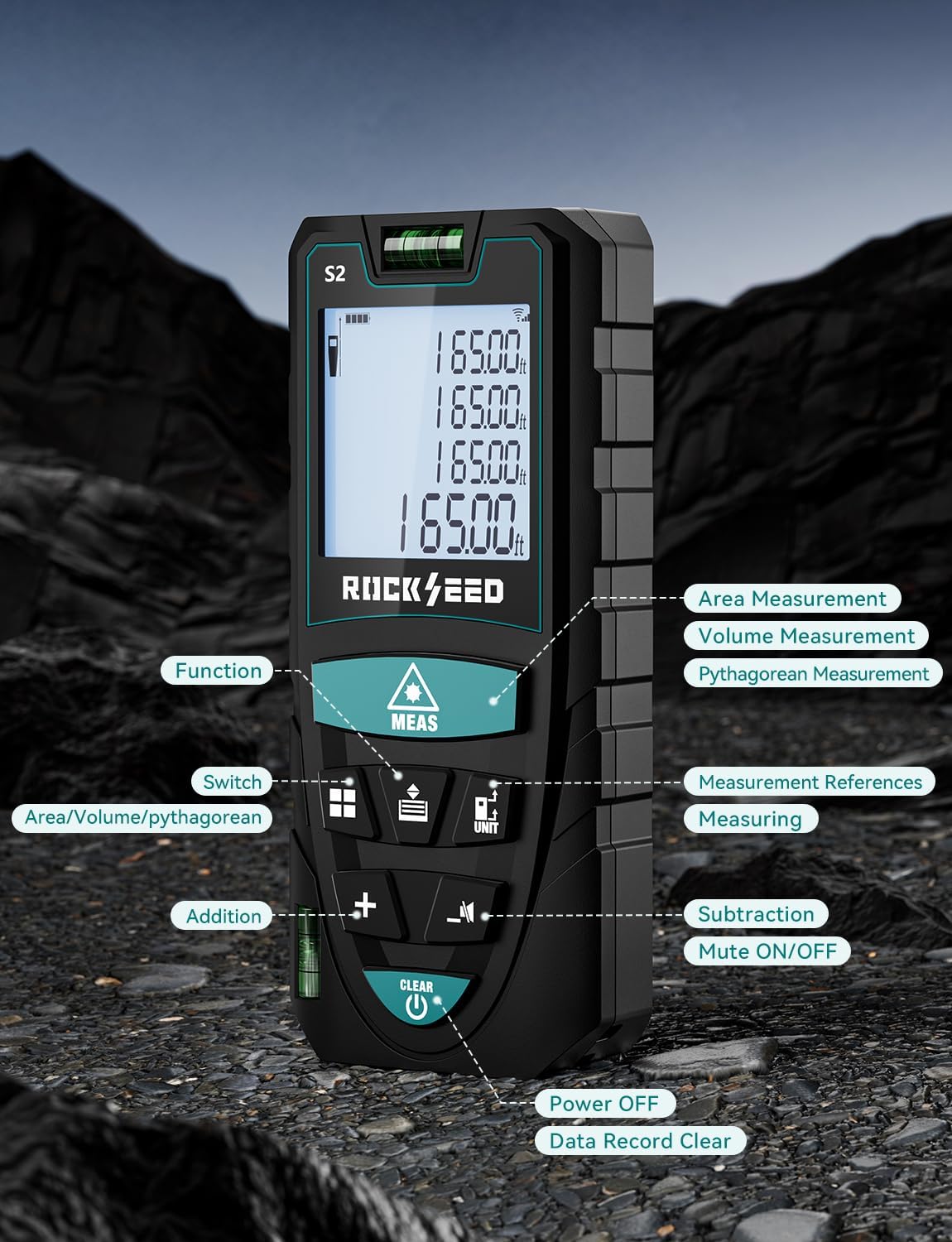
Slika: Detaljna view of the RockSeed S2 Laser Distance Meter, indicating the location and function of each button, including Function, Switch, Addition, Subtraction, Mute ON/OFF, Measurement References, Measuring, Power Off, and Data Record Clear.
Refer to the image above for the location of each control button:
- Dugme MEAS: Initiates single or continuous measurement.
- Funkcijska tipka: Ciklično se mijenjaju načini mjerenja (Površina, Zapremina, Pitagorin postupak).
- Dugme UNIT: Changes measurement units (M/In/Ft).
- Referentno dugme: Switches between front and back measurement reference points.
- + / - Dugmad: Used for addition and subtraction of measurements.
- Dugme za isključivanje zvuka: Toggles the measurement beep sound on or off.
- CLEAR / OFF Button: Clears current measurement, deletes data, or powers off the device (long press).
5. Podešavanje
5.1 Instalacija baterije
The RockSeed S2 requires two AAA 1.5V batteries (included). To install or replace batteries:
- Pronađite poklopac odjeljka za bateriju na stražnjoj strani uređaja.
- Pomaknite poklopac prema dolje da biste otvorili pretinac.
- Umetnite dvije AAA baterije, pazeći na ispravan polaritet (+/-).
- Zatvorite poklopac pretinca za baterije povlačenjem prema gore dok ne klikne na svoje mjesto.
6. Uputstvo za upotrebu
6.1 Uključivanje/isključivanje napajanja
- Uključeno: Pritisnite MEAS button once to turn on the device.
- Iskljuciti: Dugo pritisnite CLEAR / OFF button to turn off the device. The device will also automatically power off after 150 seconds of inactivity.
6.2 Prebacivanje jedinica
To change the measurement unit (meters, inches, feet):
- Dugo pritisnite JEDINICA button to cycle through M (meters), In (inches), Ft (feet), and Ft+In (feet and fractional inches).

Image: The device display illustrating the four available unit conversions: feet + inches, inches, meters, and feet.
6.3 Odabir referentne tačke
The device can measure from its front or back edge. The default is typically the back edge.
- Pritisnite Referenca button to switch between the front and back reference points. An icon on the display will indicate the active reference point.

Image: Illustration demonstrating how to measure from both the front and back reference points of the device.
6.4 Mjerenje jedne udaljenosti
- Usmjerite laser prema ciljanoj površini.
- Pritisnite MEAS button once. The measured distance will appear on the display.
6.5 Kontinuirano mjerenje (praćenje)
- Pritisnite MEAS button and hold it for approximately 2 seconds. The device will enter continuous measurement mode.
- Move the device to track distances. The display will update in real-time, showing current, minimum, and maximum values.
- Pritisnite MEAS button again to exit continuous measurement mode.
6.6 Mjerenje površine
- Pritisnite Funkcija button until the area icon (rectangle) appears on the display.
- Izmjerite prvu stranu (dužinu) pritiskom MEAS.
- Izmjerite drugu stranu (širinu) pritiskom MEAS opet.
- Izračunata površina će biti prikazana.
6.7 Mjerenje zapremine
- Pritisnite Funkcija button until the volume icon (cube) appears on the display.
- Izmjerite dužinu pritiskom MEAS.
- Izmjerite širinu pritiskom MEAS.
- Izmjerite visinu pritiskom MEAS.
- Izračunata zapremina će biti prikazana.
6.8 Pitagorino mjerenje
This mode allows indirect measurement of height or distance using the Pythagorean theorem.
- Pritisnite Funkcija button until a Pythagorean icon appears (there are typically 3 types: 2-point height, 3-point height, 3-point partial height). Select the desired mode.
- Pratite upute na ekranu da biste izmjerili potrebne stranice (hipotenuza, baza itd.) pritiskom na MEAS za svaki segment.
- The calculated indirect measurement will be displayed.

Slika: Visual examples of the various measurement functions: Continuous Measurement, Area Measurement, Volume Measurement, and Pythagorean Measurement.
6.9 Sabiranje i oduzimanje
Da biste dodali ili oduzeli mjerenja:
- Izvršite mjerenje.
- Pritisnite + dugme za dodavanje ili - dugme za oduzimanje.
- Perform the next measurement. The result will be automatically added or subtracted.
- Ponovite po potrebi.
6.10 Memorija podataka
The device stores up to 20 sets of measurement data.
- To view sačuvane podatke, pritisnite dugme Memorija button (often integrated with another function button, refer to device layout).
- To manually delete the current data, press the CLEAR dugme.
6.11 Funkcija isključivanja zvuka
To enable or disable the measurement beep sound:
- Pritisnite Mute button (speaker icon) to toggle the sound on or off.

Image: A visual comparison of the device's display in daylight and with its LCD backlight activated in a dark environment, demonstrating improved visibility.
7. Održavanje
7.1 Čišćenje
- Obrišite uređaj mekom krpom, damp tkanina. Nemojte koristiti abrazivna sredstva za čišćenje ili rastvarače.
- Clean the laser lens carefully with a soft cloth, similar to cleaning camera lenses.
7.2 Skladištenje
- Store the device in its protective cloth bag when not in use.
- Uređaj držite na suhom i hladnom mjestu, dalje od direktne sunčeve svjetlosti i ekstremnih temperatura.
- Izvadite baterije ako uređaj nećete koristiti duži period kako biste spriječili curenje.
8. Otkrivanje problema
Ako naiđete na probleme s uređajem, pogledajte sljedeće uobičajene probleme i rješenja:
| Problem | Mogući uzrok | Rješenje |
|---|---|---|
| Uređaj se ne uključuje | Prazne ili slabe baterije; Nepravilna ugradnja baterija | Zamijenite baterije; provjerite polaritet baterija. |
| Netačna mjerenja | Unstable device; Obstruction in laser path; Target surface too reflective/non-reflective; Environmental factors (strong light) | Ensure device is stable; Clear laser path; Use a target plate for difficult surfaces; Measure in dimmer conditions. |
| Laserski snop nije vidljiv | Bright ambient light; Long distance measurement | Use in dimmer conditions; Use a target plate. |
| Poruka o grešci na ekranu | Measurement out of range; Signal interference | Ensure target is within range; Re-measure, ensuring clear path. |
9. Specifikacije
| Feature | Specifikacija |
|---|---|
| Broj modela | S2-50M |
| Measurement Range | 165 stopa (50 metara) |
| Preciznost | ±1/16 inča (±2 mm) |
| mjerne jedinice | Meters (M), Inches (In), Feet (Ft), Feet + Fractional Inches (Ft+In) |
| Laser Class | Klasa 2 |
| Vrsta baterije | 2 x AAA 1.5V alkalne baterije |
| Automatsko isključivanje lasera | 30 sekundi |
| Auto Device Off | 150 sekundi |
| Skladištenje podataka | 20 grupa |
| Zaštita od prašine i prskanja | IP54 |
| Materijal | Akrilonitril butadien stiren |
| Težina artikla | 120 grama (4.2 unci) |
| Certifikati | CE, FCC, FDA, ROHS |
10. Jamstvo i podrška
10.1 Informacije o garanciji
RockSeed products in the United States come with a two-year free repair service. Ova garancija pokriva nedostatke u materijalu i izradi pod normalnom upotrebom.
10.2 Tehnička podrška
For technical assistance or after-sales service, please contact RockSeed support:
- Telefon: 904-900-2136 (Monday to Friday, 9:00 a.m. to 6:00 p.m. Eastern Time)
- Email: Replies typically within 24 hours on weekdays.
RockSeed is committed to continuous improvement and customer satisfaction.