
1. Uvod
This manual provides detailed instructions for the proper use and maintenance of your BAOFENG UV-32 10W Ham Radio. The UV-32 is a multi-band two-way radio featuring 10W selectable power, GPS navigation, a 2.0-inch color display, and multiple programming options including wireless app connectivity. Please read this manual thoroughly before operating the device to ensure safe and efficient communication.
2. Sigurnosne informacije
Observe the following safety precautions to prevent injury or damage to the radio:
- Ne koristite radio u eksplozivnim atmosferama (npr. zapaljivi plinovi, čestice prašine, metalni prah).
- Do not transmit without an antenna connected.
- Keep the antenna at least 2.5 cm (1 inch) away from your body when transmitting.
- Koristite samo baterije i punjače odobrene od strane BAOFENG-a. Neodobreni pribor može uzrokovati oštećenje ili požar.
- Ne rastavljajte niti modificirajte radio. Popravke trebaju obavljati samo kvalificirani tehničari.
- Izbjegavajte produženo izlaganje direktnoj sunčevoj svjetlosti ili ekstremnim temperaturama.
- Do not operate the radio while driving or performing other activities that require full attention.
3. Sadržaj paketa
Provjerite da li se sve stavke nalaze u vašem paketu:
- 1 x BAOFENG UV-32 Radio
- 1 x 2500mAh baterija
- 1 x USB-C punjač
- 1 x Baza za desktop punjač
- 1 x Standard UV Antenna
- 1 x Long Airband Antenna
- 1 x Slušalice
- 1 x kopča za pojas
- 1 x Radio Case Holder

Image: The BAOFENG UV-32 radio shown with its complete set of accessories, including the battery, charger, antennas, headset, belt clip, and case holder.
4. Proizvod je gotovview
Familiarize yourself with the main components of your UV-32 radio.

Slika: Front view of the BAOFENG UV-32 radio, highlighting the 2.0-inch color display, alphanumeric keypad, and function buttons.
Ključne komponente:
- Antenski konektor: For attaching the standard UV or airband antenna.
- Dugme za napajanje/glasnoću: Uključuje/isključuje radio i podešava jačinu zvuka.
- Prikaz: 2.0-inch color screen showing frequency, channel, battery status, and other indicators.
- PTT dugme: Push-To-Talk button for transmitting.
- Side Keys (P1, P2): Prilagodljive funkcijske tipke.
- Tastatura: Alphanumeric input for frequencies, channels, and menu navigation.
- USB-C priključak za punjenje: Za direktno punjenje baterije.
- Priključak za dodatnu opremu: For connecting the headset or programming cable.
5. Podešavanje
5.1 Ugradnja i punjenje baterije
- Align the 2500mAh Li-ion battery with the grooves on the back of the radio.
- Pomaknite bateriju prema gore dok ne klikne na svoje mjesto.
- To charge, connect the USB-C charger directly to the battery's USB-C port or place the radio with the battery attached into the desktop charging base.
- The charging indicator on the desktop base will show red during charging and green when fully charged.

Image: A close-up of the 2500mAh Li-ion battery for the UV-32, highlighting its integrated USB-C charging port.
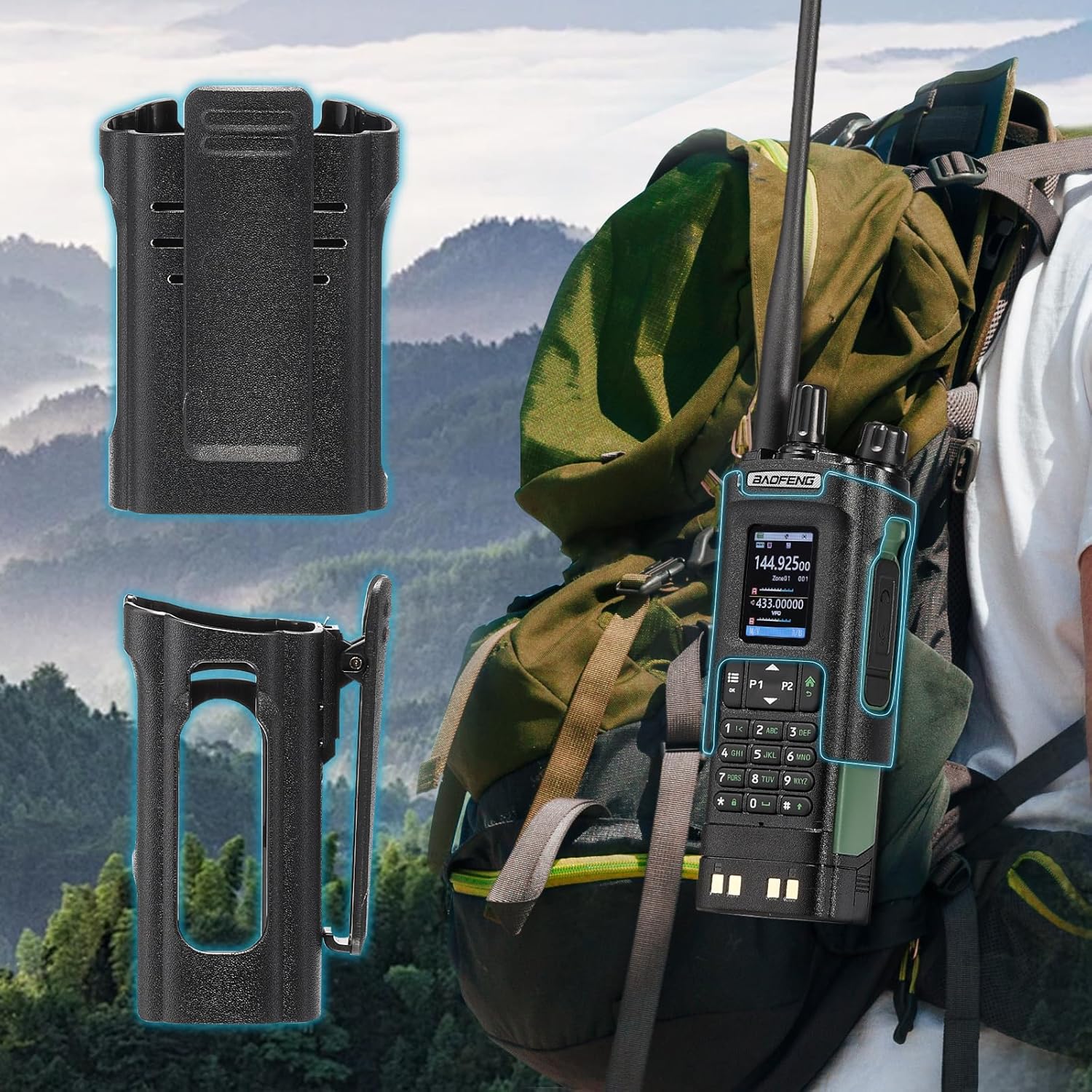
Image: The BAOFENG UV-32 radio demonstrating both direct USB-C charging and charging via its desktop cradle.
5.2 Instalacija antene
- Select the appropriate antenna: the standard UV antenna for general VHF/UHF use or the long airband antenna for enhanced aviation signal reception.
- Zavrnite odabranu antenu u smjeru kazaljke na satu na konektor antene na vrhu radija dok ne bude čvrsto pričvršćena prstima. Nemojte previše zategnuti.

Image: The BAOFENG UV-32 radio illustrating the use of two different antennas: a standard antenna for UHF/VHF and a longer antenna specifically designed for airband reception.
5.3 Ugradnja kopče za remen
- Poravnajte kopču za kaiš s otvorima za vijke na stražnjoj strani radija.
- Pričvrstite kopču za remen pomoću priloženih vijaka.
- The radio case holder can be used to attach the radio to a backpack or belt for secure carrying.

Image: The BAOFENG UV-32 radio securely mounted to a backpack strap using its belt clip and an additional case holder, demonstrating portability.
6. Upravljanje radiom
6.1 Uključivanje/isključivanje i jačina zvuka
Okrenite dugme za napajanje/jačinu zvuka u smjeru kazaljke na satu da biste uključili radio i povećali jačinu zvuka. Okrenite suprotno od smjera kazaljke na satu da biste smanjili jačinu zvuka i isključili radio.
6.2 Prikaz prekoview
The 2.0-inch color display provides essential information:
- Frekvencija/Kanal: Displays the current operating frequency or channel number.
- Nivo baterije: Označava preostalo napunjenost baterije.
- Jačina signala: Shows the strength of received signals.
- Indikatori načina rada: Icons for various functions like GPS, Bluetooth, power level, etc.

Image: A close-up of the BAOFENG UV-32's 2-inch color display, showing detailed frequency, channel, and status information.
6.3 Kanalni način rada u odnosu na frekvencijski način rada
Radio radi u dva osnovna načina rada:
- Frekvencijski način rada (VFO): Allows direct input of frequencies for scanning or temporary use.
- Način rada kanala (MR): Uses pre-programmed channels for quick access to stored frequencies.
Pritisnite MENU button and navigate to the mode setting to switch between VFO and MR modes.
6.4 Odabir frekvencije
- Tastatura: In Frequency Mode, directly enter the desired frequency using the numeric keypad.
- Quick Channel Knob: Rotate the top knob to quickly scroll through frequencies or channels.
- Strelice gore/dolje: Use the arrow keys (P1/P2) to fine-tune frequencies or navigate channels.
6.5 Prenos i prijem
- Ensure an antenna is properly connected.
- Select the desired frequency or channel.
- Za slanje, pritisnite i držite PTT dugme sa strane radija. Govorite jasno u mikrofon.
- Otpustite PTT dugme za prekid odašiljanja i povratak u režim prijema.
- Nivoi snage: The UV-32 offers High (H), Medium (M), and Low (L) power settings. Adjust this in the menu to balance range and battery life.
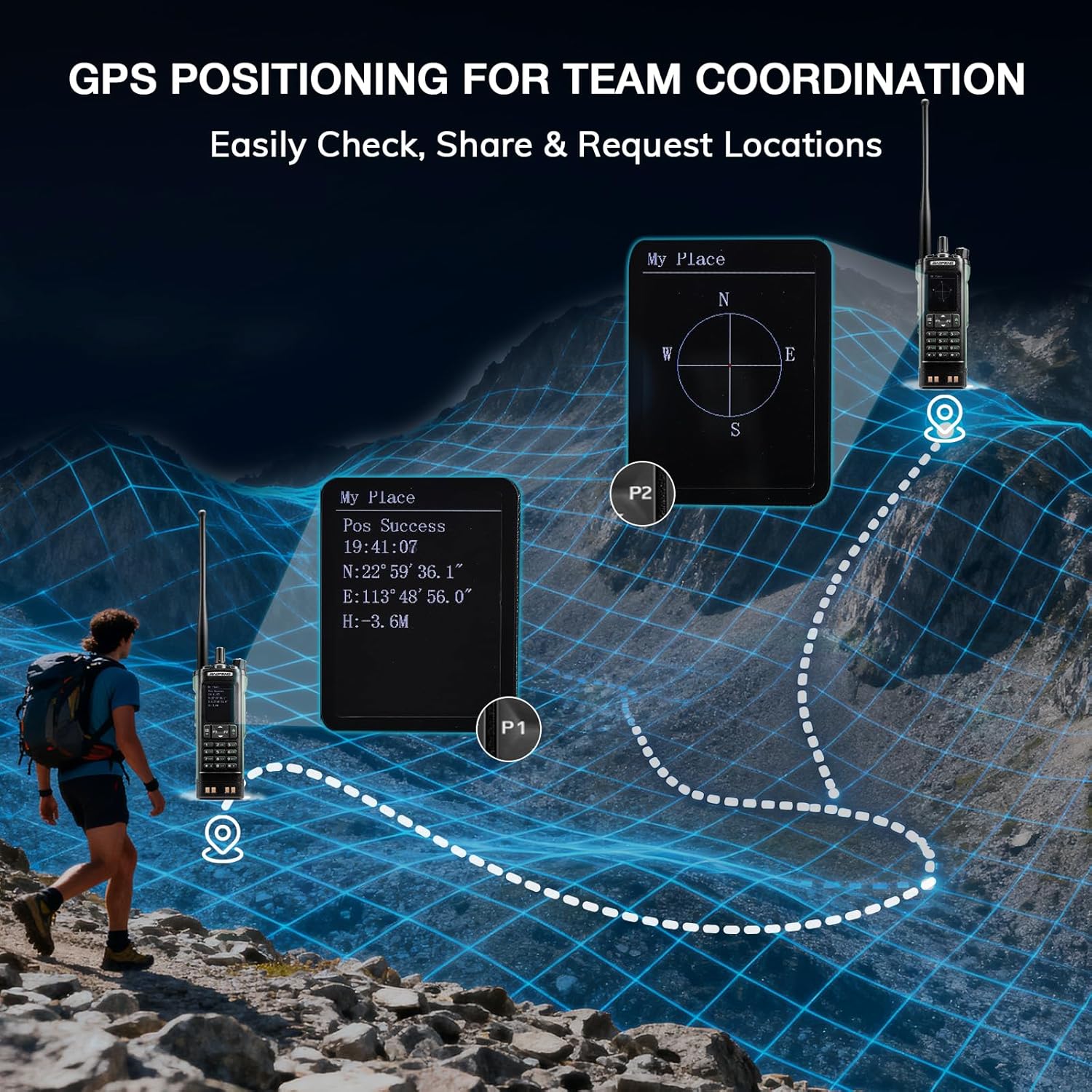
Image: The BAOFENG UV-32 radio's display showing different power output levels (High, Medium, Low) and an external SWR meter for measurement.
6.6 Opcije programiranja
The UV-32 offers several methods for programming frequencies and settings:
- Wireless APP Programming: Connect your radio to a smartphone (iOS/Android) via Bluetooth using the dedicated BT app for quick and wireless programming.
- CHIRP softver: For advanced or bulk programming, use CHIRP software on a PC. Select "UV-17ProGPS" as the radio model in CHIRP.
- Programiranje tastature: Basic programming can be done directly on the radio using the keypad and menu system.
- Kopiranje frekvencije jednim ključem: This feature allows for easy cloning of frequencies from another radio. Refer to the radio's on-screen prompts or full manual for specific steps.

Image: An illustration depicting the various programming methods available for the BAOFENG UV-32, including mobile app (Bluetooth), CPS software, CHIRP software, and direct keypad input.

Image: Two BAOFENG radios illustrating the one-key frequency copy function, allowing for quick and easy channel cloning between devices.
6.7 GPS navigacija
The integrated GPS module provides real-time location data:
- Pristupite GPS funkciji putem menija radija.
- View your current latitude, longitude, and altitude.
- The radio supports sharing your location or requesting coordinates from other team members for improved coordination.

Image: A visual representation of the BAOFENG UV-32's GPS functionality, showing how it displays coordinates and facilitates location sharing for team coordination in outdoor environments.
6.8 Enhanced Airband Reception
For clearer reception of aviation signals, utilize the dedicated AM antenna included with your UV-32. This specialized antenna is designed to provide more accurate and stable airband listening compared to standard UV dual-band antennas.
6.9 NOAA Meteorološki radio
The UV-32 can receive NOAA weather alerts. Consult the radio's menu for instructions on how to scan for and select NOAA channels in your area.
6.10 Customizable Side Keys
The radio features four customizable side keys (P1, P2, and two others). These can be programmed via the menu or programming software to quickly access frequently used functions such as scan, monitor, or power level adjustment.

Image: A close-up of the BAOFENG UV-32's side, highlighting the customizable P1 and P2 function keys.
7. Održavanje
7.1 Čišćenje radija
Obrišite površinu radija mekom krpomamp krpom. Ne koristite jake hemikalije ili abrazivna sredstva za čišćenje. Prije upotrebe provjerite jesu li svi priključci suhi.
7.2 Njega baterija
- Prije prve upotrebe do kraja napunite bateriju.
- Izbjegavajte prekomjerno punjenje ili potpuno pražnjenje baterije.
- Bateriju čuvajte na hladnom i suhom mjestu kada se ne koristi duži period.
7.3 Skladištenje
When storing the radio for a long time, remove the battery and store it separately. Keep the radio in a dry, dust-free environment away from direct sunlight and extreme temperatures.
8. Otkrivanje problema
| Problem | Mogući uzrok | Rješenje |
|---|---|---|
| Radio se ne uključuje | Baterija nije pravilno instalirana ili je prazna. | Provjerite je li baterija sigurno pričvršćena. Potpuno napunite bateriju. |
| Ne mogu prenijeti | Antenna not connected. Incorrect frequency/channel. Low power setting. | Attach antenna. Verify frequency/channel. Increase power level. |
| Poor reception/transmission range | Obstructions. Low power setting. Incorrect antenna. | Move to an open area. Increase power. Ensure correct antenna is used and properly connected. |
| Programming errors with CHIRP/APP | Incorrect radio model selected. Connection issues. Outdated software/firmware. | Ensure "UV-17ProGPS" is selected in CHIRP. Re-establish Bluetooth connection. Update software/firmware if available. |
9. Specifikacije
| Feature | Detalj |
|---|---|
| Brand | BAOFENG |
| Broj modela | UV-32 |
| Broj kanala | 1000 |
| Frekvencijski opseg | UHF, VHF |
| Izlazna snaga | Up to 10W (selectable High, Medium, Low) |
| Display | 2.0-inčni ekran u boji |
| Baterija | 2500mAh Li-ion (uključena) |
| Punjenje | USB-C, Desktop Charger Base |
| Posebne karakteristike | Digital Display, Dual Band, USB-C Rechargeable, Wireless APP Programming, Wireless Channel Clone, GPS, NOAA Reception |
| Connectivity Protocol | Bluetooth |
| Dimenzije proizvoda | 1.2"D x 2.2"Š x 4"H |
| Nivo vodootpornosti | Nije vodootporan |
10. Garancija i podrška
Your BAOFENG UV-32 radio comes with an 18-mjesečna garancija. BAOFENG also provides doživotno uzdržavanje za ovaj proizvod.
For technical assistance, warranty claims, or further inquiries, please visit the official BAOFENG webweb-mjesto ili direktno kontaktirajte njihovu korisničku podršku. Sačuvajte račun kao dokaz o kupovini za usluge u garantnom roku.