
Uvod
This manual provides essential information for the safe and efficient use of your Google Pixel 9 Pro 5G smartphone. Please read these instructions carefully before operating your device.

Slika 1: Prednja strana view of the Google Pixel 9 Pro 5G.
Šta je u kutiji
Provjerite da li su svi artikli prisutni u pakovanju:
- Google Pixel 9 Pro Smartphone
- USB-C to USB-C Cable (1m, USB 2.0)
- Alat za izbacivanje SIM kartice
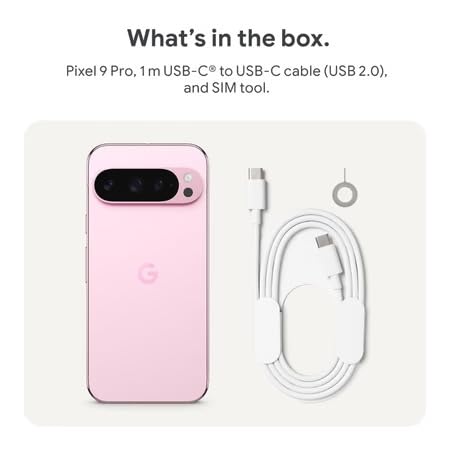
Figure 2: Included items in the Pixel 9 Pro packaging.
Setup
1. Umetanje SIM kartice
- Locate the SIM tray on the side of your Pixel 9 Pro.
- Insert the provided SIM ejector tool into the small hole on the SIM tray and press gently until the tray pops out.
- Place your Nano-SIM card into the tray with the gold contacts facing down. Ensure it is seated correctly.
- Carefully push the SIM tray back into the device until it is flush.
2. Početno punjenje
Prije prve upotrebe, preporučuje se da potpuno napunite uređaj.
- Spojite USB-C kabel na priključak za punjenje na dnu telefona.
- Connect the other end of the cable to a compatible USB power adapter (sold separately) and plug it into a power outlet.
- Ikona baterije na ekranu će pokazati status punjenja.
3. Uključivanje / isključivanje napajanja
- Za uključivanje: Press and hold the Power button (located on the right side) until the Google logo appears on the screen.
- Za isključivanje: Pritisnite i držite dugme za napajanje, a zatim dodirnite 'Isključivanje' na ekranu.
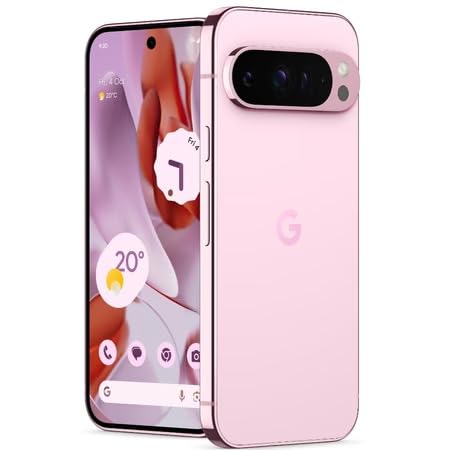
Figure 3: Power and volume buttons on the side of the device.
4. Čarobnjak za početno podešavanje
Upon powering on for the first time, follow the on-screen instructions to:
- Odaberite svoj jezik i regiju.
- Povežite se na Wi-Fi mrežu.
- Prijavite se sa svojim Google računom ili kreirajte novi.
- Set up security features such as fingerprint unlock, face unlock, PIN, pattern, or password.
- Prenesite podatke sa starog uređaja (opciono).
Uputstvo za upotrebu
Osnovna navigacija
- Geste na ekranu osjetljivom na dodir: Interact with the device using taps, swipes, pinches (for zoom), and long presses.
- Početni ekran: Access your applications, widgets, and customize your layout.
- Obavještenja: Prevucite nadole od vrha ekrana do view obavještenja.
- Brze postavke: Swipe down twice from the top of the screen to access quick settings toggles (Wi-Fi, Bluetooth, etc.).
Rad kamere
The Pixel 9 Pro features a powerful triple rear camera system.
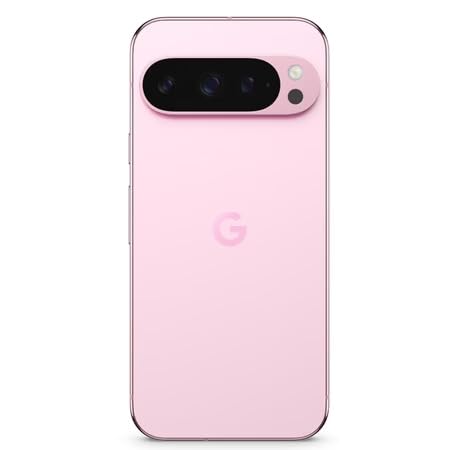
Figure 4: Rear camera system of the Pixel 9 Pro.
- Otvaranje kamere: Dodirnite ikonu aplikacije Kamera na početnom ekranu ili zaključanom ekranu.
- Zamjena objektiva: Tap the icons on the viewfinder to switch between wide, ultrawide, and 5x telephoto lenses.
- Načini snimanja: Select from various modes such as Night Sight for low-light conditions, Astrofotografija for capturing stars, Makro for close-up shots, Duga ekspozicija for creative effects, and Portret for depth-of-field effects.
- Super rezolucija zumiranja: Pinch the screen to digitally zoom up to 30x. For video, Super Res Zoom supports up to 20x.
- Pro Controls: Access advanced camera settings like shutter speed and manual focus for greater creative control.
Upravljanje baterijom
- Provjera nivoa baterije: View procenat baterijetage in the status bar or in Settings > Battery.
- Extreme Battery Saver: Enable this mode in Settings > Battery > Extreme Battery Saver to significantly extend battery life.
- Punjenje: Use the provided USB-C cable and a compatible power adapter for optimal charging speed.
Sigurnosne karakteristike
Your Pixel 9 Pro incorporates multiple hardware security layers to protect your data.
- Otključavanje otiskom prsta: Register your fingerprints in Settings > Security & privacy > Device unlock.
- Otključavanje licem: Podesite prepoznavanje lica za praktično otključavanje.
- PIN/Uzorak/Lozinka: Always set a strong screen lock method.
- Ažuriranja softvera: Regularly install system updates to ensure your device has the latest security patches.
Temperaturni senzor
The Pixel 9 Pro includes a thermometer for measuring temperature.
- Open the dedicated Thermometer app.
- Follow the on-screen instructions to measure body temperature or the temperature of objects.
- Temperature data can be saved and tracked within the Fitbit application.
Održavanje
Čišćenje vašeg uređaja
- Koristite meku krpu koja ne ostavlja dlačice za čišćenje ekrana i kućišta telefona.
- Avoid using abrasive materials, harsh chemicals, or aerosol sprays.
- Do not submerge the device in water, despite its water-resistant rating.
Ažuriranja softvera
Google regularly releases software updates to improve performance, add features, and enhance security.
- To check for updates, go to Settings > System > System update.
- Ensure your device is connected to Wi-Fi and has sufficient battery charge before installing updates.
Physical Care
The Pixel 9 Pro is built with Corning Gorilla Glass Victus 2 and is water-resistant, offering durability against everyday drops and spills.
- While durable, avoid excessive impacts or drops to prevent damage.
- Consider using a screen protector and a protective case for additional safeguarding.
Rješavanje problema
Uređaj ne reaguje
If your phone becomes unresponsive, perform a force restart:
- Press and hold the Power button for approximately 10-15 seconds until the device restarts.
Rušenje ili zamrzavanje aplikacija
- Zatvorite problematičnu aplikaciju i ponovo je otvorite.
- Clear the app's cache: Go to Settings > Apps > See all apps > [App Name] > Storage & cache > Clear cache.
- Provjerite da li je aplikacija ažurirana na najnoviju verziju iz Google Play trgovine.
- Ponovo pokrenite telefon.
Problemi s mrežnom povezivošću (Wi-Fi/Mobilna mreža)
- Toggle Wi-Fi or cellular data off and then back on.
- Ponovo pokrenite telefon.
- Provjerite da li je vaša SIM kartica ispravno umetnuta.
- Reset network settings: Go to Settings > System > Reset options > Reset Wi-Fi, mobile & Bluetooth.
Baterija se brzo prazni
- Check battery usage in Settings > Battery to identify power-consuming apps.
- Smanjite svjetlinu ekrana i trajanje isključenja ekrana.
- Disable unnecessary features like GPS, Bluetooth, and Wi-Fi when not in use.
- Enable Extreme Battery Saver mode.
Vraćanje na tvorničke postavke (posljednja opcija)
Warning: A factory reset will erase all data from your phone. Back up all important data before proceeding.
- Idite u Postavke > Sistem > Opcije resetovanja > Obriši sve podatke (vraćanje na fabričke postavke).
- Confirm your decision when prompted.
Specifikacije
| Feature | Detalj |
|---|---|
| Brand | |
| Model | Pixel 9 Pro |
| Operativni sistem | Android 15 |
| Procesor | Google Tensor G4 (3.1 GHz) |
| RAM | 16 GB |
| Interna pohrana | 256 GB |
| Display | 6.3 Inches LTPO OLED (Actua), 1280 x 2856 Pixels, 120 Hz Refresh Rate |
| Zadnja kamera | 50 MP wide + 48 MP ultrawide (Macro) + 48 MP 5x telephoto |
| Prednja kamera | 42 MP |
| Kapacitet baterije | 4700 Milliamp Hours (up to 24 hours average life) |
| Povezivanje | 5G, Wi-Fi 7, Bluetooth 5.3, NFC, UWB, USB-C |
| SIM kartica | Jedna Nano SIM kartica |
| Otpornost na vodu | Otporan na vodu |
| Dimenzije | 8 x 72 x 153 milimetara |
| Težina | 198 grama |
Garancija i podrška
Informacije o garanciji
Your Google Pixel 9 Pro 5G comes with a 1 godine garancije proizvođača od datuma kupovine. Ova garancija pokriva proizvodne nedostatke pri normalnoj upotrebi. Molimo sačuvajte dokaz o kupovini za reklamacije u slučaju garancije.
Korisnička podrška
For technical assistance, warranty claims, or other support inquiries, please contact Google customer service:
- Proizvođač: Google LLC, 1600 Amphittheatre Parkway, Mountain View, CA 94043, SAD
- Phone Support (India): +91 7718892303
- Kontakt uvoznika (Indija): Nexora Axis Private Limited (+91 7718892303)
For the most up-to-date support information, please visit the official Google Pixel support website.