
Laxasfit LF-01
Laxasfit LF-01 Smart Watch User Manual
Model: LF-01
1. Uvod
Welcome to the user manual for your Laxasfit LF-01 Smart Watch. This guide provides essential information on setting up, operating, and maintaining your device to ensure optimal performance and a seamless user experience. Please read this manual thoroughly before using your smart watch.
1.1 Šta se nalazi u kutiji
- Smartwatch
- Kabel za punjenje
- Uputstvo za upotrebu
2. Podešavanje
2.1 Punjenje uređaja
Before initial use, fully charge your Laxasfit LF-01 Smart Watch. Connect the provided charging cable to the charging port on the back of the watch and plug the USB end into a standard USB power adapter (not included) or a computer's USB port. The watch display will indicate charging status. A full charge typically takes approximately 2 hours.
2.2 Instalacija aplikacije
To unlock the full potential of your smart watch, download and install the companion application on your smartphone. The application allows for data synchronization, notification management, and watch face customization.
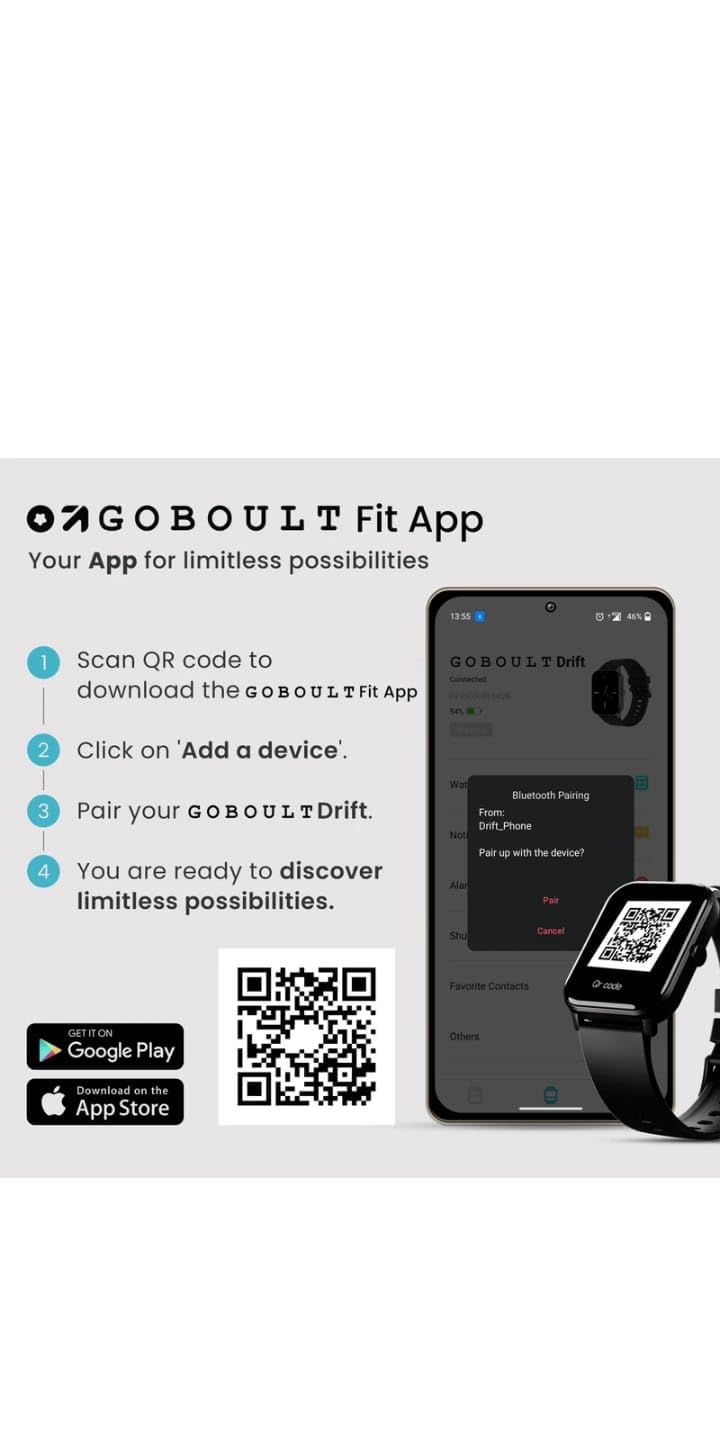
- Scan the QR code provided in the image below or search for "Boult Fit App" in your smartphone's app store (Google Play Store for Android, Apple App Store for iOS).
- Instalirajte aplikaciju.
- Otvorite aplikaciju i slijedite upute na ekranu da biste kreirali račun ili se prijavili.

Opis slike: This image displays a smartphone screen with instructions for downloading and pairing the companion app. It shows four steps: "Scan QR code to download the Boult Fit App", "Click on 'Add a device'", "Pair your Boult Drift", and "You are ready to discover limitless possibilities." Below these steps are QR codes for both Google Play and the App Store, along with their respective logos. The right side of the image shows a smartwatch display and a phone screen demonstrating the Bluetooth pairing process within the app.
Download the Boult Fit App: https://app.moyoung.com/app-download/BoultFit
2.3 Uparivanje sa vašim pametnim telefonom
After installing the app, follow these steps to pair your smart watch:
- Provjerite je li Bluetooth omogućen na vašem pametnom telefonu.
- Open the companion app and navigate to the "Add Device" or "Pair Device" section.
- The app will search for available devices. Select "Laxasfit LF-01" or a similar device name from the list.
- Potvrdite zahtjev za uparivanje i na pametnom telefonu i na pametnom satu ako se to od vas zatraži.
- Nakon uparivanja, sat će sinhronizirati podatke s vašim telefonom.
3. Ključne karakteristike
The Laxasfit LF-01 Smart Watch offers a range of features designed to enhance your daily life and fitness tracking.
3.1 Monitoring zdravlja
Monitor your vital health parameters directly from your wrist.
- Monitor otkucaja srca: Prati vaš puls tokom cijelog dana.
- Praćenje spavanja: Analizira vaše obrasce spavanja, uključujući duboki san, lagani san i vrijeme buđenja.
- Praćenje aktivnosti: Bilježi korake, udaljenost i potrošene kalorije.

Opis slike: This image shows a collage of smartwatch features. Prominently featured is a smartwatch display showing a heart rate monitor with a graph and current heart rate (108 bpm). Other elements include icons for 7-day battery life, IP68 water resistance, 60 sports modes, mini games, 1.69" HD display, Bluetooth calling, and multiple watch faces.
3.2 sportskih modova
The watch supports over 60 workout modes to accurately track various physical activities.
- Track specific metrics for activities like running, cycling, walking, and more.
- View real-time data such as duration, calories burned, and heart rate during workouts.

Opis slike: A man is shown performing an exercise with a battle rope, wearing a smartwatch on his wrist. The image highlights the watch's capability to track over 60 workout modes. An overlay shows a smartwatch display with fitness metrics: "Steps 25969", "Distance 10.56 km", and "Calories 2982 Kcal".
3.3 Bluetooth pozivanje
With its built-in speaker and microphone, the Laxasfit LF-01 allows you to manage calls directly from your wrist when connected to your smartphone via Bluetooth.
- Receive incoming call notifications.
- Answer or reject calls.
- Make calls using the watch's interface (requires phone connection).
Opis slike: This image shows a smartwatch worn on a wrist, displaying an incoming call notification. The screen shows "Mom" as the caller, along with green (answer) and red (decline) call icons. Text above the watch states "Manage calls, the smart way." and "Bluetooth calling" with "Dedicated Speaker & Microphone" below.
3.4 Ekran i brojčanici sata
- Vrsta prikaza: LCD touchscreen for clear visibility and easy interaction.
- Prilagodljivi brojčani satovi: Choose from over 140 watch faces via the companion app to personalize your device.
4. Operacija
4.1 Osnovna navigacija
- Touchscreen: Prevucite prstom lijevo/desno, gore/dolje za navigaciju kroz menije i funkcije. Dodirnite za odabir.
- Bočno dugme: Typically used to wake the screen, return to the home screen, or access the app menu. Refer to the on-screen prompts for specific functions.
4.2 Using Fitness Tracking
Za početak treninga:
- Swipe on the watch face to find the "Workout" or "Sports Modes" icon.
- Tap to select your desired activity (e.g., Running, Cycling).
- Tap "Start" to begin tracking.
- Tokom treninga, možete view podaci u realnom vremenu.
- Tap "Pause" or "End" to stop the workout. Data will sync with the app.
4.3 Upravljanje obavještenjima
Once paired with your smartphone, the watch will display notifications for calls, messages, and other app alerts.
- Prevucite prstom prema dolje s brojčanika sata do view nedavna obavještenja.
- Tap on a notification to read the full message (if supported).
- Notifications can be managed and filtered through the companion app settings.
5. Održavanje
5.1 Čišćenje pametnog sata
- Redovno brišite ekran i remen sata mekom,amp tkanina.
- Izbjegavajte upotrebu jakih hemikalija ili abrazivnih materijala, jer oni mogu oštetiti uređaj.
- Prije punjenja provjerite jesu li kontakti za punjenje čisti i suhi.
5.2 Njega baterija
- Izbjegavajte izlaganje sata ekstremnim temperaturama.
- Ne ostavljajte sat potpuno ispražnjen duži vremenski period.
- For optimal battery life, charge the device before it completely runs out of power.
6. Otkrivanje problema
If you encounter issues with your Laxasfit LF-01 Smart Watch, refer to the following common solutions:
- Sat se ne uključuje: Provjerite je li sat potpuno napunjen. Spojite ga na punjač na najmanje 30 minuta.
- Ne može se upariti sa pametnim telefonom:
- Provjerite je li Bluetooth omogućen na vašem telefonu.
- Provjerite je li sat u dometu vašeg telefona.
- Ponovo pokrenite i telefon i pametni sat.
- Pokušajte odvojiti i ponovo upariti uređaj putem aplikacije.
- Netačni podaci o fizičkoj spremnosti:
- Pazite da sat čvrsto prianja uz zglob, otprilike širine jednog prsta iznad kosti ručnog zgloba.
- Calibrate the device through the app if an option is available.
- Obavještenja se ne prikazuju:
- Provjerite postavke obavještenja aplikacije na telefonu i unutar prateće aplikacije.
- Provjerite je li sat pravilno povezan putem Bluetootha.
- Ekran ne reaguje: Restart the watch by pressing and holding the side button (if applicable) or by connecting it to the charger.
If problems persist, consult the companion app's help section or contact customer support.
7. Tehničke specifikacije
| Feature | Specifikacija |
|---|---|
| Model | LF-01 |
| Display Type | LCD |
| Povezivanje | Bluetooth |
| Operativni sistem | Vlasnički operativni sistem |
| Kapacitet memorije | 32 GB |
| Posebne karakteristike | Fitness Tracking, Heart Rate Monitor, Notifications, Sleep Tracking |
| Kompatibilni uređaji | Pametni telefon, tablet |
| Vrijeme punjenja | 2 sata |
| Materijal | Plastika, silikon |
| Težina artikla | 200 g |
| Zemlja porijekla | Kina |
8. Garancija i podrška
8.1 Informacije o garanciji
Your Laxasfit LF-01 Smart Watch typically comes with a standard warranty. Please refer to your purchase documentation for specific warranty terms and conditions. A 10-day replacement policy may apply, and extended warranty options might be available for purchase.
8.2 Korisnička podrška
For further assistance, technical support, or warranty claims, please refer to the contact information provided with your product packaging or visit the official Laxasfit website (if available). You may also contact the seller directly for support.
Ask a question about this manual
Ask about setup, troubleshooting, compatibility, parts, safety, or missing instructions. Manuals+ will review the question and use this page’s manual context to help answer it.