
Uvod
This manual provides comprehensive instructions for the ALLIMITY RC933A FMB1 Voice Remote Control. Designed for ease of use, this remote offers full functionality for compatible TCL Mini LED Smart TV models without requiring complex programming or setup. Its ergonomic design ensures comfortable handling and reliable performance.
Kompatibilni modeli televizora:
- TCL Q8CX7
- TCL 85Q8CX7
- TCL 98Q8CX7
- TCL 75Q8CX7
- TCL 65C8K
- TCL 75C89K
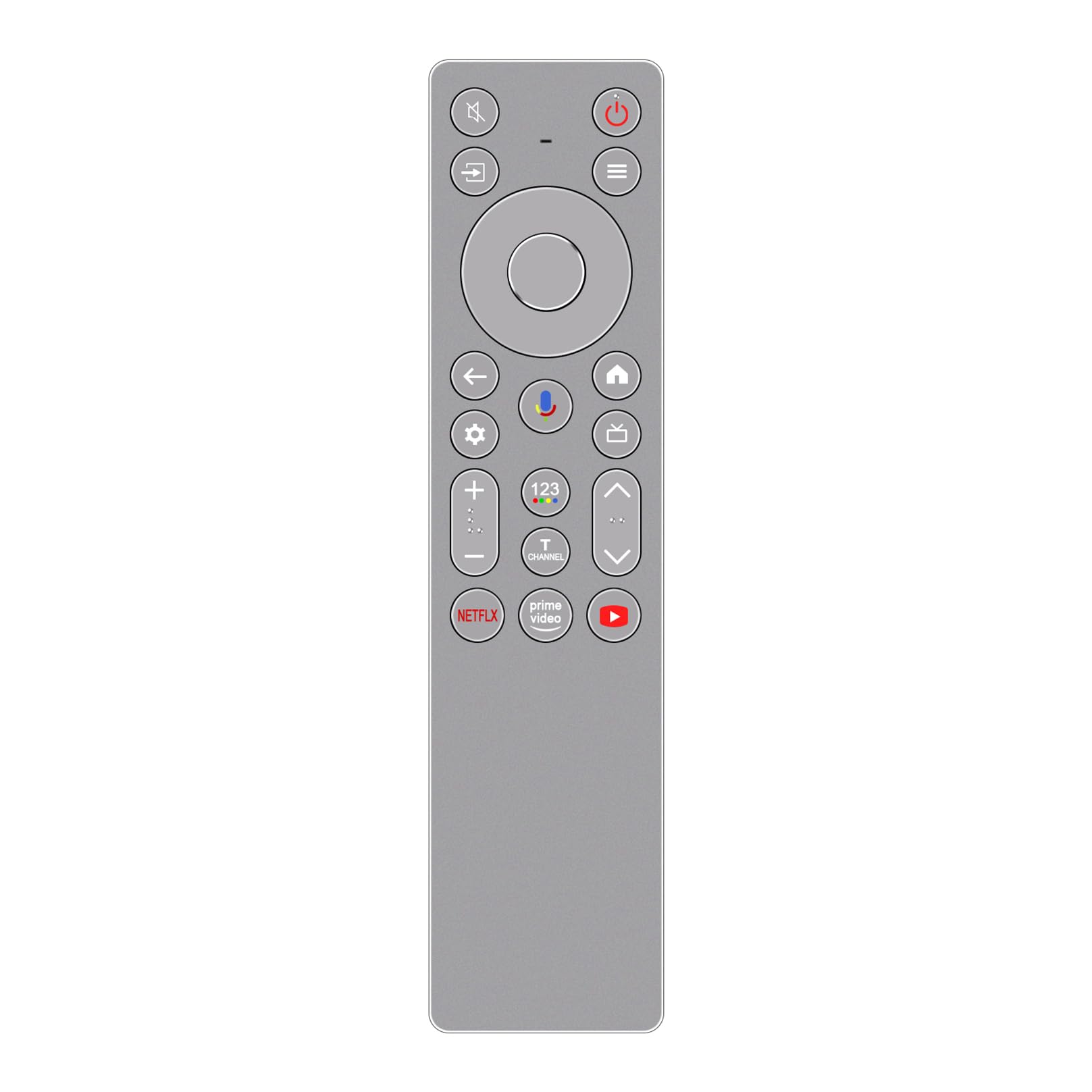
Slika: Front view of the ALLIMITY RC933A FMB1 Voice Remote Control, showcasing its button layout and sleek silver-grey finish.
Setup
The ALLIMITY RC933A FMB1 remote control is designed for immediate use with compatible TCL Smart TVs. No programming or complex setup is required. Simply install the batteries to begin operation.
Instalacija baterije
- Pronađite odeljak za baterije na poleđini daljinskog upravljača.
- Gurnite poklopac pretinca za baterije.
- Umetnite dvije AA baterije, pazeći da pozitivni (+) i negativni (-) terminali budu pravilno poravnati s indikatorima unutar odjeljka.
- Čvrsto zatvorite poklopac odeljka za baterije.
The remote is now ready for use. Point it towards your TCL Smart TV and press any button to confirm functionality.
Uputstvo za upotrebu
The ALLIMITY RC933A FMB1 remote control provides intuitive access to your TV's functions, including voice commands and dedicated app buttons.
Dugme Functions Overview
- Dugme za napajanje: Uključuje ili isključuje TV.
- Directional Pad (D-Pad) and OK Button: Navigacija kroz menije i potvrđivanje odabira.
- Dugme za povratak: Vraća se na prethodni ekran ili meni.
- Dugme za početnu stranicu: Pristupa početnom ekranu televizora.
- Dugme za postavke: Otvara meni postavki televizora.
- Pojačavanje/stišavanje glasnoće: Podešava jačinu zvuka TV-a.
- Kanal gore/dolje: Mijenja TV kanale.
- Dugme za isključivanje zvuka: Isključuje ili uključuje zvuk TV-a.
- Dugme za ulaz/izvor: Odabire ulazne izvore (HDMI, AV, itd.).
- Namjenski gumbi za aplikacije: Brzi pristup Netflixu, Prime Videu i YouTubeu.
Funkcionalnost glasovne kontrole
The remote features a voice command button for convenient control of your TV. This allows you to search for content, change settings, or launch apps using your voice.
- Pritisnite Dugme za glasovnu kontrolu (typically indicated by a microphone icon).
- Hold the remote approximately 10-30 cm (4-12 inches) from your mouth.
- Jasno izgovorite svoju komandu u mikrofon daljinskog upravljača.
- Otpustite dugme kada završite s govorom.

Slika: Detaljna view of the ALLIMITY RC933A FMB1 remote control, with a magnified inset showing the multi-colored microphone icon for voice control.
Održavanje
Pravilna njega i održavanje osigurat će dugotrajnost i optimalne performanse vašeg daljinskog upravljača.
Čišćenje
- Obrišite daljinski upravljač mekom, suhom krpom.
- Za tvrdokornu prljavštinu, lagano dampOperite krpu vodom ili blagim, neabrazivnim sredstvom za čišćenje. Izbjegavajte prekomjernu vlagu.
- Ne koristite jake hemikalije, rastvarače ili abrazivne spužve za čišćenje, jer mogu oštetiti površinu ili unutrašnje komponente daljinskog upravljača.
Zamjena baterije
- Zamijenite baterije kada daljinski upravljač postane spor ili prestane raditi.
- Always replace both batteries at the same time with new AA batteries.
- Nemojte miješati stare i nove baterije ili različite vrste baterija.
- Izvadite baterije ako daljinski upravljač nećete koristiti duži period kako biste spriječili curenje.
Skladištenje
Daljinski upravljač čuvajte na hladnom i suhom mjestu, dalje od direktne sunčeve svjetlosti, ekstremnih temperatura i visoke vlažnosti.
Rješavanje problema
If you encounter issues with your ALLIMITY RC933A FMB1 remote control, refer to the following common solutions:
- Daljinski ne reaguje:
- Provjerite jesu li baterije pravilno umetnute s ispravnim polaritetom.
- Zamijenite baterije svježim AA baterijama.
- Provjerite da nema prepreka između daljinskog upravljača i infracrvenog prijemnika televizora.
- Provjerite da li ste unutar efektivnog radnog dometa (do 10 metara).
- Glasovno upravljanje ne radi:
- Uvjerite se da daljinski upravljač ima svježe baterije.
- Press and hold the voice control button while speaking.
- Govorite jasno i direktno u mikrofon.
- Check your TV's settings to ensure voice control is enabled and properly configured.
- Kratki domet prenosa:
- Replace batteries with new ones. Low battery power can reduce range.
- Pazite da jaki izvori svjetlosti (poput direktne sunčeve svjetlosti ili jakih fluorescentnih svjetala) ne ometaju infracrveni signal.
- Remove any physical obstructions between the remote and the TV.
Specifikacije
| Brand | ALLIMITY |
| Naziv modela | MM-RC933A-FMB1 |
| Boja | Silver/Grey (as pictured) |
| Tehnologija povezivanja | infracrveni (IR) |
| Tip kontrole | Glasovna komanda |
| Maksimalni domet | 10 metara (33 stopa) |
| Broj dugmadi | 25 |
| Opis baterije | AA (potrebna 2) |
| Težina proizvoda | 59 grama |
| Dimenzije (Dužina x Širina) | 18.5 cm (7.28 in) x 4.8 cm (1.89 in) |
| Maksimalan broj podržanih uređaja | 1 (for direct control, though it can be compatible with multiple models) |

Slika: Jedna pored druge view of the ALLIMITY RC933A FMB1 remote control, illustrating its length (18.5 cm / 7.28 in) and width (4.8 cm / 1.89 in).
Garancija i podrška
For specific warranty information or technical support regarding your ALLIMITY RC933A FMB1 Voice Remote Control, please refer to the documentation provided with your purchase or contact the retailer/manufacturer directly. Keep your purchase receipt as proof of purchase for any warranty claims.