
Uvod
Welcome to the ACwO DwOTS Flow Open-Ear Earbuds user manual. These earbuds are designed to provide a unique open-ear listening experience with X-Fidelity sound, AI-ENC noise reduction for calls, and versatile dual modes for music and gaming. This manual will guide you through the setup, operation, and maintenance of your new earbuds.
Product Overview
The ACwO DwOTS Flow earbuds feature an open-ear design for comfort and environmental awareness. They come with a compact charging case.

Slika 1: Prednja strana view of ACwO DwOTS Flow Open-Ear Earbuds.

Slika 2: Bočna strana view of ACwO DwOTS Flow Open-Ear Earbuds, showing the ear hook design.

Slika 3: Natrag view of ACwO DwOTS Flow Open-Ear Earbuds.
Setup
1. Punjenje slušalica i kutijice
Before first use, fully charge the ACwO DwOTS Flow earbuds and their charging case.
- Stavite slušalice u kutijicu za punjenje, pazeći da su pravilno postavljene.
- Spojite kućište za punjenje na izvor napajanja pomoću kompatibilnog USB kabela.
- Indikatorska svjetla na kućištu će pokazivati status punjenja.
- Punjenje od 10 minuta omogućava približno 2.5 sata reprodukcije. Potpuno punjenje nudi do 50 sati ukupnog vremena reprodukcije s kućištem za punjenje.
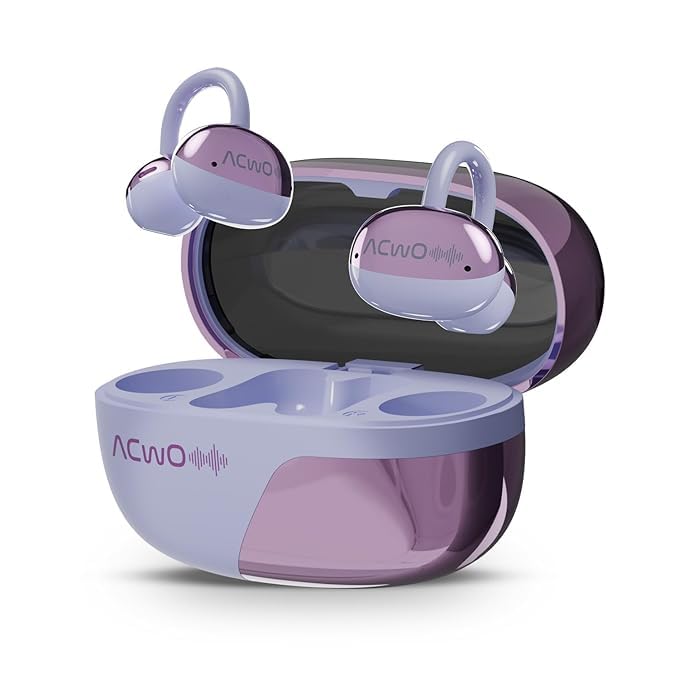
Figure 4: ACwO DwOTS Flow charging case with earbuds inserted.
2. Uparivanje sa uređajem
The ACwO DwOTS Flow earbuds use Bluetooth 5.3 for wireless connectivity.
- Otvorite kutijicu za punjenje. Slušalice će automatski ući u način rada za uparivanje.
- Na vašem uređaju (pametnom telefonu, tabletu, laptopu) omogućite Bluetooth.
- Traži "ACwO DwOTS Flow" in the list of available Bluetooth devices.
- Select "ACwO DwOTS Flow" to connect. Once connected, a voice prompt will confirm successful pairing.
Dvostruko povezivanje: These earbuds support connecting to two devices simultaneously. After pairing with the first device, follow the pairing steps for the second device. The earbuds will intelligently switch between devices.

Figure 5: Illustration of ACwO DwOTS Flow connected to two devices simultaneously.
Uputstvo za upotrebu
Nositi slušalice
The open-ear design ensures comfort and allows you to remain aware of your surroundings. Gently place the earbuds over your ears, ensuring a stable and comfortable fit.

Figure 6: ACwO DwOTS Flow earbuds demonstrating comfortable and stable fit.

Figure 7: Diagram illustrating the open-ear listening concept for environmental awareness and balanced audio.
Audio reprodukcija
Enjoy X-Fidelity Acoustics with balanced highs, mids, and deep bass.

Slika 8: Interni view highlighting the premium dynamic drivers for enhanced sound quality.
Upravljanje pozivima
The integrated AI-ENC (Environmental Noise Cancellation) microphone ensures clear calls by reducing background noise.
- Odgovori/Završi poziv: Jednom dodirnite područje za kontrolu dodirom na bilo kojoj slušalici.
- odbiti poziv: Pritisnite i držite područje za kontrolu dodirom na bilo kojoj slušalici 2 sekunde.
Music & Gaming Modes
Switch between modes to optimize your audio experience.
- Muzički način rada: Provides rich, balanced audio for general listening.
- Način igre: Offers dynamic sound with reduced latency for an immersive gaming experience.
- Promjena načina rada: Refer to the product's quick start guide or packaging for specific touch control gestures to switch between Music and Gaming modes.
Environmental Awareness Mode
This mode allows you to hear your surroundings clearly while enjoying audio, enhancing safety in various environments. This is a core feature of the open-ear design.
Održavanje
- čišćenje: Za čišćenje slušalica i kućišta za punjenje koristite meku, suhu krpu. Izbjegavajte upotrebu abrazivnih materijala ili jakih hemikalija.
- Otpornost na vodu: The earbuds are IPX5 water resistant, meaning they can withstand splashes and sweat. Do not submerge them in water. Ensure they are dry before placing them back in the charging case.
- Skladištenje: Čuvajte slušalice u torbici za punjenje kada se ne koriste kako biste ih zaštitili i održali napunjenima.
Rješavanje problema
| Problem | Moguće rješenje |
|---|---|
| Slušalice se ne uparuju |
|
| Nema zvuka ili je mala jačina zvuka |
|
| Poor call clarity (AI-ENC Mic) |
|
| Slušalice se ne pune |
|
Specifikacije
| Feature | Detalj |
|---|---|
| Naziv modela | DwOTS Flow |
| Brand | ACwO |
| Tehnologija povezivanja | bežični (Bluetooth) |
| Bluetooth verzija | 5.3 |
| Oblik slušalice | Otvorenog uha |
| Funkcije kontrole buke | AI-ENC Noise Reduction |
| Trajanje baterije | Do 50 sata (s kućištem za punjenje) |
| Brzo punjenje | 10 mins charge for 2.5 hours playtime |
| Nivo vodootpornosti | IPX5 |
| Vrsta audio drajvera | Dynamic Driver |
| Kontrolni metod | glas (Note: Typically includes touch controls, refer to product packaging for specific gestures.) |
| Kompatibilni uređaji | Cellphones, Tablets, Laptops, Gaming Consoles |
| Dimenzije proizvoda | 4.5 x 6 x 2.8 cm |
| Težina artikla | 150 g |
| Materijal | Plastika |
| Zemlja porijekla | Indija |
Garancija i podrška
For warranty information, technical support, or service inquiries, please refer to the warranty card included with your product or visit the official ACwO webstranica. Također možete direktno kontaktirati prodavca za pomoć.