
1. Uvod
This manual provides detailed instructions for the proper setup, operation, and maintenance of your Facmogu AK-50 Bluetooth Stereo Audio Amplifier. Please read this manual thoroughly before using the device to ensure optimal performance and safety. The AK-50 is designed to deliver clear, powerful stereo sound with versatile connectivity options for various audio sources.
2. Sigurnosna uputstva
- Osigurajte napajanje voltage odgovara zahtjevima navedenim na uređaju.
- Ne izlažite uređaj kiši, vlazi ili ekstremnim temperaturama.
- Izbjegavajte postavljanje jedinice u blizini izvora topline ili na direktnu sunčevu svjetlost.
- Ne otvarajte casing; sve servisne radove prepustite kvalifikovanom osoblju.
- Držite uređaj dalje od djece.
- Isključite napajanje tokom oluja sa grmljavinom ili kada se uređaj ne koristi duži period.
3. Sadržaj paketa
Provjerite da li su sve stavke prisutne u paketu:
- AK50 Audio Amplifier x1
- Daljinski upravljač x1
- FM antena x1
- Uputstvo za upotrebu x1
- Power Cord (1 Meter) x1
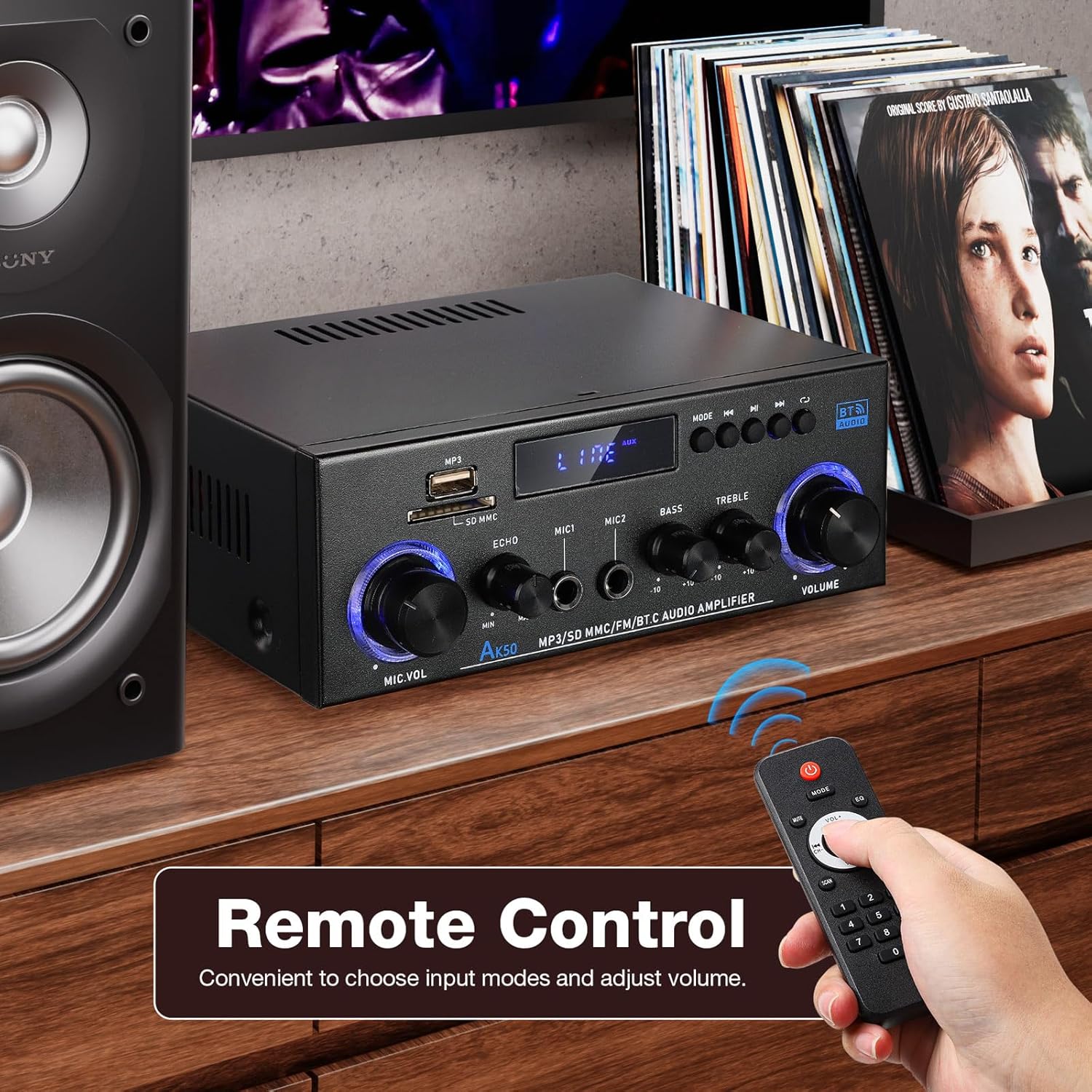
Figure 3.1: Package contents of the AK-50 amplifier.
4. Proizvod je gotovview
4.1 Prednja ploča

Figure 4.1: Front Panel Controls and Inputs.
- USB port: Za reprodukciju sa USB memorije.
- Utor za SD/MMC karticu: For SD/MMC card playback.
- Prozor za prikaz funkcija: Prikazuje trenutni način rada i postavke.
- MP3/FM Control Buttons: Reprodukcija/Pauza, Sljedeća/Prethodna pjesma, Odabir načina rada.
- MIC VOL (Microphone Volume): Podešava jačinu zvuka povezanih mikrofona.
- ECHO: Podešava efekat odjeka za mikrofone.
- MIC1/MIC2 Input: 6.35mm jack inputs for microphones.
- BASS: Podešava niskofrekventni audio izlaz.
- TREBLE: Podešava visokofrekventni audio izlaz.
- OBIM: Glavna kontrola jačine zvuka za sve audio izlaze.
4.2 Zadnja ploča

Slika 4.2: Priključci na zadnjoj ploči.
- AUX Audio Input (RCA L/R): Connect external audio devices via RCA cables.
- Line Audio Signal Output (RCA L/R): Output audio signal to another amppodizač ili uređaj za snimanje.
- FM ANT: Priključak za FM antenu.
- Speaker System 4Ω-16Ω (Left/Right Channel Output): Connect passive speakers using speaker wire. Observe polarity.
- DC Input 12V/5A: Power input for 12V DC power supply.
- Ulaz za izmjeničnu struju: Connect the AC power cord (90-240V, 50-60Hz).
- Prekidač: Okreće ampLifier ON/OFF.
5. Podešavanje
5.1 Priključivanje zvučnika
- Osigurajte ampLifier je isključen.
- Connect your passive speakers to the "Speaker System 4Ω-16Ω" terminals on the rear panel.
- Uskladite pozitivni (+) pol amplifier to the positive (+) terminal of the speaker, and the negative (-) to the negative (-). Use appropriate speaker wire.
5.2 Priključak za napajanje
- Connect the supplied AC power cord to the "AC Power Input" on the rear panel.
- Uključite drugi kraj kabla za napajanje u odgovarajuću zidnu utičnicu.
5.3 Priključak FM antene
- Connect the FM antenna to the "FM ANT" port on the rear panel.
- Proširite antenu za bolji prijem.
5.4 Audio Source Connection (AUX)
- To connect an external audio device (e.g., CD player, TV, computer) via RCA, use an RCA cable.
- Connect one end of the RCA cable to the audio output of your device and the other end to the "AUX Audio Input" (L/R) on the ampzadnja ploča spasilačkog uređaja.
6. Uputstvo za upotrebu
6.1 Uključivanje/isključivanje
Flip the "POWER ON/I" switch on the rear panel to turn the amplifier on or off. The front display will illuminate when powered on.
6.2 Volume, Bass, and Treble Control
- OBIM: Rotate the large knob on the right of the front panel to adjust the master volume.
- BASS: Rotate the "BASS" knob to increase or decrease low-frequency sounds.
- TREBLE: Rotate the "TREBLE" knob to increase or decrease high-frequency sounds.
6.3 Odabir ulaza
Press the "MODE" button on the front panel or the remote control to cycle through available input sources: Bluetooth (BT), USB, SD, FM, and AUX.
7. Povezivanje
7.1 Bluetooth veza
- Prebacite amplifier to Bluetooth mode using the "MODE" button. The display will show "BT".
- Na svom mobilnom uređaju omogućite Bluetooth i potražite dostupne uređaje.
- Select "AK-50" from the list of devices to pair.
- Nakon uparivanja, možete strimovati zvuk sa svog uređaja na amplifier.

Figure 7.1: Bluetooth connectivity with a smartphone. Maintain a distance of 16.4ft/5m without obstructions for optimal connection.
Video 7.1: A demonstration of the Facmogu AK-50 Bluetooth Stereo Audio Ampspasilac, izložbaasinnjegov dizajn i karakteristike.
7.2 Reprodukcija sa USB-a/SD kartice
- Insert a USB drive or SD/MMC card into the respective slot on the front panel.
- Prebacite amplifier to USB or SD mode using the "MODE" button. The ampLiferier će automatski detektovati i reprodukovati zvuk files.
- Use the MP3/FM control buttons to navigate tracks (Next/Previous) and Play/Pause.
7.3 AUX ulaz
After connecting an external audio source to the rear AUX input (as described in Section 5.4), switch the amplifier to AUX mode using the "MODE" button. Play audio from your connected device.
7.4 FM radio
- Ensure the FM antenna is properly connected.
- Prebacite amplifier to FM mode using the "MODE" button.
- Use the MP3/FM control buttons to scan for and select radio stations.
8. Funkcija karaoke
The AK-50 amplifier features two microphone inputs for karaoke use.
- Spojite do dva mikrofona na ulaze MIC1 i MIC2 na prednjoj ploči.
- Podesite jačinu zvuka mikrofona pomoću dugmeta "MIC VOL".
- Use the "ECHO" knob to add a reverberation effect to the microphone audio.

Slika 8.1: Korištenje amplifier for karaoke with dual microphone inputs.
9. Daljinski upravljač
The included remote control allows for convenient operation of the ampspasilac iz daljine.
- Snaga: Okreće ampLifier on/off.
- Način rada: Cycles through input sources (BT, USB, SD, FM, AUX).
- Volumen +/-: Podešava glavnu jačinu zvuka.
- Play/Pause, Next/Previous: Controls media playback in USB/SD/Bluetooth modes.
- EQ: Selects equalizer presets (if available).
- Tastatura sa brojevima: Direct track selection for USB/SD.

Figure 9.1: Remote control for the AK-50 amplifier.
10. Otkrivanje problema
| Problem | Mogući uzrok | Rješenje |
|---|---|---|
| Nema struje | Kabel za napajanje nije priključen; Prekidač isključen; Kvar utičnice. | Check power cord connection; Turn power switch ON; Test outlet with another device. |
| Nema izlaza zvuka | Incorrect input selected; Volume too low; Speaker wires loose/incorrectly connected; Faulty audio source. | Select correct input mode; Increase volume; Check speaker wire connections and polarity; Test with a different audio source. |
| Bluetooth se ne povezuje | Amplifier not in BT mode; Device Bluetooth off; Device too far; Interference. | Prekidač amplifier to BT mode; Enable Bluetooth on your device; Move device closer to amplifier (within 5m); Reduce interference. |
| USB/SD kartica se ne reprodukuje | Incorrect mode; Unsupported file format; Corrupted media; Card/drive not inserted correctly. | Prebacite se na USB/SD način rada; Osigurajte files are MP3 or supported format; Try a different USB/SD card; Reinsert media. |
| Loš FM prijem | Antena nije povezana ili produžena; Slab signal. | Connect and extend FM antenna; Reposition antenna for better signal. |
11. Specifikacije
| Feature | Specifikacija |
|---|---|
| Broj modela | A50803-MG-US |
| Brand | Facmogu |
| Tehnologija povezivanja | Bluetooth |
| Bežična komunikacija | Bluetooth |
| Način audio izlaza | Stereo |
| Impedansa zvučnika | 4-16Ω |
| Power Input | AC 90-240V, 50-60Hz / DC 12V/5A |
| Materijal | Metal |
| Težina artikla | 1.98 funte (0.9 kg) |
| Dimenzije paketa | 8.5 x 8.11 x 3.82 inča (21.6 x 20.6 x 9.7 cm) |
| Uključene komponente | AK50 Audio Amplifier |
| Vrsta montaže | Tabletop Mount |
12. Održavanje
- čišćenje: Koristite meku, suhu krpu za čišćenje spoljašnjosti ampNe koristite tekuća sredstva za čišćenje ili aerosole.
- Skladištenje: Kada se ne koristi duži period, uskladištite amplifier in a cool, dry place, away from direct sunlight and moisture.
- ventilacija: Ensure proper ventilation around the unit to prevent overheating. Do not block the ventilation openings.
13. Garancija i podrška
For warranty information or technical support, please refer to the contact details provided with your purchase or visit the official Facmogu webSačuvajte račun kao dokaz o kupovini u slučaju bilo kakvih reklamacija.