
1. Uvod
Thank you for choosing the AODSK 88-Key Weighted Hammer Action Digital Piano and Storage Bench. This manual provides essential information for the safe and efficient use of your new instrument. Please read it thoroughly before assembly and operation, and retain it for future reference.

Image 1.1: The AODSK 88-Key Digital Piano and accompanying white storage bench.
2. Sigurnosna uputstva
- Napajanje: Koristite samo navedeni adapter za napajanje. Osigurajte jačinu zvukatage odgovara zahtjevima vaše regije.
- Voda i vlaga: Do not expose the instrument to rain, moisture, or excessive humidity. Avoid placing objects filled with liquids on or near the piano.
- ventilacija: Osigurajte odgovarajuću ventilaciju. Ne blokirajte ventilacijske otvore.
- Izvori toplote: Keep the instrument away from heat sources such as radiators, heat registers, stoves, or other heat-producing appliances.
- čišćenje: Čistite samo suhom krpom. Ne koristite tekuća sredstva za čišćenje ili aerosole.
- djeca: Supervise children when they are near the instrument. Small parts could be a choking hazard.
- Moving the Instrument: When moving the piano, ensure it is unplugged and handled carefully to prevent damage or injury.
3. Sadržaj paketa
Molimo Vas da provjerite da li se u Vašem paketu nalaze sve dolje navedene stavke:
- AODSK 88-Key Digital Piano Unit
- White Storage Bench
- Triple Pedal Unit
- Furniture Stand Components
- Poklopac kliznog ključa
- Adapter za napajanje
- Slušalice
- Dust Cover
- Okov i alati za montažu
- Korisnički priručnik (ovaj dokument)
- Online Lesson Access Information
4. Podešavanje
4.1. Digital Piano Assembly
Follow these steps to assemble the digital piano and its stand:
- Raspakujte sve komponente i položite ih na meku, čistu površinu kako biste spriječili ogrebotine.
- Attach the side panels of the furniture stand to the main piano body using the provided screws and tools. Ensure all connections are secure.
- Install the triple pedal unit into its designated slot on the stand. Connect the pedal cable to the corresponding port on the piano.
- Carefully place the assembled piano unit in its desired location.
- Slide the key cover into its tracks above the keyboard.
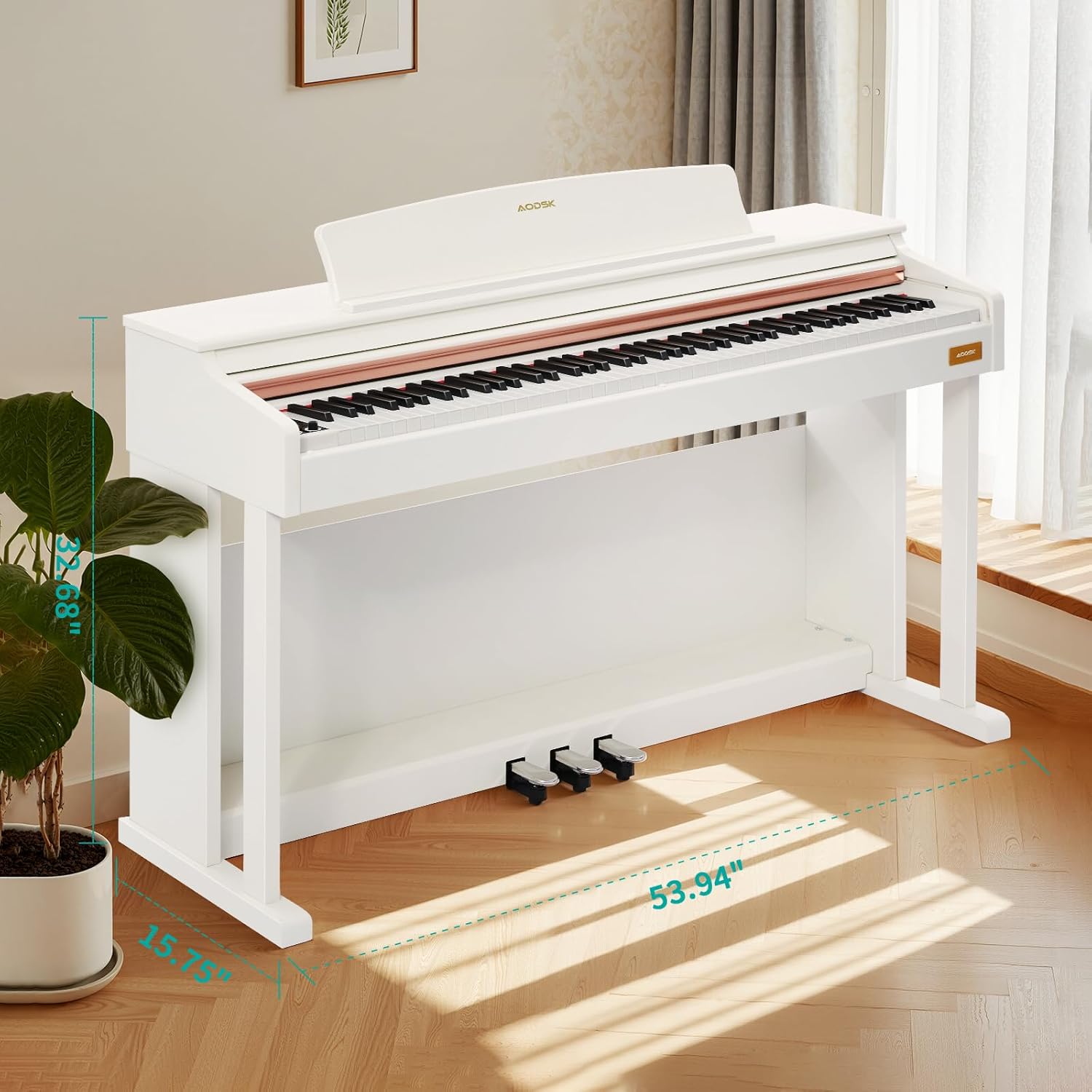
Image 4.1: Digital piano dimensions for placement planning. (Approx. 53.94" W x 15.75" D x 32.68" H)
4.2. Storage Bench Assembly
The storage bench is designed for quick, tool-free assembly:
- Remove the bench legs and hardware from the storage compartment under the seat.
- Screw each leg firmly into the designated corner mounts on the underside of the bench seat. No tools are typically required for this step.
- Ensure all legs are stable and the bench is level before use.

Image 4.2: The storage bench with its lid open, revealing the internal compartment.
5. Components Overview
5.1. Kontrolna tabla
The control panel provides access to various functions and settings of the digital piano.

Slika 5.1: Krupni plan view of the digital piano's control panel, showing buttons for tone, rhythm, demo, volume, and other features.
- Dugme za napajanje: Uključuje ili isključuje klavir.
- Dugmad za jačinu zvuka: Podesite glavnu jačinu zvuka.
- Dugme za ton: Selects from 680 available tones.
- Dugme za ritam: Selects from 600 available rhythms.
- Demo dugme: Plays demonstration songs (80 available).
- Podijeljeno dugme: Activates dual keyboard split tone function.
- MP3 Play/Pause: Controls MP3 playback via USB.
- Snimanje/Reprodukcija: Initiates and plays back two-track recordings.
- Numerical Select: Used to input specific tone, rhythm, or demo numbers.
- USB utičnica: For MP3 playback and potentially other data transfer.
5.2. Triple Pedal System
The piano features a standard triple pedal system for expressive playing.
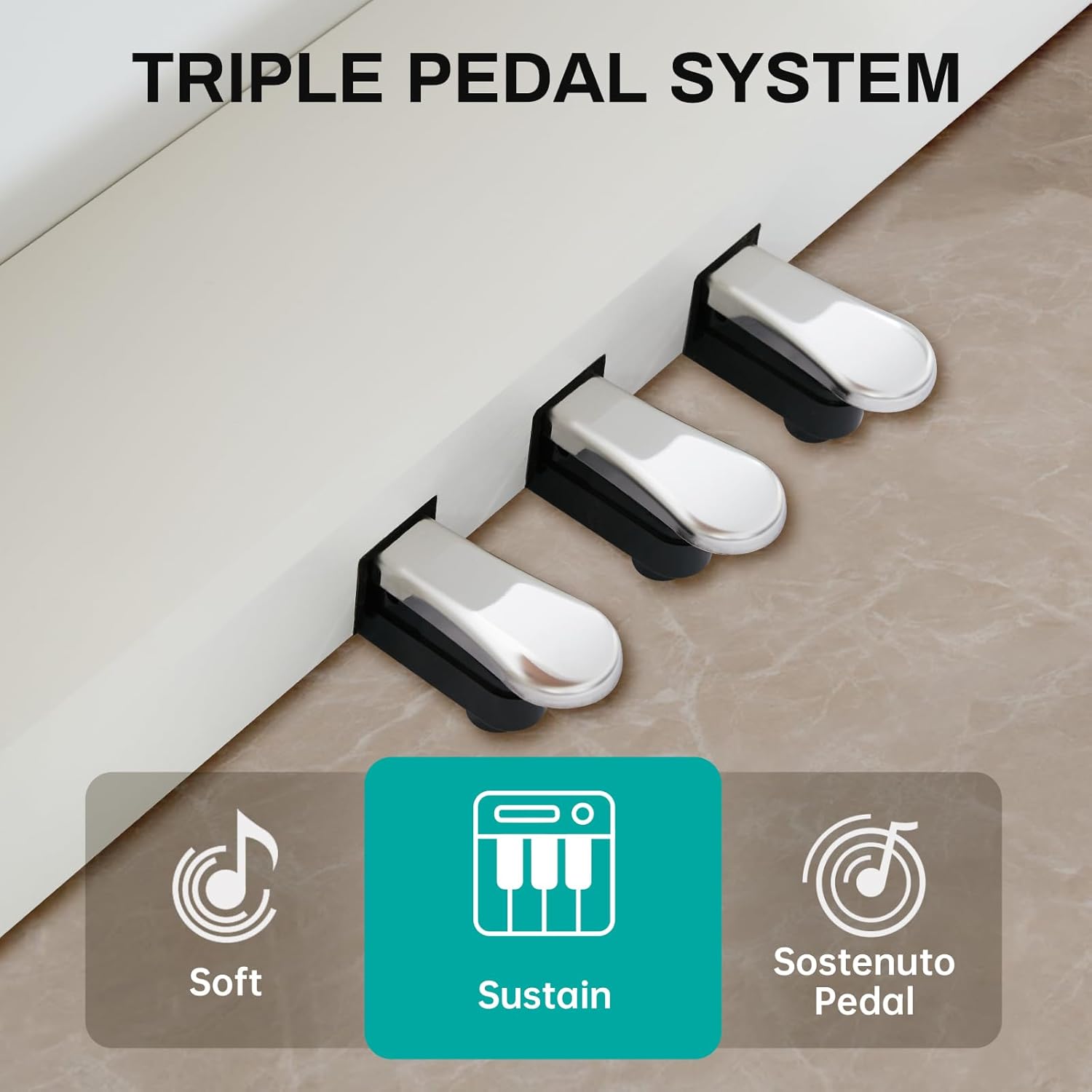
Image 5.2: Close-up of the three pedals: Soft, Sustain, and Sostenuto.
- Mekana pedala (lijeva): Reduces the volume and changes the timbre of the notes.
- Sustain Pedal (Middle): Sustains the notes, allowing them to ring out after the keys are released.
- Sostenuto Pedal (Right): Sustains only the notes that are held down at the moment the pedal is pressed, while subsequent notes remain unaffected.
5.3. 88-Key Weighted Hammer Action Keyboard
The 88-key keyboard is designed to replicate the feel of an acoustic grand piano, providing a realistic playing experience.
- Weighted Hammer Action: Provides a heavier touch in the lower register and a lighter touch in the higher register, similar to an acoustic piano.
- Osjetljivost na dodir: The piano responds to the force with which keys are played, allowing for dynamic expression.
6. Uputstvo za upotrebu
6.1. Uključivanje/isključivanje
Pritisnite Dugme za napajanje on the control panel to turn the piano on. Press it again to turn the piano off.
6.2. Kontrola jačine zvuka
Koristite Dugmad za jačinu zvuka on the control panel to adjust the overall output volume of the piano.
6.3. Odabir tona
Pritisnite Tone Button, then use the numerical keys or navigation buttons to select from the 680 available instrument tones.
6.4. Odabir ritma
Pritisnite Dugme za ritam, then use the numerical keys or navigation buttons to select from the 600 available rhythm patterns.
6.5. Demonstracijske pjesme
Pritisnite Demo dugme to cycle through or select one of the 80 built-in demonstration songs.
6.6. Dual Keyboard Split Tone
Aktivirajte Podijeli dugme to divide the keyboard into two sections, allowing two different tones to be played simultaneously or for two players to use the keyboard independently.
6.7. MP3 Playback
Umetnite USB disk sa MP3 files into the USB utičnica. Koristite MP3 Play/Pause and navigation buttons to control playback.
6.8. Two-Track Recording
Pritisnite Dugme za snimanje to start recording your performance. Press it again to stop. Use the Play Button to listen to your recorded tracks.
6.9. Pedal Functions
Iskoristite Soft, Sustain, and Sostenuto Pedals as described in Section 5.2 to add expression to your playing.
7. Održavanje
Proper maintenance ensures the longevity and performance of your digital piano.
- čišćenje: Wipe the piano and bench surfaces with a soft, dry cloth. For stubborn dirt, slightly dampen the cloth with water and mild soap, then wipe dry immediately. Avoid abrasive cleaners or solvents.
- Poklopac za prašinu: Use the provided dust cover when the piano is not in use to protect it from dust and debris.
- Briga o ključevima: Keep the keys clean. If they become dirty, wipe them gently with a soft, slightly damp tkanina.
- Uslovi okoline: Store the piano in a stable environment, away from direct sunlight, extreme temperatures, and high humidity, which can affect electronic components and wood finishes.
8. Otkrivanje problema
Ako naiđete na bilo kakve probleme, pogledajte donju tabelu za uobičajene probleme i rješenja.
| Problem | Mogući uzrok | Rješenje |
|---|---|---|
| Nema zvuka | Power off; Volume too low; Headphones connected; Pedal issue. | Ensure power is on. Increase volume. Disconnect headphones. Check pedal connections. |
| Tasteri ne reaguju | Instrument off; Specific setting activated (e.g., local control off). | Turn piano on. Check manual for advanced settings like local control. |
| Pedale ne rade | Pedal cable loose; Pedal unit faulty. | Ensure pedal cable is securely connected to the piano. |
| Problemi s reprodukcijom MP3 datoteka | USB disk nije ispravno formatiran; Nekompatibilan file type; USB drive loose. | Ensure USB drive is FAT32 formatted. Use MP3 files. Reinsert USB drive. |
| Izobličen zvuk | Volume too high; Speaker interference. | Reduce volume. Ensure no objects are blocking speakers. |
Ako problem i dalje postoji nakon isprobavanja ovih rješenja, obratite se korisničkoj podršci.
9. Specifikacije
- tastatura: 88-Key Weighted Hammer Action
- polifonija: 128 napomena
- Tonovi: 680 built-in tones
- Ritmovi: 600 ugrađenih ritmova
- Demonstracijske pjesme: 80
- Pedale: Triple Pedal System (Soft, Sustain, Sostenuto)
- Funkcije: Dual Keyboard Split, MP3 Playback, Two-Track Recording
- Dimenzije klupe: 29-inch width, 2.68-inch deep storage bin
- Bench Weight Capacity: 300 funte
- Povezivanje: USB utičnica
10. Garancija i podrška
This AODSK product is covered by a standard manufacturer's warranty against defects in materials and workmanship. Please refer to the warranty card included in your package for specific terms and conditions, including the warranty period and how to make a claim.
For technical support, troubleshooting assistance, or warranty inquiries, please contact AODSK customer service through the retailer where you purchased the product or visit the official AODSK webstranica za kontakt informacije.