
1. Uvod
Thank you for choosing the RUIZU 64GB HiFi Lossless MP3 Player. This device is engineered to deliver a pure, high-resolution audio experience, supporting a wide range of lossless formats. Its compact design and intuitive touchscreen interface make it ideal for enjoying your music without distractions. This manual provides essential information for setting up, operating, and maintaining your player.
2. Proizvod je gotovview
The RUIZU HiFi Lossless MP3 Player features a durable CNC-milled aluminum alloy body, ensuring both elegance and resilience. Designed for a dedicated audio experience, it operates exclusively with wired headphones, eliminating latency and interference associated with wireless connections. The 2-inch HD IPS touchscreen provides clear visuals and easy navigation.
2.1. Physical Features and Dimensions
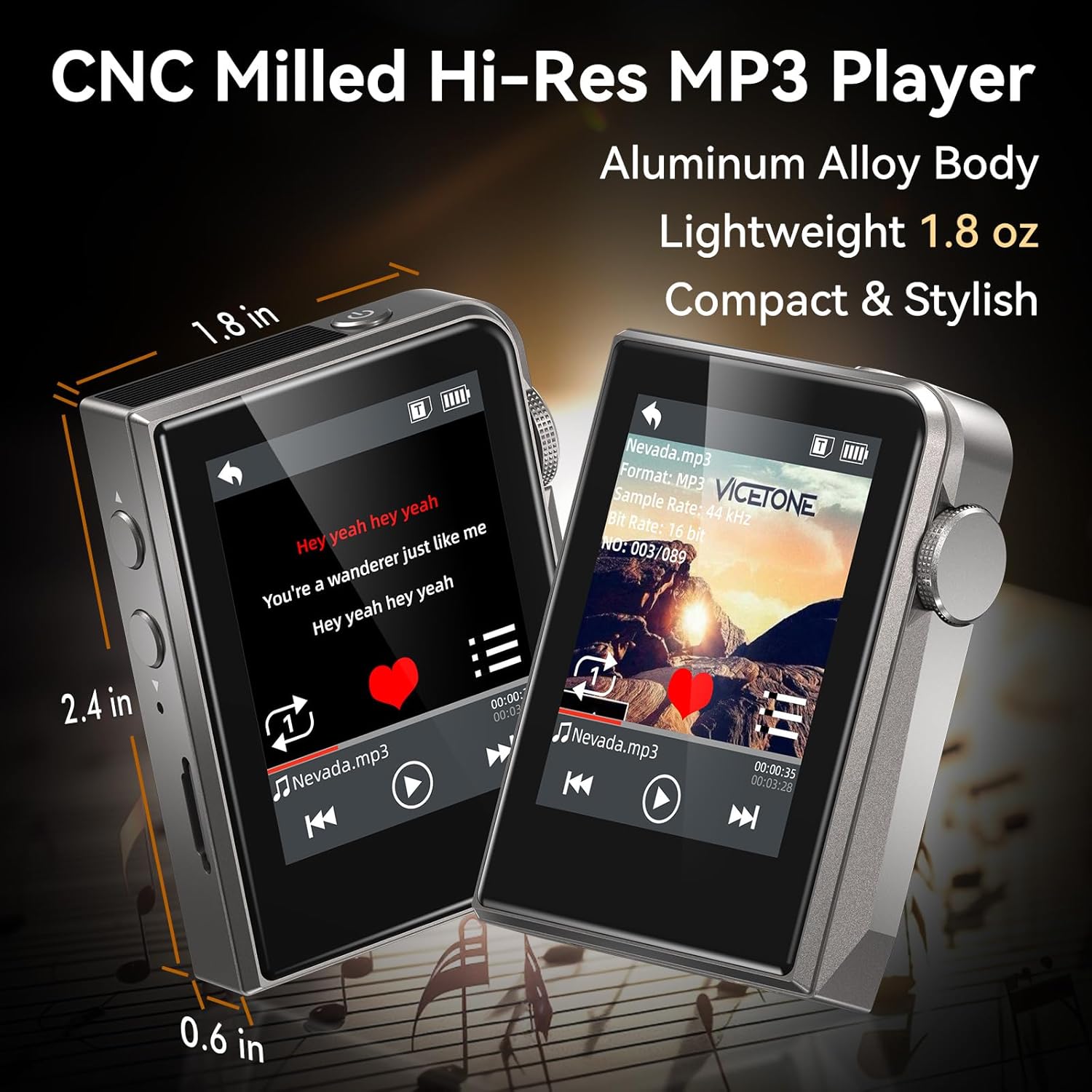
The RUIZU MP3 Player is compact and lightweight, measuring approximately 2.36 x 1.81 x 0.55 inches and weighing 1.76 ounces.
2.2. Wired Audio Design

The player supports advanced DAC decoding for high-resolution audio formats such as MP3, WMA, WAV, APE, FLAC, AAC, M4A, OGG, ALAC, DSF, and DFF, ensuring pure sound quality.
2.3. Sadržaj paketa

The package includes the RUIZU 64GB Hi-res MP3 Player, 3.5mm wired headphones, a USB-C cable for charging and file transfer, a protective pouch, and this user manual.
3. Podešavanje
3.1. Punjenje uređaja
Before first use, fully charge the MP3 player. Connect the provided USB-C cable to the player's USB-C port and the other end to a USB power adapter (not included) or a computer's USB port. The battery indicator on the screen will show charging status.
3.2. Prenos muzike Files
- Connect the MP3 player to your computer using the supplied USB-C cable.
- Plejer će se na vašem računaru pojaviti kao prenosivi disk.
- Prevucite i ispustite željeni audio files (MP3, WAV, FLAC, APE, OGG, DSD256, etc.) into the player's internal storage or a connected microSD card folder.
- Safely eject the device from your computer before disconnecting the USB-C cable.
3.3. Umetanje MicroSD kartice

The player supports microSD cards up to 128GB for expanded storage. Gently insert the card into the designated slot until it clicks into place.
4. Uputstvo za upotrebu
4.1. Uključivanje/isključivanje
Press and hold the power button (usually on the side) to turn the player on or off.
4.2. Osnovna navigacija
The player features a 2-inch HD IPS touchscreen for navigation. Swipe to browse menus and tap to select options. The dedicated Home button allows for quick return to the main menu.
4.3. Reprodukcija muzike

Access your music library through the 'Music' or 'Folder' options on the main screen. Select a song to begin playback. Use the on-screen controls for play/pause, skip forward/backward.
4.3.1. Režimi reprodukcije
The player offers various playback modes:
- nasumično: Reprodukuje numere nasumičnim redoslijedom.
- Ponovi jedno: Ponavlja trenutnu numeru.
- Folder Loop: Repeats all tracks within the current folder.
- sekvencijalno: Plays tracks in order.
- All Loop: Repeats all tracks in the current playlist/library.
4.3.2. Equalizer (EQ)
Customize your sound experience using the built-in equalizer. Navigate to the 'Equalizer' setting to adjust frequency bands or select from preset options.
4.3.3. Playlists and Favorites
Create up to 4 favorite lists or organize your music into folders for easy access.
4.3.4. Skip Tracks with Screen Off
For convenience during activities like jogging, the player allows you to skip tracks using physical buttons even when the screen is off.
4.4. Dodatne funkcije
The player includes several utility functions:
- Štoperica: Za aktivnosti mjerenja vremena.
- Kalendar: Keep track of dates.
- Ograničenje jačine zvuka: Set a maximum volume level for hearing protection.
- Date & Time Display: View trenutni datum i vrijeme.
- Tajmer za isključivanje: Automatically turn off the player after a set period.
- Power-Saving Shutdown: Configure automatic shutdown to conserve battery.
- Jezici: Supports 21 languages for the user interface.
5. Održavanje
- Uređaj držite suhim. Izbjegavajte izlaganje vlazi ili tekućinama.
- Očistite ekran i kućište mekom, suhom krpom. Ne koristite abrazivna sredstva za čišćenje.
- Izbjegavajte ekstremne temperature.
- Ne pokušavajte sami rastavljati ili popravljati uređaj. To će poništiti garanciju.
6. Otkrivanje problema
6.1. Device Does Not Turn On
- Provjerite je li baterija napunjena. Spojite uređaj na izvor napajanja i ostavite ga da se puni najmanje 30 minuta prije nego što ga ponovo pokušate uključiti.
- If the device is unresponsive, try performing a soft reset by pressing and holding the power button for 10-15 seconds.
6.2. Nema zvuka
- Check if headphones are properly connected to the 3.5mm audio jack.
- Verify the volume level is not set to zero or muted.
- Test with a different pair of wired headphones to rule out headphone malfunction.
- Osigurajte zvuk filenisu oštećene i u podržanom su formatu.
6.3. Nije moguće prenijeti Files
- Provjerite je li USB-C kabel sigurno povezan i s uređajem za reprodukciju i s računarom.
- Try a different USB port on your computer or a different USB-C cable.
- Restart your computer and the MP3 player.
- Check if your computer's operating system recognizes the device as a removable disk.
6.4. MicroSD Card Not Detected
- Ensure the microSD card is inserted correctly and fully seated in its slot.
- Try removing and reinserting the card.
- Test with a different microSD card to determine if the card itself is faulty.
- Ensure the card is formatted to a compatible file sistem (npr. FAT32).
7. Specifikacije
| Feature | Specifikacija |
|---|---|
| Brand | RUIZU |
| Model | 64GB HiFi Lossless MP3 Player |
| Kapacitet memorije | 64 GB (Internal), expandable up to 128GB via Micro SD card |
| Veličina ekrana | 2 inča |
| Display Technology | LCD |
| Tehnologija povezivanja | Aux, USB (Wired only, No Bluetooth) |
| Posebne karakteristike | Equalizer, Hi-Res Audio, Touch Screen |
| Kompatibilni uređaji | Headphones, Personal Computer |
| Vrsta medija | Micro SD |
| Težina artikla | 4.9 unce |
| Baterije | 1 nestandardna baterija (uključena) |
8. Garancija i podrška
For warranty information and technical support, please refer to the official RUIZU webweb-mjesto ili kontaktirajte prodavača. Sačuvajte račun kao dokaz o kupovini za bilo kakve reklamacije u garanciji.