
Motorola Moto G15 Power
Motorola Moto G15 Power 4G Korisnički priručnik za pametni telefon
Model: Moto G15 Power
1. Uvod
Welcome to the user manual for your new Motorola Moto G15 Power 4G smartphone. This guide provides essential information to help you set up, operate, maintain, and troubleshoot your device. The Moto G15 Power is designed to deliver a superior mobile experience with its advanced features, including a vibrant Full HD+ display, a high-resolution camera system, and a long-lasting battery.
Please read this manual carefully to ensure optimal performance and longevity of your device. Keep it for future reference.
2. Početno podešavanje
2.1 Sadržaj paketa
Pobrinite se da vaš paket sadrži sljedeće stavke:
- Motorola Moto G15 Power pametni telefon
- 30W TurboPower punjač
- USB-C kabl
- Alat za izbacivanje SIM kartice
- Vodič za brzi početak (ovaj priručnik)
2.2 Umetanje SIM i microSD kartica
- Pronađite ladicu za SIM karticu sa strane telefona.
- Umetnite alat za izbacivanje SIM kartice u mali otvor pored ladice i lagano gurnite dok ladica ne iskoči.
- Place your Nano-SIM card(s) and/or microSD card into the tray with the gold contacts facing down. Ensure they are correctly seated. The Moto G15 Power supports Dual SIM functionality.
- Pažljivo gurnite nosač nazad u telefon dok ne klikne na svoje mjesto.

Slika: Sa strane view of the Motorola Moto G15 Power, illustrating the location of the SIM card tray.
2.3 Punjenje uređaja
Before first use, fully charge your Moto G15 Power. Connect the USB-C cable to the phone's charging port and the 30W TurboPower charger to a power outlet. The battery indicator will show charging progress.
2.4 Uključivanje/isključivanje
- To power on: Press and hold the Power button (located on the right side of the phone) until the Motorola logo appears.
- To power off: Press and hold the Power button, then tap 'Power off' on the screen.
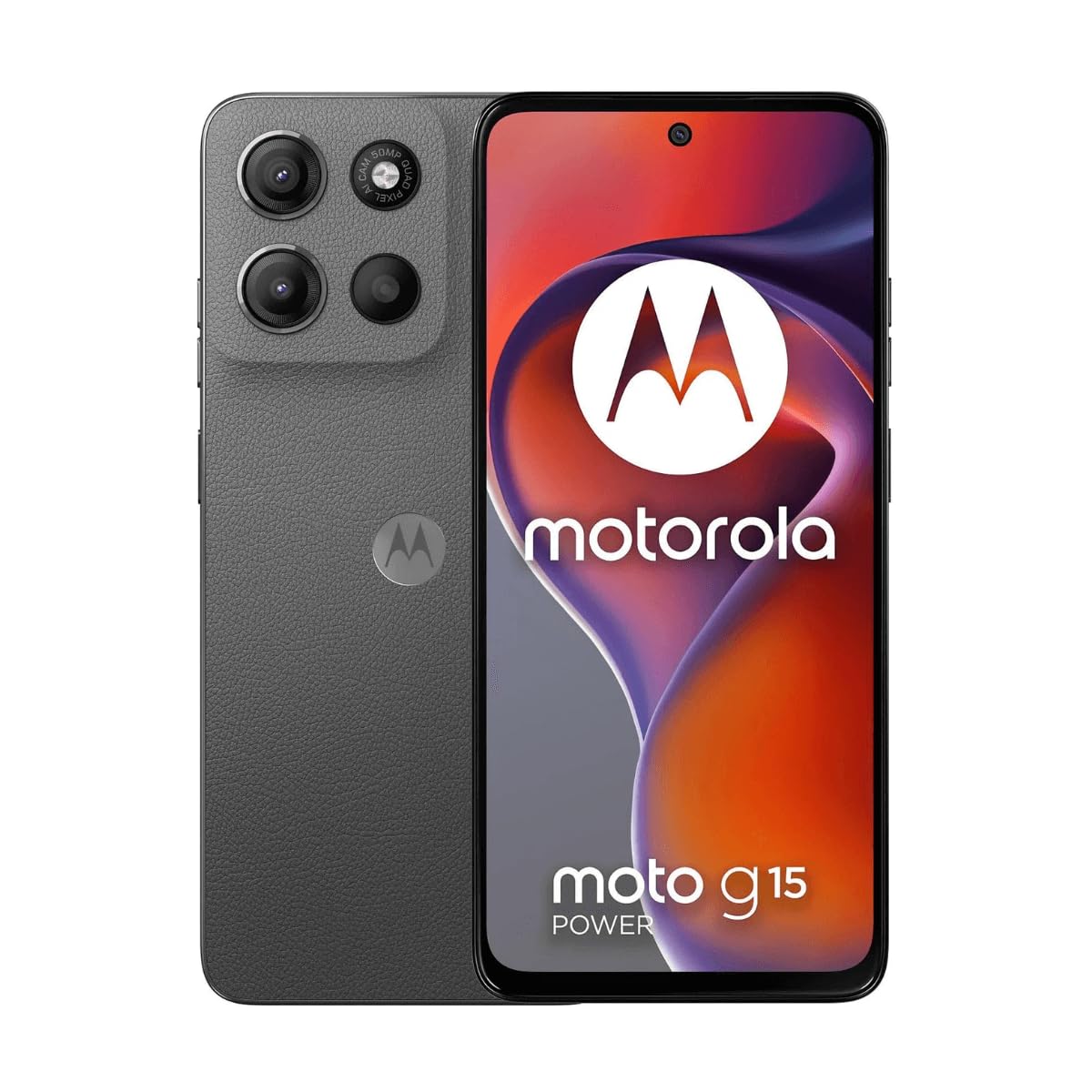
Slika: Front view of the Motorola Moto G15 Power, displaying the screen and the location of the power button on the right side.
3. Upravljanje vašim uređajem
3.1 Navigacija putem ekrana osjetljivog na dodir
Your Moto G15 Power features a responsive 6.72-inch Full HD+ display. Use the following gestures for navigation:
- Dodirnite: Odaberite stavku ili otvorite aplikaciju.
- Prevucite: Skrolajte kroz ekrane ili liste.
- štipanje: Uvećavanje ili smanjivanje fotografija i web stranice.
- Dugi pritisak: Pristupite kontekstualnim menijima ili premjestite ikone.
3.2 Upućivanje poziva i slanje poruka
To make a call, open the Phone app and dial the number or select a contact. To send a message, open the Messages app, tap 'Start chat', and enter the recipient and your message.
3.3 Korištenje kamere
The Moto G15 Power is equipped with a 50 MP main camera with Quad Pixel technology and an 8 MP front camera. Open the Camera app to capture photos and videos.
- Foto mod: Dodirnite dugme okidača da biste snimili sliku.
- Video način rada: Prebacite se u video mod i dodirnite dugme za snimanje da biste započeli/zaustavili snimanje.
- Selfi kamera: Dodirnite ikonu prekidača kamere da biste koristili prednju kameru.
- Napredne karakteristike: Explore settings for portrait mode, night vision, and other photographic enhancements.

Slika: Stražnja strana view of the Motorola Moto G15 Power, highlighting the 50MP camera module.
3.4 Audio i ekran
Experience enhanced audio with Dolby Atmos support, whether through headphones or the phone's speakers. The 6.72-inch Full HD+ display features a High Brightness Mode for improved outdoor visibility.
3.5 Upravljanje baterijom
Your device is equipped with a 6000 mAh battery and supports 30W TurboPower charging. To optimize battery life:
- Podesite svjetlinu ekrana.
- Zatvorite nekorištene aplikacije.
- Omogućite način rada za uštedu baterije kada je to potrebno.
3.6 Povezivanje
The Moto G15 Power supports 4G cellular networks, Wi-Fi, Bluetooth, and NFC. Access these settings via the Quick Settings panel or the Settings app.
4. Održavanje i njega
4.1 Čišćenje uređaja
Use a soft, lint-free cloth to clean the screen and body of your phone. Avoid abrasive materials or harsh chemicals. For stubborn smudges, slightly dampi krpu vodom.
4.2 Otpornost na vodu
The Moto G15 Power is designed to be splash and liquid resistant. This means it can withstand minor splashes or light rain. It is not waterproof and should not be submerged in water. Liquid damage is not covered under warranty.
4.3 Ažuriranja softvera
Redovno provjeravajte i instalirajte ažuriranja softvera kako biste osigurali da vaš uređaj ima najnovije funkcije, sigurnosne zakrpe i poboljšanja performansi. Idite na Postavke> Sistem> Ažuriranja sistema.
4.4 Njega baterija
To prolong battery life, avoid exposing your phone to extreme temperatures. Do not leave it fully charged or fully discharged for extended periods.
5. Otkrivanje problema
5.1 Uređaj se ne uključuje
- Provjerite je li baterija napunjena. Spojite punjač i pričekajte nekoliko minuta prije nego što pokušate uključiti uređaj.
- Pritisnite i držite dugme za napajanje najmanje 10-15 sekundi da biste prisilno ponovo pokrenuli računar.
5.2 Problemi s naplatom
- Check if the charger and USB-C cable are securely connected to both the phone and the power outlet.
- Pokušajte koristiti drugi kompatibilni punjač i kabel kako biste isključili neispravnu dodatnu opremu.
- Uvjerite se da je priključak za punjenje čist i da nema ostataka.
5.3 Problemi s mrežnom vezom
- Ponovo pokrenite telefon.
- Provjerite je li način rada u avionu onemogućen.
- Verify that your SIM card is correctly inserted and active.
- Resetuj mrežne postavke: Postavke > Sistem > Opcije resetiranja > Resetiraj Wi-Fi, mobilne uređaje i Bluetooth.
5.4 Rušenje ili zamrzavanje aplikacija
- Zatvorite i ponovo otvorite aplikaciju.
- Obrišite keš memoriju i podatke aplikacije: Settings > Apps > [App Name] > Storage & cache > Clear cache / Clear storage.
- Ažurirajte aplikaciju iz Google Play trgovine.
- Ako problem i dalje postoji, deinstalirajte i ponovo instalirajte aplikaciju.
6. Specifikacije
| Feature | Specifikacija |
|---|---|
| Naziv modela | Moto G15 Power |
| Operativni sistem | Android |
| Procesor | MediaTek Helio G81 Extreme |
| RAM | 8 GB |
| Interna pohrana | 512 GB |
| Proširiva pohrana | Do 512 GB (microSD) |
| Veličina ekrana | 6.72 inča |
| Rezolucija ekrana | 2340 x 1080 pixels (Full HD+) |
| Zadnja kamera | 50 MP |
| Prednja kamera | 8 MP |
| Kapacitet baterije | 6000 mAh |
| Punjenje | 30W TurboPower |
| Povezivanje | 4G, 2G, Wi-Fi, Bluetooth, NFC |
| SIM Type | Dvije Nano SIM kartice |
| Dimenzije | 9 x 76 x 166 mm |
| Otpornost na vodu | Splash and liquid resistant |
| Priključak za slušalice | USB-C |
| Boja | Gravity Grey |
7. Informacije o garanciji
Your Motorola Moto G15 Power is covered by a limited warranty. The terms and conditions of this warranty may vary by region. Please refer to the warranty card included in your product packaging or visit the official Motorola webstranicu za detaljne informacije o garancijskom pokrivanju, trajanju i postupcima podnošenja zahtjeva.
Sačuvajte dokaz o kupovini za eventualne reklamacije u vezi s garancijom.
8. Podrška
Za dodatnu pomoć, tehničku podršku ili pristup dodatnim resursima, posjetite službenu stranicu za podršku kompanije Motorola. website. You can find FAQs, software downloads, and contact information for customer service.
Motorola Official Support: www.motorola.com/support
Ask a question about this manual
Ask about setup, troubleshooting, compatibility, parts, safety, or missing instructions. Manuals+ will review the question and use this page’s manual context to help answer it.