Uvod
This manual provides detailed instructions for the installation, operation, and maintenance of your Jortan Outdoor WiFi PTZ Security Camera. Please read this manual thoroughly before using the product to ensure correct setup and optimal performance. Keep this manual for future reference.
The Jortan Outdoor WiFi PTZ Security Camera is designed for both indoor and outdoor surveillance, offering features such as pan, tilt, and zoom control, infrared night vision, two-way audio, and motion detection. It connects via Wi-Fi and is managed through the Yoosee application.
Product Overview
Ključne karakteristike
- PTZ kontrola: Remotely pan, tilt, and zoom the camera for comprehensive coverage.
- Infracrveni noćni vid: Provides clear video recording in low-light conditions.
- 2-smjerni audio: Enables live communication through the camera's built-in microphone and speaker.
- Detekcija pokreta: Triggers real-time alerts upon detecting movement.
- IP66 ocijenjeno: Ensures durability and weather resistance for outdoor use.
- Lokalna pohrana: Supports video recording to a micro SD card (not included).
Sadržaj paketa
The package includes the Jortan Outdoor WiFi PTZ Security Camera, a power adapter, and mounting screws.
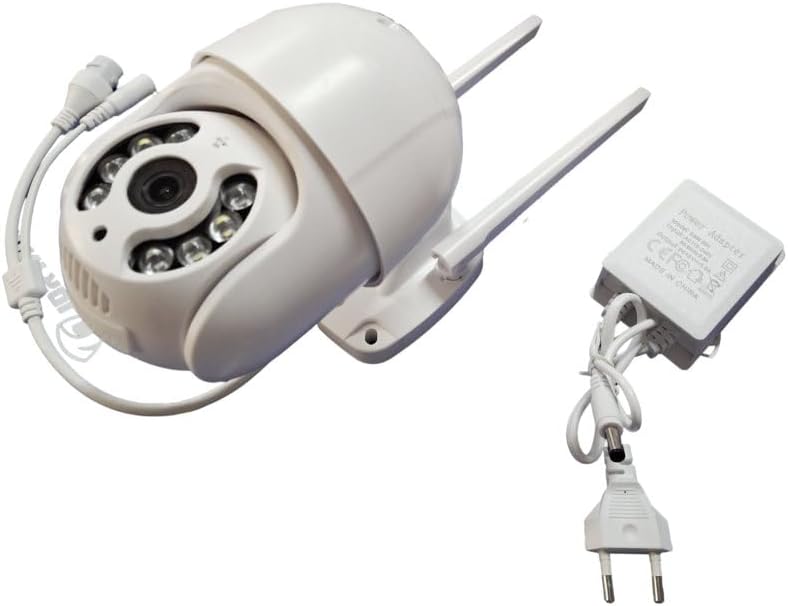
Image: The Jortan Outdoor WiFi PTZ Security Camera shown alongside its power adapter and connection cables, illustrating the complete set of components.
Vodič za postavljanje
1. Fizička instalacija
Select a suitable location for mounting the camera, ensuring it has a clear view of the area you wish to monitor and is within range of your Wi-Fi network. Use the provided mounting screws to securely attach the camera to a wall or ceiling. The camera is IP66 rated for outdoor durability.
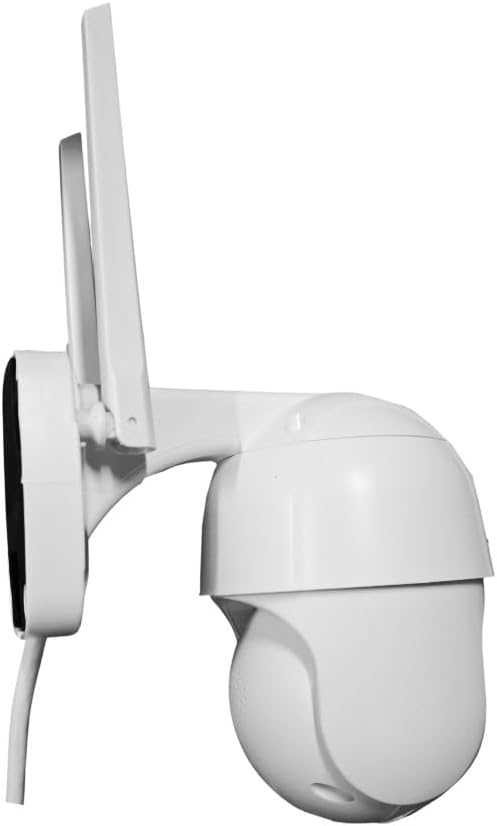
Slika: Sa strane view of the Jortan Outdoor WiFi PTZ Security Camera, highlighting the integrated mounting bracket for secure installation.
2. Priključak za napajanje
Connect the provided power adapter to the camera's power input port and then plug the adapter into a standard electrical outlet. The camera will power on and initiate its startup sequence.
3. Preuzimanje aplikacije i kreiranje računa
- Preuzmite Yoosee aplikaciju iz trgovine aplikacija vašeg pametnog telefona (Google Play Store za Android ili Apple App Store za iOS).
- Open the Yoosee app and follow the on-screen instructions to create a new user account or log in if you already have one.
4. Uparivanje kamere
- In the Yoosee app, tap the 'Add Device' or '+' icon.
- Select the option to add a new camera and follow the app's prompts to connect the camera to your 2.4GHz Wi-Fi network. Ensure your smartphone is connected to the same Wi-Fi network during the pairing process.
- The app will guide you through scanning a QR code on the camera or using sound wave pairing.
- Once successfully paired, you can name your camera and begin live viewing.
Uputstvo za upotrebu
PTZ kontrola
Od uživo view interface in the Yoosee app, use the directional controls to pan (rotate horizontally), tilt (rotate vertically), and zoom the camera lens to adjust your viewing angle and focus on specific areas.
Night Vision
The camera automatically switches to infrared night vision mode in low-light conditions, providing clear black and white video footage. No manual adjustment is typically required.
Dvosmjerni audio
To use the two-way audio feature, tap the microphone icon in the Yoosee app's live view. You can then speak into your phone, and your voice will be projected through the camera's speaker. Tap the speaker icon to listen to audio from the camera's surroundings.
Detekcija pokreta i upozorenja
Configure motion detection settings within the Yoosee app. You can set detection zones, sensitivity levels, and schedule times for alerts. When motion is detected, the camera will record footage i šaljite push obavještenja na vaš pametni telefon.
Local Storage (Micro SD Card)
The camera supports local storage via a micro SD card (up to 128GB, not included). To install, power off the camera, locate the SD card slot (refer to the camera's physical design), and insert the card. Format the SD card through the Yoosee app settings for proper recording. Recorded footage can be accessed and replayed directly from the app.
Održavanje
- čišćenje: Povremeno čistite objektiv kamere mekom, suhom krpom kako biste osigurali jasnu sliku. Ne koristite jake hemikalije.
- Ažuriranja firmvera: Check the Yoosee app regularly for available firmware updates. Keeping the camera's firmware updated ensures optimal performance and security.
- Napajanje: Provjerite da li su adapter za napajanje i kabel neoštećeni.
Rješavanje problema
- Kamera se ne povezuje na Wi-Fi:
- Provjerite da vaša Wi-Fi mreža koristi frekvenciju od 2.4 GHz. Kamera ne podržava Wi-Fi od 5 GHz.
- Check that the Wi-Fi password entered in the app is correct.
- Približite kameru svom Wi-Fi ruteru kako biste poboljšali jačinu signala.
- Ponovo pokrenite kameru i ruter.
- Nema video feeda:
- Provjerite je li kamera uključena i povezana na Wi-Fi.
- Provjerite internetsku vezu.
- Restart the Yoosee app.
- Loš noćni vid:
- Provjerite da li je objektiv kamere čist i bez prepreka.
- Avoid placing the camera near reflective surfaces that might interfere with infrared illumination.
- Obavještenja o kretanju nisu primljena:
- Check motion detection settings in the Yoosee app (sensitivity, detection zones, schedule).
- Ensure push notifications are enabled for the Yoosee app in your phone's settings.
Specifikacije
| Feature | Detalj |
|---|---|
| Proizvođač | Jortan |
| Dimenzije proizvoda | 18 x 18 x 12 cm |
| Posebne karakteristike | 2 Way Audio, Local Recording, Motion Sensor, Night Vision, PTZ Technology |
| Unutrašnja/vanjska upotreba | Na otvorenom |
| Connectivity Protocol | Wi-Fi (samo 2.4 GHz) |
| Vrsta montaže | Zidni nosač |
| Rezolucija video snimanja | 720p |
| Uključene komponente | Montažni vijak |
Garancija i podrška
Specific warranty information is not provided with this product. Please refer to the retailer's return policy or contact the seller directly for details regarding warranty coverage.
For technical support or further assistance, please refer to the help section within the Yoosee application or contact the app's support channels. Ensure you have your product model and purchase details available when seeking support.


