
1. Uvod
The FOSSIBOT F114 is a rugged smartphone designed for durability and performance in challenging environments. It features a robust build, a powerful battery, and an advanced camera system, running on the Android 15 operating system. This manual provides essential information for setting up, operating, maintaining, and troubleshooting your device.
2. Šta se nalazi u kutiji
Upon opening your FOSSIBOT F114 package, you should find the following items:
- FOSSIBOT F114 Mobile Phone
- 18W brzi punjač
- USB kabel Type-C
- Pin SIM kartice
- Uputstvo za upotrebu

Video: Raspakivanje i inicijalna slikaview of the FOSSIBOT F114 Rugged Smartphone, showcasing the included accessories and the device itself.
3. Device Overview
3.1. Displej
The FOSSIBOT F114 features a 6.67-inch HD+ IPS display with a resolution of 720 x 1600 pixels and a 60Hz refresh rate. The display is designed to be scratch-resistant, offer high transparency, and include anti-fingerprint properties for clear visibility.

3.2. Procesor i memorija
Powered by an octa-core UNISOC T615 processor, the F114 ensures smooth multitasking and gaming. It comes with 16GB of RAM (4GB physical + 12GB virtual RAM) and 128GB of internal storage, expandable up to 2TB via an SD card.

3.3. Sistem kamera
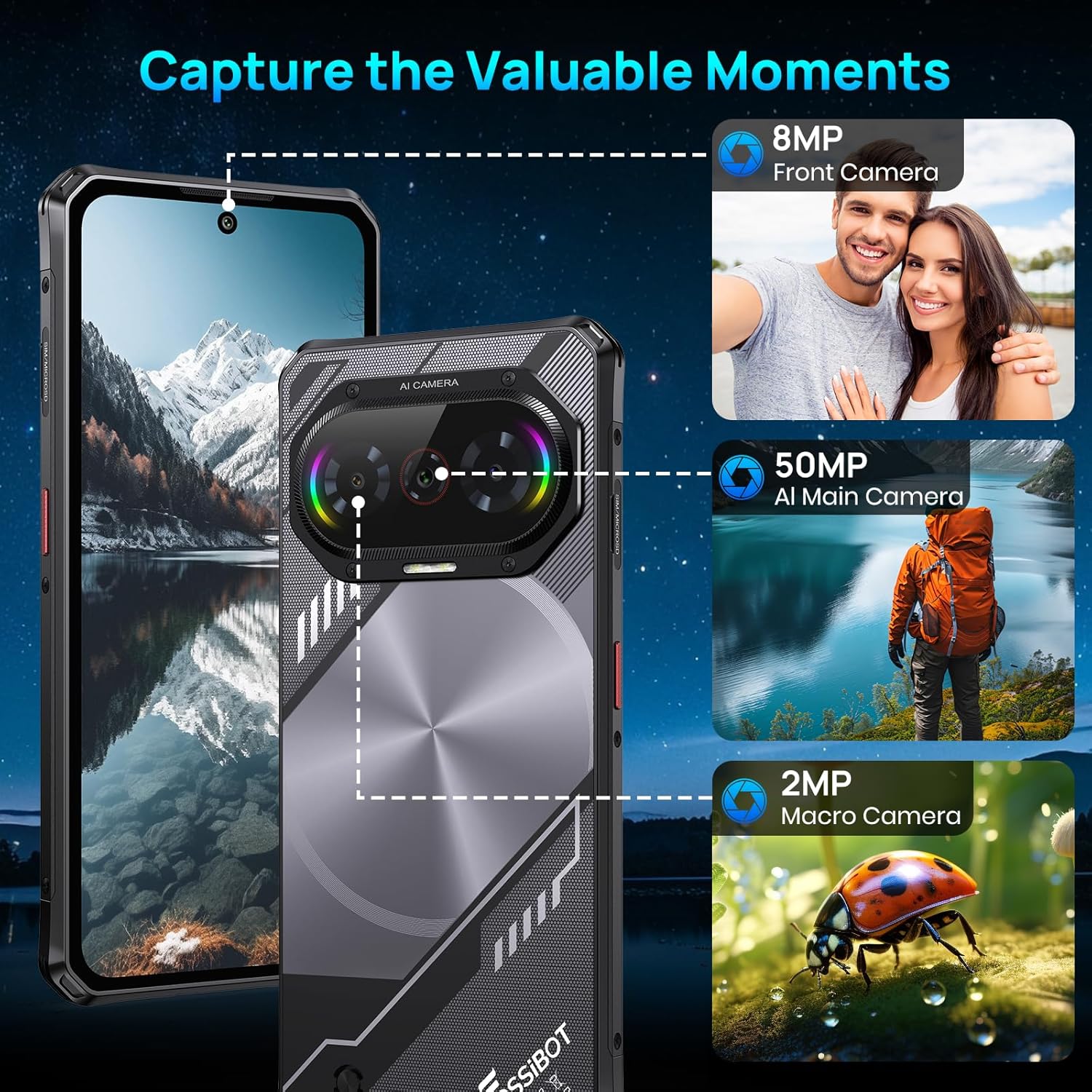
The device is equipped with a versatile camera setup: a 50MP AI main camera, an 8MP front camera, and a 2MP macro camera. This configuration allows for detailed photos, clear selfies, and close-up shots.
3.4. Baterija
A 5000mAh large-capacity battery provides extended usage, complemented by 18W fast charging capabilities to quickly replenish power.

3.5. Trajnost
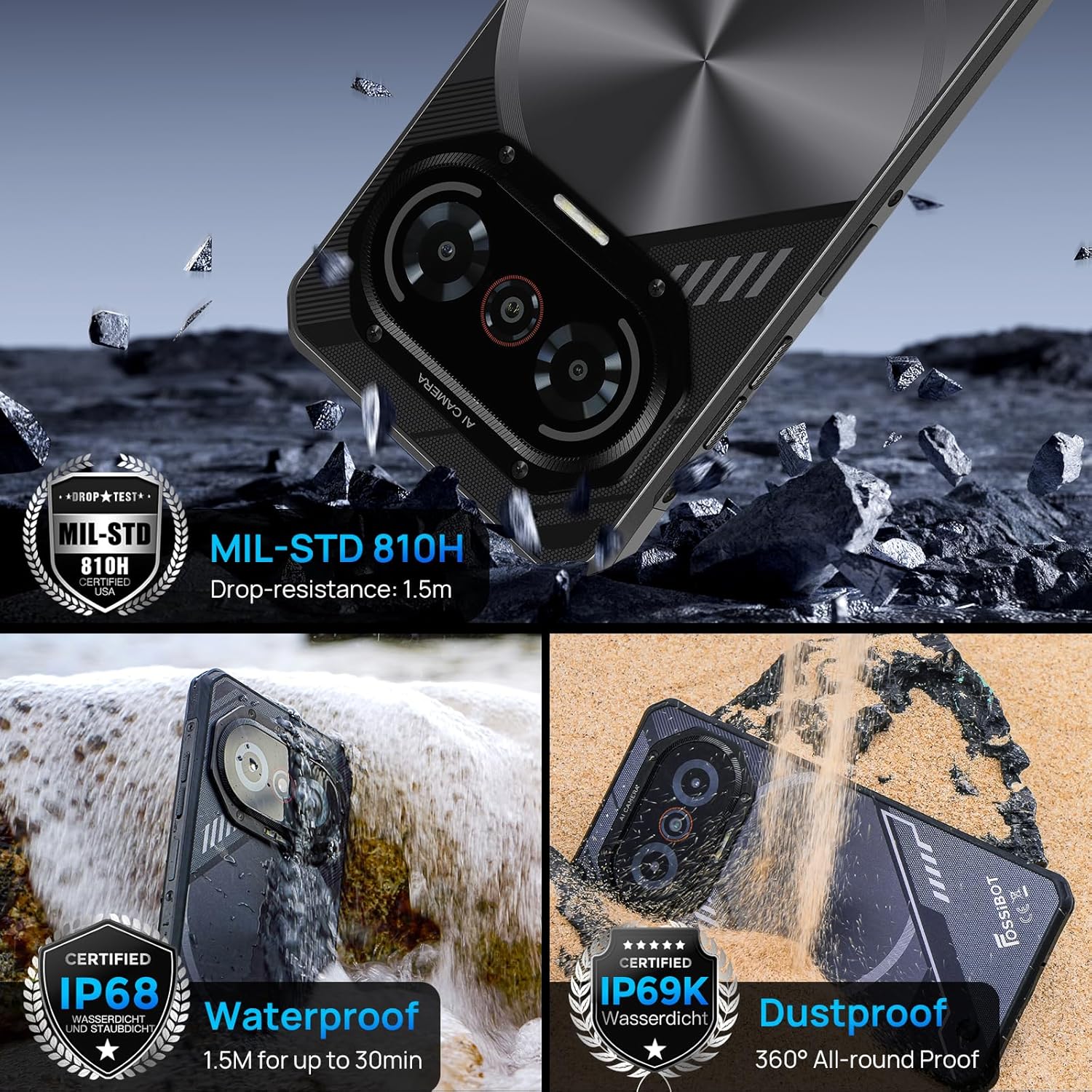
The F114 is certified with IP68/IP69K and MIL-STD-810H standards, making it waterproof, dustproof, and drop-resistant. It is built to withstand harsh outdoor conditions.
3.6. Operativni sistem
The smartphone runs on the latest Android 15 operating system, offering enhanced privacy features, faster app launches, and improved multitasking capabilities.

3.7. Povezivanje i ostale funkcije
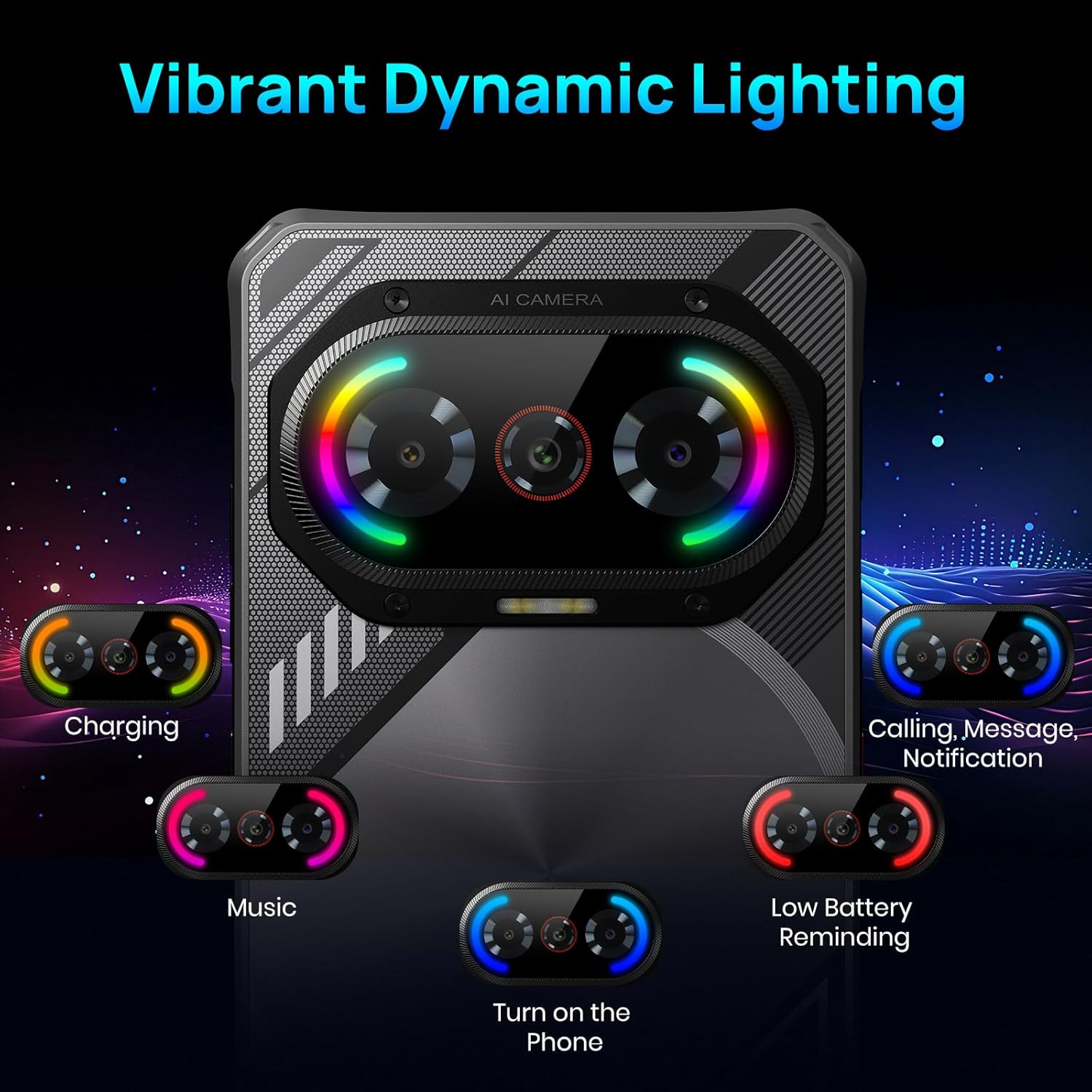
The F114 supports dual 4G SIM cards and includes comprehensive navigation systems (GPS, GLONASS, Galileo, Beidou, QZSS). It also features NFC for contactless payments and data transfer. The device incorporates a dynamic lighting effect on the rear for notifications and charging status.
4. Početno podešavanje
4.1. Instalacija SIM kartice i SD kartice
- Pronađite ladicu za SIM karticu sa strane telefona.
- Insert the provided SIM card pin into the small hole next to the tray to eject it.
- Place your Nano SIM card(s) and/or a microSD card (up to 2TB) into the tray, ensuring correct orientation.
- Pažljivo vratite ladicu u telefon.
4.2. Uključivanje / isključivanje napajanja
- Za uključivanje: Press and hold the Power button (usually on the right side) until the FOSSIBOT logo appears.
- Za isključivanje: Pritisnite i držite dugme za napajanje, a zatim odaberite "Isključivanje" iz opcija na ekranu.
- Ponovno pokretanje: Pritisnite i držite dugme za napajanje, a zatim odaberite "Ponovno pokretanje" iz ponuđenih opcija.
5. Osnovni rad
5.1. Navigacija po ekranu
- Dodirnite: Dodirnite ikonu ili opciju da biste je odabrali.
- Prevucite: Prevucite prstom preko ekrana da biste se pomicali ili kretali između ekrana.
- štipanje: Koristite dva prsta za zumiranje ili smanjivanje slika i web stranice.
5.2. Obavještenja i brze postavke
- Obavještenja: Prevucite nadole od vrha ekrana do view obavještenja.
- Brze postavke: Swipe down again from the notification panel to access quick settings for Wi-Fi, Bluetooth, brightness, etc.
6. Rad kamere
The FOSSIBOT F114's camera app offers various modes to enhance your photography:
- Foto mod: Standardni način rada za svakodnevne fotografije.
- Portretni način: Stvara efekat dubine polja, zamućujući pozadinu.
- Profesionalni način rada: Allows manual control over settings like ISO, white balance, and exposure.
- Noćni način rada: Optimizes settings for low-light conditions.
- HDR: High Dynamic Range for balanced exposure in high-contrast scenes.
- Makro način rada: For extreme close-up photography using the 2MP macro lens.
- Podvodni način rada: Special mode for capturing photos and videos while submerged.
To take a photo, open the Camera app and tap the shutter button. To switch between modes, swipe left or right on the mode selector above the shutter button.
7. Posebne karakteristike
7.1. Dynamic Lighting Effects
The FOSSIBOT F114 features customizable dynamic lighting on the rear panel. These lights can indicate various statuses:
- Status punjenja: Different light patterns/colors for charging levels.
- Incoming Calls/Messages: Visual alerts for new communications.
- Muzički ritam: Lights can synchronize with music playback.
- Podsjetnik na nisku bateriju: A distinct light pattern to indicate low power.
You can configure these lighting effects in the device settings under 'Radiant and agile' or similar menu options, allowing you to choose different rhythm modes like Joyful Movement, Bidirectional streaming light, Musical Pulse, and Rhythmic Pursuit.
Video: A demonstration of the FOSSIBOT F114's various features, including its display, processor, camera capabilities, dynamic mood lights, and fast charging.
7.2. NFC (Komunikacija bliskog polja)
NFC allows for quick, short-range wireless communication. Use it for:
- Beskontaktno plaćanje: Make payments at compatible terminals using Google Pay.
- Prijenos podataka: Dijeli files, photos, and contacts with other NFC-enabled devices.
To enable NFC, go to Settings > Connected devices > Connection preferences > NFC.
7.3. GPS i navigacija
The FOSSIBOT F114 supports multiple global navigation satellite systems (GPS, GLONASS, Galileo, Beidou, QZSS) for accurate location tracking and navigation, ideal for outdoor activities.
8. Održavanje
- čišćenje: Koristite meku, damp cloth to clean the device. Avoid harsh chemicals.
- Izloženost vodi: While waterproof, ensure all ports are securely closed before exposing the phone to water. After water exposure, dry the phone thoroughly before charging.
- Ažuriranja softvera: Redovno provjeravajte i instalirajte ažuriranja softvera kako biste osigurali optimalne performanse i sigurnost.
- Održavanje baterije: Izbjegavajte ekstremne temperature. Nemojte često potpuno prazniti bateriju.
9. Otkrivanje problema
9.1. Uređaj se ne uključuje
- Provjerite je li baterija napunjena. Povežite telefon s punjačem najmanje 30 minuta.
- Pritisnite i držite dugme za napajanje 10-15 sekundi da biste prisilno ponovo pokrenuli računar.
9.2. Loša mrežna veza
- Provjerite je li vaša SIM kartica pravilno umetnuta.
- Verify that your carrier is supported (Note: AT&T, CRICKET, and Verizon are not supported).
- Ponovo pokrenite telefon.
- Idite u Postavke > Mreža i internet > Mobilna mreža i provjerite jesu li mobilni podaci omogućeni.
9.3. Rušenje ili zamrzavanje aplikacija
- Obrišite keš memoriju problematične aplikacije (Postavke > Aplikacije > [Naziv aplikacije] > Pohrana i keš memorija > Obriši keš memoriju).
- Ažurirajte aplikaciju na najnoviju verziju iz Google Play trgovine.
- Ako problem i dalje postoji, deinstalirajte i ponovo instalirajte aplikaciju.
9.4. Brzo pražnjenje baterije
- Smanjite svjetlinu ekrana.
- Zatvorite nekorištene aplikacije koje rade u pozadini.
- Isključite Wi-Fi, Bluetooth i GPS kada ih ne koristite.
- Provjerite potrošnju baterije u Postavkama > Baterija kako biste identificirali aplikacije koje troše mnogo energije.
10. Specifikacije
| Feature | Specifikacija |
|---|---|
| Brand | FOSSIBOT |
| Naziv modela | F114FT128 |
| Operativni sistem | Android 15 |
| Veličina instalirane RAM memorije | 16 GB |
| Kapacitet memorije | 128 GB (Expandable to 2 TB via SD card) |
| Veličina ekrana | 6.67 inča |
| Rezolucija | 720 x 1600 |
| Refresh Rate | 60 Hz |
| Cellular Technology | 4G |
| Wireless Carrier | Unlocked (AT&T, CRICKET, and Verizon not supported) |
| Broj utora za SIM kartice | Dual SIM |
| Tip konektora | USB tip C |
| Nivo vodootpornosti | Waterproof (IP68/IP69K) |
| Front Photo Sensor Resolution | 8 MP |
| Rear Facing Camera Photo Sensor Resolution | 50 MP (Main) |
| Number of Rear Facing Cameras | 2 (50MP Main + 2MP Macro) |
| Kapacitet baterije | 5000 Milliamp Sati |
| Prosječni vijek trajanja baterije | 5 days (Standby) |
| Rezolucija video snimanja | 1080p pri 30 fps |
| GPS Geotagging Functionality | Istina |
11. Garancija i podrška
FOSSIBOT offers comprehensive support for your F114 smartphone:
- garancija: A 1-year long-term warranty is provided.
- Povratak: A 30-day free return guarantee is available.
- Služba za korisnike: Year-round customer support and 24-hour online customer service are provided to assist with any issues.
For further assistance, please refer to the contact information provided with your product documentation or visit the official FOSSIBOT website.