
1. Važna sigurnosna uputstva
Please read all instructions carefully before using the fan and retain this manual for future reference. Failure to follow these instructions may result in electric shock, fire, or serious personal injury.
- Osigurajte napajanje voltage odgovara naljepnici s nazivnim vrijednostima na ventilatoru.
- Do not operate the fan with a damaged cord or plug. Contact authorized service personnel for repair.
- Keep fingers and other objects away from the fan blades and guards during operation.
- Ne uranjajte ventilator, kabel ili utikač u vodu ili druge tekućine.
- Isključite ventilator iz električne utičnice prije čišćenja ili bilo kakvog održavanja.
- Ovaj uređaj nije namijenjen za upotrebu od strane osoba (uključujući djecu) sa smanjenim fizičkim, senzornim ili mentalnim sposobnostima, ili nedostatkom iskustva i znanja, osim ako im je dat nadzor ili upute o korištenju uređaja od strane osobe odgovorne za njihovu sigurnost.
- Djeca trebaju biti pod nadzorom kako bi se osiguralo da se ne igraju s uređajem.
- Do not use the fan near curtains, drapes, or other objects that could be drawn into the fan.
- Postavite ventilator na stabilnu, ravnu površinu kako biste spriječili njegovo prevrtanje.
2. Proizvod je gotovview
The SONA SFS 9068DC is a remote-controlled DC dual-bladed high velocity fan designed for efficient air circulation. It features a brushless DC motor, dual fan blades for enhanced wind delivery, 3D oscillation, and smart memory functions.

Slika 2.1: Gotovoview of the SONA SFS 9068DC fan highlighting its core features including 32W power, brushless DC motor, dual-bladed design, and up to 20m wind delivery.
3. Sadržaj paketa
Before assembly, please check that all items listed below are present in the package:
- Sklop glave ventilatora
- Pedestal Stand (Upper and Lower sections)
- Osnovna ploča
- Daljinski upravljač
- Korisnički priručnik (ovaj dokument)
4. Postavljanje i montaža
Follow these steps to assemble your SONA SFS 9068DC fan:
- Attach the Pedestal Stand to the Base: Securely connect the lower section of the pedestal stand to the base plate. Ensure it is stable and tightened.
- Connect Upper Pedestal Section: Insert the upper section of the pedestal stand into the lower section. Adjust the height as desired and secure it.
- Montirajte glavu ventilatora: Carefully place the fan head assembly onto the top of the upper pedestal section. Ensure it clicks into place or is securely fastened according to the design.
- Priključite napajanje: Uključite kabl za napajanje u odgovarajuću električnu utičnicu.
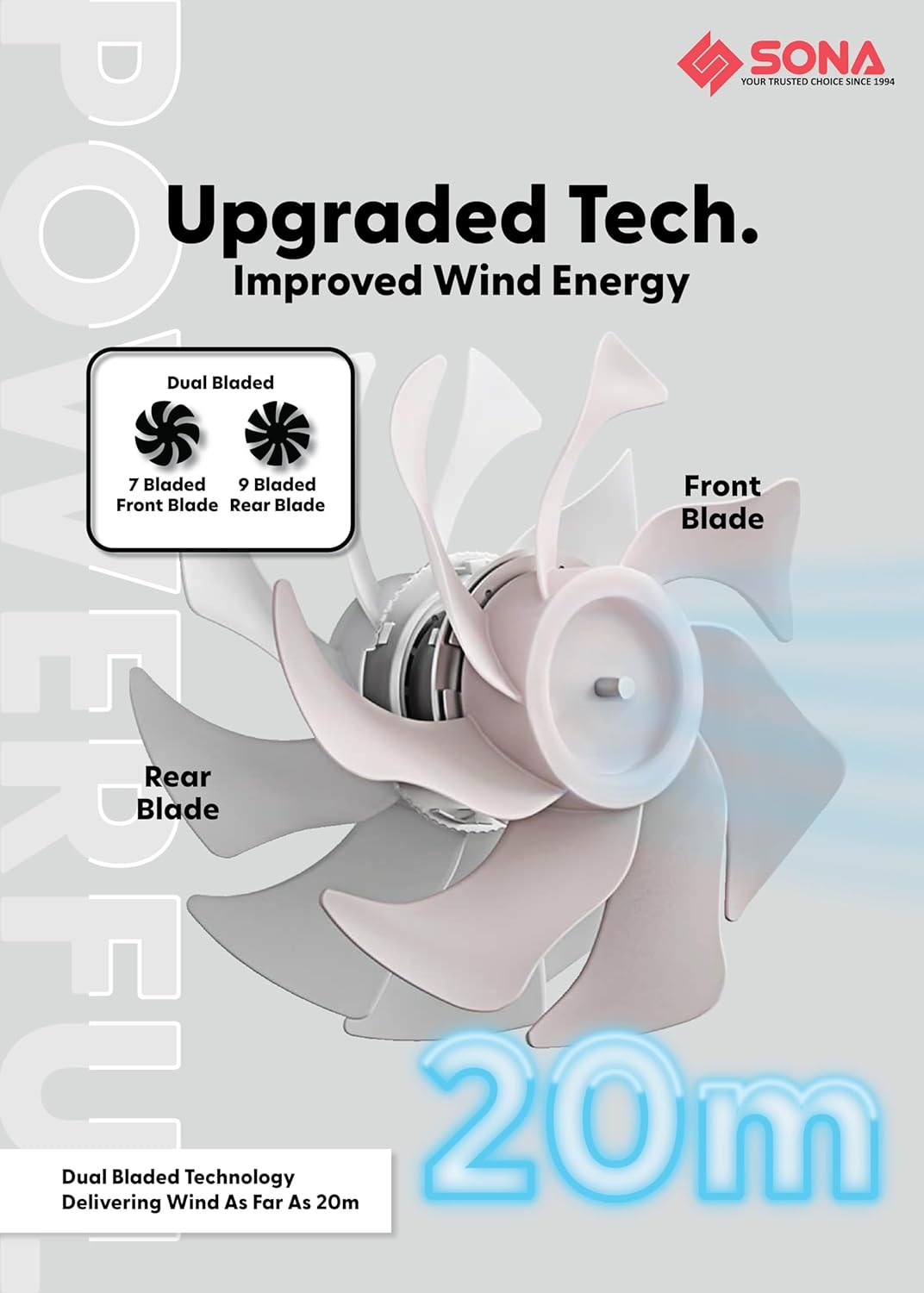
Figure 4.1: Illustration of the dual-bladed design, featuring a 7-bladed front fan and a 9-bladed rear fan, which contributes to improved wind energy and extended wind delivery.

Figure 4.2: Detail of the brushless DC motor, highlighting its role in providing powerful airflow with 32W power consumption and contributing to the fan's longevity.
5. Uputstvo za upotrebu
Ventilator se može upravljati pomoću kontrolne ploče na uređaju ili priloženog daljinskog upravljača.
5.1 Kontrolna ploča i funkcije daljinskog upravljača
- Dugme za napajanje: Uključuje/isključuje ventilator.
- Podešavanje brzine: Cycle through 9 wind speeds.
- Dugme za oscilovanje: Activates/deactivates 3D oscillation (up-down and left-right).
- Dugme za tajmer: Sets the operating timer for up to 9 hours.
- ECO-Saving Function: Activates the energy-saving mode, which can operate for up to 15 hours.
- Funkcija pametne memorije: The fan remembers your last used settings (speed, oscillation, mode) when turned off and resumes them upon restart.
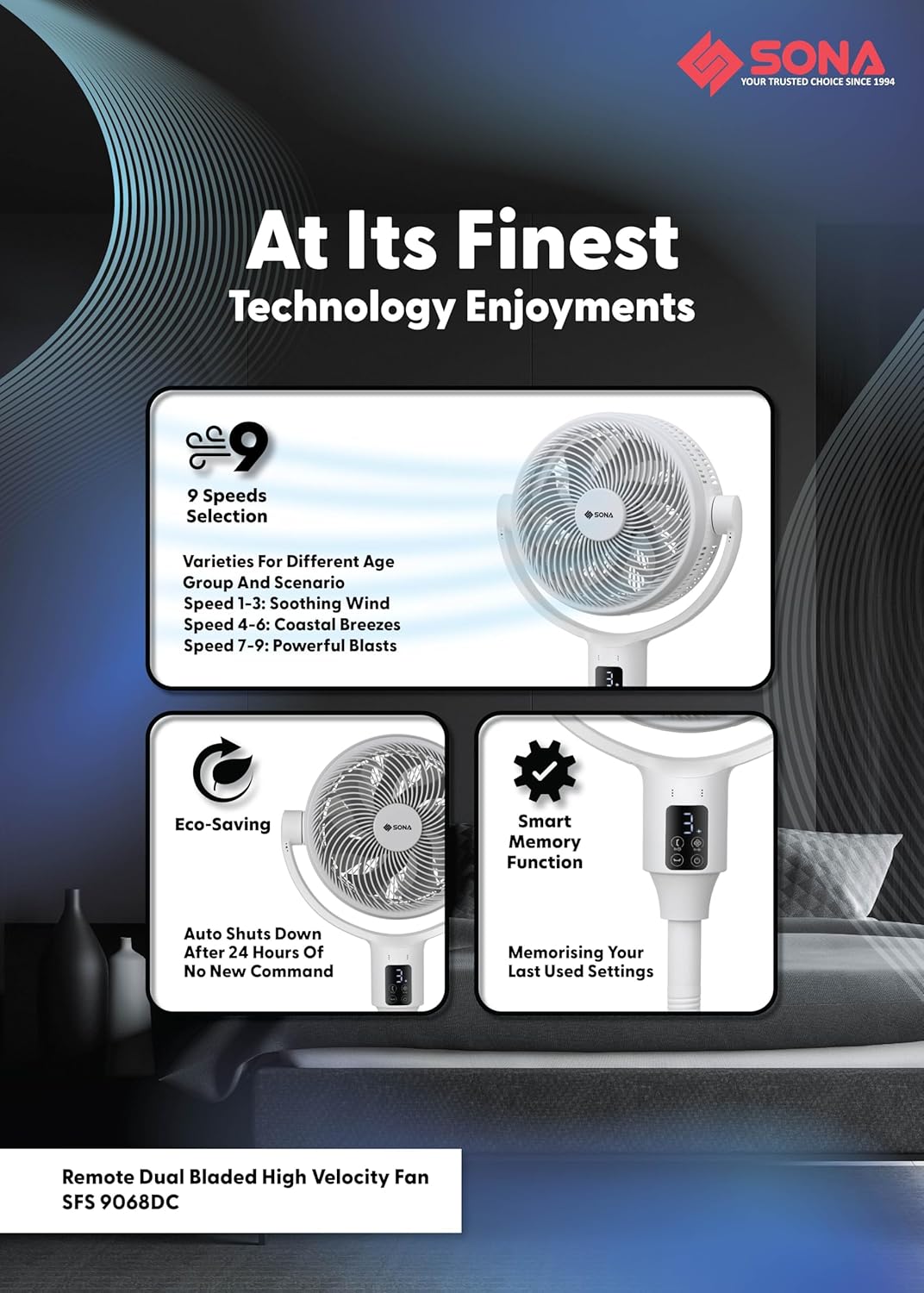
Slika 5.1: Gotovoview of the fan's operational features, including 9 speed settings (1-3 soothing, 4-6 coastal breezes, 7-9 powerful blasts), Eco-Saving mode, and Smart Memory function.
6. Objašnjenje karakteristika
6.1 Dual Bladed Technology
The fan incorporates a unique dual-bladed design with a 7-bladed front fan and a 9-bladed rear fan. This configuration works synergistically to generate a powerful and consistent airflow, delivering wind up to 20 meters.
6.2 DC motor bez četkica
Equipped with a premium brushless DC motor, the fan operates efficiently at 32W, providing strong wind output while ensuring a longer lifespan and quieter operation compared to traditional motors.
6.3 3D Oscillation and Height Adjustment
The fan offers 3D oscillation, allowing it to move both horizontally (left-right) and vertically (up-down) to distribute air across a wider area. It also features 2-in-1 height adjustments, enabling use as both a floor fan (lowest 63 cm) and a pedestal fan (highest 111 cm).
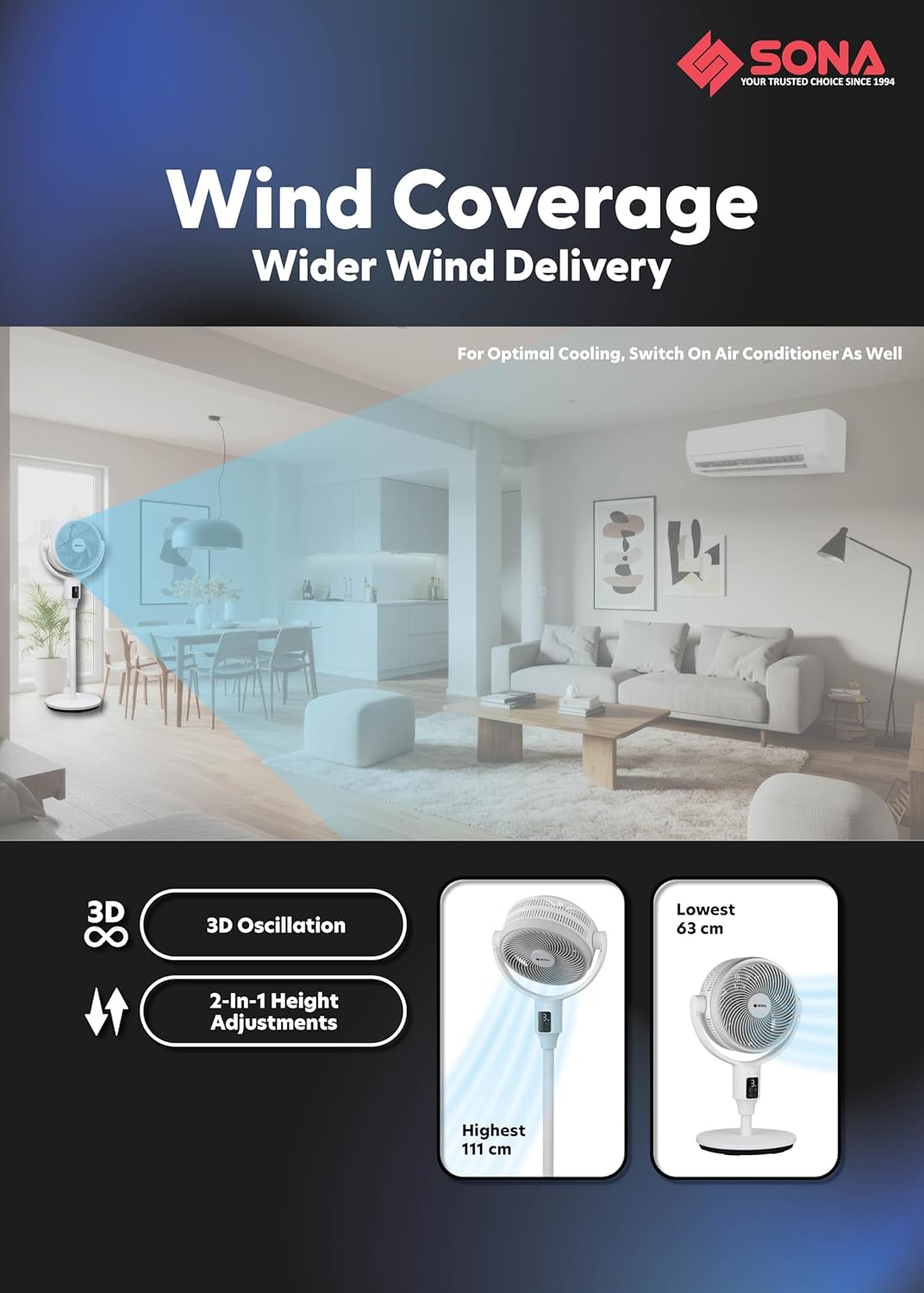
Figure 6.1: Visual representation of the fan's 3D oscillation capability and its adjustable height settings, ranging from 63 cm to 111 cm.
6.4 Anti-Drag Technology
This feature maximizes the drawing of air from the back of the fan and minimizes air loss as air travels from the back to the front. The unique shape and curving of the rear guard and rear fan blade are designed to maximize air intake. The unmovable middle fan blade pushes drawn air further without dispersing it, and the front fan blade's purpose is to deliver wind distance, with its curved edges on the front fan guard designed to push wind forward.
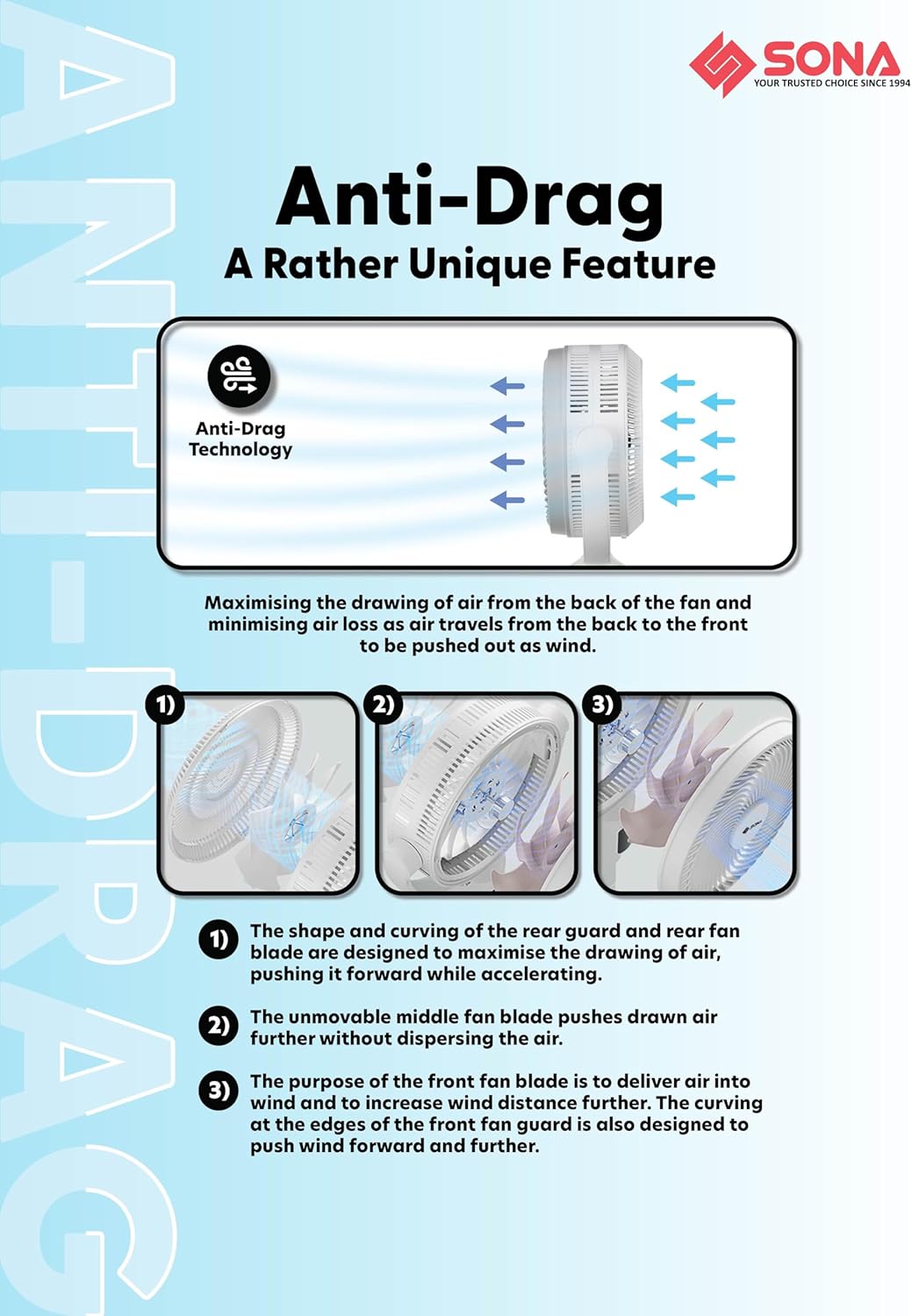
Figure 6.2: Detailed explanation of the Anti-Drag Technology, illustrating the airflow path and the roles of the fan components in maximizing wind delivery.
7. Održavanje i čišćenje
Redovno čišćenje osigurava optimalne performanse i produžava vijek trajanja vašeg ventilatora. Uvijek isključite ventilator iz struje prije čišćenja.
- Eksterijerno čišćenje: Obrišite vanjske površine ventilatora mekom,amp tkanina. Nemojte koristiti abrazivna sredstva za čišćenje ili rastvarače.
- Čišćenje oštrice: The front and rear guards are dismantlable for easy access to the fan blades. Carefully remove the front guard, then the fan blades. Wipe the blades with a soft, damp cloth to remove dust and debris. Ensure blades are completely dry before reassembly.
- Čišćenje zaštitnih štitnika: The fan features anti-rusting plastic front and rear guards. Clean them with a damp tkanina.
- Skladištenje: Kada se ventilator ne koristi duži period, čuvajte ga na hladnom i suhom mjestu, po mogućnosti u originalnom pakovanju.
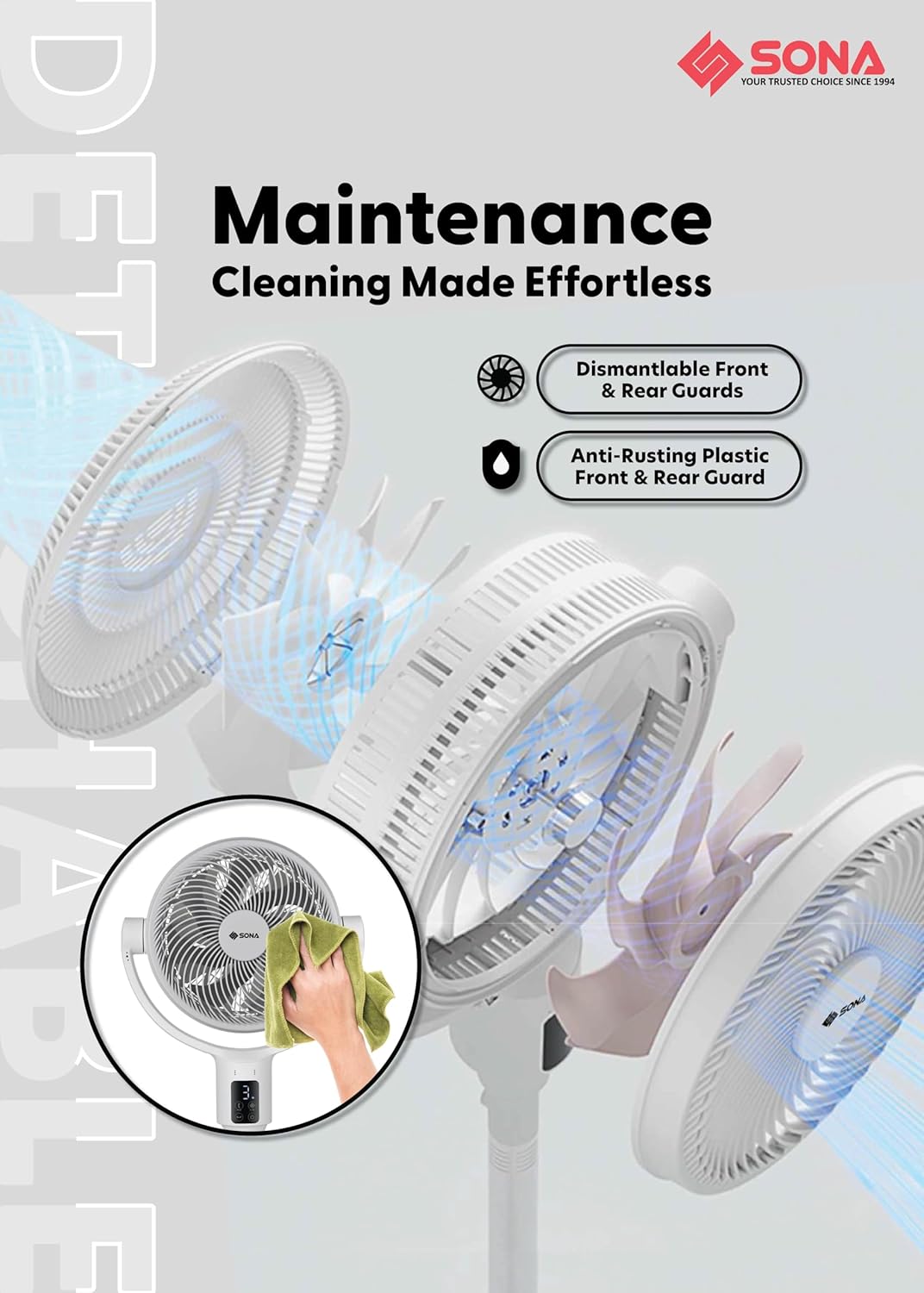
Figure 7.1: Visual guide for fan maintenance, demonstrating the ease of dismantling guards for cleaning and highlighting the anti-rusting material.
8. Otkrivanje problema
If you encounter any issues with your fan, please refer to the table below for common problems and solutions.
| Problem | Mogući uzrok | Rješenje |
|---|---|---|
| Ventilator se ne uključuje | Nema napajanja Dugme za napajanje nije pritisnuto | Check if the power cord is securely plugged in. Ensure the power outlet is functional. Press the power button on the unit or remote. |
| Slab protok vazduha | Lopatice ventilatora su prljave Fan speed is too low | Unplug the fan and clean the fan blades and guards (refer to Maintenance section). Increase the fan speed setting. |
| Ventilator proizvodi neobičan zvuk | Labavi dijelovi Zapreka u lopaticama ventilatora | Unplug the fan and check for any loose components or foreign objects obstructing the blades. Ensure the fan is on a stable surface. |
| Daljinski upravljač ne radi | Istrošene baterije Prepreka između daljinskog upravljača i ventilatora | Replace the batteries in the remote control. Ensure there is a clear line of sight between the remote and the fan's receiver. |
| Oscilacija ne radi | Funkcija oscilacije nije aktivirana | Press the oscillation button on the unit or remote to activate the feature. |
9. Specifikacije
| Feature | Specifikacija |
|---|---|
| Broj modela | SFS 9068DC |
| Power Input | 100-240V~ 50/60Hz |
| Potrošnja energije | 32W |
| Tip motora | DC motor bez četkica |
| Broj brzina | 9 |
| Tajmer | Do 9 sati |
| Oscilacija | Up-Down and Left-Right 3D Oscillation |
| Ventilatorske lopatice | 7 Bladed Front Fan Blade, 9 Bladed Rear Fan Blade |
| Wind Delivery | Do 20m |
| Posebne karakteristike | Smart Memory Function, ECO-Saving Function (15Hrs), Remote Control, Anti-Drag Technology |
| Podešavanje visine | 2-in-1 (Lowest 63 cm, Highest 111 cm) |
| Materijal | Plastika |
| Boja | Bijelo |
10. Informacije o garanciji
The SONA SFS 9068DC fan comes with a 3-godišnja garancija na motor from the date of purchase. This warranty covers manufacturing defects under normal use. Please retain your proof of purchase for warranty claims. The warranty does not cover damage caused by misuse, accident, unauthorized repair, or normal wear and tear.
11. Korisnička podrška
For further assistance, troubleshooting, or warranty inquiries, please contact Sona customer support:
- Webstranica: Visit the official Sona webstranica za resurse podrške.
- Email: Pogledajte pakovanje proizvoda ili službene webstranica za e-poštu korisničke službe.
- Telefon: Pogledajte pakovanje proizvoda ili službene webstranica za brojeve telefona korisničke službe.
Please have your model number (SFS 9068DC) and proof of purchase ready when contacting support.