
Uvod
The GoveeLife Smart Air Quality Monitor (Model H5140) is designed to provide real-time monitoring of indoor air quality. It accurately measures Carbon Dioxide (CO2) levels, temperature, and humidity, offering valuable insights into your environment. This device helps you maintain a healthy and comfortable living or working space by alerting you to changes in air quality.
Šta je u kutiji
Pažljivo raspakujte sadržaj i provjerite da li su svi predmeti prisutni:
- Smart CO2 Monitor x 1
- Power Cord (2m/6.5ft) x 1
- Adapter za napajanje x 1
- Korisnički priručnik x 1

Image: Contents of the GoveeLife Smart Air Quality Monitor package.
Setup
- Priključak za napajanje: Connect the provided Type-C cable to the monitor and plug the power adapter into a standard wall outlet. The device will power on automatically.
- Preuzimanje aplikacije: Preuzmite aplikaciju Govee Home iz trgovine aplikacija za vaš pametni telefon (dostupna za iOS i Android).
- Uparivanje uređaja: Open the Govee Home app, create an account or log in, and follow the on-screen instructions to add your Smart Air Quality Monitor. Ensure your Wi-Fi network is 2.4GHz, as the device only supports this frequency.
- plasman: Place the monitor in a central location within the room you wish to monitor, away from direct airflow, windows, or heat sources for accurate readings.
Uputstvo za upotrebu
Prikaz u realnom vremenu
The monitor features a clear LED digital tube display that shows four essential metrics simultaneously:
- CO2 Value: Displays the current Carbon Dioxide concentration in Parts Per Million (PPM).
- temperatura: Shows the ambient temperature in degrees Fahrenheit (°F) or Celsius (°C).
- Vlažnost: Indicates the relative humidity (%RH).
- Sat u stvarnom vremenu: Displays the current time (requires connection to the Govee Home app for synchronization).
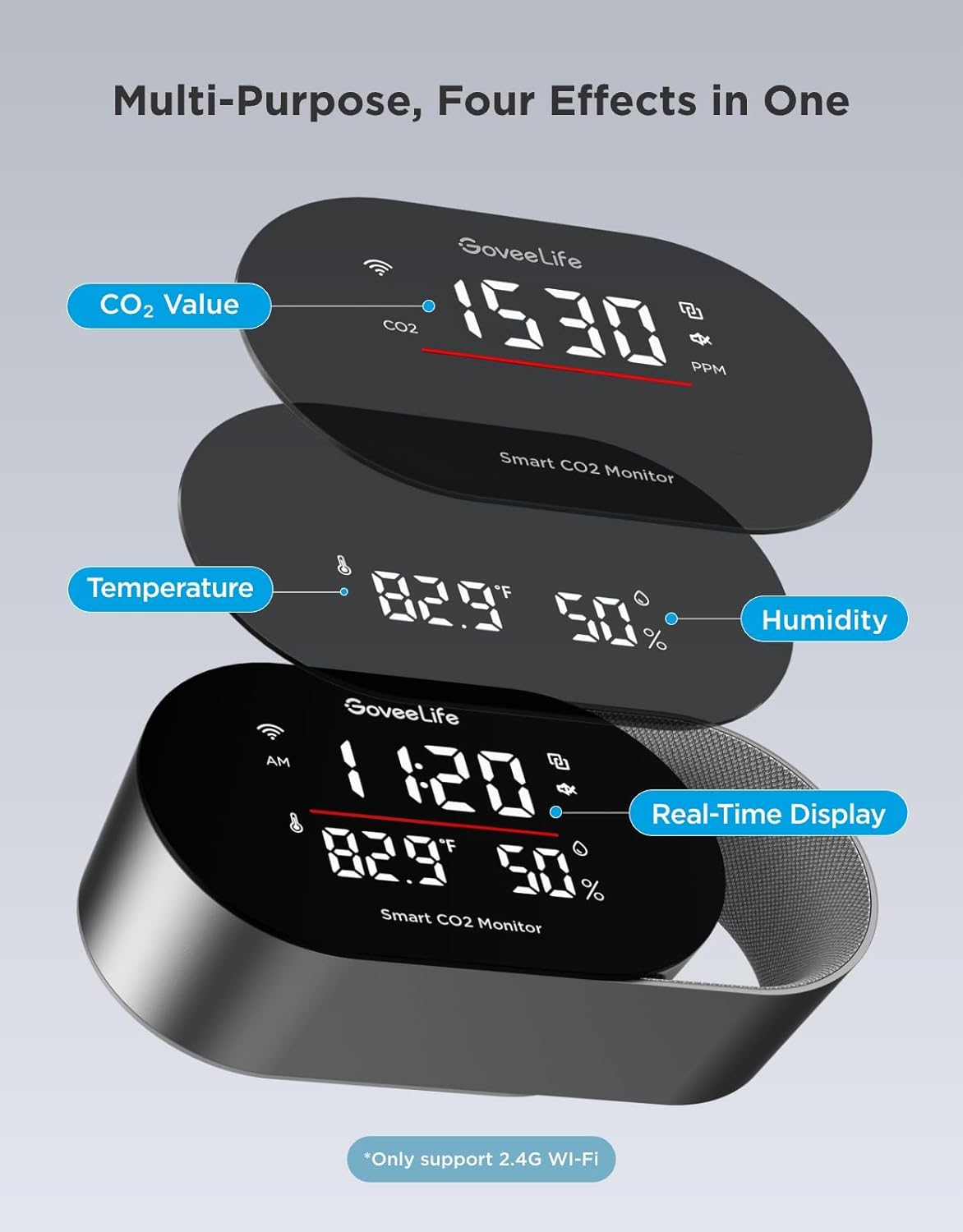
Image: Multi-purpose display showing CO2, temperature, humidity, and time.
Understanding CO2 Levels
The monitor provides an intuitive display of CO2 levels, often accompanied by a color-coded light bar for quick assessment:
- Dobro (Zeleno): 400-1000 PPM. Indicates healthy air quality.
- Umjereno (žuto): 1000-1400 PPM. Suggests ventilation may be beneficial.
- Poor (Red): >1400 PPM. Indicates high CO2 levels, requiring immediate ventilation.
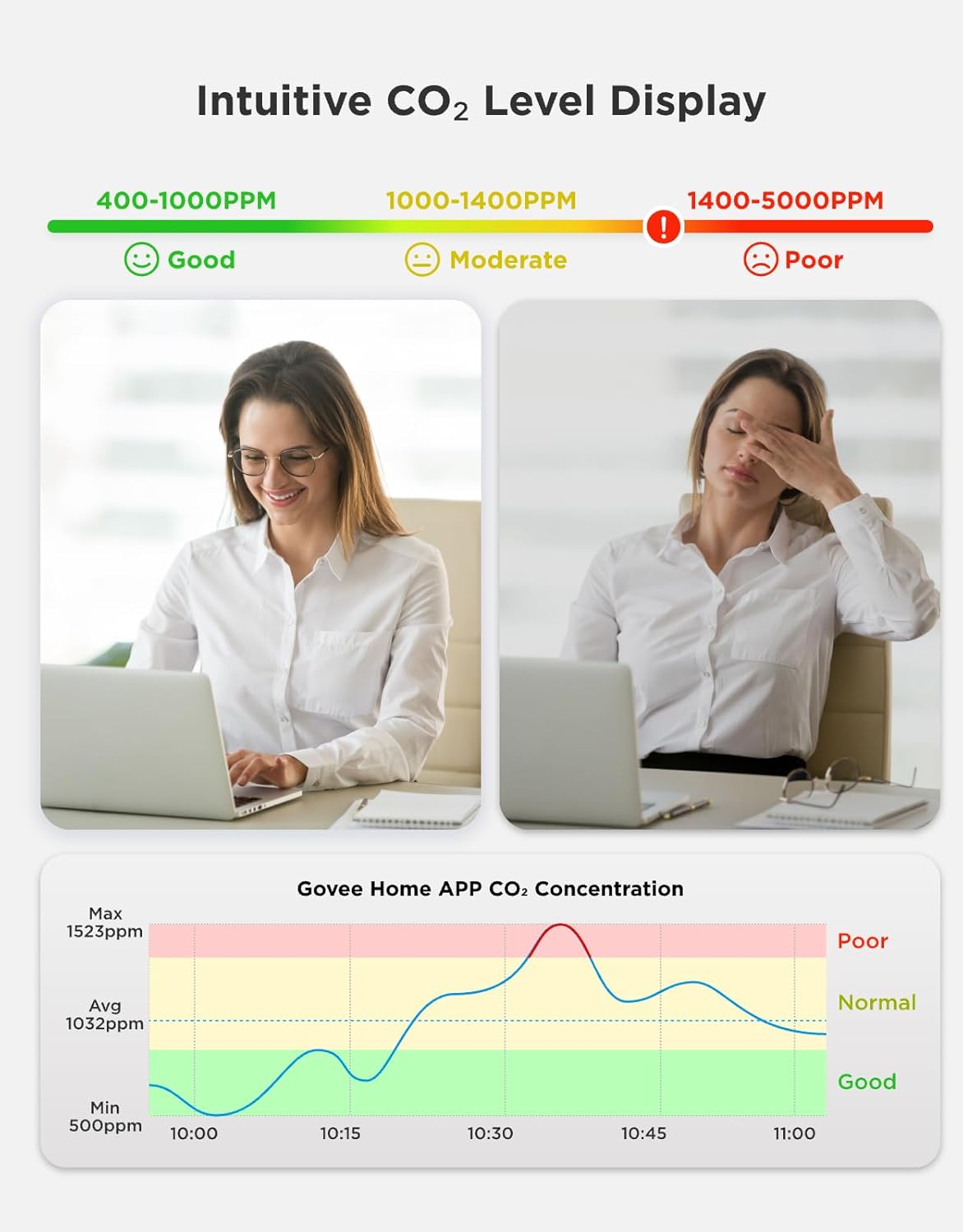
Image: Intuitive CO2 level display with good, moderate, and poor ranges.

Image: 3-Color Indicator Bar for CO2 levels.
Triple Alert System
The monitor provides comprehensive alerts when CO2 levels, temperature, or humidity exceed user-defined thresholds:
- Buzzer Alert: The device emits an audible alarm, and the screen flashes.
- Obavještenja aplikacije: Instant alerts are sent to your smartphone via the Govee Home app.
- Email Reports: Detailed reports can be sent to your email address.

Image: Three types of alarms for different scenarios.
Prilagodljivi LED ekran
Adjust the display settings to suit your preferences and environment:
- Programmable Screen: Customize what information is displayed on the screen via the Govee Home app.
- Podešavanje svjetline: Set custom day/night schedules for automatic brightness adjustment, ensuring clear visibility during the day and preventing light disturbance at night.

Image: LED digital tube display with customizable settings.
Data Tracking & Export
Monitor historical air quality data and export reports for analysis:
- Istorijski podaci: Track up to 20 days of data within the Govee Home app and access up to two years of cloud historical data.
- CSV Export: Export professional CSV reports for detailed analysis, useful for health consultations or optimizing energy efficiency.
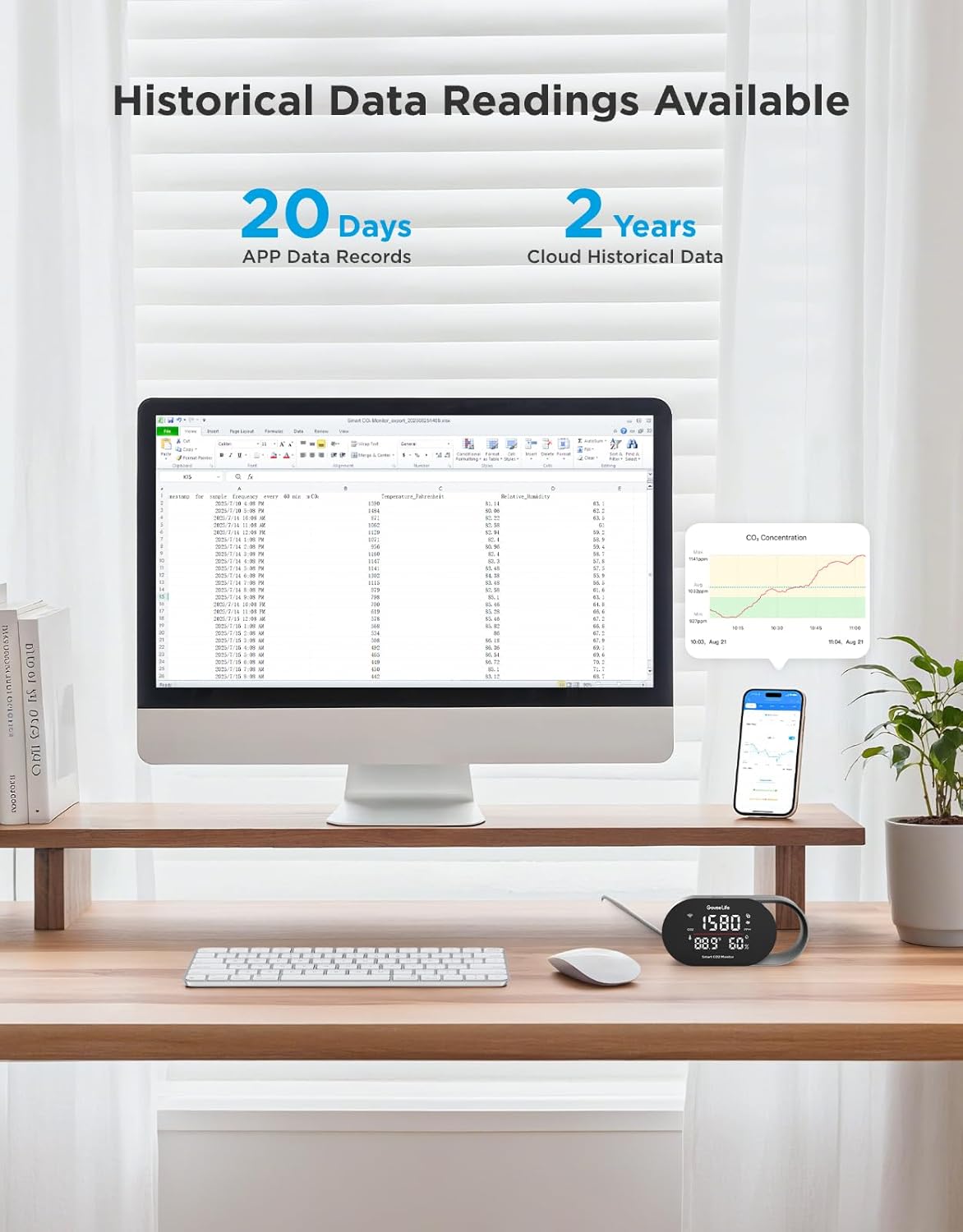
Image: Historical data readings available in app and for export.
Integracija pametnog doma
Integrate your monitor with smart home ecosystems for enhanced control:
- upravljanje glasom: Query CO2 concentration using voice commands through Amazon Alexa or Google Assistant.
- Ecological Linkage: Connect with compatible smart humidifiers and tower fans to enable automatic adjustments based on air quality readings, transforming passive monitoring into active environmental management.
Specifikacije
Key technical specifications for the GoveeLife Smart Air Quality Monitor:
| Feature | Specifikacija |
|---|---|
| Broj modela | H5140 |
| CO2 Reading Accuracy | ±(40 ppm + 5%) |
| CO2 Refresh Rate | 5 sekundi |
| Preciznost temperature | ±0.54°F |
| Preciznost vlažnosti | ±3% |
| Veličina ekrana | 4.82 inča |
| Povezivanje | 2.4GHz Wi-Fi |
| Materijal | PC+ABS |
| Boja | Crna |
| Dimenzije proizvoda | 14.2 x 6.81 x 7.59 cm |
| Težina artikla | 150 g |
| Kompatibilni uređaji | Humidifier, Tower fan (via smart home integration) |

Image: Accuracy and high-speed performance specifications.
Održavanje
To ensure optimal performance and longevity of your GoveeLife Smart Air Quality Monitor, follow these maintenance guidelines:
- čišćenje: Gently wipe the device with a soft, dry cloth. Do not use liquid cleaners or abrasive materials, as they may damage the sensors or display.
- plasman: Avoid placing the monitor in areas with extreme temperatures, high humidity, or direct sunlight. Keep it away from sources of strong vibrations or electromagnetic interference.
- ventilacija: Ensure the sensor vents are not obstructed to allow for accurate air sampling.
Rješavanje problema
If you encounter issues with your GoveeLife Smart Air Quality Monitor, refer to the following common solutions:
- Uređaj se ne uključuje: Ensure the power cable is securely connected to both the monitor and a working power outlet. Try a different outlet or power adapter if available.
- Netačna očitavanja: Verify the monitor is placed in an appropriate location, away from direct airflow, vents, or heat sources. Allow the device to stabilize for at least 10-15 minutes after initial power-on or relocation.
- Problemi s vezom aplikacije: Ensure your smartphone's Bluetooth is enabled and the monitor is within range. Confirm your Wi-Fi network is 2.4GHz. Restart both the monitor and your smartphone, then try pairing again through the Govee Home app.
- Nema upozorenja: Check the alert settings within the Govee Home app to ensure thresholds are correctly set and notifications are enabled.
- Displej ne radi: If the display is blank or unresponsive, try restarting the device by unplugging and re-plugging the power cable. If the issue persists, contact customer support.
Garancija i podrška
GoveeLife products are designed for reliability and performance. For warranty information, technical support, or any questions not covered in this manual, please visit the official GoveeLife webweb-mjesto ili kontaktirajte njihov tim za korisničku podršku. Sačuvajte račun za kupovinu u slučaju reklamacije.
GoveeLife Official Webstranica: www.govee.com


