
Uvod
Thank you for choosing the GNCC 1080P Indoor Security Camera. This manual provides detailed instructions for setting up, operating, and maintaining your camera to ensure optimal performance and security for your home. This camera offers high-definition video, advanced detection features, and two-way audio communication.
Šta je u kutiji
Molimo Vas da provjerite sadržaj paketa. Ako bilo koji artikl nedostaje ili je oštećen, obratite se korisničkoj podršci.
- Indoor camera
- Adapter za napajanje
- Uputstvo za upotrebu
- Montažni vijak
- 2m kabl za napajanje
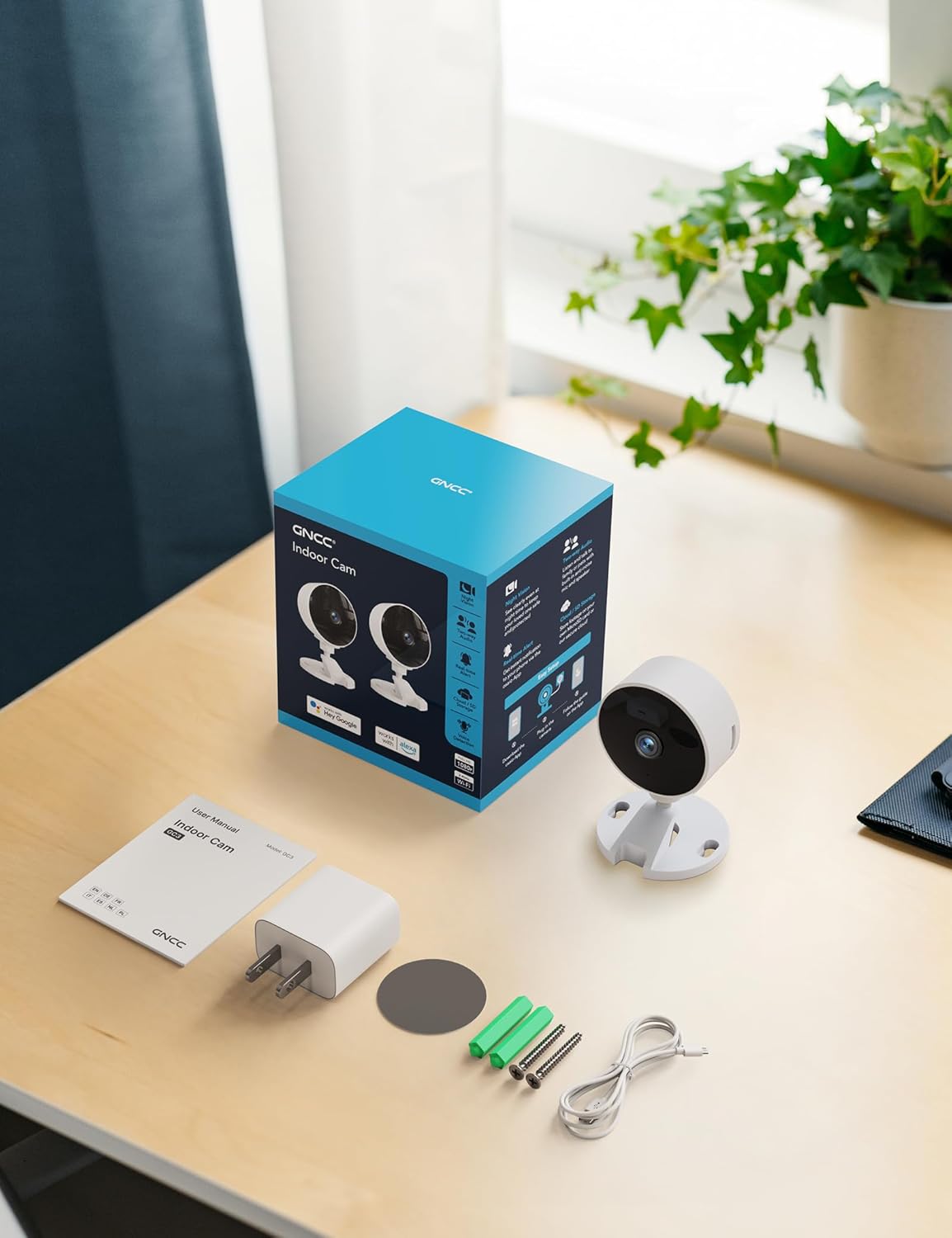
Image: All components included in the GNCC Indoor Camera package, neatly laid out on a wooden surface.
Karakteristike proizvoda
The GNCC Indoor Security Camera is equipped with several features designed to enhance your home security and monitoring experience:
- 1080P Full HD rezolucija: Provides clear and detailed video monitoring.
- 15m Night Vision: Built-in infrared LEDs enable clear vision up to 15 meters in low-light conditions.
- Smarter AI Detection: Advanced AI (subscription required) for identifying people, pets, vehicles, and packages, reducing false alerts.
- Fleksibilne opcije pohrane: Supports local recording with a 128GB Micro SD card (not included) and offers a 14-day free cloud storage trial.
- Jednostavno postavljanje: Can be installed quickly using 3M tape or included screws for wall mounting.
- Način privatnosti: One-tap privacy mode to disable the lens and LED for enhanced privacy.
- Dvosmjerni zvuk: Ugrađeni mikrofon i zvučnik za komunikaciju u realnom vremenu.
- Pametna integracija: Compatible with Alexa and Google Home for voice control.
- Porodično dijeljenje: Allows sharing access with up to 3 users.

Image: Visual representation of the camera's core functionalities, including HD resolution, night vision, and two-way audio.
Setup
1. Uključivanje
- Spojite priloženi adapter za napajanje na ulazni priključak za napajanje kamere.
- Uključite adapter za napajanje u standardnu električnu utičnicu.
- Kamera će se uključiti, a indikatorska lampica će prikazivati njen status.
2. Instalacija aplikacije i kreiranje računa
- Download the official GNCC app from your smartphone's app store (iOS App Store or Google Play Store).
- Otvorite aplikaciju i slijedite upute na ekranu da biste kreirali novi račun ili se prijavite ako ga već imate.
3. Dodavanje kamere u aplikaciju
- In the GNCC app, tap the "+" icon to add a new device.
- Select "Security Camera" or the specific model if prompted.
- Slijedite upute aplikacije da biste povezali kameru s Wi-Fi mrežom od 2.4 GHz. Note: This camera is not compatible with 5GHz Wi-Fi networks.
- You may be required to scan a QR code displayed on your phone with the camera lens or enter a code manually.
- Once connected, name your camera and assign it to a specific room or location.

Image: The GNCC camera alongside a smartphone showing the camera's live feed and app interface, demonstrating connectivity.
4. Opcije montaže
The camera offers flexible mounting options:
- Položaj stola: Simply place the camera on a flat surface like a shelf, table, or desk.
- Montaža na zid: Use the included 3M adhesive tape for a drill-free installation, or use the provided screws for a more permanent fixture. Ensure the mounting surface is clean and dry before applying adhesive.
Uputstvo za upotrebu
Uživo View i daljinsko praćenje
Once connected, you can access the live video feed from your camera anytime, anywhere, through the GNCC app.

Image: A smartphone screen showing the live feed from the GNCC camera, illustrating remote monitoring capabilities.
Dvosmjerni audio
The camera features a built-in microphone and speaker, allowing for two-way communication. Tap the microphone icon in the app to speak, and release to listen. This is ideal for communicating with family members or pets.

Image: A visual representation of the two-way audio feature, showing a child and a pet, with text bubbles indicating conversation.
Night Vision
The camera automatically switches to night vision mode in low-light conditions, providing clear black and white images up to 15 meters. This ensures continuous monitoring even in complete darkness.

Image: A baby sleeping in a crib, demonstrating the camera's clear night vision capabilities in a dark environment.
Detekcija pokreta i zvuka
The camera can detect motion and sound, sending instant alerts to your smartphone. With an optional AI subscription, the camera can differentiate between people, pets, vehicles, and packages, reducing false alarms. You can customize motion detection zones within the app.

Image: Children and a dog triggering motion and sound detection, with example alert notifications shown.
Opcije skladištenja
Your GNCC camera supports two primary storage methods for recorded footage:
- Micro SD kartica: Insert a Micro SD card (up to 128GB, not included) into the camera's slot for continuous local recording.
- Cloud Storage: A 14-day free trial of cloud storage is included. Cloud storage provides secure, off-site backup of your recordings, accessible from anywhere.

Image: The camera with visual cues for both SD card and cloud storage, highlighting flexible recording options.
Privacy Mode
To ensure privacy, the GNCC camera features a one-tap privacy mode within the app. Activating this mode will fully disable the camera lens and LED indicator, preventing any recording or live viewing.
Održavanje
- čišćenje: Za čišćenje objektiva i kućišta kamere koristite meku, suhu krpu. Izbjegavajte upotrebu tečnih sredstava za čišćenje ili abrazivnih materijala.
- Ažuriranja firmvera: Regularly check the GNCC app for firmware updates. Keeping your camera's firmware up-to-date ensures optimal performance, security, and access to new features.
- plasman: Osigurajte da je kamera postavljena na stabilno mjesto, dalje od direktne sunčeve svjetlosti, izvora topline i prekomjerne vlage.
Rješavanje problema
| Problem | Mogući uzrok / rješenje |
|---|---|
| Kamera se ne povezuje na Wi-Fi |
|
| No video feed / Offline status |
|
| Loš kvalitet videa |
|
| Motion/Sound alerts not received |
|
| Dvosmjerni zvuk ne radi |
|
Specifikacije
| Feature | Detalj |
|---|---|
| Naziv modela | GC3B-1P |
| Unutrašnja/vanjska upotreba | Indoor |
| Rezolucija video snimanja | 1080p full HD |
| Noćni vid | 15 metara |
| Tehnologija povezivanja | bežični (Wi-Fi) |
| Wi-Fi frekvencija | 2.4GHz (nije kompatibilno sa 5GHz) |
| Izvor napajanja | Corded Electric |
| Tip kontrolera | Amazon Alexa, Google Home |
| Vrsta montaže | Stolni nosač, zidni nosač |
| Opcije skladištenja | Micro SD kartica (do 128 GB, nije uključena), pohrana u oblaku |
| Dvosmjerni audio | Da |
| AI detekcija | Motion, Sound (AI features require subscription) |
| Dimenzije proizvoda | 2.56 x 2.76 x 3.54 inča |
| Težina artikla | 2.24 unce |
| Boja | Bijelo |
| Uključene komponente | Indoor camera, Power Adapter, Instruction Manual, Mounting Screw, 2m power cord |
Garancija i podrška
GNCC products are designed for reliability and performance. For specific warranty details, please refer to the warranty card included with your product or visit the official GNCC website.
If you encounter any issues or have questions regarding your GNCC 1080P Indoor Security Camera, please contact GNCC Customer Support through the following channels:
- Official GNCC Webstranica: Look for the "Support" or "Contact Us" section.
- Podrška putem e-pošte: Refer to the contact information provided in the GNCC app or on the product packaging.
- Podrška unutar aplikacije: Some issues can be resolved directly through the help section within the GNCC application.
Please have your product model (GC3B-1P) and purchase information ready when contacting support.