
Uvod
This manual provides essential information for setting up, operating, maintaining, and troubleshooting your NIMO 15.6-inch FHD Gaming Laptop, model Nimo N153. Please read this manual thoroughly before using your device to ensure proper function and longevity.

Image: The NIMO 15.6-inch FHD Gaming Laptop, showcasing njegovim elegantnim dizajnom.
Šta je u kutiji
Nakon raspakivanja, provjerite da li su prisutne sve dolje navedene stavke:
- 1 x Nimo N153 laptop
- 1 x brzi punjač tipa C 100W PD
- 1 x Korisnički priručnik (ovaj dokument)
- Windows 11 Home (unaprijed instaliran)
- Informacije o garanciji i povratu
Setup
1. Početno uključivanje i punjenje
Before first use, connect the laptop to the power adapter and a wall outlet. The Type-C 100W PD Fast Charger is designed for efficient charging. Allow the battery to charge sufficiently before disconnecting.

Image: The compact Type-C 100W PD Fast Charger included with the laptop.
2. Operating System Setup (Windows 11)
Upon first boot, follow the on-screen instructions to complete the Windows 11 Home setup. This includes selecting your region, language, connecting to a Wi-Fi network, and creating a user account.
3. Podešavanje čitača otiska prsta
For enhanced security, set up the integrated fingerprint reader. Navigate to Windows Settings > Accounts > Sign-in options and follow the prompts to register your fingerprint.

Image: Close-up of the laptop's keyboard, highlighting the fingerprint reader and backlit keys.
4. Povezivanje perifernih uređaja
Laptop ima razne portove za povezivanje eksternih uređaja:
- USB portovi: Connect USB devices such as mice, keyboards, and external storage.
- HDMI priključak: Povežite se s vanjskim monitorom ili TV-om za prošireni prikaz.
- Tip-C portovi: For data transfer, charging, and connecting compatible Type-C accessories.
- Utor za mikro SD karticu: Insert Micro SD cards for additional storage or data transfer.
- Priključak za slušalice: Povežite slušalice ili spoljne zvučnike.
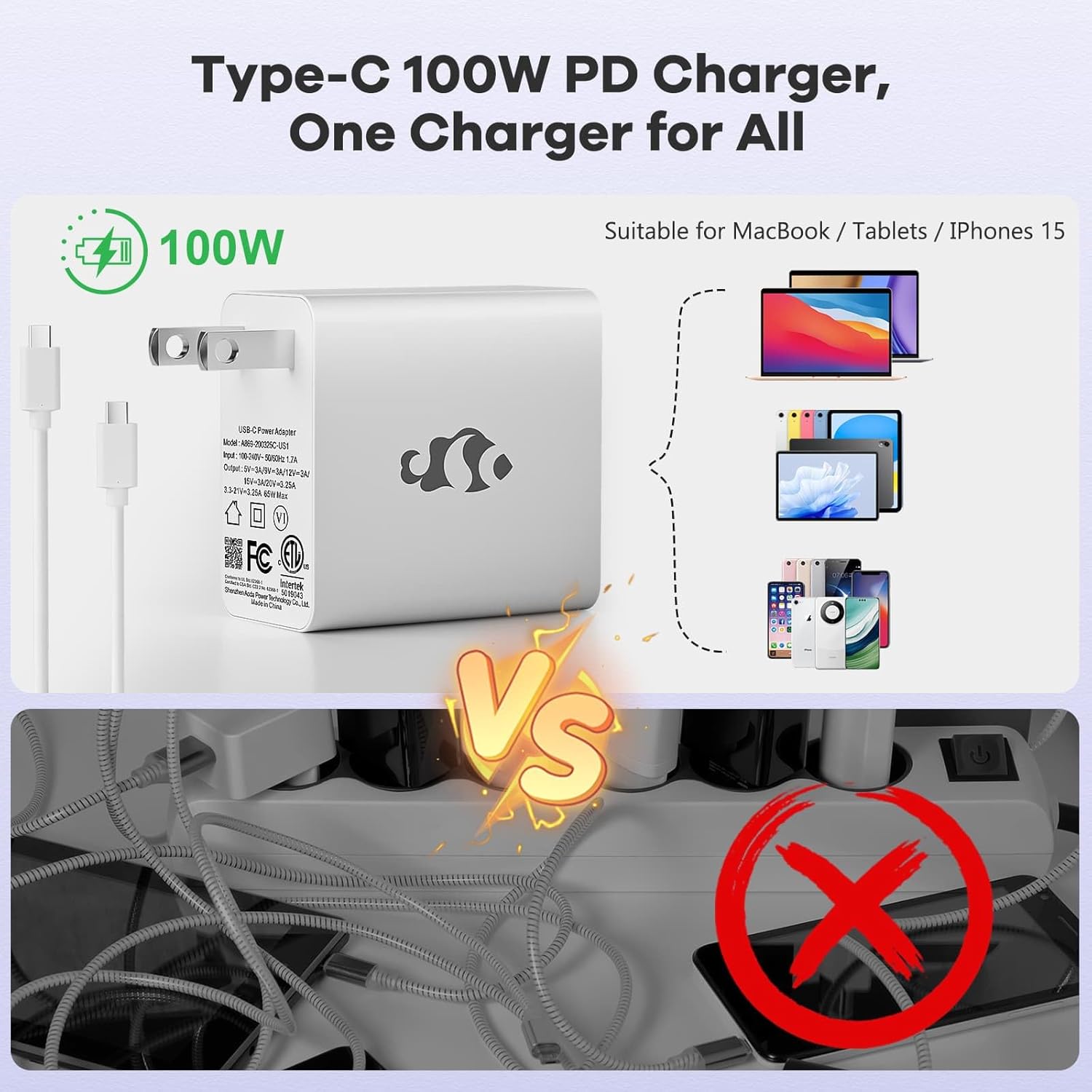
Image: Diagram illustrating the various ports available on the NIMO laptop, including USB, HDMI, Type-C, Micro SD, and headphone jack.
Uputstvo za upotrebu
1. Uključivanje/isključivanje i režim spavanja
- Uključeno: Pritisnite dugme za napajanje koje se nalazi na tastaturi.
- Iskljuciti: Kliknite na dugme Start u sistemu Windows, a zatim izaberite Napajanje > Isključi.
- Režim spavanja: Zatvorite poklopac laptopa ili kliknite na dugme Start, a zatim odaberite Napajanje > Spavanje.
2. Keyboard and Touchpad Functions
- Tastatura sa pozadinskim osvetljenjem: The keyboard features backlighting for use in low-light conditions. Use the dedicated function key (Fn + F key combination, typically) to adjust brightness or toggle it on/off.
- Numerička tastatura: The full-size keyboard includes a numeric keypad for convenient data entry.
- Multi-touch Touchpad: Supports various gestures for navigation and control within Windows. Refer to Windows settings for touchpad gesture customization.
3. Bežično povezivanje
- Wi-Fi: Da biste se povezali na bežičnu mrežu, kliknite na ikonu Wi-Fi u programskoj traci, odaberite željenu mrežu i unesite lozinku ako je potrebno.
- Bluetooth: Da biste uparili Bluetooth uređaje, idite na Postavke sustava Windows > Bluetooth i uređaji i slijedite upute za dodavanje novog uređaja.
4. WebŠtit od bregaste kamere
The laptop is equipped with a physical webcam shield for privacy. Slide the shield to cover or uncover the webcam po potrebi.
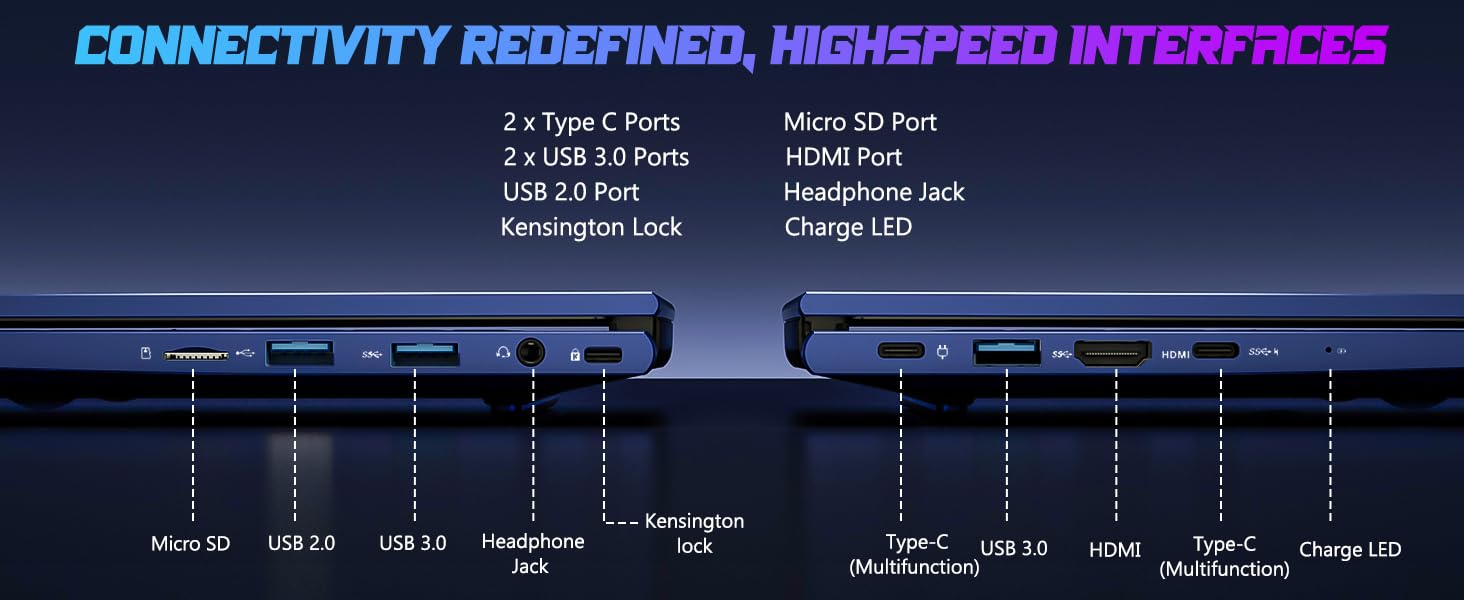
Image: Illustration of the laptop's webcam with a privacy shield feature.
5. Karakteristike ekrana
The 15.6-inch FHD IPS anti-glare display (1920x1080 resolution) provides clear visuals. Adjust display settings such as brightness and resolution through Windows Display Settings.

Image: The NIMO laptop displaying a vibrant image on its 15.6-inch FHD IPS screen.
Održavanje
1. Čišćenje laptopa
- ekran: Lagano koristite meku krpu koja ne ostavlja dlačice dampOperite vodom ili sredstvom za čišćenje ekrana. Ne prskajte tečnost direktno na ekran.
- Tastatura i kućište: Koristite meku, suhu krpu. Za tvrdokornu prljavštinu, laganoamp Može se koristiti krpa, pazeći da tekućina ne uđe u otvore.
- luke: Održavajte otvore čistim od prašine i ostataka. Po potrebi koristite komprimirani zrak, držeći limenku uspravno.
2. Ažuriranja softvera
Regularly check for and install Windows updates to ensure system stability, security, and optimal performance. Go to Windows Settings > Windows Update.
3. Upgradability
The Nimo N153 laptop supports upgradable dual-channel memory and detachable RAM/SSD. If you plan to upgrade components, it is recommended to consult a qualified technician or refer to NIMO's official support resources to avoid voiding your warranty or damaging the device.
Rješavanje problema
If you encounter issues with your NIMO laptop, try the following basic troubleshooting steps:
- Nema napajanja: Ensure the charger is securely connected to both the laptop and a working power outlet. Check the charge LED indicator.
- Problemi s prikazom: If the screen is blank, try connecting an external monitor via HDMI to check if the issue is with the laptop's internal display. Ensure display drivers are up to date.
- Problemi s povezivanjem (Wi-Fi/Bluetooth): Restart the laptop and your router/Bluetooth device. Check Windows network settings to ensure Wi-Fi and Bluetooth are enabled.
- Spore performanse: Close unnecessary applications, check for malware, and ensure sufficient free storage space on the SSD.
- Zamrzavanje sistema: Pritisnite i držite dugme za napajanje 10-15 sekundi da biste prisilno isključili laptop, a zatim ga ponovo pokrenite.
For more complex issues or if the problem persists, please contact NIMO customer support.
Specifikacije
| Feature | Detalj |
|---|---|
| Brand | NIMO |
| Naziv modela | Nimo N153 |
| Veličina ekrana | 15.6 inča |
| Rezolucija | 1920x1080 Pixels (FHD IPS Anti-glare) |
| CPU model | AMD Ryzen 5 6600H (6 jezgara, 12 niti, do 4.5 GHz) |
| Grafički koprocesor | AMD Radeon 660M (Integrated GPU) |
| Veličina instalirane RAM memorije | 16 GB DDR5 (4800 MHz) |
| Veličina tvrdog diska | 1 TB SSD (PCIe 4.0) |
| Operativni sistem | Windows 11 Home |
| Posebne karakteristike | Pozadinsko osvjetljenje tastature, čitač otiska prsta, HD audio, numerička tastatura, WebŠtit od bregaste kamere |
| Tehnologija povezivanja | Wi-Fi (802.11a/b/g/n/ac), Bluetooth |
| Luke | 2x Type-C, 2x USB 3.0, 1x USB 2.0, 1x HDMI, 1x Micro SD, 1x Headphone Jack, Kensington Lock |
| Trajanje baterije | Up to 5 Hours (Usage), Up to 7 Hours (Standby) |
| Kapacitet baterije | 53.58 vatnih sati |
| Punjač | 100W GaN Type-C PD Fast Charger |
| Težina artikla | 3.8 funti |
| Dimenzije (D x Š x Debljina) | 14.07" x 8.98" x 0.76" |
Napomena: Specifikacije su podložne promjenama bez prethodne najave.
Garancija i podrška
1. Garancija proizvođača
Vaš laptop NIMO N153 je pokriven 2-godišnja garancija proizvođača from Nimo Direct Inc. This warranty covers defects in materials and workmanship under normal use. Please retain your proof of purchase for warranty claims.
2. Politika povrata
NIMO nudi 90-dnevna politika povrata bez problema. If you are not satisfied with your purchase, you may return the product within 90 days of purchase. Refer to your purchase documentation for specific return procedures.
3. Korisnička podrška
Za tehničku pomoć, reklamacije ili bilo kakve upite vezane za proizvod, obratite se korisničkoj podršci NIMO-a:
- Email: service@nimopc.com
- Online: Posjetite službeni NIMO webstranica za resurse podrške i opcije kontakta.
Naš posvećeni tim za podršku vam je na raspolaganju.

Image: NIMO customer service representatives ready to assist.