
1. Uvod
Thank you for choosing the Klarus E5 Plus Ultra-Slim Dual Switch Triple-Light EDC Flashlight. This manual provides detailed instructions for the safe and efficient operation, maintenance, and troubleshooting of your new device. Please read this manual thoroughly before use and retain it for future reference.
2. Proizvod je gotovview
The Klarus E5 Plus is a compact and versatile everyday carry (EDC) flashlight featuring three distinct light sources and a dual-switch design for intuitive control. Its ultra-slim profile, magnetic base, and pocket clip offer multiple hands-free lighting options.

Figure 1: Klarus E5 Plus Flashlight with key features highlighted.
3. Sadržaj paketa
- Klarus E5 Plus Flashlight
- USB-C kabl za punjenje
- Korisnički priručnik (ovaj dokument)

Figure 2: Contents included in the Klarus E5 Plus package.
4. Specifikacije
| Feature | Detalj |
|---|---|
| Model | E5 PLUS |
| Max Output | 650 Lumens (Side COB) |
| Izvori svjetlosti | Front (White), Side (Warm White, Red) |
| Dimenzije | 113 mm x 25 mm x 8 mm |
| Težina | 1.26 oz (39 g) |
| Baterija | Ugrađeni litijum-jonski od 500mAh |
| Port za punjenje | USB-C |
| Vrijeme punjenja | Pribl. 1.5 sati |
| Max Runtime | Do 12.5 sati (niski način rada) |
| Otpornost na vodu | IPX4 (otporan na prskanje) |
| Materijal | Aluminum Alloy (6061) |
| Posebne karakteristike | Dual Switch, Magnetic Base, Pocket Clip, Flicker-Free Dimming |

Figure 3: Physical dimensions and weight comparison.
5. Setup: Charging the Battery
The Klarus E5 Plus features a built-in rechargeable lithium-ion battery. Before first use, fully charge the device.
- Locate the USB-C charging port on the side of the flashlight, protected by a silicone cover.
- Gently lift the silicone cover to expose the USB-C port.
- Connect the provided USB-C cable to the flashlight and plug the other end into a compatible USB power source (e.g., computer, wall adapter).
- During charging, the indicator light on the flashlight will illuminate red.
- Once fully charged (approximately 1.5 hours), the indicator light will turn blue.
- Disconnect the charging cable and securely close the silicone cover to maintain IPX4 water resistance.

Figure 4: Charging the Klarus E5 Plus via USB-C.
6. Uputstvo za upotrebu
The E5 Plus features two distinct switches for controlling its multiple light sources.
6.1. Head Light (Front White Light) Operation
- Uključi/isključi: Pritisnite i držite Prekidač prednjeg svetla (upper button) for 0.5 seconds.
- Promjena svjetline: With the head light on, single-click the Prekidač prednjeg svetla to cycle through brightness modes (Low, High).
- Memorija načina rada: The head light will remember the last used brightness mode when turned off and on again.
6.2. Side Light (Warm White & Red Light) Operation
- Uključi/isključi: Pritisnite i držite Side Light Switch (lower button) for 0.5 seconds.
- Change Brightness (Warm White): With the warm white side light on, single-click the Side Light Switch to cycle through brightness modes (Low, Medium, High, Turbo).
- Toggle Red Light: With the warm white side light on, double-click the Side Light Switch to switch to Red Constant-On mode. Double-click again to return to warm white.
- Crveni Strobe: From Red Constant-On mode, single-click the Side Light Switch to activate Red Strobe mode. Single-click again to return to Red Constant-On.
- Memorija načina rada: The warm white side light will remember the last used brightness mode. Red light modes do not have memory and will default to Red Constant-On when reactivated.

Figure 5: Dual switch operation for the Klarus E5 Plus.
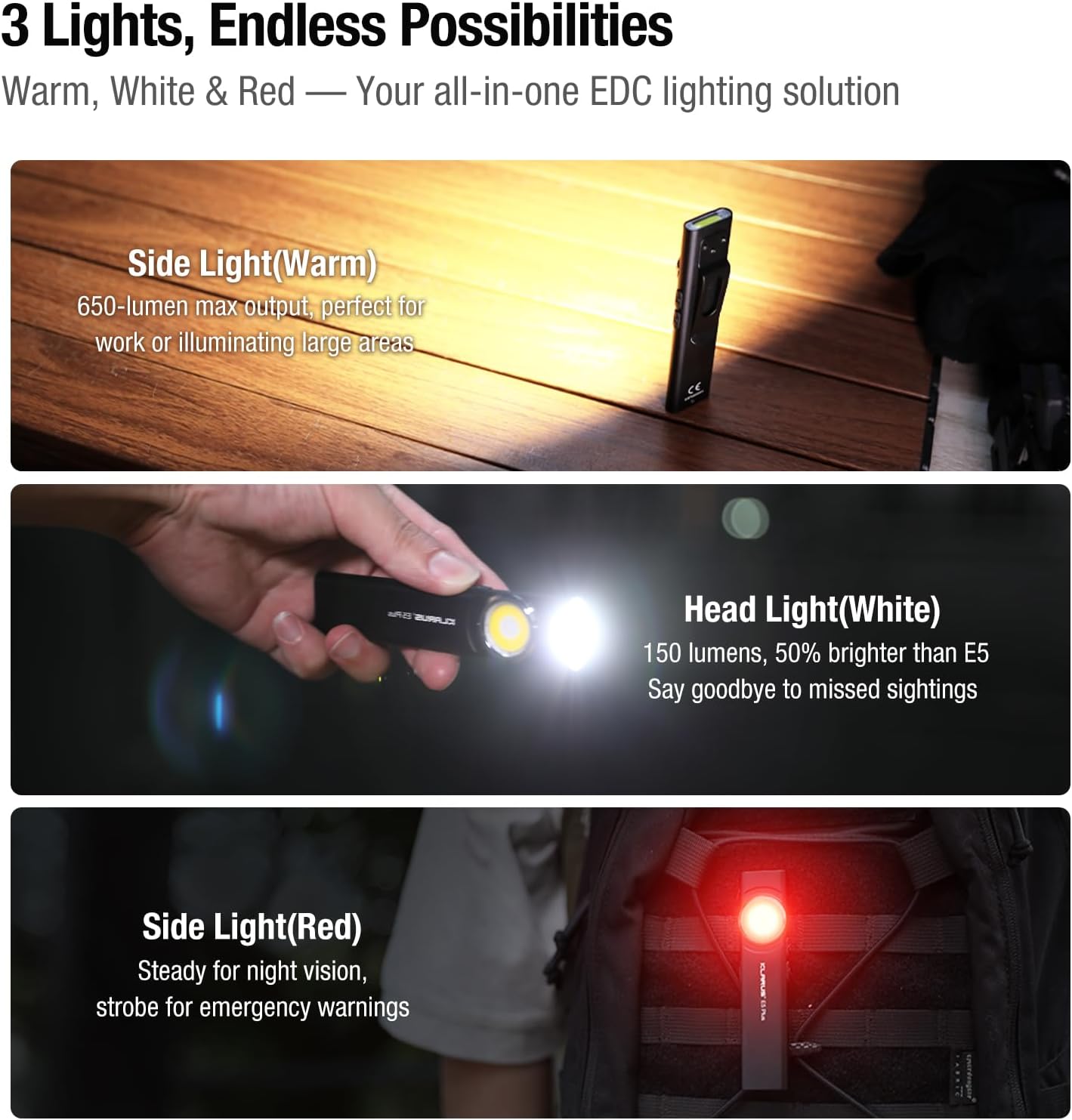
Figure 6: Three light sources and their applications.

Figure 7: Hands-free usage with magnetic base and clip.
7. Održavanje
- čišćenje: Obrišite tijelo svjetiljke mekom krpomamp krpom. Izbjegavajte abrazivna sredstva za čišćenje ili rastvarače.
- Punjenje: Recharge the battery regularly to maintain optimal performance, especially if stored for extended periods.
- Skladištenje: Čuvajte baterijsku lampu na hladnom i suvom mestu dalje od direktne sunčeve svetlosti i ekstremnih temperatura.
- Otpornost na vodu: Ensure the USB-C port's silicone cover is securely closed to maintain IPX4 water resistance.
8. Otkrivanje problema
| Problem | Mogući uzrok | Rješenje |
|---|---|---|
| Lampa se ne uključuje. | Low battery or lockout mode activated. | Charge the battery. Ensure no buttons are accidentally pressed during storage. |
| Izlaz svjetlosti je slab. | Slaba baterija ili odabran pogrešan način rada. | Charge the battery. Cycle through brightness modes to select a higher setting. |
| Indikator punjenja ne radi. | Labava veza ili neispravan kabel/punjač. | Ensure USB-C cable is securely connected. Try a different USB-C cable or power source. |
9. Zvanični videozapisi proizvoda
The following videos provide additional visual guidance and demonstrations of the Klarus E5 Plus flashlight's features and operation.
Klarus E5 Plus - Ultra-Slim Dual Switch Triple-Light EDC Flashlight
Video 1: Overview of the Klarus E5 Plus, highlighting its ultra-slim design, dual switch, and triple-light functionality. This video demonstrates the product's key features and versatility.
10. Garancija i podrška
Klarus products are manufactured to high-quality standards. For warranty information, technical support, or service inquiries, please refer to the official Klarus webstranicu ili kontaktirajte ovlaštenog prodavača. Molimo sačuvajte dokaz o kupovini za reklamacije u slučaju garancije.
Proizvođač: KLARUS