
Uvod
The Surfans F28 is a high-fidelity portable music player designed to deliver an immersive audio experience. Featuring dual ESS9018 DACs, a 4.4mm balanced output, and comprehensive Bluetooth 5.2 support including LDAC and aptX HD, the F28 supports a wide range of lossless audio formats. This manual provides detailed instructions for setting up, operating, maintaining, and troubleshooting your device to ensure optimal performance and longevity.

Slika 1: Prednja i zadnja strana view of the Surfans F28 HiFi Music Player.
Sadržaj paketa
Molimo Vas da provjerite da li se u Vašem paketu nalaze sve dolje navedene stavke:
- 1x Surfans F28 HiFi Music Player
- 1x USB-C kabl za punjenje
- 1x 128GB Micro SD Card (pre-installed or included separately)
- 1x Korisnički priručnik (ovaj dokument)

Figure 2: Illustration of typical package contents.
Product Overview
Familiarize yourself with the various components and controls of your F28 music player.
Ključne karakteristike:
- Dual ESS9018 DACs: For high-resolution audio decoding and minimal distortion.
- 4.4mm balansirani izlaz: Provides enhanced audio quality and power for demanding headphones.
- 3.5 mm jednostrani izlaz: Standard audio output for common headphones.
- Dvosmjerni Bluetooth 5.2: Supports LDAC and aptX HD for high-quality wireless audio transmission and reception.
- 3.5-inčni IPS ekran osjetljiv na dodir: Za intuitivnu navigaciju i kontrolu.
- ALPS Analog Volume Knob: For precise volume adjustments.
- Proširiva pohrana: Podržava Micro SD kartice do 512GB.
- USB-C priključak: Za punjenje i prijenos podataka.

Figure 3: The F28 player showcasing its display and audio capabilities.

Figure 4: The dual ESS9018K2M DAC chips, central to the F28's high-fidelity audio.

Figure 5: Top panel with 4.4mm balanced and 3.5mm single-ended audio outputs, and the ALPS analog volume knob.
Setup
1. Punjenje uređaja
Before first use, fully charge the F28. Connect the included USB-C cable to the player's USB-C port and the other end to a USB power adapter (5V/1A recommended) or a computer's USB port. The charging indicator will show the charging status. A full charge typically takes several hours.
2. Umetanje Micro SD kartice
The F28 supports Micro SD cards up to 512GB. Locate the Micro SD card slot on the bottom of the device. Gently insert the Micro SD card with the gold contacts facing down until it clicks into place. To remove, push the card in slightly until it springs out.

Figure 6: Inserting the Micro SD card and connecting via USB-C for data transfer.
3. Prenos muzike Files
Connect the F28 to your computer using the USB-C cable. The player will appear as a removable storage device. You can then drag and drop your music files directly into the Micro SD card's folders. The F28 supports various lossless formats including DSD (DSF/DFF), FLAC/WAV (up to 384kHz), AIFF/APE, as well as MP3/AAC.

Slika 7: Podržani audio file formats for the F28 player.
Uputstvo za upotrebu
1. Uključivanje/isključivanje
- Uključeno: Pritisnite i držite dugme za napajanje (nalazi se sa strane) dok se ekran ne osvijetli.
- Iskljuciti: Press and hold the power button until a power-off prompt appears, then confirm.
2. Osnovna navigacija
The F28 features a 3.5-inch IPS touchscreen for primary navigation. Swipe gestures and taps are used to select options and move between menus. Physical buttons on the side provide additional control for playback (play/pause, next/previous track) and menu navigation.
3. Reprodukcija muzike
From the main menu, select "My Music" or "Folder" to browse your audio files. Tap on a song to begin playback. The playback screen displays track information, progress, and playback controls.
4. Kontrola jačine zvuka
Adjust the volume using the gold-colored ALPS analog knob located on the top right of the device. Rotate clockwise to increase volume and counter-clockwise to decrease. The volume level will be displayed on the screen.
5. Bluetooth povezivanje
The F28 supports Bidirectional Bluetooth 5.2 with LDAC and aptX HD codecs for high-quality wireless audio. To pair with Bluetooth headphones or speakers:
- Go to "System Settings" and select "Bluetooth".
- Uključite Bluetooth.
- Plejer će skenirati dostupne uređaje. Odaberite svoj uređaj sa liste za uparivanje.
The F28 can also act as a Bluetooth receiver, allowing you to stream audio from your phone or PC to the player.

Figure 8: The F28 features a Bluetooth 5.2 chip for stable and high-quality wireless connections.
6. Postavke ekvilajzera
The F28 includes an equalizer to customize your sound. Navigate to the "Equalizer" option in the settings. You can choose from various presets or create a custom sound profile by adjusting the frequency bands.
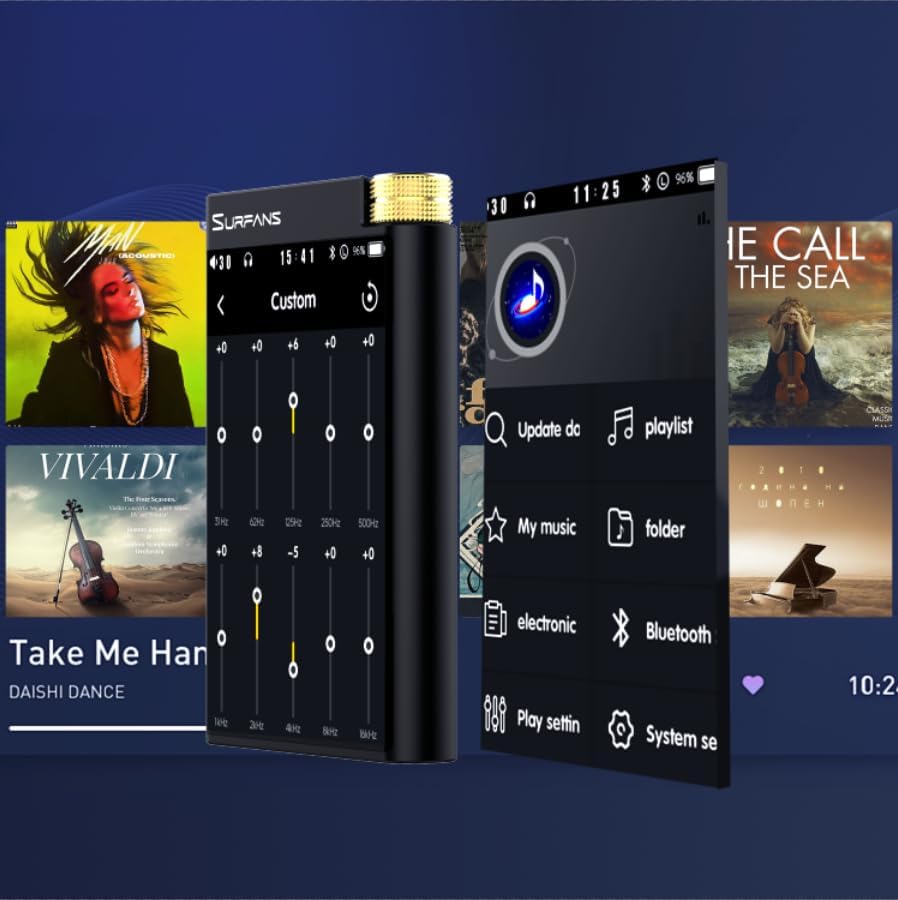
Figure 9: Customizing audio with the built-in equalizer.
7. Povezivanje s vanjskim uređajima
Use the 4.4mm balanced or 3.5mm single-ended output to connect to headphones, amplifiers, or speakers. The USB-C port also supports USB DAC functionality, allowing the F28 to act as an external sound card for your computer.

Figure 10: The F28 can be connected to various audio systems, including acting as a USB DAC for computers.
Održavanje
- čišćenje: Za čišćenje uređaja koristite meku, suhu krpu. Izbjegavajte upotrebu abrazivnih sredstava za čišćenje ili rastvarača.
- Skladištenje: Čuvajte plejer na hladnom i suhom mjestu, dalje od direktne sunčeve svjetlosti i ekstremnih temperatura.
- Održavanje baterije: Da biste produžili vijek trajanja baterije, izbjegavajte često potpuno pražnjenje baterije. Ako je skladištite duži period, punite bateriju do oko 50% svakih nekoliko mjeseci.
Rješavanje problema
| Problem | Mogući uzrok | Rješenje |
|---|---|---|
| Uređaj se ne uključuje. | Slaba baterija; uređaj se zamrznuo. | Charge the device for at least 30 minutes. If still unresponsive, try holding the power button for 10-15 seconds for a hard reset. |
| Touchscreen is unresponsive or slow. | Privremeni softverski problem; smetnje zaštitnog faktora ekrana. | Restart the device. Ensure the screen is clean and free of debris. If using a screen protector, ensure it is properly applied and not too thick. |
| Problemi s uparivanjem putem Bluetootha. | Device not in pairing mode; distance; interference. | Ensure both devices are in pairing mode and within range. Turn off and on Bluetooth on both devices. Clear previous pairings if necessary. |
| Low volume via Bluetooth. | Volume settings on both devices; codec compatibility. | Increase volume on both the F28 and the connected Bluetooth device. Ensure optimal codec (LDAC/aptX HD) is selected if supported by the receiving device. |
| Muzika files not recognized or played in incorrect order. | Oštećen files; file system indexing issue. | Osigurati files are in supported formats. Re-scan the music library from the player's settings. If issues persist, try reformatting the Micro SD card (backup data first) and re-transferring files. Note: Some players may sort by filename alphabetically rather than track number metadata. |
Specifikacije
| Feature | Detalj |
|---|---|
| Naziv modela | F28 128G |
| Dimenzije proizvoda | 0.7 x 2.6 x 4.7 inča |
| Težina artikla | 9.6 unce |
| DAC Chip | Dvostruki ESS9018K2M |
| Podržani audio formati | DSD (DSF/DFF), FLAC/WAV (up to 384kHz/32-bit), AIFF/APE, MP3/AAC, WMA Lossless |
| Bluetooth verzija | 5.2 (Bidirectional, supports LDAC/aptX HD) |
| Veličina ekrana | 3.5 Inches IPS Touchscreen |
| Interna pohrana | 128GB (included Micro SD card) |
| Proširiva pohrana | Do 512 GB putem Micro SD kartice |
| Baterija | 1x 12V battery (included), approx. 12-hour playback |
| Izlazni portovi | 4.4 mm balansirani, 3.5 mm jednostrani |
| Tehnologija povezivanja | Aux, Bluetooth 5.2, USB-C |
| Posebna karakteristika | Equalizer |
Garancija i podrška
For warranty information and technical support, please refer to the official Surfans webweb-mjesto ili direktno kontaktirajte njihovu korisničku službu. Sačuvajte račun kao dokaz o kupovini za reklamacije u slučaju garancije.
You can visit the official Surfans Store on Amazon for more information and support: Surfans Audio Store