
Uvod
The eppfun SK003Pro is a Bluetooth 5.4 hands-free car speakerphone designed for clear communication and safe driving. It features advanced noise reduction, voice control integration, and multi-point connectivity.
Ključne karakteristike:
- Bluetooth 5.4 tehnologija: Integrates the latest low-energy Bluetooth 5.4 chip for longer transmission distance and faster speed.
- Jasna komunikacija: Equipped with a Bluetooth 5.4 chipset, integrated speaker, echo and background noise reduction, and volume control for clear calls.
- Hands-free pozivanje: Utilizes an integrated microphone and DSP technology for effective noise reduction and excellent sound quality. The 3W integrated speaker delivers clear and loud audio.
- upravljanje glasom: Supports safe driving with calls and navigation via Google Assistant/Siri Assistant.
- Višestruka veza: Connects to two devices simultaneously, allowing easy switching between music and calls.
- Jednostavna instalacija: Simple pairing with your mobile phone and attachment to the sun visor with the included clip.
1. Postavljanje i instalacija
Follow these steps to set up your eppfun SK003Pro speakerphone:
- Napunite uređaj: Before first use, fully charge the speakerphone using the provided USB Type-C cable. A full charge takes approximately 1.5 hours.

Image: The USB Type-C charging port and ON/OFF switch are located on the side of the device. Connect the provided cable to charge.
- Uključeno: Slide the ON/OFF switch to the "ON" position. The device will enter pairing mode.
- Uparite sa svojim telefonom:
- Omogućite Bluetooth na svom mobilnom telefonu.
- Traži dostupnim Bluetooth uređajima.
- Select "eppfun SK003Pro" from the list to connect. A confirmation tone will sound upon successful pairing.
- Install in Vehicle: Attach the speakerphone to your car's sun visor using the integrated clip. Ensure it is securely fastened and does not obstruct your view.

Image: The speakerphone is designed to clip easily onto the car's sun visor for optimal microphone and speaker placement.
2. Uputstvo za upotrebu
2.1 Osnovne funkcije
- Odgovaranje / završavanje poziva: Pritisnite Dugme za poziv (phone icon) once to answer an incoming call or end an ongoing call.
- Odbijanje poziva: Pritisnite i držite Dugme za poziv na 2 sekunde da odbijete dolazni poziv.
- Kontrola jačine zvuka: Koristite '+' i '-' buttons to adjust the call volume or media playback volume.
- Ponovno biranje zadnjeg broja: Dvaput pritisnite Dugme za poziv da ponovo pozovete poslednji birani broj.
2.2 Glasovni asistent (Siri/Google asistent)
The eppfun SK003Pro supports voice commands through your phone's assistant.
- Aktivirajte glasovnog asistenta: Pritisnite Dugme za mikrofon (microphone icon) once to activate Siri or Google Assistant on your connected phone.
- You can then use voice commands for navigation, making calls, sending messages, and more, ensuring safe driving.
2.3 Višestruka veza
The device can connect to two mobile phones simultaneously.
- Pair the first phone as described in the "Setup" section.
- After the first phone is connected, put the speakerphone back into pairing mode (usually by briefly disconnecting and reconnecting, or by holding the call button if it has a dedicated pairing function - refer to specific device prompts if available).
- Uparite drugi telefon.
- The speakerphone will now be connected to both devices, allowing you to switch between them for calls or media.

Image: The speakerphone supports connecting to two mobile phones simultaneously, enabling seamless switching between devices.
3. Održavanje
- čišćenje: Za čišćenje uređaja koristite meku, suhu krpu. Ne koristite tekuća sredstva za čišćenje ili aerosole.
- Skladištenje: Uređaj čuvajte na hladnom i suhom mjestu, dalje od direktne sunčeve svjetlosti i ekstremnih temperatura.
- Održavanje baterije: To prolong battery life, avoid fully discharging the battery frequently. Charge the device regularly, even if not in use for extended periods. The high-quality lithium battery offers up to 500 hours of standby time.

Image: The device features an 800mAh lithium battery, providing extended standby time and reliable performance.
4. Otkrivanje problema
If you encounter issues with your eppfun SK003Pro, refer to the following solutions:
| Problem | Mogući uzrok | Rješenje |
|---|---|---|
| Nije moguće uparivanje s telefonom. | Bluetooth is off on phone; device is not in pairing mode; device battery is low. |
|
| Poor call quality / Others cannot hear me clearly. | Microphone obstruction; low volume; environmental noise; device not positioned correctly. |
|
| No sound from speakerphone. | Volume too low; device not connected; media routed to phone speaker. |
|
| Glasovni asistent ne reaguje. | Not activated; phone settings. |
|
5. Specifikacije
| Feature | Detalj |
|---|---|
| Brand | eppfun |
| Broj modela | SK003Pro |
| Boja | Grey |
| Tehnologija povezivanja | Bluetooth 5.4 |
| Kompatibilni uređaji | Pametni telefon, tablet |
| Materijal | Akrilonitril Butadien Stiren (ABS), Metal |
| Izlaz zvučnika | 3W (Dual 3W speakers, 40MM Graphene Diaphragm)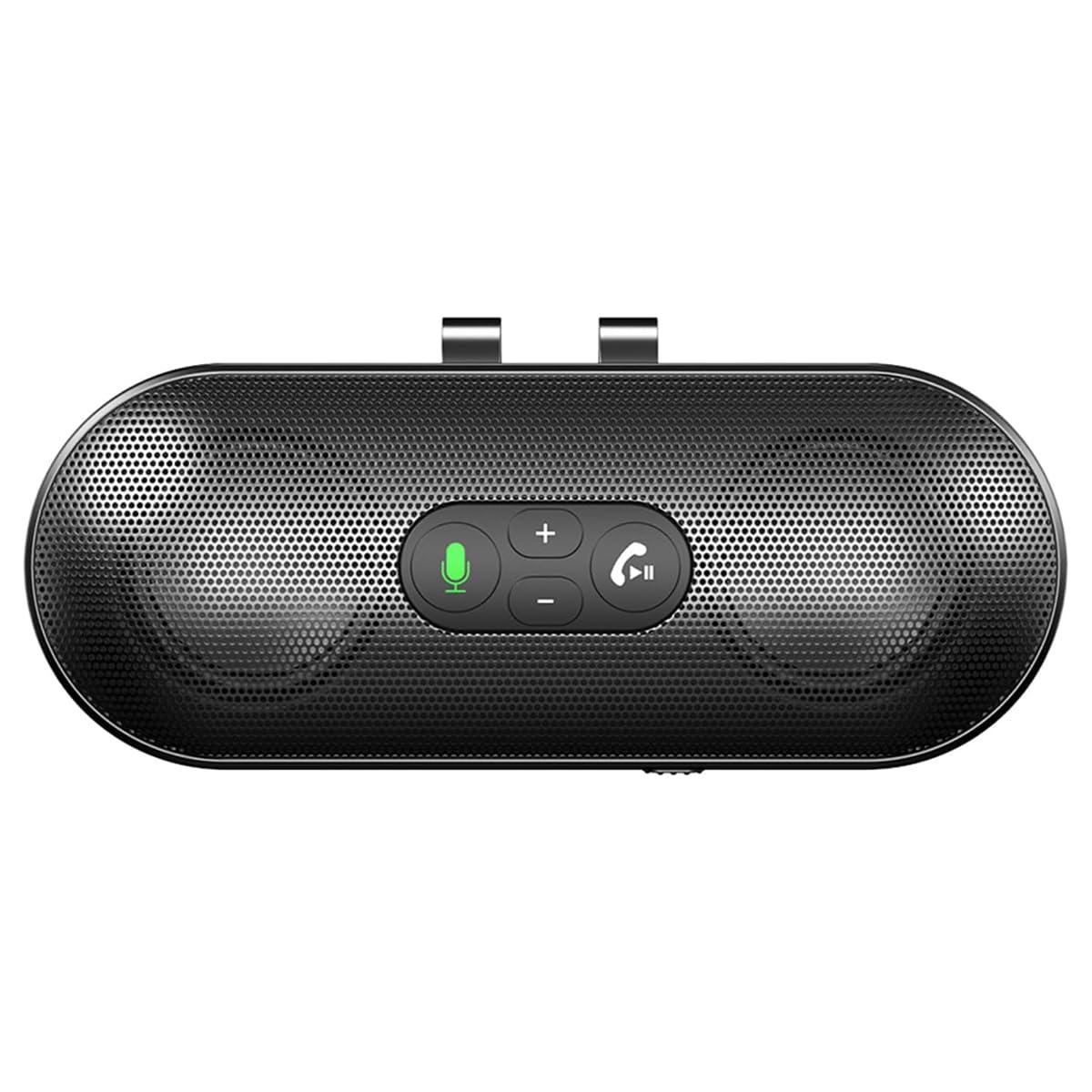 Image: The speakerphone features a powerful audio system with dual 3W speakers and 40mm Graphene Diaphragms for clear and loud sound. |
| Mikrofon | Integrated, High-definition with DSP noise reduction |
| Vrsta baterije | Litijum-jonska (800 mAh) |
| Port za punjenje | USB Type-C |
| Vrijeme punjenja | Približno 1.5 sata |
| Vrijeme pripravnosti | Do 500 sati |
| Zemlja porijekla | Kina |
6. Informacije o garanciji
The eppfun SK003Pro comes with a manufacturer's warranty.
- Garancija proizvođača: 1 godina
- Molimo sačuvajte svoj dokaz o kupovini za zahtjeve u vezi s garancijom.
- Warranty does not cover damage caused by misuse, accidents, unauthorized repairs, or normal wear and tear.
7. Korisnička podrška
For further assistance or inquiries, please contact eppfun customer support:
- Proizvođač: eppfun
- Webstranica: www.eppfun.com (Napomena: Ovo je rezervirano mjesto URL, please refer to your product packaging or official documentation for the correct support website.)
- Email: support@eppfun.com (Note: This is a placeholder email, please refer to your product packaging or official documentation for the correct support email.)
When contacting support, please provide your product model number (SK003Pro) and a detailed description of the issue.