1. Uvod
This manual provides essential information for the proper installation, operation, and maintenance of your Generic 25-foot High-Speed HDMI Cable with Ethernet. This cable is designed to deliver high-quality digital video and audio signals between compatible devices, supporting advanced features such as Ethernet data connectivity, Audio Return Channel (ARC), and 3D content.
2. Karakteristike
- Brzi prijenos podataka: Supports high bandwidth for resolutions up to 4K and beyond.
- Ethernet Data Connectivity: Allows for internet connection sharing among compatible devices without a separate Ethernet cable.
- Audio povratni kanal (ARC): Enables a TV to send audio data upstream to an A/V receiver or surround sound system, reducing the need for a separate audio cable.
- 3D podrška: Compatible with 3D video formats.
- Visokokvalitetna gradnja: Produced with high-grade materials for reliable performance and durability.
3. Proizvod je gotovview
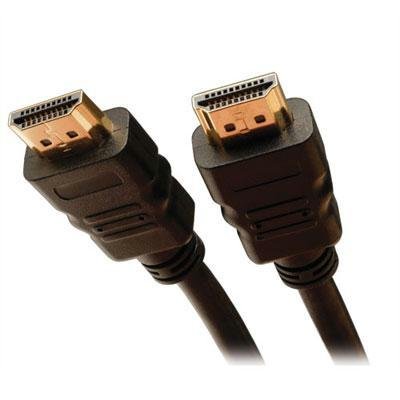
The image above displays the Generic 25-foot High-Speed HDMI Cable with Ethernet. It features standard HDMI Type A connectors on both ends, designed for secure and reliable connections. The cable is constructed to support the latest HDMI specifications, ensuring optimal signal integrity over its 25-foot length.
4. Upute za postavljanje
Follow these steps to connect your HDMI cable:
- Identifikujte portove: Pronađite HDMI izlazni priključak na izvornom uređaju (npr. Blu-ray uređaj, igraća konzola, računar) i HDMI ulazni priključak na uređaju za prikaz (npr. TV, monitor, projektor).
- Poveži izvor: Pažljivo umetnite jedan kraj HDMI kabla u HDMI izlazni priključak vašeg izvornog uređaja. Provjerite da li je potpuno umetnut.
- Poveži ekran: Pažljivo umetnite drugi kraj HDMI kabla u HDMI ulazni priključak vašeg uređaja za prikaz. Provjerite da li je potpuno umetnut.
- Uređaji za uključenje: Uključite i izvorni uređaj i uređaj za prikaz.
- Odaberite unos: On your display device, use the remote control or on-screen menu to select the correct HDMI input source (e.g., HDMI 1, HDMI 2) that corresponds to the port you used.
Napomena: For optimal performance, ensure both devices are powered off before connecting or disconnecting the cable.
5. Uputstvo za upotrebu
Once the HDMI cable is correctly connected and the input source is selected on your display device, the cable operates automatically. It will transmit digital video and audio signals from your source device to your display. If your devices support HDMI Ethernet Channel (HEC) and Audio Return Channel (ARC), these features will also function automatically when enabled on your devices.
- video: The cable supports various video resolutions, including 1080p, 4K, and 3D content, depending on the capabilities of your connected devices.
- audio: High-quality digital audio, including multi-channel surround sound, will be transmitted.
- Ethernet: If both connected devices support HEC, they can share an internet connection without additional Ethernet cables.
6. Održavanje i njega
Da biste osigurali dugotrajnost i optimalne performanse vašeg HDMI kabla, slijedite ove smjernice za održavanje:
- Pažljivo rukujte: Izbjegavajte oštro savijanje kabela ili pretjerano opterećenje konektora.
- Održavajte čistoću: Use a soft, dry cloth to gently wipe the cable and connectors if they become dusty. Do not use liquid cleaners directly on the connectors.
- Pravilno skladištenje: When not in use, coil the cable loosely. Avoid tight coiling or kinking, which can damage internal wires.
- Izbjegavajte ekstremne uslove: Do not expose the cable to extreme temperatures, direct sunlight for prolonged periods, or excessive moisture.
7. Otkrivanje problema
If you encounter issues with your HDMI cable, consider the following troubleshooting steps:
- Nema slike/zvuka:
- Uverite se da je kabl dobro povezan sa oba uređaja.
- Provjerite je li na vašem uređaju za prikaz odabran ispravan HDMI ulaz.
- Pokušajte spojiti kabel na drugi HDMI priključak na vašem uređaju za prikaz.
- Test the cable with another HDMI-compatible device to rule out issues with the source or display.
- Ponovo pokrenite i izvorni i uređaj za prikaz.
- Poor Picture Quality (Flickering, Static):
- Provjerite ima li fizičkih oštećenja na kabelu ili konektorima.
- Pazite da kabel ne prolazi u blizini izvora jakih elektromagnetskih smetnji.
- Smanjite rezoluciju ili brzinu osvježavanja na izvornom uređaju da vidite da li problem i dalje postoji.
- No Ethernet/ARC Functionality:
- Confirm that both connected devices support HDMI Ethernet Channel (HEC) and Audio Return Channel (ARC) and that these features are enabled in their settings.
- Consult the user manuals of your source and display devices for specific instructions on enabling these features.
8. Tehničke specifikacije
| Specifikacija | Detalj |
|---|---|
| ASIN | B0F8172RB8 |
| Proizvođač | 212 Main |
| Datum prve dostupnosti | 8. novembra 2023 |
9. Garancija i podrška
For information regarding warranty coverage or technical support for your Generic 25-foot High-Speed HDMI Cable with Ethernet, please refer to the documentation provided at the point of purchase or contact the retailer directly. Specific warranty terms and support procedures may vary.


