
1. Uvod i krajview
The BSIDE SH7 is a versatile device combining a high-resolution thermal imaging camera with a comprehensive digital multimeter. This instrument is designed for electrical and electronic professionals, offering advanced diagnostic capabilities for various applications, including home inspection, HVAC, electrical plumbing, and boiler inspection.
Key features include a 320x320 infrared (IR) resolution, a 3.98-inch touch LCD, 15 selectable thermal palettes, and a 20000-count multimeter for precise measurements. The included macro lens enhances its utility for inspecting small electronic components and printed circuit boards (PCBs).
2. Podešavanje
2.1 Raspakivanje i početni pregled
Carefully unpack all components from the carrying case. Verify that the following items are present:
- BSIDE SH7 Thermal Imaging Camera Multimeter
- Makro sočivo
- Kabel za punjenje
- Torbica za nošenje
- Uputstvo za upotrebu
Inspect the device for any visible damage. If any components are missing or damaged, contact customer support.

Figure 2.1: BSIDE SH7 Thermal Imaging Camera Multimeter with included accessories, including the macro lens, charging cable, and carrying case.
2.2 Punjenje uređaja
The device is equipped with a built-in 2500mAh rechargeable battery. Before first use, fully charge the device using the provided charging cable. Connect the charging cable to the device's charging port and a suitable USB power adapter (not included).
2.3 Uključivanje/isključivanje
To power on the device, press and hold the power button located on the side. The device will display a loading screen before entering the thermal imaging mode. To power off, press and hold the power button again.
Video 2.1: Demonstrates powering on the BSIDE SH7 and its initial boot sequence, showing the loading process and transition to thermal imaging mode.
2.4 Attaching the Macro Lens
For detailed inspection of small components, attach the macro lens to the thermal camera. Align the macro lens with the camera's thermal sensor and secure it in place. The macro lens provides a magnification of 0.3X with a working object distance of 35mm.
2.5 Postavke jezika
Upon initial setup or if needed, you can change the device's language. Navigate to the 'Settings' menu, then 'More Settings', and select 'Language'. Choose 'English' from the available options.
Video 2.2: Illustrates the process of navigating the menu to change language settings and other configurations on the BSIDE SH7.
3. Uputstvo za upotrebu
3.1 Thermal Imaging Mode
The BSIDE SH7 provides a visual representation of temperature differences, allowing for quick identification of hot and cold spots.
- Interpretacija prikaza: The 3.98-inch touch LCD displays the thermal image with temperature readings for the central spot, highest temperature (hot spot), and lowest temperature (cold spot) within the field of view.
- Thermal Palettes: The device offers 15 thermal palettes (e.g., White Hot, Black Hot, Rainbow, Iron Red) to visualize temperature data. Tap the palette icon on the screen to cycle through or select a desired palette from the settings.
- Emissivity and Distance: Adjust emissivity (0.01-1) and measurement distance (0.3-3m) in the settings for accurate temperature readings based on the target material and distance.
- High & Low Temperature Alarm: Set specific temperature thresholds. The camera will trigger an alarm if the measured temperature exceeds or falls below these set points.
- Image Storage and Export: The device can store up to 19,000 thermal images. Connect the device to a computer via USB to export and analyze the stored data.
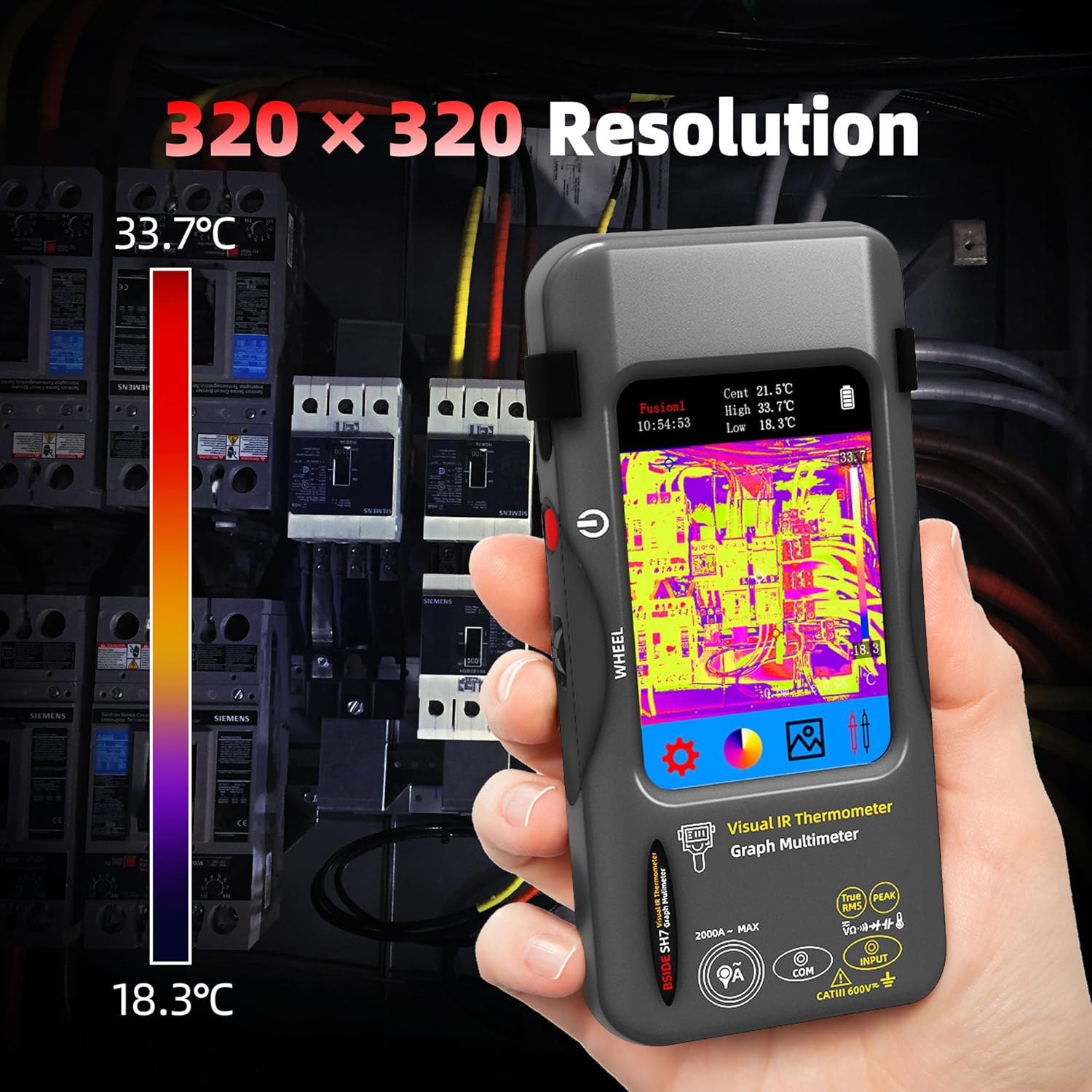
Figure 3.1: Thermal image display showing temperature distribution on a circuit breaker panel, highlighting the 320x320 IR resolution.

Figure 3.2: The device's display indicating hot, cold, and central temperature spots for precise thermal analysis.

Figure 3.3: A visual representation of the 15 thermal palettes available on the device, allowing users to choose the best visualization for their application.

Figure 3.4: The device connected to a computer, demonstrating the capability for real-time image export and data analysis.
3.2 Režim multimetra
The integrated 20000-count digital multimeter offers a wide range of electrical measurement functions.
- Voltage Mjerenje: Izmjerite DC voltage (20mV to 1000V) and AC voltage (20mV to 750V) using the included test leads.
- Resistance and Continuity: Measure resistance (200Ω to 200MΩ) and perform continuity tests.
- Capacitance and Diode: Test capacitance (999.99nF to 99.999mF) and perform diode tests.
- Mjerenje temperature: Measure temperature from -20℃ to 1300℃ (-4℉ to 2372℉).
- Fleksibilna izmjenična struja Clamp: The device supports flexible AC current clamp measurements up to 2000A. Note: The flexible AC current clamp nije uključeno u paket.

Figure 3.5: The multimeter display showing a DC voltage measurement, demonstrating its 20000-count capability.

Figure 3.6: The device in multimeter mode, performing a capacitance measurement on a circuit board, useful for electronic maintenance.
3.3 Touch LCD Operation
The 3.98-inch color touch LCD allows for intuitive navigation and setting adjustments. Tap icons to select modes, swipe to scroll through menus, and use the on-screen keyboard for input where applicable.

Figure 3.7: A hand demonstrating interaction with the 3.98-inch touch LCD, highlighting the device's user-friendly interface.
4. Održavanje
4.1 Čišćenje
Regularly clean the device's exterior with a soft, dry cloth. For the screen and lens, use a lens cleaning cloth and a specialized cleaning solution if necessary. Avoid abrasive cleaners or solvents that could damage the display or casing.
4.2 Njega baterija
To prolong battery life, avoid fully discharging the battery frequently. Recharge the device when the battery indicator is low. If storing the device for an extended period, ensure it is charged to approximately 50% and recharge every few months.
4.3 Skladištenje
Store the device in its carrying case in a cool, dry place, away from direct sunlight, extreme temperatures, and high humidity. Ensure the macro lens is protected when not in use.
5. Otkrivanje problema
This section addresses common issues you might encounter with your BSIDE SH7 device.
- Uređaj se ne uključuje: Ensure the battery is sufficiently charged. Connect the device to the charging cable and allow it to charge for at least 30 minutes before attempting to power on again.
- Netačna očitanja temperature: Verify that the emissivity setting matches the material being measured. Ensure the measurement distance is within the recommended range (0.3-3m). Clean the thermal lens if it appears dirty.
- Multimeter readings are unstable or incorrect: Check the connection of the test leads to both the device and the circuit being measured. Ensure the correct measurement function is selected. Replace test leads if they are damaged.
- Ekran na dodir ne reaguje: Pokušajte ponovo pokrenuti uređaj. Ako problem i dalje postoji, provjerite je li ekran čist i suh.
- Cannot export images to computer: Ensure the USB cable is securely connected to both the device and the computer. Check if the device is in the correct mode for data transfer (if applicable, refer to 'More Settings' for 'Format Storage' or 'Update' options, which might relate to data management).
Ako naiđete na probleme koji nisu ovdje navedeni ili ako koraci za rješavanje problema ne riješe problem, obratite se korisničkoj podršci.
6. Specifikacije
6.1 Infrared Camera Specifications
- Veličina ekrana: 3.98 inčni TFT LCD
- IR rezolucija: 320 x 320
- Rezolucija ekrana: 320 x 480
- Kut od View (FOV): 50.0°(H)x 50.0°(V)/72.1°(D)
- Spatial Resolution (IFOV): 8.89mrad
- Raspon temperature: -20 ℃ do 550 ℃ (-4 ℉ do 1022 ℉)
- Termička osjetljivost/NETD: Manje od 60 mk
- Brzina osvježavanja: 25Hz
- Postavke udaljenosti: 0.3-3 m
- Emisivnost: 0.01-1 (podesivo)
- Thermal Palettes: 15 opcija
- Number of Storage Images: 19000
6.2 Digital Multimeter Specifications
- MAX Display: 20000 counts
- DC Voltage: 20mV/200mV (±0.1%+3); 2V/20V (±0.05%+3); 200V/1000V (±0.5%+3)
- AC Voltage: 20mV/200mV (±0.1%+3); 2V/20V (±0.05%+3); 200V/750V (±0.5%+3)
- Flexible AC Current: 200A/2000A (±1.0%+5)
- Otpor: 200Ω (±0.5%+3); 2kΩ/20KΩ/200KΩ (±0.2%+3); 2MΩ/20MΩ (±1%+3); 200MΩ (±5%+5)
- Kapacitet: 999.99nF (±5.0%+20); 9.999µF/999.9µF (±2%+5); 99.999mF (±5%+10)
- temperatura: -20℃ to 1300℃ (-4℉ to 2372℉) (±2%+5)
- dioda: Da
- kontinuitet: Da
6.3 Macro Lens Specifications
- Working Object Distance: 35mm
- povećanje: 0.3X
6.4 Opšte specifikacije
- Snaga: Punjiva baterija od 2500 mAh (ugrađena)
- Veličina: 169 x 81 x 26.8mm (6.65 x 3.19 x 1.06 inča)
- Težina: 270 g (9.5 unci)
7. Informacije o garanciji
The BSIDE SH7 Thermal Imaging Camera Multimeter is covered by a manufacturer's warranty. Please refer to the warranty card included with your product or visit the official BSIDE webZa detaljne uslove garancije posjetite stranicu. Sačuvajte račun kao dokaz o kupovini u slučaju reklamacije.
8. Podrška
For technical assistance, product inquiries, or troubleshooting beyond the scope of this manual, please contact BSIDE customer support. Contact information can typically be found on the product packaging, the official BSIDE webstranicu ili garantni list.