
1. Uvod
Thank you for choosing the KLIM KLCD-0582 CD Cassette Boombox. This versatile audio system combines classic and modern features, allowing you to enjoy music from various sources including CDs, cassette tapes, AM/FM radio, Bluetooth-enabled devices, USB drives, and auxiliary input. This manual provides detailed instructions for safe operation, setup, and maintenance of your device. Please read it thoroughly before use and retain it for future reference.
2. Važna sigurnosna uputstva
- Pažljivo pročitajte ove upute prije korištenja uređaja.
- Sačuvajte ove upute za buduću upotrebu.
- Obratite pažnju na sva upozorenja na proizvodu i u uputama za upotrebu.
- Slijedite sva uputstva.
- Nemojte koristiti ovaj aparat u blizini vode.
- Čistite samo suhom krpom.
- Ne blokirajte ventilacijske otvore. Instalirajte u skladu s uputama proizvođača.
- Ne postavljajte u blizini izvora toplote kao što su radijatori, grejni registri, peći ili drugi uređaji (uključujući ampLifiers) koji proizvode toplotu.
- Zaštitite kabl za napajanje od gaženja ili priklještenja, posebno na utikačima, utičnicama i na mjestu gdje izlaze iz uređaja.
- Koristite samo dodatke/pribor koje je naveo proizvođač.
- Isključite ovaj aparat iz struje tokom oluja sa grmljavinom ili kada se ne koristi duži vremenski period.
- Sav servis prepustite kvalifikovanom servisnom osoblju. Servisiranje je potrebno kada je uređaj oštećen na bilo koji način, kao što je oštećen kabl za napajanje ili utikač, prolivena tečnost ili su predmeti upali u aparat, ako je uređaj bio izložen kiši ili vlazi, ne radi normalno , ili je odbačeno.
3. Sadržaj paketa
Molimo Vas da provjerite paket za sljedeće stavke:
- KLIM CD Cassette Player (KLCD-0582)
- Kabl za napajanje (AC kabl)
- AAA alkaline batteries * 2 (for remote control)
- KLIM envelope
- Uputstvo za upotrebu (ovaj dokument)
4. Proizvod je gotovview
Familiarize yourself with the main components and controls of your KLIM KLCD-0582 boombox.
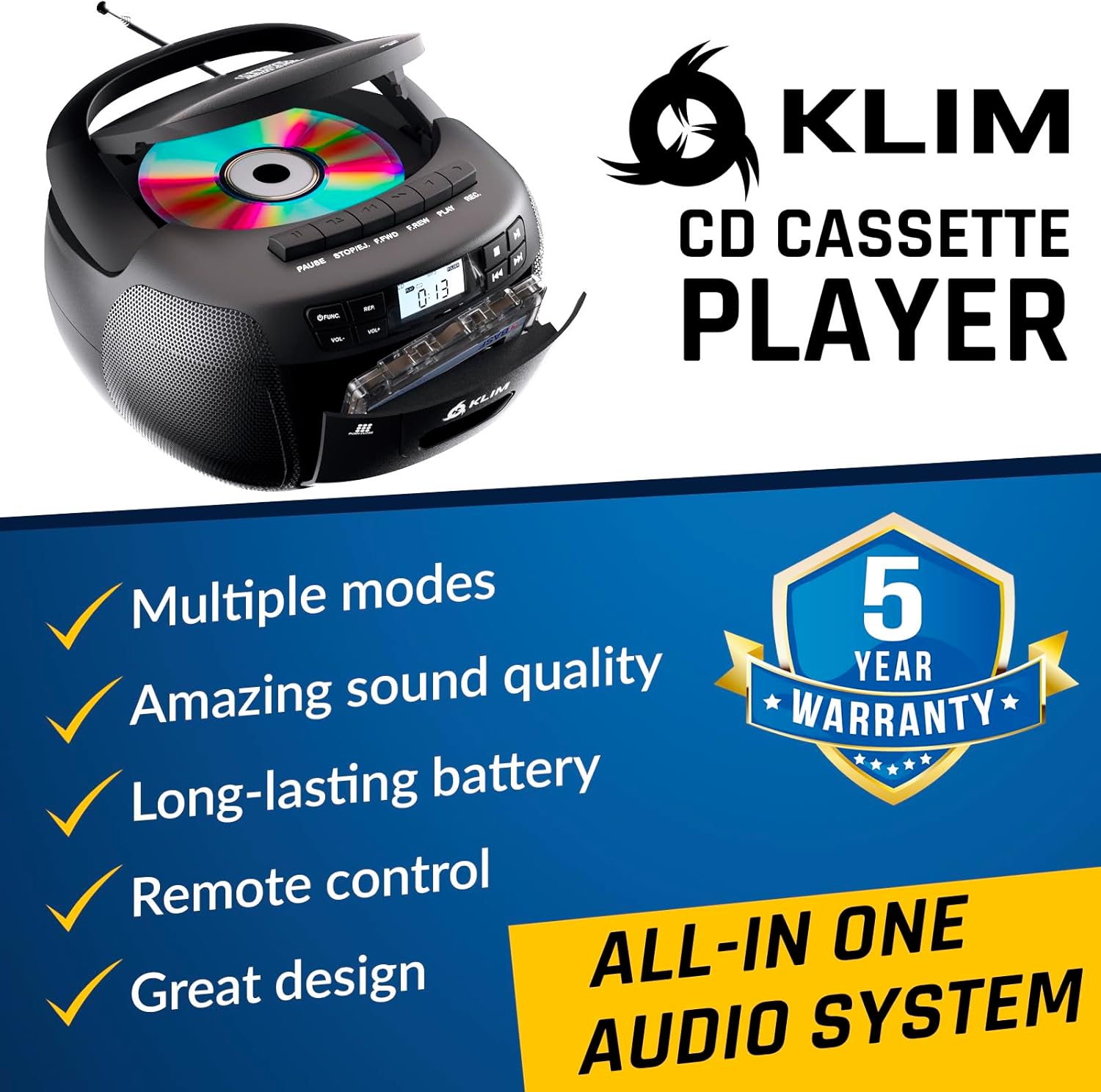
Slika 4.1: Prednja strana view of the KLIM KLCD-0582 CD Cassette Boombox, showing the CD lid, cassette deck, and control buttons.
Kontrole na prednjoj ploči:
- Dugme za napajanje: Uključuje ili isključuje jedinicu.
- Dugme za funkciju/režim: Switches between CD, Cassette, Radio, Bluetooth, USB, and AUX modes.
- Volume Control (VOL+/-): Podešava jačinu zvuka reprodukcije.
- Play/Pause Button (CD/USB): Pokreće ili pauzira reprodukciju CD-a/USB-a.
- Stop Button (CD/USB/Cassette): Zaustavlja reprodukciju.
- Dugmad za preskakanje/pretraživanje (<< / >>): Skips tracks or searches within a track (CD/USB). Tunes radio stations.
- Repeat Button (CD/USB): Ponavlja trenutnu pjesmu ili sve pjesme.
- Program Button (CD/USB): Programs track order for CD/USB playback.
- Record Button (Cassette): Initiates recording to cassette tape.
- Eject Button (Cassette): Opens the cassette deck.
- LCD ekran: Shows current mode, track number, radio frequency, etc.

Slika 4.2: Detaljno view of the LCD display and speaker area, highlighting the digital interface.
Side/Rear Panel Connections:
- Ulaz za izmjeničnu struju: Povezuje kabl za napajanje naizmeničnom strujom.
- Pretinac za baterije: Holds 6 C-size batteries for portable use.
- USB port: Za reprodukciju zvuka files sa USB drajva.
- AUX ulaz (3.5 mm): Povezuje vanjske audio uređaje.
- Priključak za slušalice (3.5 mm): Za privatno slušanje.
- Teleskopska antena: For AM/FM radio reception.

Figure 4.3: Product label on the bottom of the unit, indicating model number and electrical ratings.
5. Podešavanje
5.1 Napajanje uređaja
Vaš boombox može se napajati naizmjeničnom strujom ili baterijama.
Naizmjenična struja (upotreba u zatvorenom prostoru):
- Uvjerite se da je jedinica isključena.
- Connect the supplied AC power cord to the AC power input on the rear of the boombox.
- Plug the other end of the AC power cord into a standard wall outlet (110-120V, 60Hz).
DC Power (Battery Operation - Portable Use):
- Provjerite je li uređaj isključen i odvojen od izmjenične struje.
- Otvorite poklopac pretinca za baterije na dnu uređaja.
- Insert 6 C-size (UM-2) batteries, ensuring correct polarity (+/-) as indicated inside the compartment.
- Čvrsto zatvorite poklopac odeljka za baterije.
Napomena: Remove batteries if the unit will not be used for an extended period to prevent leakage and damage.
5.2 Ugradnja baterija u daljinski upravljač
- Otvorite odeljak za baterije na poleđini daljinskog upravljača.
- Insert 2 AAA alkaline batteries, observing the correct polarity.
- Zatvorite poklopac odeljka za baterije.

Figure 5.1: The boombox shown with its remote control, which requires AAA batteries.
5.3 Podešavanje antene
Za optimalan FM radio prijem, potpuno ispružite teleskopsku antenu. Za AM prijem, okrenite uređaj radi najboljeg signala.
6. Operacija
6.1 Osnovne kontrole
- Uključivanje/isključivanje: Pritisnite POWER dugme.
- Odaberite način rada: Pritisnite FUNKCIJA or MODE button repeatedly to cycle through CD, Cassette, Radio (AM/FM), Bluetooth, USB, and AUX modes.
- Podesite glasnoću: Koristite VOL+ i VOL- dugmad.
6.2 Reprodukcija CD-a
- Pritisnite FUNKCIJA dugme za odabir CD moda.
- Otvorite poklopac pretinca za CD.
- Place a CD (audio CD or MP3/WMA CD) with the label side facing up.
- Close the CD compartment lid. The unit will read the disc and begin playback automatically or display the total number of tracks.
- Pritisnite PLAY/PAUSE za pokretanje ili pauziranje reprodukcije.
- Pritisnite STOP da zaustavite reprodukciju.
- Koristi SKIP (<< / >>) buttons to skip tracks. Hold to fast forward/rewind within a track.
- Reprodukcija programa: U stop modu, pritisnite PROGRAM. Koristi SKIP to select desired tracks, then press PROGRAM again to confirm each track. Press IGRAJ za početak programirane reprodukcije.
- Ponovi reprodukciju: Pritisnite REPEAT once for single track repeat, twice for all tracks repeat.
6.3 Reprodukcija i snimanje kaseta
- Pritisnite FUNKCIJA dugme za odabir TAPE moda.
- Pritisnite EJECT button to open the cassette deck.
- Insert a cassette tape and close the deck.
- Pritisnite IGRAJ za početak reprodukcije.
- Koristi FAST FORWARD (FFWD) or REWIND (REW) dugmad za navigaciju kroz traku.
- Pritisnite STOP da zaustavite reprodukciju.
Snimanje na kasetu:
- Insert a blank, recordable cassette tape.
- Select the desired source (CD, Radio, AUX, Bluetooth, USB).
- Pokrenite reprodukciju na izvoru (npr. reprodukujte CD pjesmu, podesite radio stanicu).
- Pritisnite RECORD button on the boombox. The IGRAJ Dugme će se također aktivirati. Snimanje će započeti.
- Pritisnite STOP da prekinete snimanje.
Važno: Ensure the cassette tape has its record-protection tabs intact for recording.
6.4 AM/FM radio
- Pritisnite FUNKCIJA dugme za odabir RADIO načina rada.
- Izvucite teleskopsku antenu za FM prijem. Za AM, okrenite uređaj.
- Koristite TUNING dugme ili SKIP (<< / >>) buttons to tune to your desired station. The frequency will be displayed on the LCD.
6.5 Bluetooth veza
- Pritisnite FUNKCIJA button to select BLUETOOTH mode. The LCD will display "BT" and the unit will enter pairing mode, indicated by a flashing Bluetooth icon.
- Na uređaju koji podržava Bluetooth (npr. pametni telefon, tablet) omogućite Bluetooth i potražite dostupne uređaje.
- Select "KLIM Boombox" from the list of devices.
- Once paired, the Bluetooth icon on the boombox's LCD will stop flashing. You can now play audio from your device through the boombox.
- Control playback (play/pause, skip tracks) either from your connected device or using the boombox's controls.
6.6 Reprodukcija s USB-a
- Umetnite USB fleš disk u USB port.
- Pritisnite FUNKCIJA button to select USB mode. The unit will automatically detect and begin playing compatible audio files (MP3/WMA).
- Koristi PLAY/PAUSE, STOP, i SKIP (<< / >>) buttons to control playback, similar to CD mode.
- Reprodukcija programa: U stop modu, pritisnite PROGRAM. Koristi SKIP to select desired tracks, then press PROGRAM again to confirm each track. Press IGRAJ za početak programirane reprodukcije.
6.7 AUX ulaz
- Connect an external audio device (e.g., MP3 player, smartphone) to the AUX input jack using a 3.5mm audio cable (not included).
- Pritisnite FUNKCIJA button to select AUX mode. The LCD will display "AUX".
- Pokrenite reprodukciju na eksternom uređaju. Zvuk će se usmjeravati kroz boombox zvučnike.
- Volume can be adjusted on both the boombox and the external device. Playback controls are managed on the external device.
6.8 Korišćenje daljinskog upravljača
The included remote control allows convenient operation from a distance of up to 20 feet. Ensure line of sight to the boombox's front panel.
- Napajanje (crveno dugme): Uključuje/isključuje uređaj.
- Isključi zvuk: Isključuje/uključuje zvuk.
- VOL +/-: Podešava jačinu zvuka.
- FUNC: Cycles through modes (CD, TAPE, FM, AM, BT, USB, AUX).
- REP: Repeat function for CD/USB.
- PROG: Program function for CD/USB.
- PLAY/PAUSE, STOP, FFWD, REW: Playback controls for CD/USB/Cassette.
- Number Buttons (0-9, -10, +10): Direct track selection for CD/USB.
7. Održavanje
7.1 Čišćenje jedinice
- Uvijek isključite jedinicu iz izvora napajanja prije čišćenja.
- Za čišćenje vanjskih površina koristite meku, suhu krpu.
- Ne koristite abrazivna sredstva za čišćenje, voskove ili rastvarače jer mogu oštetiti završnu obradu.
- Za CD sočiva koristite specijalizirani disk za čišćenje CD sočiva.
- Za kasetofon, periodično čistite glave kasete i valjke lagano obrađenim pamučnim štapićem.ampnapunjen izopropil alkoholom.
7.2 Skladištenje
When not in use for extended periods, store the unit in a cool, dry place away from direct sunlight and extreme temperatures. Remove batteries from both the main unit and the remote control to prevent leakage.
8. Otkrivanje problema
If you encounter issues with your boombox, please refer to the following common problems and solutions before contacting support.
| Problem | Mogući uzrok | Rješenje |
|---|---|---|
| Nema struje | Kabl za naizmjeničnu struju nije priključen; Baterije su prazne ili nepravilno umetnute. | Provjerite priključak AC kabla; Zamijenite baterije ili provjerite ispravan polaritet. |
| Nema zvuka | Volume too low; Mute function active; Incorrect mode selected; Headphones connected. | Increase volume; Press MUTE on remote; Select correct mode; Disconnect headphones. |
| CD se ne reprodukuje / greška "NEMA DISKA" | CD inserted incorrectly; CD dirty or scratched; CD compartment not closed; Unit in wrong mode. | Insert CD label side up; Clean or replace CD; Close CD lid securely; Select CD mode. |
| Kaseta se ne reproducira/ne snima | Tape inserted incorrectly; Tape damaged; Record-protection tab missing (for recording); Unit in wrong mode. | Insert tape correctly; Use a new tape; Cover record-protection tab with tape; Select TAPE mode. |
| Loš radio prijem | Antena nije izvučena; Položaj uređaja. | Potpuno ispružite FM antenu; Okrenite uređaj za bolji AM prijem. |
| Greška Bluetooth uparivanja | Boombox not in pairing mode; Device Bluetooth off; Device too far. | Ensure boombox is in BT mode and flashing; Enable Bluetooth on device; Move device closer (within 30 ft). |
| Daljinski upravljač ne radi | Baterije su prazne ili nepravilno umetnute; Prepreka između daljinskog upravljača i uređaja. | Replace batteries; Ensure clear line of sight to the unit's front panel. |
9. Specifikacije
| Feature | Detalj |
|---|---|
| Broj modela | KLCD-0582 |
| Brand | KLIM |
| Tehnologija povezivanja | Pomoćni, Bluetooth 5.1, USB |
| Boja | Crna |
| Dimenzije artikla (D x Š x V) | 8.5 x 8.39 x 4.92 inča |
| Težina artikla | 1.5 kilograma |
| Izvor napajanja | Corded Electric (AC 110-120V/60Hz), 6 x C-size batteries (DC 9V) |
| Kompatibilni uređaji | MP3 plejer, uređaji sa Bluetooth podrškom |
| Podržani standardi | CD, MP3, WMA |
| Podržani audio format | CD-DA, MP3, WMA |
| Zvučnici | 3W Dual Speakers |
| Radio Bands | AM/FM |
10. Garancija i podrška
10.1 Informacije o garanciji
The KLIM KLCD-0582 CD Cassette Boombox comes with a 5 godine garancije. This warranty covers manufacturing defects and ensures the product meets its specified performance. Please retain your proof of purchase for warranty claims.
10.2 Korisnička podrška
For any questions, technical assistance, or warranty claims, please contact KLIM customer support. You can typically find contact information on the manufacturer's website or through the retailer where you purchased the product. KLIM offers 24/7 customer support to assist you.
For more information, visit the official KLIM webweb-mjesto ili pogledajte kontakt podatke navedene na pakovanju vašeg proizvoda.