
1. Uvod
The RX-350 Infrared Thermal Imager is a high-performance device designed for precise temperature measurements using infrared technology. It is ideal for monitoring areas where identifying temperature variations is crucial. The RX-350 offers excellent thermal resolution, allowing detection of even small temperature differences on objects and surfaces.
This manual provides essential information for the safe and effective operation of your thermal imager. Please read it thoroughly before use and keep it for future reference.

2. Sigurnosne informacije
Always observe the following safety precautions to prevent injury and avoid damage to the device:
- Do not point the camera directly at high-intensity light sources (e.g., sun, lasers) as this may damage the infrared sensor.
- Avoid exposing the device to extreme temperatures, humidity, or corrosive environments.
- Ne pokušavajte rastavljati ili modificirati uređaj. Za sve servisne radove obratite se kvalificiranom osoblju.
- Use only the provided charger and battery type.
- Držite uređaj van domašaja djece.
3. Proizvod je gotovview
3.1. Komponente i kontrole

Familiarize yourself with the following parts:
- Infracrvena sočiva: Hvata toplotno zračenje.
- Objektiv digitalnog fotoaparata: Captures visible light images for fusion mode.
- LED svjetlo: Provides illumination for visible light photography in dark environments.
- Camera Screen: Displays thermal and visible images, menu, and data.
- Power ON/OFF Key: Uključuje ili isključuje uređaj.
- Tipka izbornika: Accesses the device's settings and options.
- Selection/Enter Key: Potvrđuje odabire u meniju.
- Navigacijski tasteri (gore, dole, levo, desno): Navigacija kroz opcije menija.
- okidač: Used to capture images or videos.
- Mikro USB port: For charging and data export to a computer.
- Remen za zapešće: Za sigurno rukovanje.
3.2. Screen Elements Explanation

The screen displays various information during operation:
- Emisivnost: Current emissivity setting.
- Nivo baterije: Označava preostalo napunjenost baterije.
- Highest Temperature Cursor: Marks the hottest point in the image.
- Šifra boje: Represents the temperature scale.
- Central Point Temperature Cursor: Displays temperature at the center of the screen.
- vrijeme: Trenutno vrijeme.
- Datum: Trenutni datum.
- Lowest Temperature Cursor: Marks the coldest point in the image.
- Central Temperature: Numerical value of the central point temperature.
3.3. Opis palete boja
The device offers several color palettes to visualize temperature differences:
- duga: A common palette showing a full spectrum of colors for temperature variations.
- Iron Oxide Red: Highlights hotter areas in red/yellow tones.
- Rock Red: Similar to Iron Oxide Red, with slightly different color mapping.
- White Heat: Displays hotter areas as white and colder areas as black.
- Black Heat: Displays hotter areas as black and colder areas as white.
- Cold Color: Emphasizes colder temperatures.
The radiation coefficient (emissivity) can be adjusted to increase the measurement accuracy of objects with half-reflection surfaces. The highest and lowest temperature cursors guide users to areas with the highest and lowest temperatures in the thermal images. Selectable color palettes are provided to meet various imaging needs.
4. Podešavanje
4.1. Raspakivanje i prvi pregled
Upon receiving your RX-350 Thermal Imager, carefully unpack all components and inspect them for any signs of damage. The package should contain:
- 1x RX-350 Thermal Imager
- 1x Zaštitna torbica
- 1x Punjač (Adapter za napajanje)
- 1x USB Cable (Micro USB)
- 1x Korisnički priručnik (ovaj dokument)

4.2. Punjenje baterije
Before first use, fully charge the device's removable 18650 Lithium Battery. Connect the Micro USB cable to the camera's USB port and the other end to the charger. Plug the charger into a power outlet. The charging indicator on the screen will show the charging status. A full charge typically takes 2 to 3 hours.

4.3. Uključivanje / isključivanje napajanja
- Za uključivanje: Press and hold the Power ON/OFF key until the screen illuminates.
- Za isključivanje: Press and hold the Power ON/OFF key until the device shuts down.
The device features an automatic shutdown function, configurable for 5 minutes, 20 minutes, or disabled.
5. Uputstvo za upotrebu
5.1. Osnovno mjerenje temperature
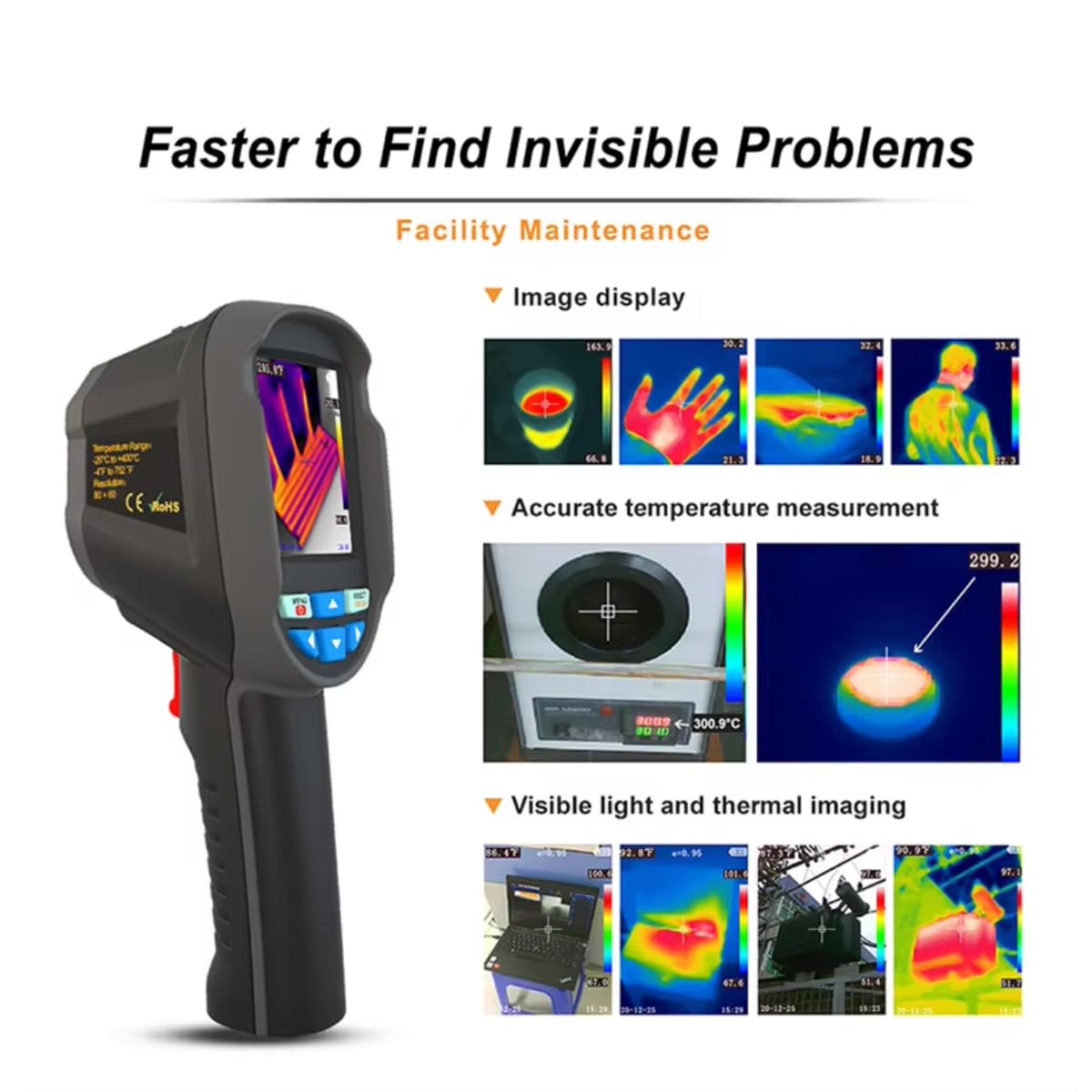
Once powered on, the camera will display a thermal image. Point the infrared lens towards the object or area you wish to measure. The screen will show real-time temperature readings, including the central point temperature, and the highest and lowest temperatures detected within the field of view.
5.2. Adjusting Emissivity
Emissivity is a crucial setting for accurate temperature measurement. Different materials have different emissivities. To adjust:
- Pritisnite Meni ključ.
- Navigate to the 'Emissivity' setting using the Navigation keys.
- Pritisnite Selection/Enter ključ.
- Adjust the value between 0.01 and 1.00 using the Navigation keys.
- Pritisnite Selection/Enter taster za potvrdu.
Consult a reference table for common material emissivities if precise measurements are required.
5.3. Changing Color Palettes
To change the visual representation of temperature:
- Pritisnite Meni ključ.
- Navigate to the 'Color Palette' setting.
- Pritisnite Selection/Enter ključ.
- Select your desired palette (e.g., Rainbow, Iron, Cold Color, White Hot, Black Hot) using the Navigation keys.
- Pritisnite Selection/Enter taster za potvrdu.
5.4. Image/Video Capture and Storage
The device supports image (JPG) and video (MP4) storage on its built-in 4GB eMMC memory (approximately 3GB user available space).
- Za snimanje slike: Aim the camera and press the Trigger dugme nakratko.
- To Record a Video: Pritisnite i držite Trigger button to start recording, and press it again to stop.
5.5. Connecting to PC for Data Export
To export captured images and videos:
- Connect the camera to your computer using the provided Micro USB cable.
- The camera will appear as a removable storage device on your computer.
- You can then copy the JPG images and MP4 videos to your computer.
The device also supports standalone image analysis on a PC.

6. Održavanje
6.1. Čišćenje
- Use a soft, dry cloth to clean the device's body.
- Za čišćenje objektiva koristite specijaliziranu krpu i otopinu za čišćenje objektiva kako biste izbjegli ogrebotine.
- Nemojte koristiti abrazivna sredstva za čišćenje ili rastvarače.
6.2. Održavanje baterije
- Redovno punite bateriju, čak i ako uređaj nije u upotrebi, kako biste održali njeno zdravlje.
- Store the device with a partially charged battery (around 50%) if it will not be used for an extended period.
- Izbjegavajte često potpuno pražnjenje baterije.
7. Otkrivanje problema
If you encounter issues with your RX-350 Thermal Imager, try the following:
- Uređaj se ne uključuje: Ensure the battery is fully charged. Try connecting the charger and powering on.
- Netačna očitanja temperature: Check the emissivity setting for the material being measured. Ensure the lens is clean.
- Ekran je prazan ili zamrznut: Try restarting the device by holding the power button. If unresponsive, allow the battery to fully discharge and then recharge.
- Ne mogu se povezati s računarom: Provjerite je li USB kabel sigurno spojen i na kameru i na računar. Pokušajte s drugim USB priključkom ili kabelom.
Ako problemi i dalje postoje, kontaktirajte korisničku podršku za pomoć.
8. Specifikacije
| Feature | Specifikacija |
|---|---|
| Model | RX-350 |
| Infracrvena rezolucija | 160x120 (19200 pixels) |
| Polje of View (FOV) | 35°(H) × 27°(V) |
| Spektralni odzivni pojas | 8 ~ 14um |
| Veličina piksela | 12um |
| NETD (temperaturna razlika ekvivalentna buci) | ≤ 50 mK |
| Frame Rate | 25Hz |
| Raspon mjerenja temperature | -20 ℃ ~ +550 ℃ (-4 ℉ ~ +1022 ℉) |
| Preciznost mjerenja | (-15 ℃ ~ +550 ℃) ± 2 ℃ or ± 2%; (-20 ℃ ~ -15 ℃) ± 4 ℃ or ± 4% |
| mjerne jedinice | ℃ / ℉ |
| Fokalna dužina objektiva | 3.2mm |
| Postavka emisivnosti | Adjustable from 0.01 ~ 1.00 |
| Measurable Distance | 0m ~ 3m |
| Optimal Measurable Distance | 0.5 ~ 1.2m |
| Focus Mode | Free Focus |
| Temperature Measurement Points | Center point / Hot spot and Cold spot |
| Color Palettes | Rainbow, Iron, Cold Color, White Hot, Black Hot |
| Veličina ekrana | 2.8 inches (240 × 320) |
| Način prikaza slike | Infrared / Visible Light / Dual Fusion |
| Sistem osvetljenja | LED svjetlo za punjenje |
| Pohrana uređaja | 4GB built-in eMMC (approx. 3GB user available) |
| Format slike/videa | JPG / MP4 |
| Image/Video Export Method | USB veza sa računarom |
| Image Analysis Function | Supports standalone analysis on PC |
| Jezik menija | English, German, Italian, Chinese |
| Vrsta baterije | Uklonjiva punjiva litijumska baterija (18650) |
| Kapacitet baterije | 2000mAh |
| Vrijeme upotrebe | 2 do 3 sati |
| Interfejs napajanja | Micro USB |
| Postavke automatskog isključivanja | 5 minutes / 20 minutes / None |
| Radna temperatura | -10 ℃ ~ +45 ℃ (-14 ℉ ~ +122 ℉) |
| Temperatura skladištenja | -20 ℃ ~ +60 ℃ (-4 ℉ ~ +140 ℉) |
| Relativna vlažnost | 10% ~ 85% RH (bez kondenzacije) |
| Težina proizvoda | 375g |
| Dimenzije proizvoda | 9.6 × 7.2 × 22.6 cm |
9. Garancija i podrška
Za informacije o garanciji i tehničkoj podršci, molimo pogledajte dokumentaciju koja je priložena uz vašu kupovinu ili se direktno obratite prodavcu. Sačuvajte dokaz o kupovini za bilo kakve reklamacije u vezi sa garancijom.


