
SVITOO SVITOO Tab 10 GMS Certified 1027C
SVITOO Kids Tablet 10 Inch User Manual
Model: SVITOO Tab 10 GMS Certified 1027C
Uvod
This manual provides essential instructions for setting up, operating, and maintaining your SVITOO Kids Tablet 10 Inch. Designed for young users, this Android 15 tablet features parental controls, a durable shockproof case, and a vibrant 10-inch HD IPS display. Please read this guide thoroughly to ensure proper use and to maximize your tablet's functionality.
Šta je u kutiji
- SVITOO Kids Tablet 10 Inch
- Protective Cover (Pre-installed)
- USB-C kabl za punjenje
- Uputstvo za upotrebu
- Poklon kutija
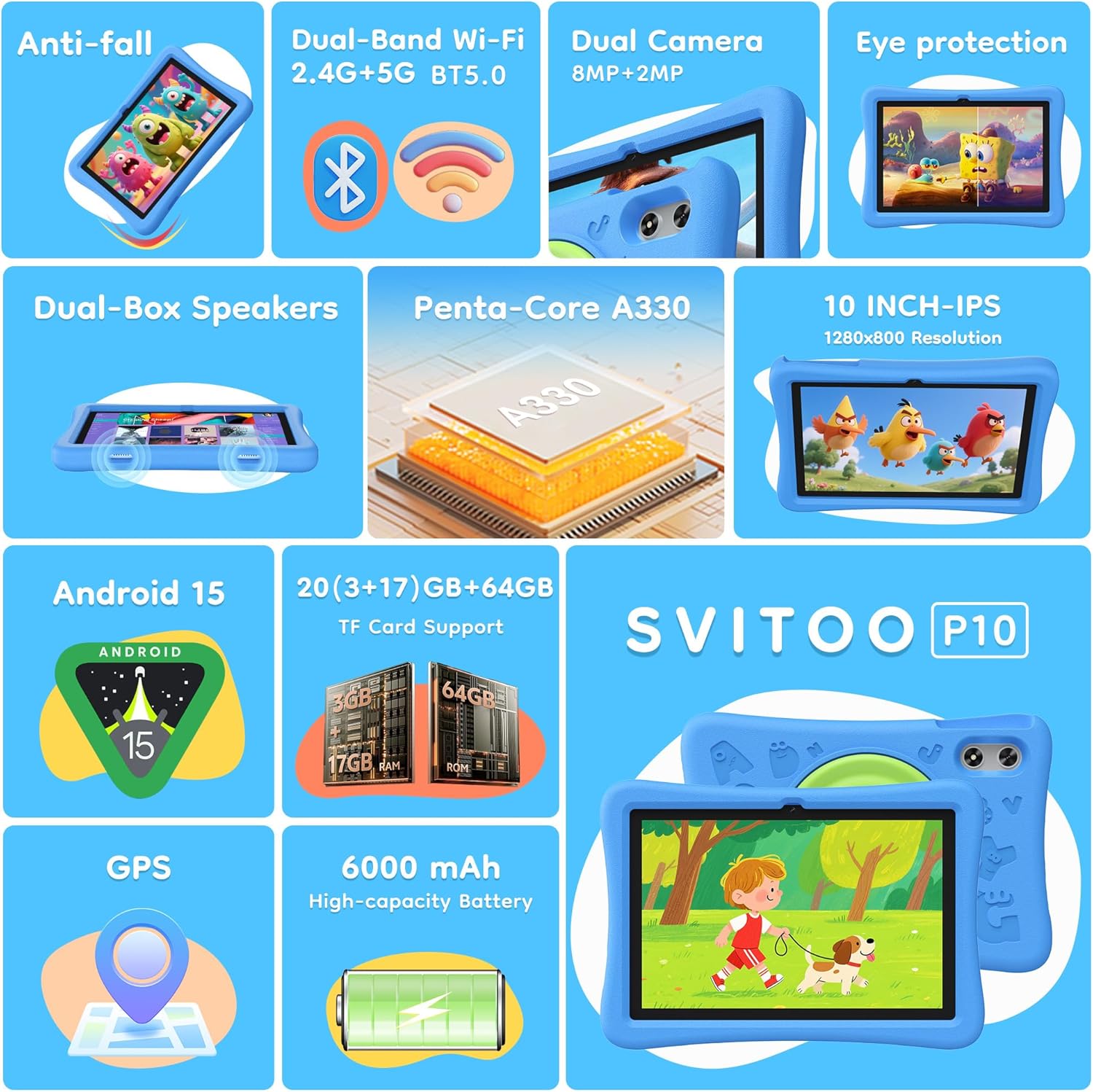
Image: The SVITOO Kids Tablet 10 Inch, shown in its blue protective case, highlighting its robust design suitable for children.
Product Overview
Ključne karakteristike
- Operativni sistem: Android 15 with GMS Certification for full Google Play access.
- Prikaz: 10-inch HD IPS (1280 x 800 pixels) touchscreen with eye protection mode.
- procesor: Unisoc T7200 8-core CPU for smooth performance.
- Memorija i pohrana: 20GB RAM (3GB physical + 17GB virtual) and 64GB internal storage, expandable up to 1TB via microSD card (sold separately).
- kamere: 8MP Rear Camera and 2MP Front Camera.
- Povezivanje: Dual-Band Wi-Fi (2.4/5 GHz) and Bluetooth 5.0.
- baterija: Baterija visokog kapaciteta od 6000 mAh za produženu upotrebu.
- audio: Dual-box speakers and a 3.5mm headphone jack.
- Trajnost: Kid-friendly EVA shockproof case with a 360° rotating handle and 180° rotating stand.
- roditeljski nadzor: Advanced settings for screen time limits, content filtering, and app management.
Tablet Components
Familiarize yourself with the physical components of your tablet:

Slika: Detaljna view of the tablet's side and rear, indicating the USB Type-C port, headphone jack, power ON/OFF button, volume controls, speakers, rear camera, and front camera.
- USB Type-C port: Za punjenje i prijenos podataka.
- Priključak za slušalice (3.5 mm): Za povezivanje žičanih slušalica.
- Dugme za uključivanje/isključivanje: Za uključivanje/isključivanje tableta ili njegovo stavljanje u stanje mirovanja.
- Dugmad za jačinu zvuka: Za podešavanje jačine zvuka.
- Zvučnici: Dual-box speakers for audio output.
- Prednja kamera: Za video pozive i selfije.
- stražnja kamera: Za snimanje fotografija i videa.
- Utor za microSD karticu: Located under a protective flap, for storage expansion.

Image: The tablet's protective case featuring a versatile 360-degree rotating handle that also functions as a 180-degree rotating stand, allowing for various viewing angles.
Vodič za postavljanje
- Napunite tablet: Before first use, fully charge the tablet using the provided USB-C cable and a compatible power adapter.
- Uključeno: Press and hold the Power ON/OFF button until the screen lights up.
- Početno podešavanje: Slijedite upute na ekranu da biste odabrali jezik, povezali se na Wi-Fi mrežu i postavili svoj Google račun.
- Google Kids Space / Parental Controls: During setup, you will have the option to configure Google Kids Space or other parental control settings. It is highly recommended to set these up immediately to ensure a safe environment for your child.
- Instalirajte aplikacije: Once setup is complete, you can download age-appropriate apps and games from the Google Play Store.
Uputstvo za upotrebu
Osnovna navigacija
- Početni ekran: Swipe left or right to access different app pages.
- Ladica za aplikacije: Prevucite prema gore od dna ekrana do view sve instalirane aplikacije.
- Obavještenja i brze postavke: Swipe down from the top of the screen to access notifications and quick settings like Wi-Fi, Bluetooth, and screen brightness.
- Nazad, Početna, Nedavne aplikacije: Use the navigation buttons at the bottom of the screen to go back, return to the home screen, or view nedavno otvorene aplikacije.
Punjenje tableta
Connect the USB-C charging cable to the tablet's USB-C port and the other end to a power adapter. The battery icon on the screen will indicate charging status. A full charge provides approximately 12 hours of mixed use.

Image: The tablet connected to a charger, displaying a battery icon with 99% charge, illustrating the charging process and battery life features like Night Mode and Energy Saving.
Način zaštite očiju
To reduce eye strain, especially during prolonged use, activate the Eye Protection Mode (often called Night Mode or Reading Mode) from the quick settings panel or display settings. This mode adjusts screen colors to warmer tones.
Roditeljski nadzor
The SVITOO Kids Tablet features robust parental controls to help manage your child's digital experience. These controls are integrated with Android 15 and Google Family Link.

Image: A family using the tablet, with an overlay showing various parental control options such as setting screen time limits, blocking harmful apps/websites, approving app downloads, and tracking child's location.
Configuring Parental Controls:
- Postavke pristupa: Idi na Postavke > Digitalno blagostanje i roditeljski nadzor or search for "Family Link" in your app drawer.
- Set Screen Time Limits: Define daily limits for tablet usage to encourage balanced screen time.
- Filtriranje sadržaja: Blokiraj pristup neprikladnom webweb stranice i aplikacije.
- App Approvals: Require parental approval for new app downloads or in-app purchases.
- Praćenje lokacije: Monitor your child's device location (if enabled and configured).
For detailed instructions on Google Family Link, please refer to Google's official support documentation.
Održavanje
- čišćenje: Za čišćenje ekrana i kućišta tableta koristite meku krpu koja ne ostavlja dlačice. Izbjegavajte abrazivna sredstva za čišćenje ili rastvarače.
- Održavanje baterije: To prolong battery life, avoid fully discharging the tablet frequently. Charge it regularly and avoid exposing it to extreme temperatures.
- Ažuriranja softvera: Keep the tablet's operating system and apps updated to ensure optimal performance and security.
- Skladištenje: Store the tablet in a cool, dry place away from direct sunlight when not in use.
- Zaštitna torbica: The included EVA shockproof case provides protection against drops and bumps. Ensure it is properly fitted at all times.
Rješavanje problema
| Problem | Rješenje |
|---|---|
| Tablet se ne uključuje. | Ensure the tablet is fully charged. Connect it to a charger for at least 30 minutes, then try powering it on again. |
| Ekran ne reagira. | Perform a force restart by holding the Power ON/OFF button for 10-15 seconds. If the issue persists, contact support. |
| Problemi s Wi-Fi vezom. | Check if other devices can connect to the Wi-Fi network. Restart your router and the tablet. Forget the network and reconnect. |
| Aplikacije se ruše ili su spore. | Close background apps. Clear app cache (Settings > Apps > [App Name] > Storage > Clear Cache). Ensure sufficient storage space is available. Restart the tablet. |
| Baterija se brzo prazni. | Smanjite svjetlinu ekrana. Zatvorite nekorištene aplikacije. Isključite Wi-Fi/Bluetooth kada se ne koriste. Provjerite potrošnju baterije u postavkama kako biste identificirali aplikacije koje troše mnogo energije. |
Specifikacije
| Feature | Detalj |
|---|---|
| Naziv modela | SVITOO Tab 10 GMS Certified 1027C |
| Operativni sistem | Android 15 |
| Veličina ekrana | 10 inča |
| Rezolucija ekrana | 1280 x 800 piksela (HD IPS) |
| Procesor | 1.8 GHz (Unisoc T7200 8-core CPU) |
| RAM | 20 GB (3 GB fizičke + 17 GB virtuelne) |
| Interna pohrana | 64 GB |
| Proširiva pohrana | Up to 1TB via MicroSD (sold separately) |
| Grafički koprocesor | Mali-G57 processor Imagination Tech |
| Bežični tip | 802.11a/b/g/n/ac (Dual-Band 2.4/5 GHz) |
| Bluetooth | Bluetooth 5.0 |
| Kapacitet baterije | 6000mAh |
| Prosječno trajanje baterije | 12 sata |
| Prednja kamera | 2 megapiksela |
| Zadnja kamera | 8 megapiksela |
| Težina artikla | 2.44 funte |
| Dimenzije proizvoda | 9.7 x 6.4 x 0.4 inča |
Garancija i podrška
Your SVITOO Kids Tablet comes with a 1-Year Manufacturer Protection. This warranty covers manufacturing defects under normal use. It does not cover damage caused by misuse, accidents, natural disasters, or unauthorized modifications.
For technical support, warranty claims, or any questions regarding your product, please contact SVITOO customer service through your Amazon order page. Look for the "Contact Us" option next to your order details.
Molimo sačuvajte dokaz o kupovini u svrhu garancije.