
1. prekoview
The VAIO SX-R Laptop is a high-performance portable computer designed for productivity and creative tasks. It features an Intel Core Ultra 7 processor, a vibrant 14-inch WQXGA touch display, ample memory, and fast storage, all running on Windows 11 Pro.

Figure 1: VAIO SX-R Laptop, open view.
2. Značajke proizvoda
- Intel Core Ultra 7 procesor: Equipped with 16 cores and AI-enhanced performance for speed and intelligent task management.
- 14" WQXGA Touch Display (2560x1600): High-resolution screen with wide color gamut and touch capability.
- 32GB LPDDR5 RAM: Provides superior multitasking capabilities with instant responsiveness.
- 1TB PCIe NVMe SSD: Offers massive storage with ultra-fast read/write speeds.
- Windows 11 Pro: Includes enterprise-grade security and productivity features.
- IR Camera & Fingerprint Reader: Enhanced security and convenient login options.
- Carbon Fiber Chassis: Lagana i izdržljiva konstrukcija.
- Water Resistant Keyboard: Designed to withstand accidental spills.

Figure 2: Key features of the VAIO SX-R Laptop.
3. Fizički overview
3.1 Portovi i konektori
The VAIO SX-R Laptop is equipped with a variety of ports for connectivity. Refer to the diagram below for port locations and types.
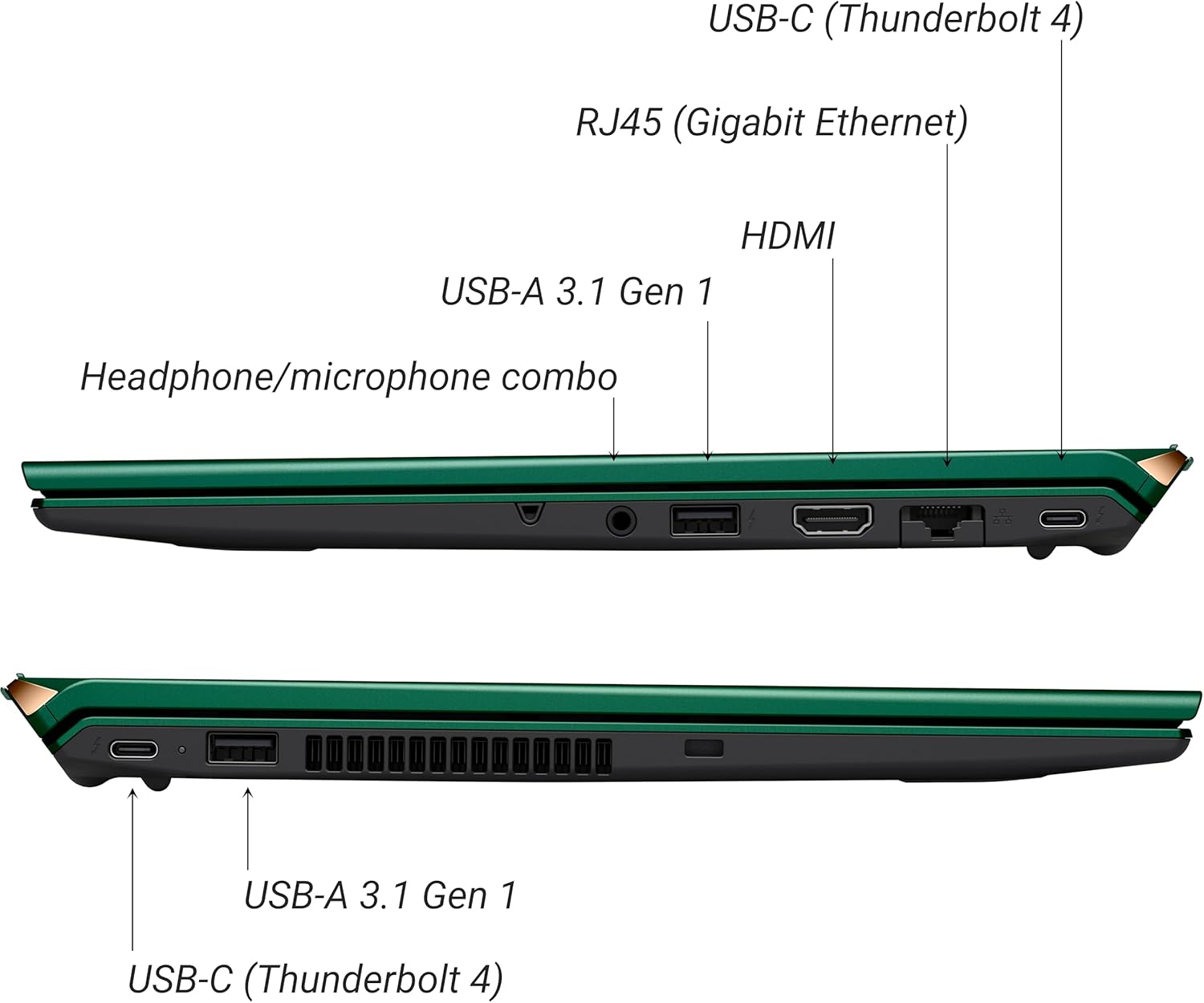
Slika 3: Bočna strana view of VAIO SX-R Laptop ports.
- USB-C (Thunderbolt 4): High-speed data transfer, video output, and power delivery.
- RJ45 (Gigabit Ethernet): Za žičane mrežne veze.
- HDMI: Za povezivanje s eksternim ekranima.
- USB-A 3.1 Gen 1: Za povezivanje USB uređaja.
- Kombinovani priključak za slušalice/mikrofon: Za audio ulaz i izlaz.
3.2 Tastatura i tačped
The laptop features a full-sized keyboard and a responsive touchpad for navigation and input.

Slika 4: Raspored tastature i touchpada.
4. Podešavanje
4.1 Početno uključivanje
- Unpack the VAIO SX-R laptop and all accessories.
- Spojite adapter za napajanje na priključak za punjenje laptopa, a zatim na utičnicu.
- Open the laptop lid. The system may power on automatically or you may need to press the power button located on the top right of the keyboard.
- Slijedite upute na ekranu da biste dovršili postavljanje sustava Windows 11 Pro, uključujući jezik, regiju, mrežnu vezu i kreiranje korisničkog računa.
4.2 Povezivanje na mrežu
- Wi-Fi: During initial setup or via Windows settings, select your preferred Wi-Fi network and enter the password. The VAIO SX-R supports Wi-Fi 7 for fast and stable wireless connectivity.
- Žični (Ethernet): Connect an Ethernet cable from your router or modem to the RJ45 port on the laptop.
5. Uputstvo za upotrebu
5.1 Uključivanje/isključivanje i stanje mirovanja
- Uključeno: Otvorite poklopac ili pritisnite dugme za napajanje.
- Isključi: Kliknite na dugme Start, zatim Napajanje > Isključi.
- spavanje: Zatvorite poklopac ili kliknite na dugme Start, a zatim na Napajanje > Spavanje.
5.2 Using the Touch Display
The 14-inch WQXGA display supports touch input. You can interact with the screen using gestures similar to a tablet or smartphone.
5.3 IR Camera and Fingerprint Reader
For enhanced security and convenience, the laptop includes an IR camera for Windows Hello face recognition and a fingerprint reader.
- Windows Hello Face Recognition: Configure this feature in Windows Settings > Accounts > Sign-in options. The IR camera will recognize your face to unlock the device.
- Čitač otiska prsta: Set up your fingerprint in Windows Settings > Accounts > Sign-in options for quick and secure access.
6. Održavanje
6.1 Opšta njega
- Keep the laptop in a clean, dry environment.
- Izbjegavajte izlaganje laptopa ekstremnim temperaturama ili direktnoj sunčevoj svjetlosti.
- Ne stavljajte teške predmete na laptop.
6.2 Čišćenje
- Za čišćenje ekrana i vanjske površine koristite meku krpu koja ne ostavlja dlačice.
- Za tvrdokorne mrlje, lagano natrljajteampOperite krpu vodom ili sredstvom za čišćenje ekrana.
- Ne prskajte sredstva za čišćenje direktno na laptop.
6.3 Njega baterija
- Da biste produžili vijek trajanja baterije, izbjegavajte često potpuno pražnjenje baterije.
- Laptop čuvajte sa djelomično napunjenim (oko 50%) ako se ne koristi duži period.
7. Otkrivanje problema
7.1 Problemi s napajanjem
- Laptop se ne uključuje: Provjerite je li adapter za napajanje sigurno priključen i je li utičnica funkcionalna. Pokušajte s drugom utičnicom.
- Baterija se ne puni: Provjerite adapter za napajanje i kabel da li su oštećeni. Osigurajte da je priključak za punjenje čist.
7.2 Problemi sa ekranom
- Nema prikaza: Spojite vanjski monitor da provjerite je li problem u internom ekranu laptopa.
- Ekran na dodir ne reaguje: Ponovo pokrenite laptop. Provjerite da li su upravljački programi za ekran ažurirani.
7.3 Problemi s povezivanjem
- Nema Wi-Fi veze: Check if Wi-Fi is enabled in Windows settings. Restart your router. Update wireless drivers.
- Bluetooth ne radi: Ensure Bluetooth is enabled and your device is discoverable.
8. Specifikacije
| Feature | Detalj |
|---|---|
| Naziv modela | VAIO SX-R (VJS4R1X0811G) |
| Procesor | Intel Core Ultra 7 (16-Core, AI-Boosted) |
| Operativni sistem | Windows 11 Pro |
| Display | 14 Inches WQXGA Touch (2560x1600) |
| RAM | 32GB LPDDR5 |
| Skladištenje | 1TB PCIe NVMe SSD |
| Grafika | Integrisana Intel Arc grafika |
| Bežično povezivanje | 802.11ax (Wi-Fi 7), Bluetooth |
| Luke | USB-C (Thunderbolt 4) x2, USB-A 3.1 Gen 1 x3, HDMI x1, RJ45 (Gigabit Ethernet) x1, Headphone/microphone combo x1 |
| Kamera | IR Camera (Windows Hello compatible) |
| Sigurnosne karakteristike | Fingerprint Reader, IR Camera |
| Trajanje baterije | Do 10 sati (prosječno) |
| Težina | 3.1 funte |
| Dimenzije (DxŠxV) | 14.2 x 15 x 3.3 inča |
9. Durability and Testing
VAIO laptops are engineered with Japanese precision and undergo rigorous quality control to ensure reliability and performance. This includes various tests to withstand daily use.
9.1 Manufacturing and Quality Assurance
Video 1: VAIO Manufacturing and Durability Testing. This video demonstrates the quality control processes and durability tests performed on VAIO laptops, including keystroke testing, dust testing, LCD screen pressure testing, and opening/closure testing.
9.2 Key Durability Features
- Water Resistant Keyboard: The keyboard is designed to resist damage from accidental liquid spills.
- Screen Durability: The display undergoes pressure testing to ensure resilience.
- Drop Test: The laptop is tested to withstand drops from up to 3 feet.

Figure 5: Water resistant keyboard testing.

Figure 6: Screen durability test in progress.

Figure 7: 3-foot drop test for VAIO laptops.
10. Garancija i podrška
Your VAIO SX-R Laptop comes with a standard manufacturer's warranty. For specific warranty terms and conditions, please refer to the documentation included with your product or visit the official VAIO support website.
For technical support, troubleshooting assistance, or service requests, please contact VAIO customer support. Information regarding support channels can be found on the VAIO webweb-mjestu ili u ambalaži vašeg proizvoda.
Protection plans are available for purchase to extend coverage beyond the standard warranty. Options include 2-Year and 4-Year Protection Plans, as well as a Complete Protect + Norton 360 monthly plan.