1. Uvod
Hvala na kupoviniasing the iFFALCON 40S55T 40-inch Full HD Google TV. This manual provides essential information for the safe and efficient use of your television. Please read it thoroughly before operating the device and retain it for future reference.
The iFFALCON 40S55T is a tunerless smart TV designed for streaming content, offering a Full HD display, Google TV operating system, Chromecast built-in, and Dolby Audio for an immersive entertainment experience.
2. Sigurnosne informacije
Uvijek se pridržavajte osnovnih sigurnosnih mjera opreza prilikom korištenja ovog televizora kako biste smanjili rizik od požara, strujnog udara i ozljeda.
- Ne izlažite televizor kiši ili vlazi.
- Ne otvarajte TV casing; sve servisne radove prepustite kvalifikovanom osoblju.
- Osigurajte odgovarajuću ventilaciju oko TV-a.
- Držite televizor dalje od direktne sunčeve svjetlosti, izvora toplote i jakih magnetnih polja.
- Koristite samo kabel za napajanje i pribor koji je isporučio proizvođač.
- Isključite televizor iz struje tokom oluje sa grmljavinom ili kada ga ne koristite duži period.
3. Sadržaj paketa
Provjerite da li se sve stavke nalaze u kutiji:
- iFFALCON 40S55T 40-inch Full HD Google TV
- Daljinski upravljač
- TV stalak (2 komada)
- Vijci za TV stalak
- Power Cable
- Garantni list
- Uputstvo za upotrebu (ovaj dokument)
4. Podešavanje
4.1 Pričvršćivanje TV postolja
- Pažljivo postavite televizor licem prema dolje na meku, ravnu površinu kako biste spriječili oštećenje ekrana.
- Poravnajte svaki dio postolja s odgovarajućim utorima na donjoj strani televizora.
- Pričvrstite postolja pomoću priloženih vijaka. Pazite da su čvrsto zategnuti.
4.2 Povezivanje napajanja
Connect the power cable to the TV's power input and then plug it into a wall outlet. The TV will enter standby mode.
4.3 Initial Setup (Google TV & Network)
Prilikom prvog uključivanja, TV će vas voditi kroz početni proces podešavanja za Google TV. To uključuje:
- Odabir jezika.
- Povezivanje na Wi-Fi mrežu.
- Signing in with your Google account to access personalized content and apps.
- Prihvatanje uslova i odredbi.
4.4 Povezivanje
The iFFALCON 40S55T offers various connection options for external devices.

Slika: Prekoview of the TV's connectivity options, including HDMI, USB, Bluetooth, and Wi-Fi.
- HDMI portovi: Connect external devices like gaming consoles, Blu-ray players, or set-top boxes.
- USB port: Za povezivanje USB uređaja za pohranu podataka radi reprodukcije medija files.
- Wi-Fi: For wireless internet connection to access streaming services and online features.
- Bluetooth: For connecting wireless headphones, speakers, or other Bluetooth-enabled accessories.
4.5 Tunerless Operation
This TV is designed as a tunerless model, meaning it does not have a built-in tuner for terrestrial (over-the-air) broadcasts. To watch terrestrial, BS, or CS broadcasts, an external tuner is required and must be purchased separately.

Image: The iFFALCON 40S55T TV showcasing its smart features, highlighting its tunerless design and ability to enjoy internet video content without an antenna connection.
5. Upravljanje televizorom
5.1 Daljinski upravljač prekoview
The remote control provides access to all TV functions, including power, volume, channel navigation, and smart TV features. It also supports voice search via 'Hey Google'.

Image: The TV remote control, featuring quick access buttons for popular streaming services and a dedicated microphone button for voice commands.
- Dugme za napajanje: Uključuje ili isključuje TV.
- Navigacijski gumbi: Koristite navigacijski taster i dugme OK za navigaciju kroz menije.
- Dugmad za jačinu zvuka/kanal: Adjust volume and change channels (if an external tuner is connected).
- Dugmad prečica aplikacije: Direct access to popular streaming services like Netflix, YouTube, etc.
- Dugme za mikrofon: Press and hold to activate 'Hey Google' voice search.
5.2 Funkcije Google TV-a
Your iFFALCON TV runs on Google TV, providing a personalized and integrated entertainment experience.
- Agregacija sadržaja: Google TV organizes movies, shows, and live TV from all your apps and subscriptions into one place.
- Personalizirane preporuke: Na osnovu vašeg viewing history and preferences, Google AI suggests content you might enjoy.
- Glasovna pretraga: Use the 'Hey Google' feature on your remote to quickly find content, get information, or control smart home devices.
- Ugrađen Chromecast: Easily cast content from your smartphone, tablet, or computer directly to your TV screen.

Image: A smartphone screen mirroring content to the iFFALCON TV, demonstrating the Chromecast built-in feature for enjoying mobile content on a larger display.
5.3 Postavke slike
The TV incorporates advanced image processing technologies to deliver a superior viewing iskustvo.
- AI PQ Processor: TCL's proprietary AiPQ Processor intelligently adjusts image quality at the pixel level, enhancing clarity, color, and contrast for a vivid and realistic picture.
- Full HD (FHD): Experience sharp and detailed images with Full High Definition resolution, offering 200% more detail than standard HD screens.

Image: A visual comparison illustrating the enhanced detail and clarity provided by Full HD resolution compared to standard HD.
- HDR10/HLG Support: Enjoy a wider range of colors and contrast with HDR10 and HLG compatibility, revealing stunning detail in both bright and dark scenes.

Slika: Emisija na TV ekranuasing the vibrant and detailed picture quality achieved with HDR10/HLG technology.
- Mikro zatamnjenje: This technology analyzes the image in hundreds of separate zones to adjust brightness and darkness independently, enhancing contrast and picture quality.

Image: A visual representation of Micro Dimming technology, illustrating how it enhances contrast and picture depth by adjusting brightness in specific areas of the screen.
5.4 Sound Settings (Dolby Audio)
The TV features Dolby Audio for clear, rich, and immersive sound.
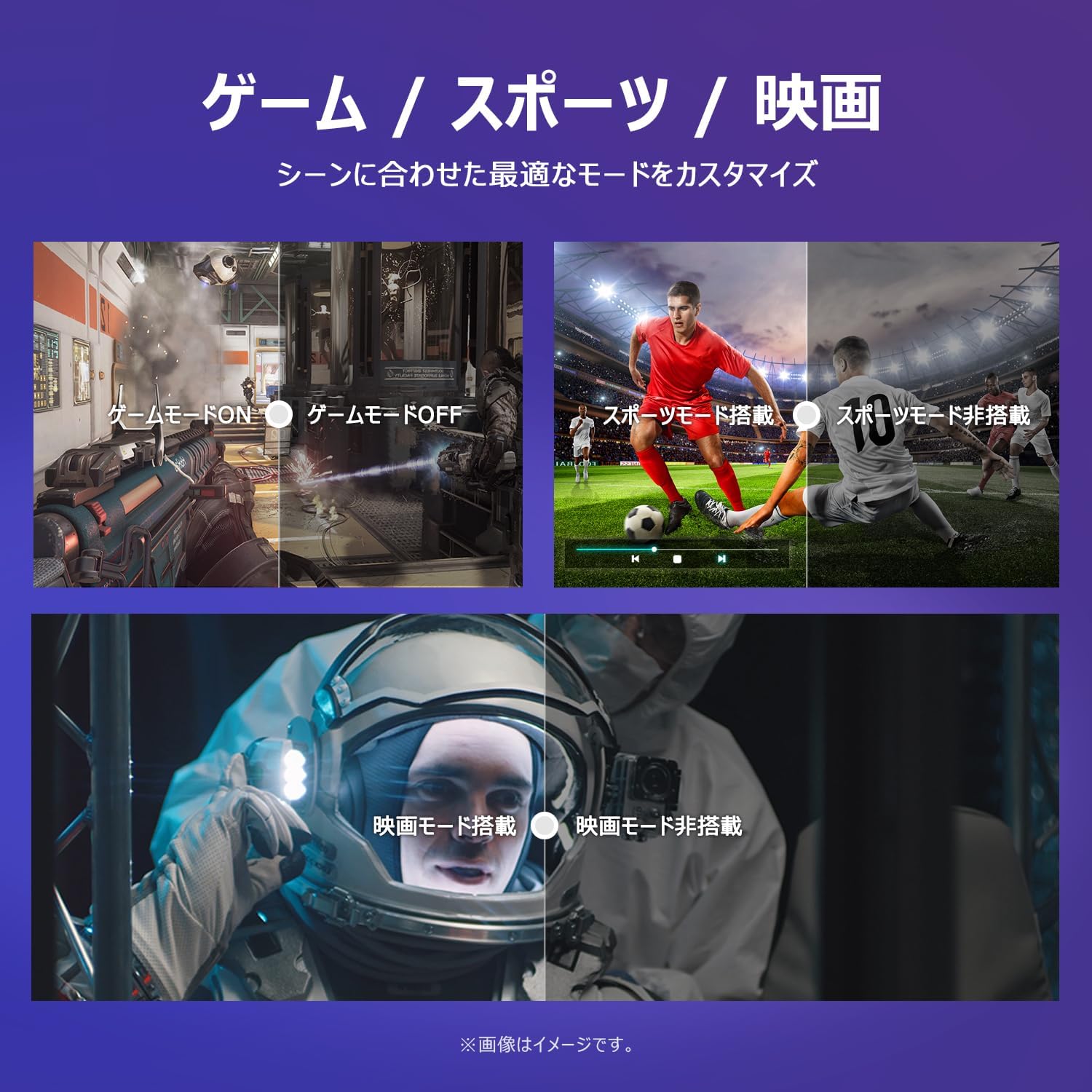
Image: The TV screen with a visual representation of sound, highlighting the immersive audio experience provided by Dolby Audio.
Access the sound settings menu to adjust modes like Standard, Music, Movie, or Custom to suit your preferences.
5.5 Režim igre
Activate Game Mode for an optimized gaming experience with reduced input lag.
Image: Visual comparisons demonstrating the optimized settings for Game Mode, Sports Mode, and Movie Mode, adapting the TV's performance to different content types.
The TV also offers dedicated Sports Mode and Movie Mode to enhance viewing for specific content types.
5.6 Postavke sistema
The quick settings menu allows you to customize frequently used system settings and rearrange their order for intuitive and convenient access.

Slika: A view of the TV's quick system settings interface, illustrating how users can easily access and customize various functions like brightness, picture mode, and network settings.
6. Održavanje
Pravilna njega i održavanje produžit će vijek trajanja vašeg televizora.
- Čišćenje ekrana: Nježno obrišite ekran mekom krpom koja ne ostavlja dlačice. Za tvrdokorne mrlje koristite sredstvo za čišćenje ekrana posebno dizajnirano za televizore, naneseno na krpu, a ne direktno na ekran.
- Čišćenje C-aasing: Koristite meku, suhu krpu za brisanje TV-aasing. Ne koristite abrazivna sredstva za čišćenje ili rastvarače.
- ventilacija: Pazite da ventilacijski otvori na stražnjoj strani televizora nisu blokirani kako biste spriječili pregrijavanje.
- Kabl za napajanje: Redovno provjeravajte kabel za napajanje da li je oštećen. U slučaju oštećenja, obratite se korisničkoj podršci radi zamjene.
7. Otkrivanje problema
Ako imate problema s televizorom, pogledajte sljedeće uobičajene probleme i rješenja. Ako problem i dalje postoji, obratite se korisničkoj podršci.
| Problem | Mogući uzrok | Rješenje |
|---|---|---|
| Nema struje | Kabl za napajanje nije priključen; utičnica ne radi | Ensure power cable is securely plugged in; Test outlet with another device |
| Nema slike, ali je zvuk prisutan | Incorrect input source; External device issue | Pritisnite dugme 'Input' na daljinskom upravljaču da biste odabrali ispravan izvor; Provjerite veze eksternih uređaja |
| Nema zvuka, ali je slika prisutna | Jačina zvuka je prigušena ili preniska; Problem sa eksternim audio sistemom | Unmute or increase volume; Check audio cable connections to external sound system |
| Daljinski upravljač ne radi | Prazne baterije; Prepreka između daljinskog upravljača i televizora | Replace batteries; Remove any obstructions; Ensure remote is pointed at the TV's IR sensor |
| Nije moguće povezati se na Wi-Fi | Netačna lozinka; Problem s ruterom; TV je previše udaljen od rutera | Verify Wi-Fi password; Restart router; Move TV closer to router or use a Wi-Fi extender |
8. Specifikacije
Detailed technical specifications for the iFFALCON 40S55T TV:

Image: Dimensional drawing of the iFFALCON 40S55T TV, indicating its physical measurements.
| Feature | Specifikacija |
|---|---|
| Veličina ekrana | 40 inča |
| Display Type | VA Liquid Crystal |
| Rezolucija | Full HD (1920 x 1080) |
| Refresh Rate | 60 Hz |
| Aspect Ratio | 16:9 |
| Kontrast Ratio | 1000:1 |
| Operativni sistem | Google TV |
| Audio izlaz | 20 Watts (2.1 channels) |
| HDMI portovi | 2 |
| USB portovi | 1 |
| Bežično povezivanje | Wi-Fi, Bluetooth |
| Dimenzije proizvoda (Š x V x D) | 89.2 x 55.8 x 18.4 cm (sa postoljem) |
| Težina proizvoda | 4.63 kg |
| Kompatibilno sa zidnom montažom | Da |
| Uključena dodatna oprema | Stand, Remote Control, Warranty Card, Power Cable |
9. Garancija i podrška
Your iFFALCON 40S55T TV comes with a manufacturer's warranty. Please refer to the included warranty card for specific terms, conditions, and duration of coverage.
For technical support, troubleshooting assistance beyond this manual, or warranty claims, please contact iFFALCON customer service. Contact information can typically be found on the warranty card or the official iFFALCON website.
Please have your model number (40S55T) and purchase date ready when contacting support.