
1. Uvod
Hvala na kupoviniasing the JVC XS-N1154B Bluetooth Speaker. This manual provides essential information for the safe and efficient operation of your device. Please read it thoroughly before use and retain it for future reference.
2. Sigurnosne informacije
- Ne izlažite zvučnik ekstremnim temperaturama, direktnoj sunčevoj svjetlosti ili visokoj vlažnosti.
- Izbjegavajte ispuštanje ili izlaganje zvučnika jakim udarcima.
- Ne pokušavajte rastavljati ili modificirati zvučnik. To će poništiti garanciju.
- Držite zvučnik dalje od vode i tekućina, uprkos njegovoj vodootpornosti, kako biste spriječili oštećenje unutrašnjih komponenti.
- Koristite samo navedeni kabel za punjenje i adapter za napajanje.
- Očistite zvučnik mekom, suhom krpom. Ne koristite abrazivna sredstva za čišćenje ili rastvarače.
3. Sadržaj paketa
Provjerite da li su sve stavke prisutne u paketu:
- JVC XS-N1154B Bluetooth Speaker
- Kabel za punjenje
- Uputstvo za upotrebu
- Daljinski upravljač (ako je uključen)
4. Proizvod je gotovview
Upoznajte se s komponentama i kontrolama zvučnika.
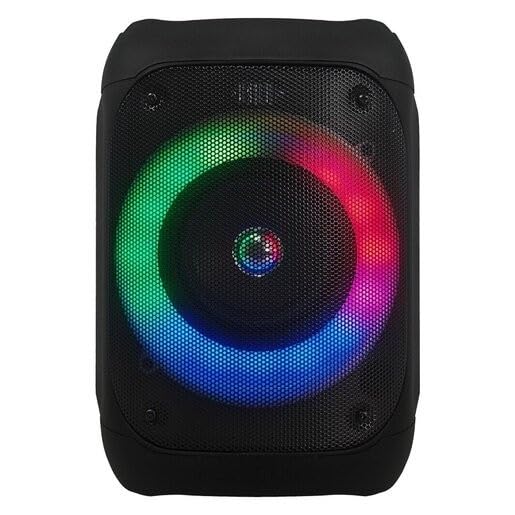
Slika 1: Front view of the JVC XS-N1154B Bluetooth Speaker, showcasing the speaker grille and integrated music-activated LED lights.
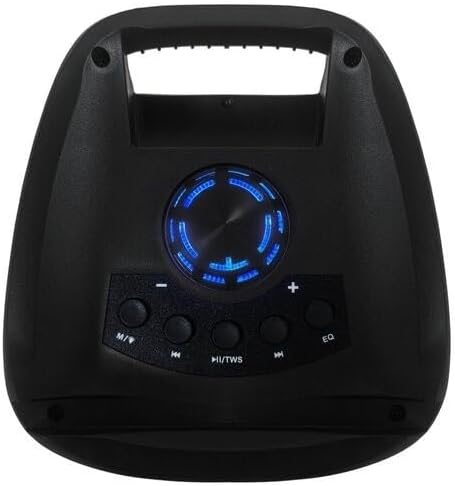
Slika 2: Top view of the JVC XS-N1154B Bluetooth Speaker, displaying the control panel with various buttons and the volume knob.
Funkcije kontrolne table:
- Dugme za napajanje: Uključuje ili isključuje zvučnik.
- Dugme za režim (M): Switches between Bluetooth, USB, SD Card, and FM Radio modes.
- Play/Pause (►||) / TWS Button: Plays or pauses audio. Long press for TWS (True Wireless Stereo) pairing.
- Previous Track (◀◀) Button: Skips to the previous track or tunes down in FM mode.
- Next Track (►►) Button: Skips to the next track or tunes up in FM mode.
- EQ taster: Ciklično se kreće kroz unaprijed postavljene postavke ekvilajzera.
- Gumb za jačinu zvuka: Rotates to adjust the volume level.
5. Podešavanje
5.1 Punjenje zvučnika
- Spojite kabel za punjenje na priključak za punjenje zvučnika.
- Plug the other end of the cable into a suitable USB power adapter (not included) or a powered USB port.
- Indikatorska lampica punjenja će svijetliti, obično crveno, tokom punjenja.
- Nakon što se zvučnik potpuno napuni, indikatorska lampica može promijeniti boju (npr. ugasiti se ili postati plavo/zelena). Isključite zvučnik iz izvora napajanja.
5.2 Uključivanje/isključivanje
- Za uključivanje: Press and hold the Power button until the speaker powers on and you hear an audible prompt.
- Za isključivanje: Press and hold the Power button again until the speaker powers off.
6. Uputstvo za upotrebu
6.1 Bluetooth uparivanje
- Ensure the speaker is powered on and in Bluetooth mode. If not, press the Mode (M) button to switch to Bluetooth mode. The speaker will indicate it is ready for pairing (e.g., a blinking LED or audible prompt).
- Na svom mobilnom uređaju (pametnom telefonu, tabletu, laptopu) omogućite Bluetooth i potražite dostupne uređaje.
- Select "JVC XS-N1154B" from the list of devices.
- Nakon uparivanja, zvučnik će dati zvučnu potvrdu, a indikatorska lampica Bluetooth veze će početi stalno svijetliti.
- Sada možete reproducirati zvuk sa svog uređaja putem zvučnika.
6.2 Reprodukcija sa USB-a/SD kartice
- Insert a USB flash drive or an SD card (with supported audio files) u odgovarajući priključak na zvučniku.
- The speaker will automatically switch to USB or SD card mode and begin playing audio. If not, press the Mode (M) button to select the correct input.
- Use the Previous Track (◀◀), Next Track (►►), and Play/Pause (►||) buttons to control playback.
6.3 Rad FM radija
- Pritisnite dugme Mode (M) da biste prešli na FM radio režim.
- To auto-scan and save available stations, press and hold the Play/Pause (►||) button. The speaker will scan and store stations automatically.
- Use the Previous Track (◀◀) and Next Track (►►) buttons to navigate between saved FM stations.
6.4 LED svjetlosnih modova
The speaker features music-activated LED lights. These lights typically synchronize with the audio playback. There may be an additional button or a combination of buttons to cycle through different light modes or to turn them off. Refer to the remote control section for specific controls if available.
6.5 Kontrola jačine zvuka
Rotate the Volume Knob on the top panel clockwise to increase volume and counter-clockwise to decrease volume.
6.6 Upotreba daljinskog upravljača
If your package includes a remote control, it provides convenient access to various functions:
- Snaga: On/Off
- Način rada: Switch input sources (Bluetooth, USB, SD, FM)
- Volumen +/-: Podesite jačinu zvuka
- Pusti/pauza: Kontrolirajte reprodukciju
- Prethodna/Sljedeća: Skip tracks/stations
- EQ: Change equalizer presets
- LED: Control LED light modes (if applicable)
7. Održavanje
7.1 Čišćenje
Wipe the speaker's exterior with a soft, dry, lint-free cloth. Do not use liquid cleaners, sprays, or solvents, as these may damage the finish or internal components. Ensure all ports are dry before use, especially given its waterproof nature.
7.2 Skladištenje
When not in use for extended periods, store the speaker in a cool, dry place, away from direct sunlight and extreme temperatures. It is recommended to charge the battery periodically to maintain its lifespan.
8. Otkrivanje problema
| Problem | Mogući uzrok | Rješenje |
|---|---|---|
| Zvučnik se ne uključuje. | Baterija je prazna. | Potpuno napunite zvučnik. |
| Nema zvuka. | Volume is too low or muted. Device not paired correctly. | Increase volume. Re-pair Bluetooth device. Check audio source. |
| Bluetooth uparivanje nije uspjelo. | Zvučnik nije u režimu uparivanja. Uređaj je previše udaljen. Smetnje. | Provjerite je li zvučnik u načinu rada za uparivanje putem Bluetootha. Približite uređaj. Isključite ostale Bluetooth uređaje. |
| USB/SD kartica se ne reprodukuje. | Netačno file format. Kartica/disk nije pravilno umetnut. | Osigurajte zvuk files are in a supported format. Reinsert the USB drive/SD card. Press Mode button to select correct input. |
| Prijem FM radija je slab. | Slab signal. | Premjestite zvučnik na mjesto s boljim prijemom. |
9. Specifikacije
- Model: XS-N1154B
- Brand: JVC
- Povezivanje: Bluetooth, USB, SD kartica
- radio: Digitalni FM radio
- Izlazna snaga: 4 Watts
- Način audio izlaza: Stereo
- Metoda kontrole: Daljinski
- Materijal: Plastika
- vodootporan: Da
- Izvor napajanja: Battery Powered
- Dimenzije: Approximately 18.6D x 18.9W x 25.5H cm
- Težina: Približno 1.2 kg
- Kompatibilni uređaji: Laptop, pametni telefon
10. Garancija i podrška
10.1 Informacije o garanciji
This JVC XS-N1154B Bluetooth Speaker comes with a 1 godina garancije od datuma kupovine. Ova garancija pokriva nedostatke u proizvodnji i izradi pri normalnoj upotrebi. Ne pokriva štetu uzrokovanu nepravilnom upotrebom, nezgodama, neovlaštenim modifikacijama ili normalnim habanjem.
10.2 Korisnička podrška
For technical assistance, warranty claims, or further inquiries, please contact JVC customer support through their official website or the retailer where the product was purchased. Please have your product model number (XS-N1154B) and proof of purchase ready when contacting support.


