
1. Uvod i krajview
The SHARP KI-TX100-H is a high-performance humidifying air purifier equipped with Plasmacluster NEXT technology. It is designed to provide a clean and comfortable indoor environment by purifying air and maintaining optimal humidity levels. This manual provides essential information for the safe and effective use of your appliance.

Figure 1: Sharp KI-TX100-H Humidifying Air Purifier. This premium model features Plasmacluster NEXT technology, aiming for Class 8 cleanroom air quality. It displays key performance metrics such as recommended room size, maximum humidification, maximum airflow, and purification speed.
Ključne karakteristike:
- Plasmacluster NEXT (50000): High-density ion generation for superior air purification.
- AI AUTO Mode: Intelligent operation that adjusts purification based on detected particle levels, aiming for Class 8 cleanroom standards.
- AI Monitor: Visualizes indoor particle count and provides notifications for maintenance and water levels.
- Coanda Flow: Efficiently collects dust and particles from distant areas of the room.
- Large Capacity Humidification: Up to 1,100 mL/h for rapid and effective humidification.
- Automatic Humidifying Filter Cleaning: Simplifies maintenance by automatically cleaning the humidifying filter.
- COCORO AIR App: Wireless LAN connectivity for remote control, monitoring, and customized operation.
2. Podešavanje
Raspakivanje i postavljanje:
- Carefully remove the air purifier from its packaging. Retain all packaging materials for future transport or storage.
- Postavite uređaj na ravnu, stabilnu površinu. Osigurajte dovoljno prostora oko uređaja za pravilan protok zraka (najmanje 30 cm od zidova ili namještaja).
- The unit is equipped with casters for easy movement. Use the stoppers to secure the unit in place once positioned.
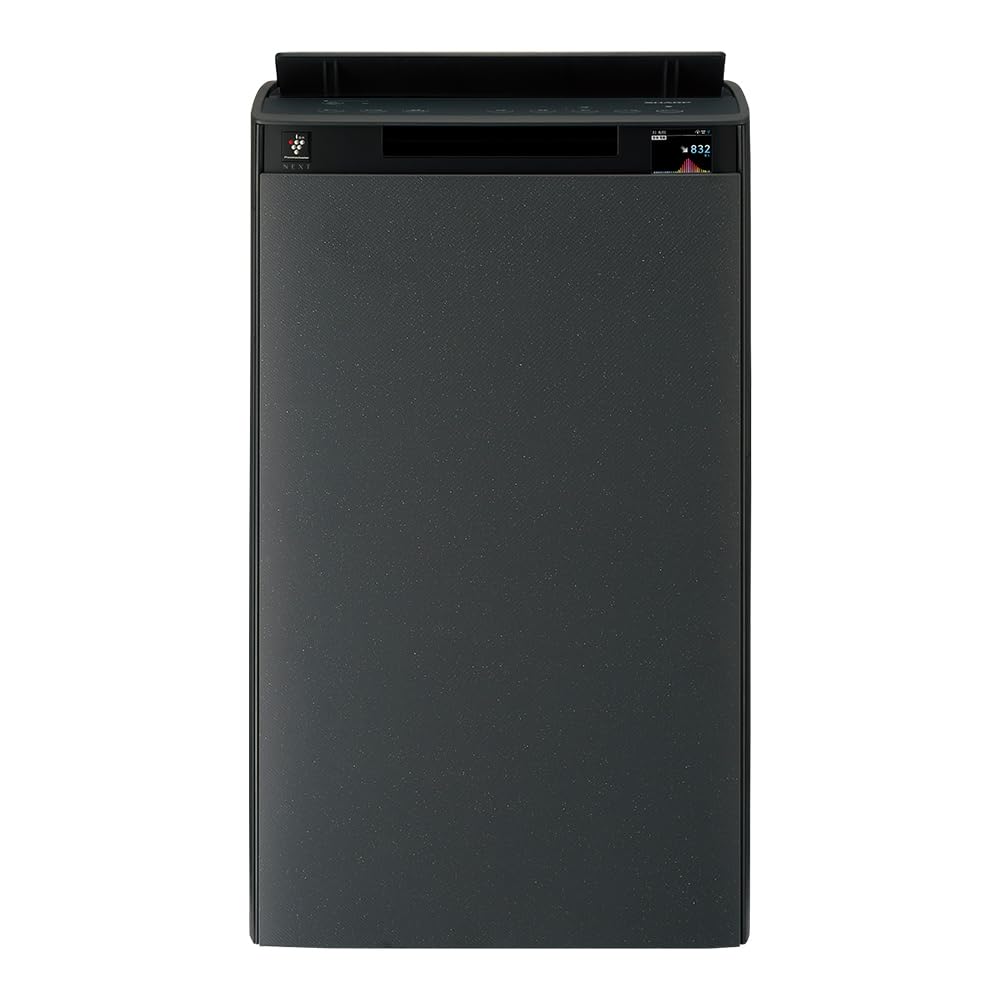
Figure 2: Product dimensions. Height: 700mm, Width: 427mm, Depth: 305mm. Ensure sufficient space for optimal performance.
Instalacija filtera:
The air purifier comes with pre-installed filters. Before first use, ensure all protective packaging is removed from the filters.
- Open the back panel of the unit.
- Remove the plastic bags from the pre-filter, deodorizing filter, and HEPA filter.
- Reinstall the filters in the correct order: pre-filter, deodorizing filter, then HEPA filter.
- Close the back panel securely.

Figure 3: Filter system diagram. The unit utilizes a multi-layer filtration system including an electrostatic HEPA filter, a deodorizing filter, and an antibacterial/anti-mold pre-filter to capture various airborne particles and odors.
Water Tank Filling (for Humidification):
- Pull out the water tank from the side of the unit.
- Open the water tank cap and fill with clean tap water. Do not use hot water or water with additives.
- Securely close the cap and reinsert the water tank into the unit until it clicks into place.
3. Uputstvo za upotrebu
Uključivanje/isključivanje:
Pritisnite dugme za napajanje na kontrolnoj tabli da biste uključili ili isključili uređaj.
Načini rada:
- AI AUTO Mode: This intelligent mode automatically adjusts fan speed and humidification based on detected air quality and humidity levels. It aims to maintain a clean room standard Class 8 level air environment.
- Način pročišćavanja zraka: Funkcioniše isključivo kao pročišćivač vazduha.
- Način ovlaživanja: Provides humidification. Can be used independently or in conjunction with air purification.
- Plasmacluster Spot Mode: Concentrates Plasmacluster ions in a specific area for intensive deodorization or sterilization.

Figure 4: AI AUTO Mode operation. This mode significantly reduces fine particle counts, demonstrating its effectiveness in achieving high air quality standards.
AI Monitor Display:
The AI Monitor on the unit's display provides real-time information about air quality, humidity, and operational status.
- Particle Count: Displays the current level of fine particles in the air.
- Temperatura i vlažnost: Shows current room temperature and humidity.
- Upozorenja o održavanju: Notifies when filters need cleaning or replacement, or when the water tank is empty.
- Estimated Electricity Cost: Provides an estimate of power consumption.

Figure 5: AI Monitor particle visualization. The display clearly indicates air quality, transitioning from 'dirty' to 'clean' as the unit purifies the air.

Figure 6: AI Monitor notifications. The display provides alerts for humidification status, maintenance schedules, low water levels, and estimated electricity usage. For detailed maintenance instructions, refer to the official support page: Oštra podrška.
COCORO AIR App (Wireless LAN):
Connect your air purifier to the COCORO AIR app via wireless LAN for enhanced control and monitoring.
- daljinski upravljač: Operate the unit from your smartphone.
- Customized Operation: Adjust settings based on your preferences or schedule.
- Nadgledanje: View air quality history and receive alerts.
- Režim za kućne ljubimce: Special operating modes for households with pets.
- Prilagodba glasa: Change the unit's voice notifications.

Figure 7: COCORO AIR app interface. The app allows for remote control, customization, and monitoring of the air purifier's functions, including timer settings and maintenance alerts.
4. Održavanje
Redovno održavanje osigurava optimalne performanse i dugotrajnost vašeg pročišćivača zraka.
Čišćenje predfiltera:
Clean the pre-filter approximately once a month or when indicated by the AI Monitor.
- Isključite uređaj i iskopčajte ga iz električne utičnice.
- Remove the back panel and carefully detach the pre-filter.
- Use a vacuum cleaner to remove dust from the pre-filter. For stubborn dirt, wash with water and mild detergent, then air dry completely before reinstalling.
Čišćenje filtera za ovlaživanje:
The unit features an automatic cleaning function for the humidifying filter. Perform this when prompted by the AI Monitor or approximately once a month.
- Uverite se da je rezervoar za vodu napunjen.
- Add a small amount of citric acid (not included) to the water tank.
- Press the 'Internal Humidification Cleaning' button on the control panel. The unit will perform an automatic cleaning cycle.

Figure 8: Automatic humidifying filter cleaning process. Add citric acid to the water tank and press the designated button for automated cleaning. A visual comparison shows the filter before and after cleaning.
Water Tank and Tray Cleaning:
Clean the water tank and humidifying tray regularly to prevent mold and bacteria growth.
- Remove the water tank and humidifying tray.
- Wash with water and a soft brush. For stubborn stains, use a mild detergent.
- Prije ponovnog sastavljanja provjerite da li su svi dijelovi temeljno isprani i osušeni.

Figure 9: Features for clean humidification. This includes an Ag+ ion cartridge for water tank hygiene, an antibacterial/anti-mold humidifying filter, and a flat tray design for simplified cleaning.
Zamjena filtera:
The deodorizing filter and HEPA filter have a lifespan and should be replaced when indicated by the AI Monitor or after several years of use, depending on environmental conditions.
- Refer to the AI Monitor or the COCORO AIR app for filter replacement timing.
- Purchase genuine SHARP replacement filters.
- Follow the installation steps outlined in the 'Filter Installation' section.
5. Otkrivanje problema
If you encounter any issues with your air purifier, refer to the following common problems and solutions:
| Problem | Mogući uzrok | Rješenje |
|---|---|---|
| Jedinica se ne uključuje | Power cord not properly connected; Power outage; Unit malfunction | Check power cord connection; Check household circuit breaker; Contact customer support |
| No air purification effect | Filters are dirty or clogged; Filters not installed correctly; Room size exceeds capacity | Clean or replace filters; Reinstall filters correctly; Ensure unit is suitable for room size |
| Nema vlaženja | Water tank is empty; Humidifying filter is dirty; Humidifying unit not installed correctly | Fill water tank; Clean humidifying filter; Reinstall humidifying unit |
| Neobična buka | Unit not on a flat surface; Obstruction in fan; Filters not installed correctly | Place on a flat surface; Check for obstructions; Reinstall filters correctly |
| AI Monitor displays an error code | Specifična interna greška | Refer to the detailed error code list in the full manual or contact customer support. |
Ako problem i dalje postoji nakon isprobavanja ovih rješenja, obratite se korisničkoj podršci SHARP-a.
6. Specifikacije
Detailed technical specifications for the SHARP KI-TX100-H Humidifying Air Purifier:
| Feature | Specifikacija |
|---|---|
| Broj modela | KI-TX100-H |
| Brand | SHARP |
| Recommended Room Size (Plasmacluster) | ~23 tatami (~38 m²) |
| Air Purification Application Area | ~46 tatami (~76 m²) |
| Maksimalni kapacitet ovlaživanja | 1,100 mL/h |
| Air Purification Time (8 tatami) | 6 minuta |
| Radni nivo zvuka | 21 ~ 53 dB |
| Noise Level (Rated) | 49 dB |
| Dimenzije proizvoda (D x Š x V) | 30.5 cm x 42.7 cm x 70 cm |
| Težina artikla | 14 kg |
| Izvor napajanja | Corded Electric |
| Boja | Grey |
7. Garancija i podrška
Informacije o garanciji:
SHARP products are manufactured to the highest quality standards. This product comes with a standard manufacturer's warranty. Please refer to the warranty card included in the original packaging for specific terms, conditions, and duration of coverage. Keep your proof of purchase for warranty claims.
Korisnička podrška:
For technical assistance, troubleshooting, or inquiries regarding your SHARP KI-TX100-H Humidifying Air Purifier, please contact SHARP customer support.
- Online podrška: Visit the official SHARP Japan support website for FAQs, manuals, and service information.
- Telefonska podrška: Contact numbers can be found on the SHARP Japan website or your warranty card.
- Servisni centri: Locate authorized service centers for repairs or maintenance.
When contacting support, please have your model number (KI-TX100-H) and purchase date available.