
1. Uvod
Thank you for choosing the DEDRA MC0932 Mini Laser Distance Meter. This compact and precise device is designed for quick and accurate distance measurements in various indoor applications. Please read this manual carefully before using the device to ensure safe and proper operation.
1.1 Sigurnosne informacije
UPOZORENJE: Lasersko zračenje
- This device emits Class II laser radiation. Do not stare directly into the laser beam or direct it towards other people's eyes.
- Do not disassemble or modify the device. Unauthorized modifications may result in hazardous laser radiation exposure.
- Držite uređaj van domašaja djece.
- Koristite samo određene baterije. Ne miješajte stare i nove baterije ili različite tipove baterija.
- Izvadite baterije ako uređaj nećete koristiti duži period kako biste spriječili curenje.
2. Sadržaj paketa
Pažljivo raspakujte kutiju i provjerite da li su sve dolje navedene stavke prisutne i u dobrom stanju:
- DEDRA MC0932 Mini Laser Distance Meter
- Zaštitna torbica
- Remen za zapešće
- AAA baterije (2x)

Image: The DEDRA MC0932 Mini Laser Distance Meter, its protective pouch, wrist strap, and two AAA batteries.
3. Proizvod je gotovview
3.1 Izgled uređaja
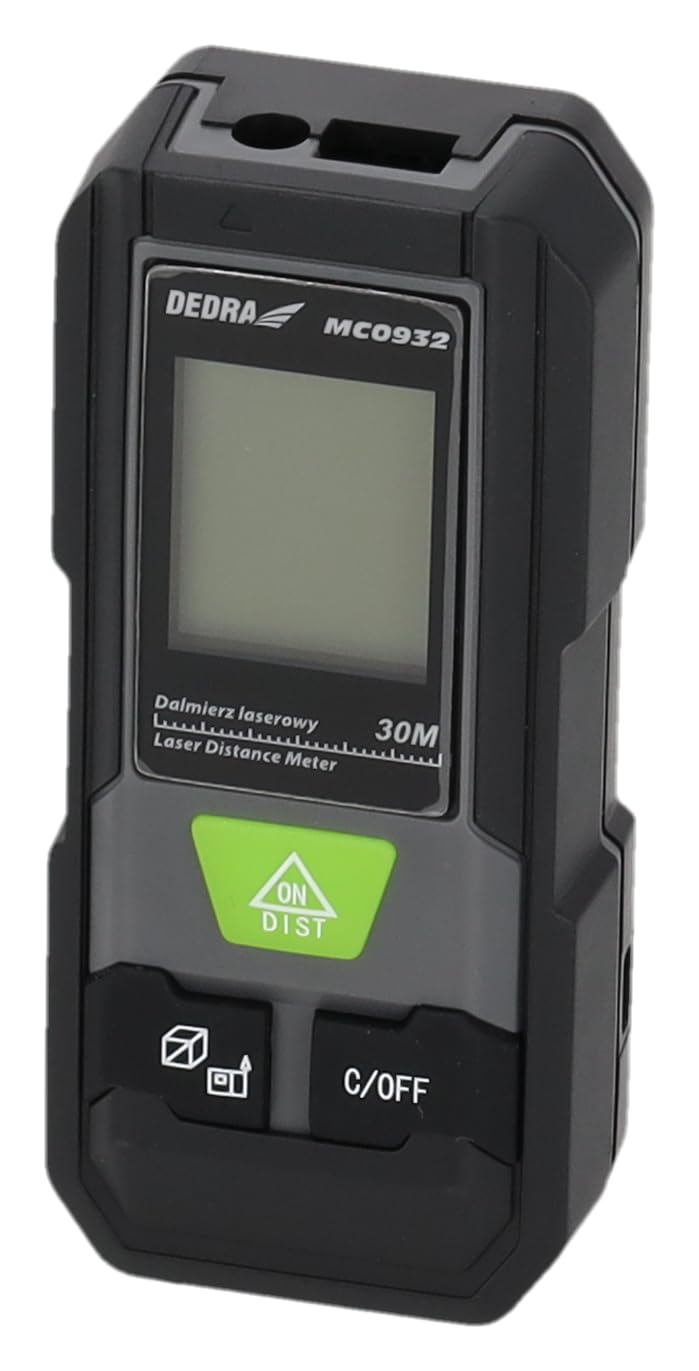
Slika: Front view of the DEDRA MC0932 showing the display and control buttons.
- Laser Emission Lens
- Objektiv za laserski prijem
- Display Screen
- ON / DIST Button (Power On / Single Measurement / Continuous Measurement)
- C / OFF Button (Clear / Power Off)
- Function / Unit Button (Mode Selection / Unit Switching)
- Reference Point Button (Front/Rear Edge Measurement)

Slika: Nazad view of the DEDRA MC0932, highlighting the battery compartment.
- Pretinac za baterije
4. Podešavanje
4.1 Instalacija baterije
- Pronađite poklopac odjeljka za bateriju na stražnjoj strani uređaja.
- Pomaknite poklopac prema dolje da biste otvorili pretinac.
- Umetnite dvije (2) AAA baterije, pazeći na ispravan polaritet (+/-) kao što je naznačeno unutar odjeljka.
- Zatvorite poklopac odjeljka za baterije tako što ćete ga vratiti na mjesto dok ne klikne sigurno.
5. Uputstvo za upotrebu
5.1 Uključivanje/isključivanje napajanja
- Za uključivanje: Pritisnite ON/DIST button once. The laser will activate, and the display will light up.
- Za isključivanje: Pritisnite i držite C/OFF button for approximately 2 seconds. The device will also automatically power off after 180 seconds of inactivity.
5.2 Mjerenje jedne udaljenosti
- Turn on the device by pressing ON/DIST. The laser will activate.
- Aim the laser beam at the target point.
- Pritisnite ON/DIST button again. The measurement will be taken and displayed on the screen.
5.3 Kontinuirano mjerenje (praćenje)
- Uključite uređaj.
- Pritisnite i držite ON/DIST button for approximately 2 seconds. The device will enter continuous measurement mode, displaying real-time distance as you move the device.
- To stop continuous measurement, press the C/OFF button once. The last measured value will remain on the display.
5.4 Mjerenje površine
- Uključite uređaj.
- Pritisnite Function / Unit button repeatedly until the area icon (a square with 'm²' or 'ft²') appears on the display.
- Izmjerite prvu stranu (npr. dužinu) pritiskom ON/DIST.
- Izmjerite drugu stranu (npr. širinu) pritiskom ON/DIST opet.
- Uređaj će automatski izračunati i prikazati površinu.
5.5 Mjerenje zapremine
- Uključite uređaj.
- Pritisnite Function / Unit button repeatedly until the volume icon (a cube with 'm³' or 'ft³') appears on the display.
- Izmjerite prvu stranu (npr. dužinu) pritiskom ON/DIST.
- Izmjerite drugu stranu (npr. širinu) pritiskom ON/DIST opet.
- Measure the third side (e.g., height) by pressing ON/DIST treći put.
- Uređaj će automatski izračunati i prikazati jačinu zvuka.
5.6 Prebacivanje jedinica
To change the measurement unit (meters, feet, inches), press and hold the Function / Unit button for approximately 2 seconds. The unit will cycle through m, ft, and in.
5.7 Reference Point Setting
The device can measure from its front edge or its rear edge. To switch the reference point, press the Referentna tačka button. An icon on the display will indicate whether the measurement is taken from the front or rear of the device.
6. Održavanje
6.1 Čišćenje
- Koristite meku, damp krpu za čišćenje uređaja casing. Ne koristite abrazivna sredstva za čišćenje ili rastvarače.
- Gently wipe the laser lenses with a clean, lint-free cloth. Avoid touching the lenses with your fingers.
6.2 Skladištenje
- Store the device in its protective pouch in a cool, dry place, away from direct sunlight and extreme temperatures.
- Remove the batteries if the device will not be used for an extended period (e.g., more than one month) to prevent battery leakage and damage.
6.3 Zamjena baterije
When the low battery indicator appears on the display, replace both AAA batteries with new ones following the instructions in Section 4.1.
7. Otkrivanje problema
| Problem | Mogući uzrok | Rješenje |
|---|---|---|
| Uređaj se ne uključuje | Baterije su prazne ili nepravilno umetnute. | Zamijenite baterije ili provjerite polaritet. |
| Poruka "Greška" na ekranu | Laser path is obstructed, target surface is too reflective/absorbent, or measurement range exceeded. | Ensure clear laser path, use a target plate if necessary, ensure target is within 0.03m-30m range. |
| Netačna mjerenja | Lenses are dirty, device is unstable, or environmental interference. | Clean lenses, ensure device is stable during measurement, avoid strong light sources. |
| Ekran je taman ili treperi | Niska snaga baterije. | Zamijenite baterije. |
8. Specifikacije
| Measurement Range | 0.03m - 30m |
| Preciznost mjerenja | ±2mm |
| mjerne jedinice | m / ft / in |
| Laser Class | Klasa II |
| Laser Type | 635nm, <1mW |
| Automatic Laser Off | 30 sekundi |
| Automatic Device Off | 180 sekundi |
| Vrsta baterije | 2 x AAA (preporučuju se alkalne baterije) |
| Radna temperatura | 0°C do 40°C (32°F do 104°F) |
| Temperatura skladištenja | -20°C do 60°C (-4°F do 140°F) |
| Dimenzije (približno) | 100 x 35 x 20 mm (3.9 x 1.4 x 0.8 inča) |
| Težina (sa baterijama) | 200 g (7.05 oz) |
| IP Rating | IP54 (zaštićen od prašine i prskanja) |
9. Garancija i podrška
DEDRA products are manufactured to high-quality standards. For warranty information, please refer to the warranty card included with your purchase or contact your local DEDRA dealer or the seller directly. For technical support or service inquiries, please reach out to the point of purchase or the official DEDRA customer service channels.