
Uvod
Thank you for choosing the KOORUI S3241XO 31.5-inch 4K OLED Gaming Monitor. This manual provides essential information for setting up, operating, and maintaining your monitor. Please read it thoroughly before use to ensure optimal performance and safety.
Sigurnosne informacije
- Ne izlažite monitor kiši ili vlazi kako biste spriječili požar ili strujni udar.
- Ne otvarajte monitor casing. Unutra nema dijelova koje korisnik može sam servisirati. Za sve servisne radove obratite se kvalifikovanom servisnom osoblju.
- Postavite monitor na stabilnu, ravnu površinu kako biste spriječili njegov pad.
- Osigurajte odgovarajuću ventilaciju oko monitora. Ne blokirajte ventilacijske otvore.
- Koristite samo adapter za napajanje i kablove koje je isporučio proizvođač.
- Isključite monitor iz strujne utičnice tokom oluja sa grmljavinom ili kada ga ne koristite duži period.
- Izbjegavajte stavljanje teških predmeta na kabel za napajanje ili kabele monitora.
Sadržaj paketa
Provjerite da li se sve stavke nalaze u vašem paketu:
- KOORUI S3241XO 31.5-inch 4K OLED Gaming Monitor
- HDMI 2.1 kabel
- DisplayPort 1.4 Cable (1.8m)
- USB 3.0 AB kabl
- Type-C kabel
- Kabel za naizmjeničnu struju
- Adapter za napajanje
- Uputstvo za upotrebu
Setup
1. Sklapanje monitora
Slijedite ove korake da biste sastavili postolje monitora i pričvrstili ga na ploču ekrana.

Image: The KOORUI S3241XO monitor with its stand, showcasing the display and connectivity options.
2. Povezivanje s uređajima
The monitor offers various connectivity options. Ensure your device supports the required output.
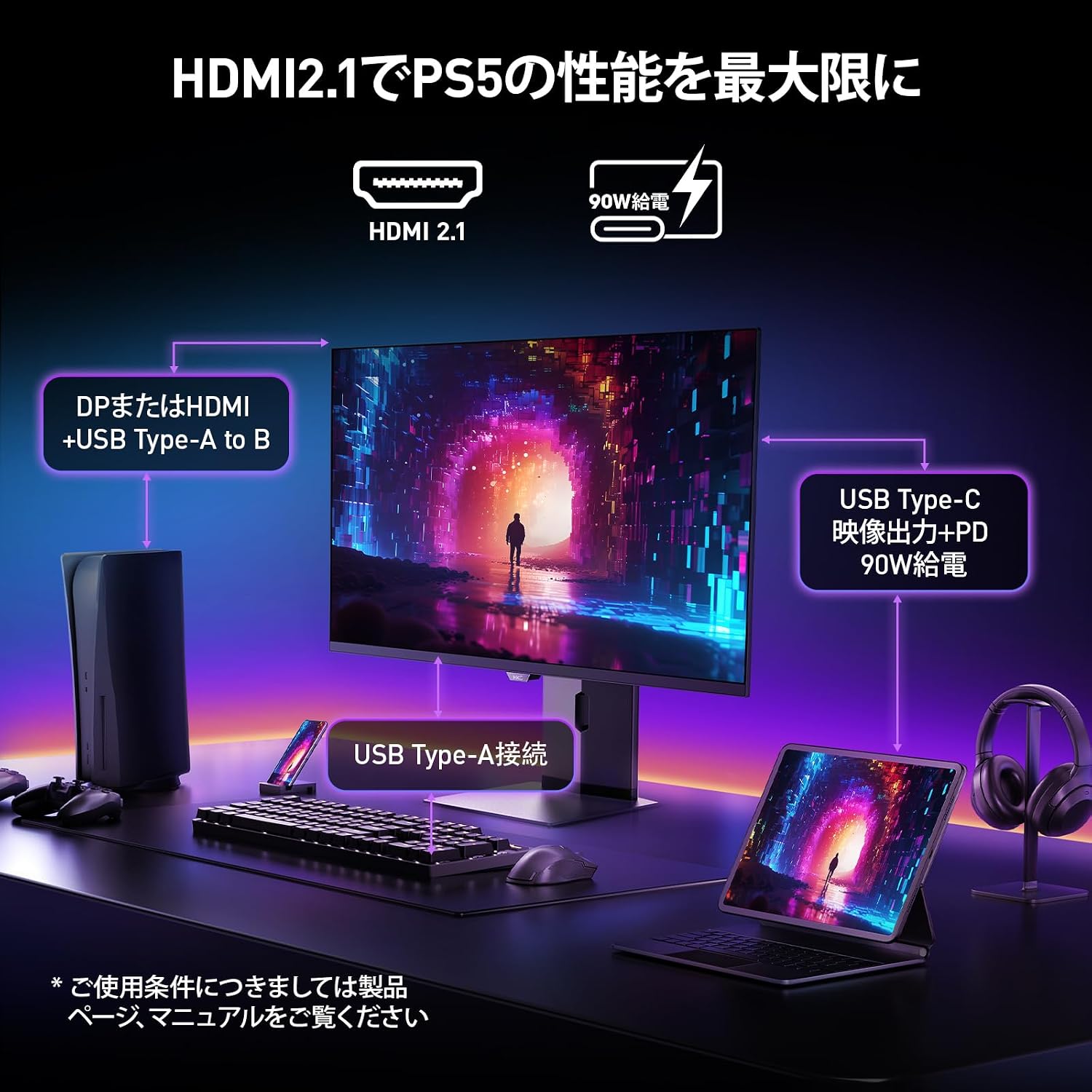
Image: A diagram illustrating how to connect various devices like a PS5, laptop, and peripherals to the monitor using HDMI 2.1, USB Type-C, and USB Type-A ports.
Portview:

Slika: Detaljna view of the monitor's rear input/output ports with numerical labels for identification.
- Kabl za napajanje: Connect the AC power cable to the monitor and a power outlet.
- USB tip-B (uzvodni): Connect to your computer to enable the monitor's USB-A ports.
- USB 3.1 Tip-A (x2): Za povezivanje USB perifernih uređaja.
- HDMI 2.1 (x2): Connect to devices supporting HDMI 2.1 for 4K 240Hz output.
- DisplayPort 1.4: Connect to devices supporting DisplayPort 1.4 for 4K 240Hz output.
- Type-C (with PD): Connect to compatible devices for video input and power delivery (up to 90W).
- Izlaz za slušalice: Za spajanje slušalica ili eksternih zvučnika.
Uputstvo za upotrebu
1. Uključivanje/isključivanje
Press the power button, usually located on the back or bottom of the monitor, to turn it on or off.
2. On-Screen Display (OSD) meni
Use the joystick or buttons on the monitor to navigate the OSD menu. The OSD allows you to adjust various settings.
Ključne postavke OSD-a:
- Postavke slike: Podesite svjetlinu, kontrast, oštrinu i temperaturu boje.
- Načini boja: Select from various preset color modes, including a professional color mode for accurate color reproduction (99% DCI-P3, 100% sRGB, Delta E<2, True 10-bit color).
- Izvor ulaza: Manually select the input source (HDMI 1, HDMI 2, DisplayPort, Type-C).
- Karakteristike igranja: Access specific gaming modes (RPG, FPS, RCG) and settings like FreeSync and G-Sync compatibility.
- Vrijeme odgovora: The monitor features a 0.03ms (OD) response time for rapid image transitions.
- HDR True Black 400: Optimizes black levels for enhanced detail in dark scenes.
- DIC (Digital Image Control) Mode: Enable or disable DIC to prevent ghosting and improve image quality.

Image: Visual representation of the monitor's color accuracy and wide color gamut.

Image: Illustrates the difference in motion clarity at various refresh rates, highlighting the 240Hz 0.03ms response.

Image: Demonstrates the enhanced black levels and detail in dark scenes provided by the KOORUI QD OLED technology compared to a typical LCD.

Image: Shows the effect of Digital Image Control (DIC) mode on reducing ghosting for smoother visuals.
3. Ergonomska podešavanja
Stalak za monitor omogućava razna podešavanja za optimizaciju vašeg viewiskustvo:
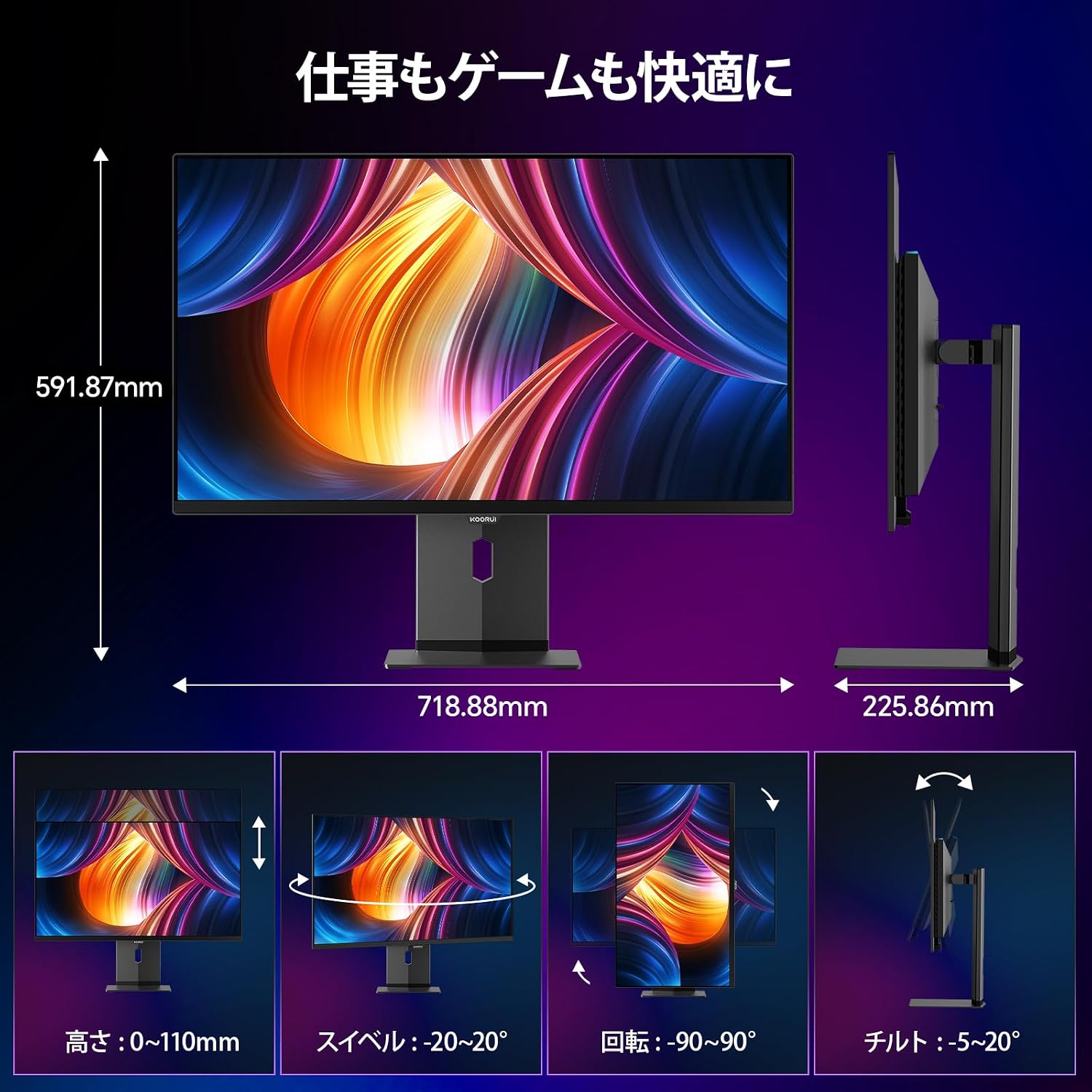
Image: Illustrations of the monitor's adjustable features: height, swivel, pivot (rotation), and tilt.
- Podešavanje visine: Adjust the display height by up to 110mm.
- Nagib: Nagnite ekran od -5° do 20° za udobno viewing angles.
- Okretni: Swivel the monitor -20° to 20° horizontally.
- Pivot (Rotacija): Rotate the screen -90° to 90° for portrait or landscape orientation.
Održavanje
1. Čišćenje monitora
- Uvijek isključite monitor prije čišćenja.
- Lagano koristite meku krpu koja ne ostavlja dlačice dampvodom ili blagim, neabrazivnim sredstvom za čišćenje ekrana.
- Ne prskajte sredstvo za čišćenje direktno na ekran.
- Avoid using benzene, thinner, or any volatile solvents, as they may damage the screen surface.
2. Karakteristike za njegu očiju
Monitor uključuje funkcije za smanjenje naprezanja očiju tokom duže upotrebe:
- Hardware Blue Light Cut: Reduces harmful blue light emissions without affecting color accuracy.
- Flicker Guard: Eliminiše treperenje ekrana za ugodniji rad viewing iskustvo.

Image: Demonstrates the effectiveness of hardware blue light reduction in preserving natural colors.

Image: Illustrates the difference between Flicker Guard off and on, showing reduced screen flickering.
3. Panel Protection Features
To prevent OLED burn-in, the monitor incorporates proprietary panel protection technologies:
- Pomak piksela: Periodically shifts pixels slightly to prevent static images from causing burn-in.
- Detekcija trake zadataka: Detects static elements like the taskbar and adjusts their brightness to minimize burn-in risk.
- Graphene Sheet + Custom Heatsink: Advanced thermal management to maintain optimal operating temperature.

Image: Visual explanation of pixel shift, taskbar detection, and thermal management for panel protection.
Rješavanje problema
Ako imate problema s monitorom, pogledajte sljedeće uobičajene probleme i rješenja:
| Problem | Mogući uzrok | Rješenje |
|---|---|---|
| Nema slike na ekranu | Kabl za napajanje isključen, pogrešan ulazni izvor, uređaj nije uključen. | Provjerite priključke za napajanje, odaberite ispravan ulazni izvor putem OSD-a i provjerite je li povezani uređaj uključen. |
| Treperenje slike | Flicker Guard disabled, cable issue, graphics card driver issue. | Enable Flicker Guard in OSD, try a different cable, update graphics drivers. |
| Loš kvalitet boje | Incorrect color mode, cable issue. | Adjust color settings in OSD, try a different cable. |
| Nema zvuka iz slušalica | Headphones not properly connected, audio settings on device/monitor. | Ensure headphones are fully plugged in, check audio output settings on your computer and monitor. |
| USB portovi ne rade | USB Type-B upstream cable not connected. | Connect the USB Type-B cable from the monitor to your computer. |
Specifikacije
| Feature | Specifikacija |
|---|---|
| Brand | KOORUI |
| Broj modela | S3241XO |
| Veličina ekrana | 31.5 inča |
| Tip panela | OLED (QLED) |
| Rezolucija | 4K UHD (3840 x 2160 piksela) |
| Refresh Rate | 240 Hz |
| Vrijeme odgovora | 0.03 ms (OD) |
| Aspect Ratio | 16:9 |
| Kontrast Ratio | 1,500,000:1 |
| Osvetljenost | 280 cd/m² |
| Gamut boja | 99% DCI-P3, 100% sRGB |
| Dubina boje | True 10-bit (1.07 billion colors) |
| HDR podrška | DisplayHDR400 True Black |
| Adaptive Sync | FreeSync and G-Sync Compatible |
| Povezivanje | 2x HDMI 2.1, 1x DisplayPort 1.4, 1x Type-C (with 90W PD), 2x USB-A 3.1, 1x USB-B, 1x Headphone Jack |
| Ergonomija | Height Adjustment (110mm), Tilt (-5° to 20°), Swivel (-20° to 20°), Pivot (-90° to 90°) |
| VESA Mount | 100 x 100 mm |
| Dimenzije (Š x V x D) | Približno 71.9 x 59.2 x 22.6 cm (sa postoljem) |
| Težina | Pribl. 8.3 KG |
| Potrošnja energije | 264 W (maks.) |
Garancija i podrška
The KOORUI S3241XO monitor comes with a 3-godišnja garancija proizvođača. The LCD panel itself is covered by a 1-year warranty. For warranty claims or technical support, please contact KOORUI customer service.
KOORUI also offers a free recycling service for monitors. Please refer to the official KOORUI website or contact support for details on how to utilize this service.
Za dodatnu pomoć, molimo vas da posjetite KOORUI Brand Store.