
Uvod
The SONRU B110 is a versatile 2-in-1 Bluetooth 5.3 audio adapter designed to transform your audio experience. It functions as both a Bluetooth transmitter (TX mode) and a Bluetooth receiver (RX mode), allowing you to wirelessly stream audio to and from various devices. Enjoy high-fidelity sound, low latency, and extended battery life for home entertainment, travel, and on-the-go use.
Sadržaj paketa
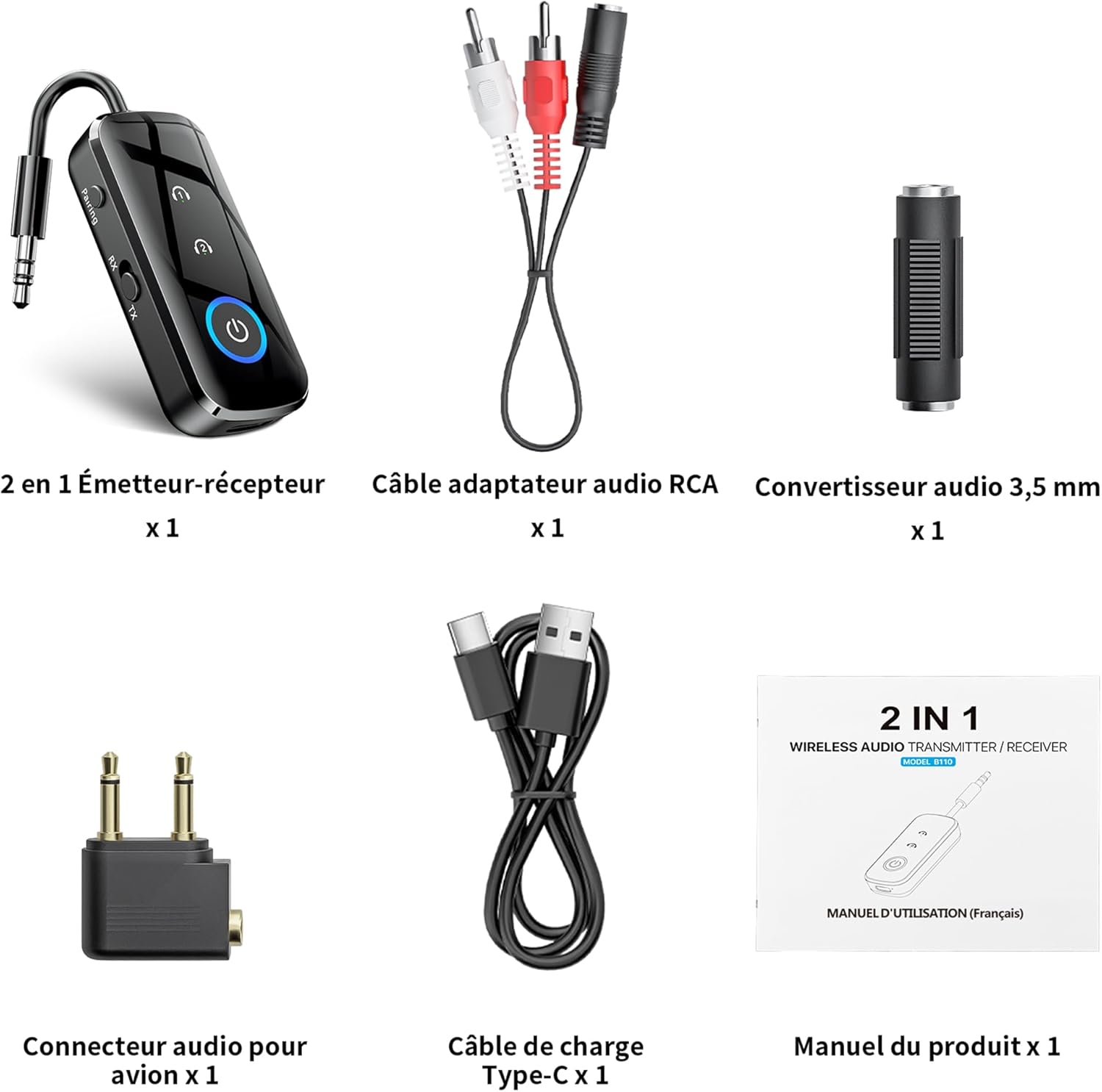
Slika 1: Sadržaj paketa
- 1 x SONRU B110 2-in-1 Bluetooth Transmitter/Receiver
- 1 x RCA Audio Adapter Cable
- 1 x 3.5mm Audio Converter
- 1 x Airplane Audio Connector
- 1 x USB Type-C kabel za punjenje
- 1 x Uputstvo za upotrebu
Product Overview

Figure 2: Device Features and Controls
The SONRU B110 features a compact design with essential controls for easy operation. It includes a 3.5mm audio jack, a mode switch (RX/TX), power button, and volume/track control buttons. The device also has a USB-C charging port.
Specifikacije
| Feature | Detalj |
|---|---|
| Model | B110 |
| Bluetooth verzija | 5.3 |
| Bluetooth protokoli | A2DP/AVRCP (Reception), A2DP (Emission) |
| Operativni opseg | >10 meters (open space) |
| Audio interfejs | Universal 3.5 mm audio input/output |
| Kapacitet baterije | 250 mAh |
| Vrijeme punjenja | Approximately 1.5 hours (USB-C) |
| Trajanje baterije (TX način rada) | Do 15 sati |
| Trajanje baterije (RX način rada) | Do 12 sati |
| Dimenzije | 13.9 x 11.6 x 2 cm |
| Težina | 110 grama |
| Posebne karakteristike | Automatic connection memory, Dual connection, Fast Charging, Hands-Free Calls, Low Latency |
Setup
1. Punjenje uređaja
Before first use, fully charge your SONRU B110.
- Connect the provided USB Type-C charging cable to the charging port on the device.
- Drugi kraj kabla priključite na USB adapter za napajanje (nije uključen) ili na USB port računara.
- Indikator punjenja će prikazivati status punjenja. Potpuno punjenje traje otprilike 1.5 sata.
- Once fully charged, the device offers up to 15 hours of use in Transmitter (TX) mode and 12 hours in Receiver (RX) mode.

Slika 3: Punjenje i vijek trajanja baterije
2. Pairing in Transmitter (TX) Mode
TX mode allows you to transmit audio from non-Bluetooth devices (e.g., TV, PC, airplane entertainment system) to Bluetooth headphones or speakers.
- Switch the device to TX mode.
- Connect the SONRU B110 to your audio source (e.g., TV, PC, MP3 player) using the 3.5mm audio cable. For airplane entertainment systems, use the provided airplane audio connector.
- Turn on your Bluetooth headphones or speaker and set them to pairing mode.
- The SONRU B110 will automatically search for and connect to nearby Bluetooth devices. The indicator light will confirm a successful connection.
- Dvostruka veza: The device supports connecting to two Bluetooth headphones/speakers simultaneously. After connecting the first device, put the second device into pairing mode. The B110 will automatically connect to it.

Figure 4: TX Mode in an Airplane

Slika 5: Dvostruka veza u TX modu
3. Pairing in Receiver (RX) Mode
RX mode allows you to receive audio from your Bluetooth-enabled smartphone, tablet, or computer and play it through non-Bluetooth devices like car stereos, wired headphones, or home speaker systems.
- Switch the device to RX mode.
- Connect the SONRU B110 to your non-Bluetooth audio device (e.g., car stereo, wired speaker) using the 3.5mm audio cable.
- Enable Bluetooth on your smartphone, tablet, or computer and search for "SONRU B110" in the list of available devices.
- Select "SONRU B110" to pair. The indicator light will confirm a successful connection.
- Automatsko ponovno povezivanje: The device has an automatic connection memory function. After a successful connection, re-enabling Bluetooth on your phone will automatically connect to the B110.

Figure 6: RX Mode in a Car

Figure 7: TX and RX Mode Compatibility
Uputstvo za upotrebu
Uključivanje/isključivanje
- Uključeno: Pritisnite i držite dugme za napajanje dok se indikatorska lampica ne upali.
- Iskljuciti: Pritisnite i držite dugme za napajanje dok se indikatorska lampica ne ugasi.
Mode Switching
- Use the TX/RX switch on the side of the device to select the desired mode (Transmitter or Receiver).
Music Control (RX Mode)
- Pusti/pauza: Pritisnite dugme za uključivanje jednom.
- Sljedeća pjesma: Pritisnite i držite dugme "+".
- Prethodni zapis: Pritisnite i držite dugme "-".
- Povećavanje glasnoće: Kratko pritisnite dugme "+".
- Smanjivanje jačine zvuka: Kratko pritisnite dugme "-".
Call Management (RX Mode)
The SONRU B110 features a built-in microphone for hands-free calls when in RX mode.
- Odgovori/Završi poziv: Pritisnite dugme za uključivanje jednom.
- odbiti poziv: Pritisnite i držite dugme za napajanje.
- Ponovno biranje zadnjeg broja: Dvaput pritisnite dugme za napajanje.
Održavanje
- Uređaj držite suhim. Izbjegavajte izlaganje vlazi ili tekućinama.
- Ne pokušavajte rastaviti ili modificirati uređaj.
- Uređaj čistite mekom, suhom krpom. Ne koristite jake hemikalije ili abrazivna sredstva za čišćenje.
- Čuvajte uređaj na hladnom i suvom mestu kada se ne koristi.
- Izbjegavajte ekstremne temperature.
Rješavanje problema
- Uređaj se ne uključuje:
- Ensure the device is fully charged. Connect it to a power source using the USB-C cable and try again.
- Cannot pair with a Bluetooth device:
- Make sure the SONRU B110 is in the correct mode (TX for transmitting, RX for receiving).
- Ensure your target Bluetooth device (headphones, speaker, phone) is in pairing mode.
- Place the devices close to each other.
- Obrišite prethodne zapise o uparivanju na oba uređaja i pokušajte ponovo upariti.
- Nema zvuka ili loš kvalitet zvuka:
- Check if the 3.5mm audio cable is securely connected to both the SONRU B110 and the audio source/receiver.
- Ensure the volume on both the SONRU B110 and the connected audio device is turned up.
- Verify that the correct input/output source is selected on your audio system (e.g., AUX input on car stereo).
- Reduce the distance between the B110 and the paired Bluetooth device, and remove any obstacles.
- Osigurajte da nema smetnji od drugih bežičnih uređaja.
- Dual connection not working:
- Ensure both target Bluetooth devices are in pairing mode when attempting to connect the second device.
- Device not compatible with musical instruments or hearing aids:
- As stated in the product features, this device is not designed for use with musical instruments or hearing aids.
Garancija i podrška
SONRU products are designed for reliability and performance. For warranty information or technical support, please refer to the contact details provided on the product packaging or visit the official SONRU webMolimo sačuvajte dokaz o kupovini za potrebe reklamacije.