
1. Uvod
This manual provides essential information for the safe and efficient use of your Reality Leuchten Munoz R54891165 LED Table Lamp. Please read these instructions carefully before first use and retain them for future reference.
Product Overview
The Munoz LED Table Lamp is a modern, portable lighting solution featuring a durable metal construction and a sophisticated design. It incorporates an energy-efficient LED light source and offers convenient touch control for adjustable brightness. Its battery-powered design allows for flexible placement without the need for a constant power outlet.
Sadržaj paketa
- Munoz LED Table Lamp (Model R54891165)
- USB kabl za punjenje
- Uputstvo za upotrebu (ovaj dokument)
2. Podešavanje
Follow these steps to prepare your lamp za prvu upotrebu.
Raspakivanje
Carefully remove all components from the packaging. Inspect the lamp and accessories for any signs of damage. If any damage is found, do not proceed with setup and contact customer support.
Početno punjenje
Before initial use, fully charge the lamp's internal battery. Connect the provided USB charging cable to the lamp's charging port and to a suitable USB power source (e.g., computer USB port, USB wall adapter). The charging time is approximately 7 to 9 hours for a full charge.

Slika: Donja strana view od lamp, highlighting the USB charging port for battery replenishment.

Image: Informative graphic illustrating key features: 4-level touch control, battery operation, USB charging, typical charging duration (7-9 hours), and approximate operating time (8-10 hours).
3. Uputstvo za upotrebu
The Munoz LED Table Lamp ima intuitivno dodirno upravljanje za podešavanje snage i svjetline.
Uključivanje/isključivanje i podešavanje svjetline
Lamp is equipped with a 4-level touch function. To operate:
- Uključiti: Lightly touch the sensor located on the top of the lamp sjena. The lamp will illuminate at its lowest brightness setting.
- Za podešavanje svjetline: Continue to lightly touch the sensor to cycle through the three available brightness levels.
- Ugasiti: After cycling through all brightness levels, a subsequent touch will turn the lamp off.

Slika: Krupni plan lamp's top, indicating the location of the touch sensor for control.
4. Upute za punjenje
To ensure optimal performance and battery longevity, follow these charging guidelines.
Punjenje baterije
- Spojite lamp na USB izvor napajanja pomoću priloženog USB kabla.
- Potpuno punjenje obično traje 7 do 9 sata.
- Kada je potpuno napunjen, lamp provides approximately 8 hours of illumination at maximum brightness.
- Avoid overcharging the battery for extended periods.
Lamp can be used while charging, but it is recommended to charge it fully before portable use.
5. Održavanje
Proper care will help maintain the appearance and functionality of your lamp.
Čišćenje
- Osigurajte lamp isključen je i odvojen od bilo kojeg izvora punjenja prije čišćenja.
- Obrišite lamp mekom, suvom krpom.
- Za tvrdokorne mrlje, malo damp Može se koristiti krpa, nakon čega slijedi odmah sušenje.
- Ne koristite abrazivna sredstva za čišćenje, rastvarače ili jake hemikalije, jer mogu oštetiti završnu obradu.
Skladištenje
Ako pohranjujete lamp for an extended period, ensure the battery is partially charged (around 50%) to preserve battery health. Store in a cool, dry place away from direct sunlight and extreme temperatures.
6. Otkrivanje problema
Ako naiđete na probleme sa svojim lamp, refer to the following common problems and solutions.
| Problem | Mogući uzrok | Rješenje |
|---|---|---|
| Lamp se ne uključuje. | Baterija je prazna. | Napunite lamp u potpunosti koristeći priloženi USB kabel. |
| Lamp se ne uključuje. | Touch sensor not responding. | Ensure your finger makes full contact with the touch sensor. Try cleaning the sensor area. |
| Lamp ne naplaćuje. | Problem sa USB kablom ili izvorom napajanja. | Check if the USB cable is securely connected. Try a different USB port or power adapter. Ensure the power source is active. |
| Kratko vrijeme rada nakon potpunog punjenja. | Battery degradation or high brightness setting. | Battery life naturally decreases over time. Using lower brightness settings will extend operating time. |
Ako problem i dalje postoji nakon isprobavanja ovih rješenja, obratite se korisničkoj podršci.
7. Specifikacije
Detailed technical specifications for the Munoz LED Table Lamp.
| Brand | ŽIVI SVOJE SVJETLO |
| Broj modela | R54891165 |
| Proizvođač | Reality Leuchten |
| Dimenzije (D x Š x V) | 13 x 13 x 21 cm |
| Težina | 385 g |
| Materijal | Metal |
| Potrošnja energije | 1.3 Watts |
| Luminous Flux | 120 lumena |
| Temperatura boje | 3000 Kelvina |
| Vrsta izvora svjetlosti | Integrisana LED |
| Tip prekidača | Touch Control (4 levels) |
| Izvor napajanja | Napaja se baterijama (USB punjivi) |
| Vrijeme punjenja | Pribl. 7-9 sati |
| Operating Time (Max Brightness) | Pribl. 8 sati |
| Klasa energetske efikasnosti | E |

Image: Technical drawing with precise dimensions of the lamp, including height, shade diameter, and base diameter.
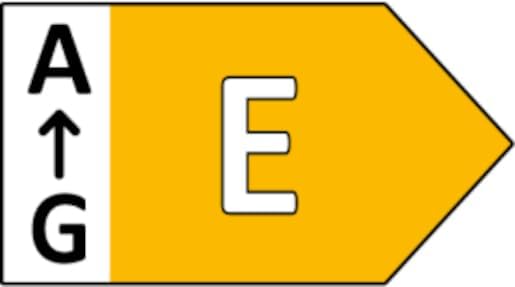
Image: Energy efficiency label indicating the product's energy class as E.
8. Sigurnosne informacije
Molimo Vas da se pridržavate sljedećih sigurnosnih mjera opreza kako biste spriječili ozljede ili oštećenje proizvoda.
- This product is designed for indoor use only. Do not expose to rain or moisture.
- Ne pokušavajte rastaviti ili modificirati lampOvo može poništiti garanciju i predstavljati sigurnosne rizike.
- Zadrži lamp dalje od izvora toplote, direktne sunčeve svjetlosti i zapaljivih materijala.
- Za punjenje koristite samo priloženi USB kabl.
- Ne uranjajte lamp u vodi ili bilo kojoj drugoj tečnosti.
- The integrated LED light source is not replaceable. If the LED fails, the entire luminaire must be replaced.
- Ovaj proizvod sadrži izvor svjetlosti klase energetske efikasnosti E.
- Čuvati van domašaja djece i kućnih ljubimaca.
9. Garancija i podrška
Za informacije o garanciji i korisničkoj podršci, obratite se prodavaču ili službenom predstavniku proizvođača website where the product was purchased. Specific warranty terms may vary by region and retailer.
For technical assistance or inquiries not covered in this manual, please contact the manufacturer, Reality Leuchten, or your point of purchase.