
1. Važne informacije o sigurnosti
Before operating the YPOO Walking Pad Treadmill, please read and understand all safety instructions. Retain this manual for future reference.
- Pobrinite se da je traka za trčanje postavljena na ravnu, stabilnu površinu.
- Držite djecu i kućne ljubimce podalje od trake za trčanje tokom rada.
- Always use the safety key during operation. Attach the clip to your clothing. If the safety key is dislodged, the treadmill will stop immediately.
- Ne koristite traku za trčanje ako je oštećena ili neispravna.
- Nosite odgovarajuću sportsku obuću.
- Konsultujte se sa ljekarom prije početka bilo kojeg novog programa vježbanja.
2. Proizvod je gotovview
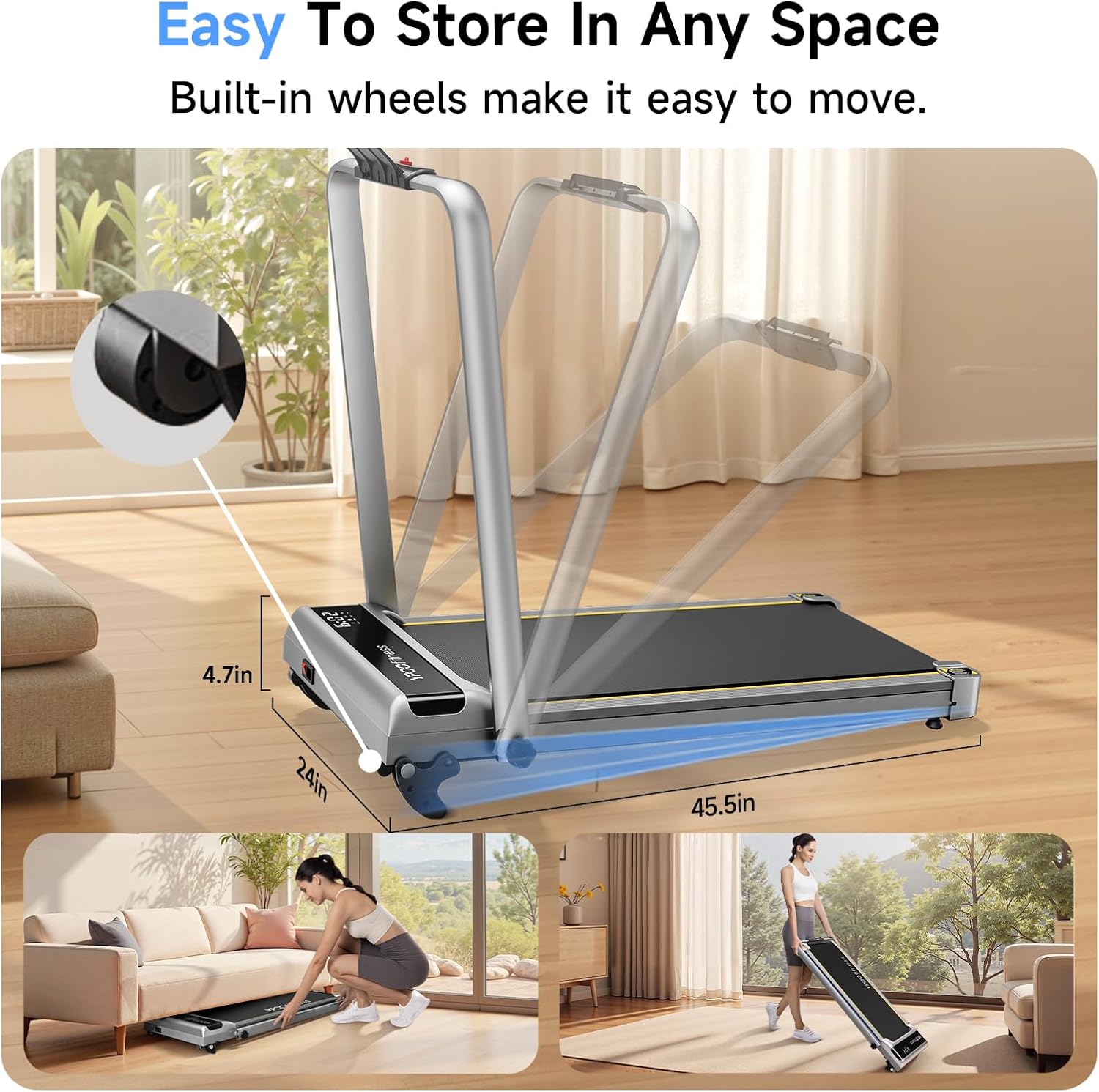
The YPOO Walking Pad Treadmill (Model ZP02) is a versatile 3-in-1 fitness device designed for walking, jogging, and under-desk use. It features a compact, foldable design with a manual incline system and multiple control options.

Image: The YPOO Walking Pad Treadmill with its handles raised, showing the display and the running belt. The image highlights the 3-level adjustable incline feature and its benefits for calorie burn, knee protection, and endurance.
3. Postavljanje i montaža
3.1 Raspakivanje i početno postavljanje
The YPOO Walking Pad Treadmill comes largely pre-assembled. Carefully remove the unit from its packaging. Place the treadmill on a level surface in your desired exercise area.
3.2 Handlebar Setup
To raise the handlebars:
- Locate the securing knobs at the base of the handlebars.
- Loosen the knobs to allow the handlebars to move freely.
- Carefully lift the handlebars to their upright position.
- Tighten the securing knobs firmly to ensure the handlebars are stable before use.

Image: The YPOO Walking Pad Treadmill shown in three modes: working mode (0.5-1.5 MPH) with handlebars folded, walking mode (0.5-2.5 MPH) with handlebars raised, and running mode (2.5-5.0 MPH) with handlebars raised. This illustrates the 3-in-1 functionality.
3.3 Podešavanje nagiba
The treadmill features a 3-level manual incline. To adjust the incline:
- Provjerite je li traka za trčanje isključena iz struje i iskopčana iz utičnice.
- Locate the incline adjustment pins at the rear of the treadmill base.
- Remove the pins and adjust the treadmill to your desired incline level (1, 2, or 3).
- Reinsert the pins securely to lock the incline in place.

Image: A close-up of the manual incline adjustment mechanism at the rear of the treadmill, showing the pins used to set the incline level.
3.4 Power Connection and Safety Key
Connect the power cord to the treadmill and then to a grounded electrical outlet. The treadmill uses a 3-prong plug. Always attach the safety key to the designated slot on the console and clip the other end to your clothing before starting your workout. This ensures the treadmill stops if you lose balance.

Image: A hand connecting the detachable power cord to the treadmill's power input, emphasizing the safety and convenience of the design.
4. Uputstvo za upotrebu
4.1 Metode kontrole
The YPOO Walking Pad Treadmill offers three methods of control:
- Kontrola konzole: Use the buttons on the handlebar console to start/stop, adjust speed, and select quick speed settings.
- daljinski upravljač: A wireless remote control is included for convenient adjustment of speed and start/stop functions.
- Ypoofit App: Connect your smartphone or tablet via Bluetooth to the Ypoofit app for advanced workout tracking, personalized classes, and full control over the treadmill.

Image: A visual representation of the three control methods: the console buttons on the handlebar, the handheld remote control, and the Ypoofit smartphone application, all used to operate the treadmill.
4.2 Početak treninga
- Provjerite je li traka za trčanje uključena u struju i je li sigurnosni ključ pričvršćen.
- Stanite na traku za trčanje.
- Press the "ON" button on the console or remote. The display will show a 3-2-1 countdown before the belt starts moving at a low speed.
- Adjust the speed using the '+' and '-' buttons on the console, remote, or via the Ypoofit app. The speed range is 0.5 to 5 MPH.
4.3 Prikaz informacija
Integrisani LED ekran pruža podatke o vježbanju u realnom vremenu:
- vrijeme: Trajanje vašeg treninga.
- Udaljenost: Ukupna pređena udaljenost.
- Kalorije: Procijenjene sagorene kalorije.
- brzina: Trenutna brzina u mph.

Image: A close-up of the treadmill's LED display, clearly showing the time, distance, calories, and speed metrics. The display is integrated into the base of the treadmill.
4.4 Using the Ypoofit App
Download the Ypoofit app from your device's app store. Follow the in-app instructions to connect your treadmill via Bluetooth. The app allows you to track your workout data, access personalized training programs, and control the treadmill remotely.

Image: A smartphone displaying the Ypoofit app interface, showing workout statistics and personalized training options. The app enhances the user experience by providing detailed tracking and guidance.
5. Održavanje
5.1 Pokretni remen
The upgraded running belt is designed to be lubrication-free, eliminating the need for regular oiling. Periodically inspect the belt for any signs of wear or damage. Keep the belt clean by wiping it with a damp krpom nakon svake upotrebe.
Slika: Presjek view of the treadmill's 5-layer non-slip running belt, illustrating its shock-absorption design for knee and ankle protection. The image also highlights the 2.5 HP motor and low noise level.
5.2 Generalno čišćenje
Wipe down the treadmill's frame and console with a soft, damp krpom. Izbjegavajte upotrebu abrazivnih sredstava za čišćenje ili rastvarača koji bi mogli oštetiti završnu obradu ili elektroničke komponente.
6. Otkrivanje problema
If you encounter any issues with your YPOO Walking Pad Treadmill, please refer to the following common troubleshooting steps:
- Treadmill not powering on: Ensure the power cord is securely plugged into both the treadmill and a working electrical outlet. Check the power switch on the treadmill. Verify the safety key is correctly inserted.
- Belt not moving: Confirm the safety key is in place. Check if the treadmill is in pause mode. If using the app, ensure it is properly connected and not paused.
- Neobični zvukovi: Inspect the running belt for any foreign objects. Ensure the treadmill is on a level surface. If noises persist, contact customer support.
- Problemi s povezivanjem aplikacije: Ensure Bluetooth is enabled on your device and the treadmill. Restart both the treadmill and your device. Try reinstalling the Ypoofit app.
For further assistance, please contact YPOO customer support.
7. Specifikacije
| Feature | Specifikacija |
|---|---|
| Brand | YPOO |
| Naziv modela | ZP02 |
| Dimenzije proizvoda | 45.5"D x 24"Š x 42.1"H |
| Težina artikla | 43 funti |
| Materijal | legirani čelik |
| Maksimalna brzina | 5 milja na sat |
| Posebna karakteristika | Manual Incline (3-level) |
| Maximum Horsepower | 2.5 konjskih snaga |
| Obavezna montaža | Ne (minimalno podešavanje) |
| Uključene komponente | Sigurnosni ključ |
| Preporuka za maksimalnu težinu | 300 funti |
| Veličina pojasa za trčanje | 37'' x 15'' |
Image: All included components laid out, featuring the hex tool, knobs, power cord, bolts, remote control, safety lock, and user manual.
8. Garancija i podrška
The YPOO Walking Pad Treadmill comes with a 1-godišnja garancija. For warranty claims, technical support, or any product-related inquiries, please contact YPOO customer service. Refer to the contact information provided in your product packaging or on the official YPOO website.
9. Videozapisi proizvoda
YPOO Foldable Treadmill with Incline Overview
Video: An official YPOO video demonstrating the key features of the foldable treadmill with incline, including its compact design, ease of setup, and various usage modes.