
1. Uvod
The EC Buying STM32F103RCT6 Core Board is a versatile development board designed for embedded systems projects. It features the STM32F103RCT6 microcontroller, offering a 72MHz main frequency, 256KB Flash memory, and 48KB SRAM. This board provides extensive connectivity with 45 IO ports, a dedicated SPI LCD interface, and various debugging options, making it suitable for learning and advanced development applications.
2. Ključne karakteristike
- Visoke performanse: Equipped with an STM32F103RCT6 microcontroller, operating at a 72MHz main frequency, 256KB Flash, and 48KB SRAM.
- Opsežan ulaz/izlaz: Features 45 accessible IO ports for diverse project requirements.
- SPI LCD Interface: Dedicated FPC 10P, 0.5mm spacing interface for direct connection to SPI-driven LCDs.
- Fleksibilne opcije napajanja: Supports 5V or USB power supply via a Type-C interface.
- Debugging & Programming: Includes 2*4P pin headers for SWD and serial port access, facilitating easy debugging and printing.
- Korisnička interakcija: Integrated reset button, user button, and two user LEDs.
- Real-Time Clock (RTC): Built-in RTC crystal (32.768KHz) and a reserved solder pad for a CR1220 RTC battery.
- Robustan dizajn: Operates reliably in temperatures ranging from -40 to 85°C.
3. Vodič za postavljanje
3.1. Raspakivanje i pregled
Carefully remove the STM32F103RCT6 Core Board from its packaging. Inspect the board for any visible damage or missing components. Ensure all pins and connectors are intact.
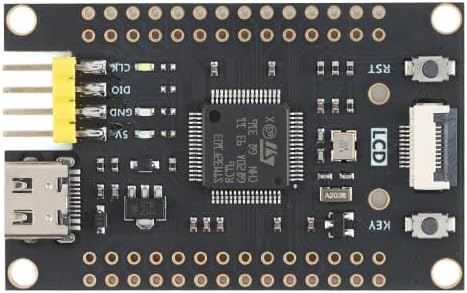
Slika 3.1: Vrh view of the STM32F103RCT6 Core Board. This image displays the main components including the STM32F103RCT6 microcontroller, the USB Type-C port for power and communication, the SPI LCD interface, and various pin headers for I/O and debugging.
3.2. Napajanje odbora
The core board can be powered via two methods:
- USB Type-C: Connect a standard USB Type-C cable from your computer or a 5V USB power adapter to the Type-C port on the board. This provides both power and a communication interface.
- 5V Pin Header: Alternatively, provide a stable 5V power supply to the designated 5V pin on the board's pin headers. Ensure correct polarity.
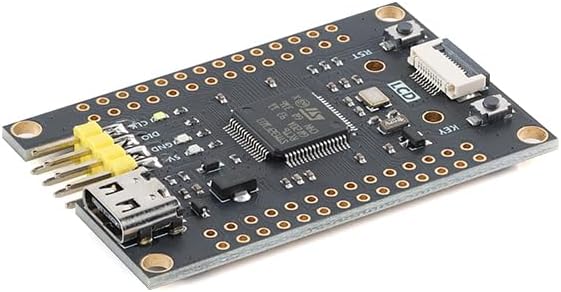
Slika 3.2: Pod uglom view of the STM32F103RCT6 Core Board. This perspective shows the board's compact form factor and provides a clearer view of the USB Type-C port and the double-row pin headers.
3.3. Povezivanje perifernih uređaja
- SPI LCD: Connect compatible SPI LCD modules directly to the FPC 10P, 0.5mm spacing LCD interface.
- SWD Debugger: Utilize the 2*4P pin arrangement to connect an SWD debugger for program uploading and debugging.
- Serijski port: The same 2*4P pin arrangement also provides access to the serial port for communication and printing debug information.
- GPIO: Connect external sensors, actuators, and other components to the 45 available IO ports via the pin headers.
4. Uputstvo za upotrebu
4.1. Postavljanje razvojnog okruženja
To begin development, install an appropriate Integrated Development Environment (IDE) such as Keil MDK, STM32CubeIDE, or PlatformIO. Ensure you have the necessary toolchains and drivers for STM32 microcontrollers installed on your computer.
4.2. Programiranje mikrokontrolera
Programs can be uploaded to the STM32F103RCT6 via the SWD interface using an ST-Link debugger or similar. Alternatively, the built-in bootloader can be used with a serial connection for programming, typically requiring specific boot mode pin configurations.
4.3. Using the User Buttons and LEDs
- Dugme za resetiranje: Pressing this button will restart the microcontroller, executing the program from the beginning.
- Korisničko dugme: This button is programmable and can be assigned various functions within your application.
- User LEDs: The two onboard LEDs are programmable and can be used for status indication, debugging, or as part of your application's output.
5. Pinout Diagram and Components
The board features clearly labeled pin headers providing access to the microcontroller's GPIOs, power lines, and communication interfaces. Refer to the images below for a visual guide to the board's layout and pin assignments.
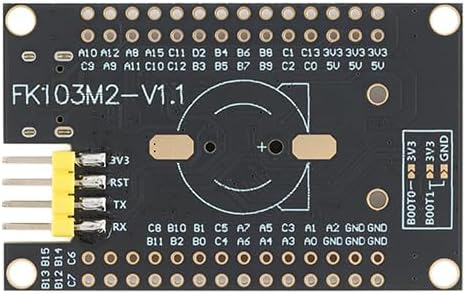
Slika 5.1: Dno view of the STM32F103RCT6 Core Board. This image highlights the pin labels for various GPIOs, power pins (3V3, GND), and the solder pad for the CR1220 RTC battery. The "FK103M2-V1.1" board version is also visible.
5.1. Pin Header Overview
The board provides two rows of pin headers on each side, exposing a total of 45 IO ports. These include general-purpose input/output pins, analog-to-digital converter (ADC) inputs, timer outputs, and various communication interfaces like I2C, SPI, and UART.
5.2. RTC Battery Holder
A solder pad is reserved for a CR1220 coin cell battery, which can be installed to power the Real-Time Clock (RTC) for timekeeping functions even when the main power is off.

Figure 5.2: STM32F103RCT6 Core Board dimensions. This image shows the physical dimensions of the board, measuring approximately 53mm in length and 33mm in width, which is useful for enclosure design and project planning.
6. Tehničke specifikacije
| Feature | Detalj |
|---|---|
| Mikrokontroler | STM32F103RCT6 |
| Glavna frekvencija | 72MHz |
| Flash memorija | 256KB |
| SRAM | 48KB |
| IO portovi | 45 |
| LCD sučelje | SPI driver, FPC 10P, 0.5mm spacing |
| Debugging Interface | SWD, Serial Port (via 2*4P pin arrangement) |
| Napajanje | 5V or USB (Type-C) |
| Main Clock Crystal | 8MHz |
| RTC kristal | 32.768KHz |
| RTC držač baterije | Reserved solder pad for CR1220 |
| Radna temperatura | -40°C do 85°C |
| Dimenzije (cca.) | 53mm x 33mm |
| Težina artikla | 1 unca |
7. Otkrivanje problema
- Ploča se ne uključuje:
- Ensure the USB Type-C cable is securely connected and providing power.
- If using the 5V pin header, verify the power supply is stable and correctly connected with proper polarity.
- Check for any visible damage to the board or components.
- Program not uploading:
- Verify that your SWD debugger or serial programmer is correctly connected to the board's 2*4P pin headers.
- Ensure the correct drivers for your debugger are installed on your computer.
- Check your IDE settings for the correct target device (STM32F103RCT6) and programming method.
- Confirm the boot mode pins are correctly configured if using serial programming.
- LCD not displaying:
- Ensure the FPC ribbon cable for the LCD is correctly inserted into the SPI LCD interface with the correct orientation.
- Verify that your code correctly initializes and drives the SPI LCD module.
- Check for compatibility between your LCD module and the board's SPI interface.
- Neočekivano ponašanje:
- Review your code for logical errors.
- Check all external connections for shorts or loose wires.
- Ensure power supply is stable and sufficient for all connected peripherals.
- Consult the STM32F103RCT6 datasheet and reference manuals for detailed information on peripheral configuration.
8. Održavanje
- čišćenje: Keep the board clean and free from dust and debris. Use a soft, dry brush or compressed air for cleaning. Avoid using liquids.
- Skladištenje: Store the board in an anti-static bag when not in use to prevent electrostatic discharge (ESD) damage. Keep it in a dry environment away from extreme temperatures.
- Rukovanje: Always handle the board by its edges to minimize contact with components and prevent ESD.
- RTC baterija: If an RTC battery is installed, replace it when necessary (typically every few years, depending on usage and battery type) to maintain accurate timekeeping.
9. Garancija i podrška
For warranty information and technical support, please refer to the official EC Buying webweb-mjesto ili direktno kontaktirajte njihovu korisničku službu. Sačuvajte račun kao dokaz o kupovini.
Note: Unauthorized modifications or improper use of the product may void the warranty.