Uvod
This manual provides essential information for the installation, operation, and maintenance of the Generic SDS-G3006-2GTXSFP-T Compact Industrial Full Gigabit Smart Ethernet Switch. This device is designed for industrial environments, offering robust networking capabilities with 4 PoE+ Gigabit Ethernet ports and 2 SFP ports. Please read this manual thoroughly before using the product to ensure proper and safe operation.
Sigurnosne informacije
Pridržavajte se sljedećih sigurnosnih mjera opreza kako biste spriječili oštećenje uređaja i osigurali sigurnost korisnika:
- Osigurajte napajanje voltage je unutar specificiranog raspona.
- Do not operate the device in environments exceeding its specified temperature and humidity limits (-40 to 75°C).
- Izbjegavajte izlaganje uređaja vodi ili prekomjernoj vlazi.
- Ne otvarajte uređaj casing; sve servisne radove prepustite kvalifikovanom osoblju.
- Properly ground the device to prevent electrical hazards.
- Use appropriate cabling for industrial environments.
Sadržaj paketa
Provjerite da li vaš paket sadrži sljedeće stavke:
- 1 x SDS-G3006-2GTXSFP-T Industrial Gigabit Smart Ethernet Switch
- Vodič za brzu instalaciju (ako je primjenjivo)
- Komplet za montažu (ako je primjenjivo)
- Terminal Block for Power Input (if applicable)
Ako bilo koji artikl nedostaje ili je oštećen, odmah se obratite svom prodavaču.
Product Overview
Izgled prednjeg panela
The front panel of the SDS-G3006-2GTXSFP-T switch features the network ports and LED indicators. Its compact and flexible housing design allows it to fit into confined spaces.
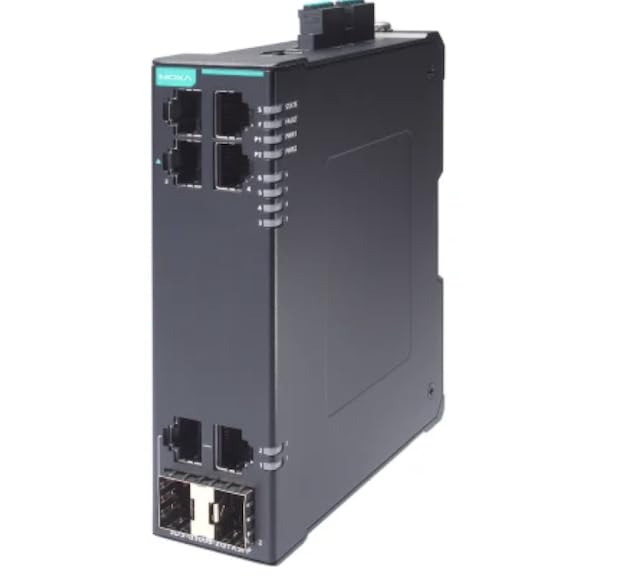
Slika 1: Front view of the SDS-G3006-2GTXSFP-T Industrial Gigabit Smart Ethernet Switch. This image displays the compact design, including the 4 PoE+ Gigabit Ethernet ports and 2 SFP ports, along with status LEDs for power and network activity.
LED indikatori
- PWR LED: Indicates power status. Green for normal operation.
- LED GREŠKA: Indicates system fault. Red for fault condition.
- LINK/ACT LED diode (po portu): Green for link, blinking for activity.
- PoE LEDs (per PoE+ port): Označava status PoE napajanja.
Luke
- Gigabit Ethernet Ports (RJ45): 4 ports supporting 10/100/1000Base-T, IEEE 802.3af/at PoE+.
- SFP portovi: 2 Gigabit SFP slots for fiber optic connections.
- Konzolni port: For local management and configuration.
Postavljanje i instalacija
Montaža prekidača
The SDS-G3006-2GTXSFP-T switch can be mounted on a DIN-rail or wall-mounted. Ensure adequate space for ventilation and cable routing.
- Montaža na DIN šinu: Pričvrstite kopču DIN šine na stražnju stranu prekidača. Zakačite vrh kopče na DIN šinu i pritisnite donji dio dok ne škljocne na svoje mjesto.
- Montaža na zid: Use the provided wall-mount bracket (if included) and screws to secure the switch to a solid surface.
Power Connection
Connect the power source to the terminal block on the switch. Ensure correct polarity and a stable power supply within the specified voltage range.
- Connect the positive (+) wire to the V+ terminal.
- Connect the negative (-) wire to the V- terminal.
- Spojite žicu za uzemljenje na terminal za uzemljenje.
Mrežna veza
Connect network devices to the RJ45 ports using standard Ethernet cables. For fiber optic connections, insert compatible SFP transceivers into the SFP slots and connect fiber optic cables.
- For PoE+ devices, connect them to the PoE+ enabled RJ45 ports.
- Uverite se da su kablovi dobro povezani.
Operacija
Uključivanje
Once the power supply is connected, the switch will power on automatically. Observe the PWR LED to confirm normal operation.
Mrežna povezanost
After connecting network devices, the corresponding LINK/ACT LEDs will illuminate, indicating a successful connection. Blinking LEDs signify data transmission.
PoE+ Functionality
The PoE+ ports automatically detect and provide power to compatible Powered Devices (PDs) such as IP cameras or wireless access points. The PoE LEDs will indicate power delivery status, with up to 36 watts output per PoE+ port in high-power mode.
Upravljanje i konfiguracija
The SDS-G3006-2GTXSFP-T is a smart Ethernet switch, offering various management options:
- Webupravljanje zasnovano na: Pristupite prekidaču web interfejs putem standardnog web pretraživač unošenjem njegove IP adrese.
- CLI (Interfejs komandne linije): Connect via the console port using a terminal emulator for advanced configuration.
- SNMP: Integrate with network management systems using SNMP protocols.
Refer to the detailed software manual for comprehensive configuration instructions.
Održavanje
Čišćenje
Redovno čistite vanjski dio prekidača mekom, suhom krpom. Nemojte koristiti tekuća ili aerosolna sredstva za čišćenje. Osigurajte da su ventilacijski otvori čisti od prašine i ostataka.
Ažuriranja firmvera
Povremeno provjeravajte proizvođačeve webstranica za ažuriranja firmvera. Održavanje firmvera ažurnim osigurava optimalne performanse i sigurnost.
Environmental Checks
Ensure the operating environment remains within the specified temperature and humidity ranges to prevent hardware degradation.
Rješavanje problema
| Problem | Mogući uzrok | Rješenje |
|---|---|---|
| Nema napajanja (LED dioda za napajanje isključena) | Nema ulaznog napajanja; neispravno napajanje; nepravilno ožičenje. | Check power cable connection; verify power source; ensure correct terminal block wiring. |
| No Link (LINK/ACT LED Off) | Faulty cable; incorrect port; connected device is off or faulty. | Replace Ethernet cable; try a different port; ensure connected device is powered on and functional. |
| PoE uređaj se ne uključuje | Device not PoE compatible; excessive power draw; faulty cable. | Verify device PoE compatibility; check total power budget; replace cable. |
| Network Access Issues | Incorrect IP configuration; network loop; software configuration error. | Verify IP settings; check for network loops; consult the software manual for configuration. |
Ako problemi potraju, kontaktirajte tehničku podršku.
Specifikacije
| Feature | Detalj |
|---|---|
| Model | SDS-G3006-2GTXSFP-T |
| Luke | 4 x 10/100/1000Base-T (PoE+), 2 x Gigabit SFP |
| PoE standard | IEEE 802.3af / at |
| PoE + izlaz | Up to 36 watts per PoE+ port |
| Radna temperatura | -40 do 75°C (-40 do 167°F) |
| Težina artikla | 16.99 funte (7.71 kg) |
| Proizvođač | Moxa |
| First Available | 18. marta 2025 |
Garancija i podrška
Informacije o garanciji
This product comes with a standard manufacturer's warranty. Please refer to the warranty card included with your product or visit the manufacturer's official webstranicu za detaljne uslove i odredbe garancije.
Tehnička podrška
For technical assistance, troubleshooting, or product inquiries, please contact your vendor or the manufacturer's customer support. Have your product model number (SDS-G3006-2GTXSFP-T) and serial number ready when contacting support.
Proizvođač: Moxa
Brand: Generic