1. Uvod
This manual provides detailed instructions for the safe and effective operation of the Generic Portable Color Meter Analyzer LS173. This device is designed for precise color measurement and analysis, featuring a touch screen interface and integrated color cards for various applications. It addresses common challenges in color management, such as inconsistent color in finished products, difficulties in matching colors, and the inconvenience of managing physical color samples.

Slika 1.1: The LS173 Color Meter Analyzer helps resolve common color management issues, improving consistency and efficiency.
Please read this manual thoroughly before using the instrument to ensure optimal performance and longevity.
2. Proizvod je gotovview
2.1 Ključne karakteristike
- Integrated Color Cards: Quickly matches measured colors to the closest color code from multiple natural color cards.
- 3.5-inch IPS Capacitive Touch Screen: Provides an intuitive and responsive operating experience.
- Veliki kapacitet pohrane: Stores up to 1000 colors and 1000 color difference records.
- Color Difference Comparison: Supports color difference comparison functions and multiple standard color addition methods.
- Prijenosni dizajn: Compact and lightweight for easy storage and transport, with an ergonomic design for stable measurements.
- Electronic Color Charts: Access multiple standard electronic color charts, eliminating the need for physical color cards.
- Upravljanje podacima: Supports import and export of personal color charts, with localized data storage for privacy.
2.2 Komponente
The LS173 Color Meter Analyzer includes the main unit, a calibration tile, and a USB Type-C charging cable. Familiarize yourself with the device's physical features:

Slika 2.2.1: Dno uređaja view showing the 8mm measuring hole and the calibration tile. The measuring hole is where the device takes color readings, and the calibration tile is used for accurate calibration.
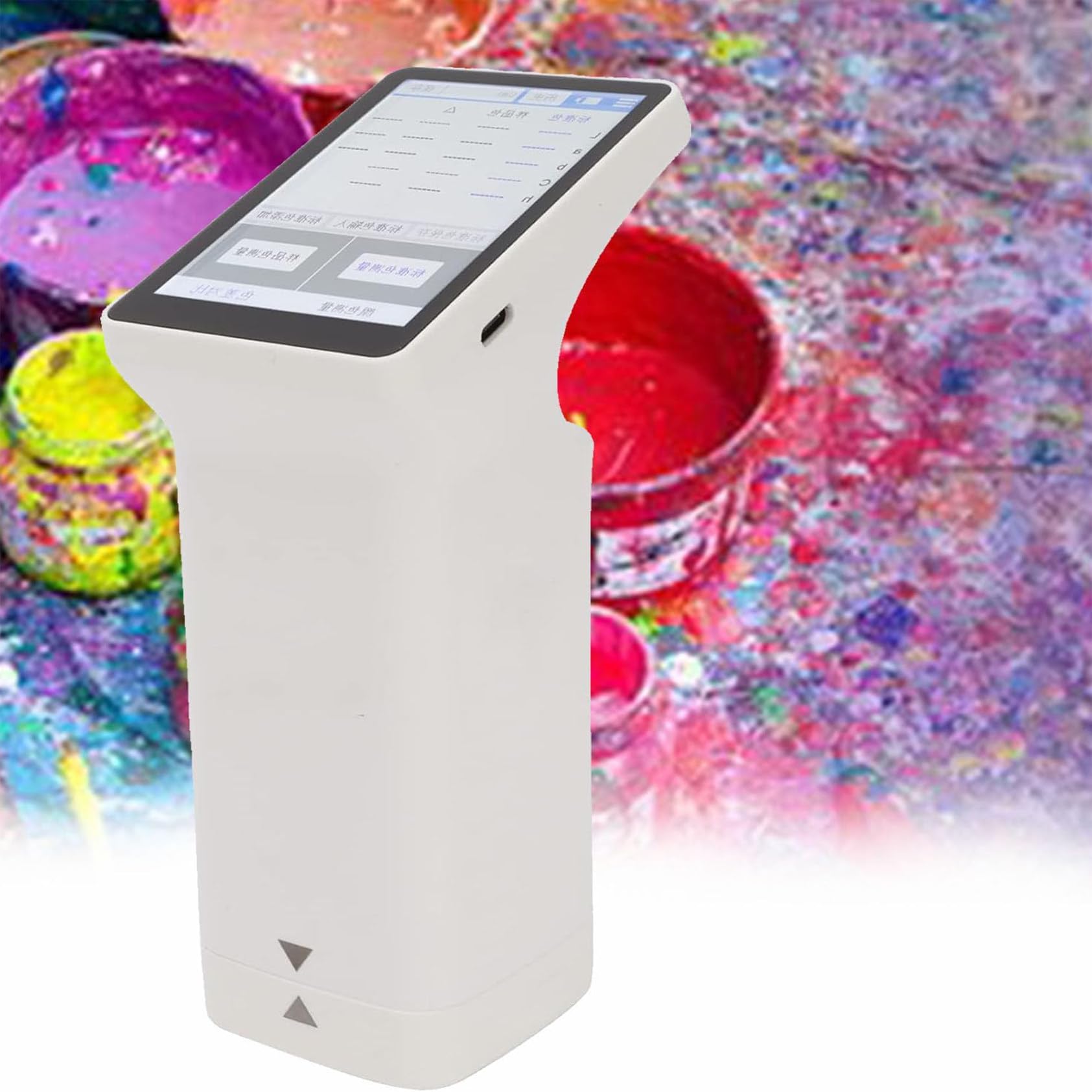
Slika 2.2.2: Main unit of the LS173 Portable Color Meter Analyzer. This image displays the overall design of the device, highlighting its compact and ergonomic form factor.
3. Podešavanje
3.1 Početno punjenje
Before first use, fully charge the device using the provided USB Type-C cable. Connect the cable to the charging port on the device and a suitable USB power adapter (not included). The charging indicator on the screen will show the charging status.
3.2 Uključivanje/isključivanje napajanja
- Za uključivanje: Pritisnite i držite dugme za napajanje dok se ekran ne osvijetli.
- Za isključivanje: Press and hold the power button until a shutdown prompt appears on the screen, then confirm.
3.3 Kalibracija
Regular calibration ensures measurement accuracy. Perform calibration before each measurement session or if the device has not been used for an extended period.
- Place the device firmly on the white calibration tile, ensuring the measuring hole is centered over the tile.
- Navigate to the calibration menu on the touch screen.
- Pratite uputstva na ekranu da biste dovršili proces kalibracije.
4. Uputstvo za upotrebu
4.1 Basic Color Measurement
- Ensure the device is calibrated.
- Place the measuring hole firmly against the surface of the object whose color you wish to measure. Ensure there is no light leakage.
- Press the measurement button or tap the "Scan" option on the touch screen.
- The measured color values (e.g., L*a*b*, L*C*h) will be displayed on the screen.
- You can save the measurement results to the device's internal storage.

Slika 4.1.1: The LS173 device displaying various electronic color charts and measurement options. This illustrates the device's capability to access and utilize digital color libraries.
4.2 Color Difference Comparison (QC Test)
The device can compare a sample color against a standard color to determine color difference (ΔE*ab).
- From the main menu, select the "Color Compare" or "QC Test" function.
- Measure the standard color by placing the device on the standard sample and selecting "Scan Standard".
- Izmjerite sample color by placing the device on the sample and selecting "Scan Sample".
- The screen will display the color difference values (ΔL*, Δa*, Δb*, ΔE*ab) and indicate if the sample passes or fails based on a set threshold.
- The total color difference formula ΔE*ab = √((ΔL*)² + (Δa*)² + (Δb*)²) is used for calculation.

Slika 4.2.1: The device's screen displaying a Quality Control (QC) test for batch testing. It shows standard and sample values, color differences, and a "PASS" indication, demonstrating its utility in quality assurance.

Slika 4.2.2: A close-up of the LS173 screen illustrating the total color difference formula (ΔE*ab) and its components (ΔL*, Δa*, Δb*). This provides insight into the mathematical basis of color difference calculation.
4.3 Data Management and Connectivity
The LS173 supports extensive data storage and management features.
- Saving Measurements: Measured colors and color difference records can be saved directly on the device.
- Personal Color Charts: Create, import, and export personal color charts. Data is stored locally, ensuring privacy.
- Povezivanje aplikacija: Connect the device to a mobile application (if available) for extended functionality, data analysis, and sharing.

Slika 4.3.1: Diagram illustrating the data management capabilities of the LS173, including local storage, personal color chart creation, electronic color chart access, color import, color sharing, and mass storage. This highlights the device's comprehensive data handling.
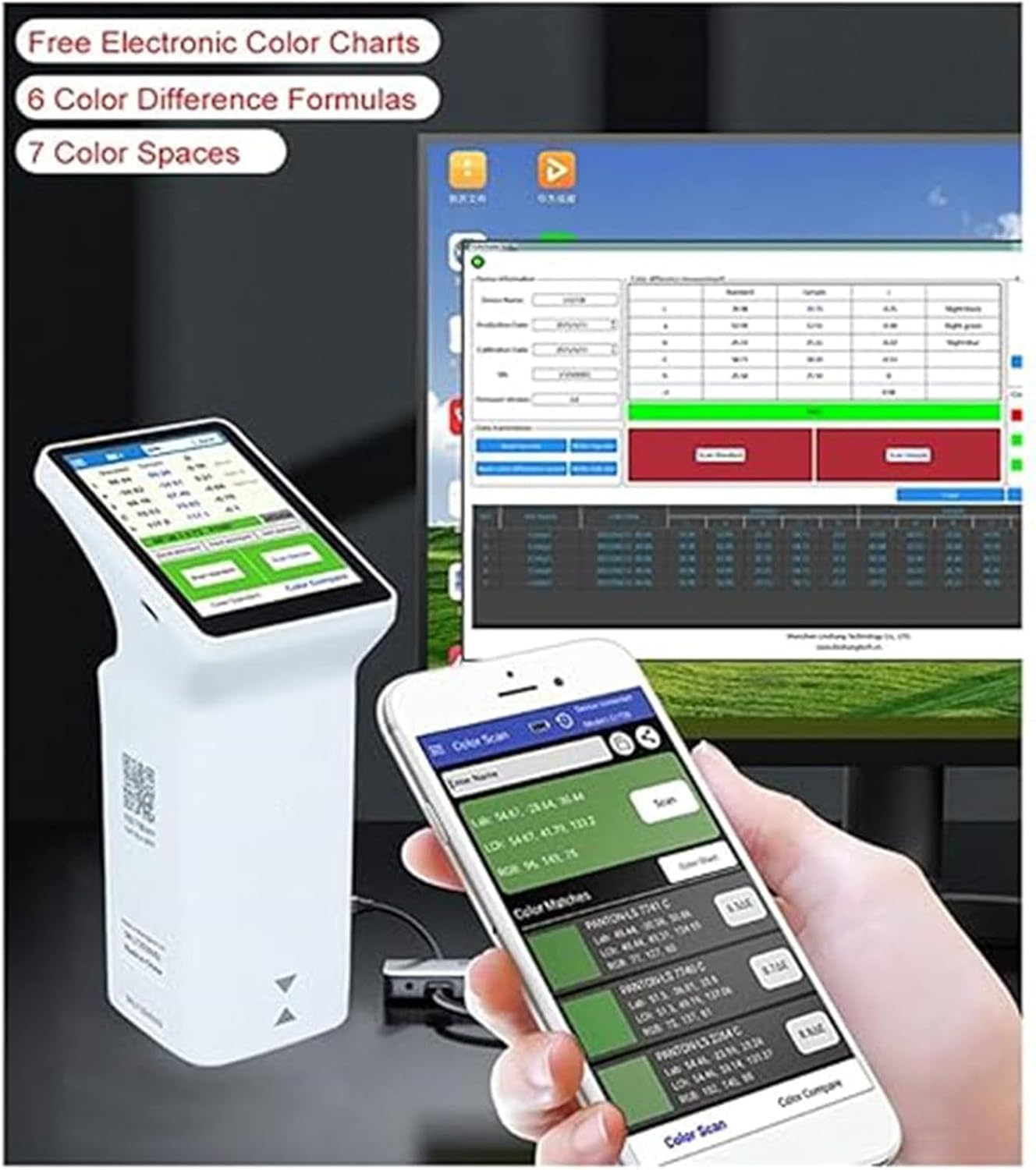
Slika 4.3.2: The LS173 device shown alongside a computer monitor displaying color analysis software and a smartphone running a companion app. This demonstrates the device's connectivity options and integration with other platforms for advanced analysis and management.
5. Održavanje
5.1 Čišćenje
- Wipe the device's exterior with a soft, dry cloth.
- For the touch screen, use a screen-specific cleaning cloth.
- Keep the measuring hole free from dust and debris. Use a soft brush or compressed air if necessary. Do not use liquid cleaners directly on the measuring hole.
5.2 Skladištenje
Store the device in a cool, dry place away from direct sunlight, extreme temperatures, and high humidity. Use the original packaging or a protective case to prevent damage.
6. Otkrivanje problema
| Problem | Mogući uzrok | Rješenje |
|---|---|---|
| Uređaj se ne uključuje. | Slaba baterija ili kvar uređaja. | Punite uređaj najmanje 30 minuta. Ako se i dalje ne uključuje, obratite se korisničkoj podršci. |
| Netačna mjerenja. | Device not calibrated, dirty measuring hole, or improper placement. | Perform calibration. Clean the measuring hole. Ensure the device is placed firmly and correctly on the sample. |
| Ekran osjetljiv na dodir ne reaguje. | Temporary software glitch or screen damage. | Ponovo pokrenite uređaj. Ako problem i dalje postoji, obratite se korisničkoj podršci. |
| Nije moguće povezati se s mobilnom aplikacijom. | Bluetooth/Wi-Fi off, app not installed, or device not discoverable. | Ensure Bluetooth/Wi-Fi is enabled on both devices. Install the correct app. Follow app instructions for pairing. |
7. Specifikacije
| Parametar | Vrijednost |
|---|---|
| Uvjeti mjerenja | Izvor svjetlosti D65, polje od view 10° |
| Measuring Time | Approximately 1 second (Average of 30 measurements at 3s intervals on a white board after calibration) |
| Dimenzije | 86 mm × 62.5 mm × 158 mm |
| Težina (uređaj) | Pribl. 245 g (0.54 lbs) |
| Display | 480×320 matrični IPS ekran u boji |
| Jezička podrška | Pojednostavljeni kineski, engleski |
| Port za punjenje | USB (tip C) |
| Kapacitet pohrane | 1000 colors, 1000 color difference records |
| Dimenzije paketa | 3.94 x 3.94 x 3.94 inča |
| Item Weight (Packaged) | 2.2 funte |
| Proizvođač | YEHOZZ |
8. Garancija i podrška
Za informacije o garanciji i tehničkoj podršci, molimo pogledajte dokumentaciju koju ste dobili uz kupovinu ili se direktno obratite prodavaču/proizvođaču. Sačuvajte dokaz o kupovini za potrebe reklamacije.


